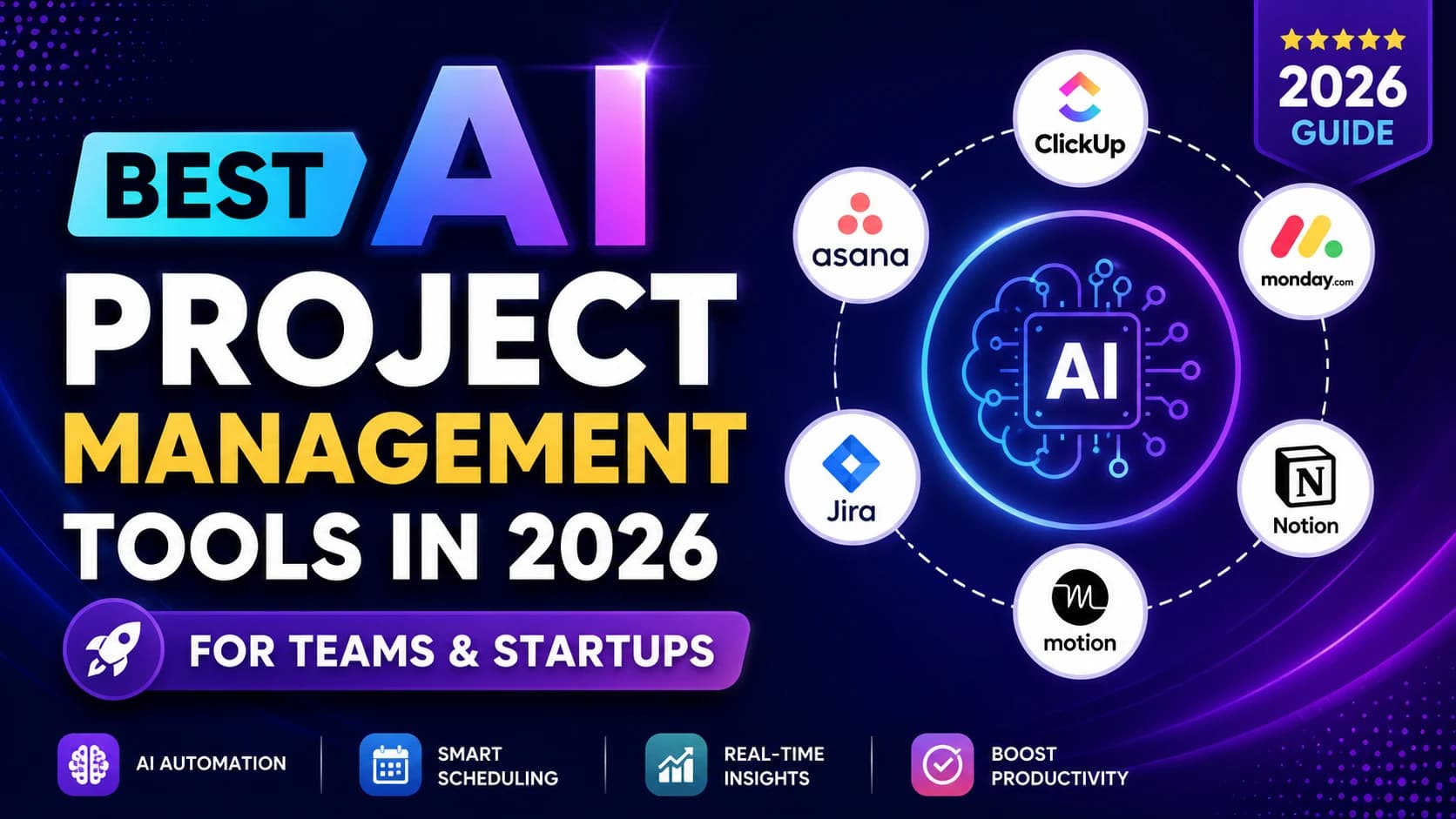
Why Most Teams Are Still Managing Projects the Hard Way
Most startup teams manage projects the same way they did five years ago — with shared spreadsheets, Slack threads that are impossible to search, and a weekly standup that half the team forgets exists.
A task gets created somewhere. A deadline gets missed somewhere else. Nobody knows what's blocking what until someone asks in a meeting, and the meeting takes longer than the actual work would have.
AI project management tools exist to close that gap. Not to replace the project manager — but to automate the status updates, the deadline tracking, the meeting summaries, and the bottleneck flags so the team can actually focus on execution.
The teams getting real results in 2026 aren't the ones with the most sophisticated PM setup. They're the ones who picked one tool, configured it properly, and got their team to actually use it consistently.
According to a 2025 PMI Pulse of the Profession report, 70% of projects fail due to poor communication and inadequate planning — not from lack of effort or skill. AI-powered tools directly address both.
- AI project management tools are seeing rapid adoption among teams managing distributed work, with task automation and AI-generated status summaries among the most commonly used features.
- Teams consistently report that AI-assisted planning reduces time spent on status updates, task tracking, and meeting prep — the administrative overhead that grows with team size.
- McKinsey's research on AI in business operations finds that workflow automation delivers meaningful time savings on repetitive coordination tasks, though results vary by team structure and tool adoption.
- The practical benefit for small teams: fewer status meetings, less time hunting for context, and faster identification of tasks that are at risk.
What does that mean in real terms for a 10-person startup? Less time in status meetings, fewer dropped tasks, fewer surprises at the end of a sprint — without adding headcount.
What AI Project Management Tools Actually Do
Skip the vendor marketing. Here's what they genuinely handle in day-to-day use:
- Auto task creation — describe a goal in plain language, get a task list back
- Smart scheduling — AI blocks focus time around meetings and adjusts when plans change
- Automated status updates — no more "what's the status on X" messages
- AI meeting summaries — call ends, action items appear automatically in the project
- Risk detection — the tool flags when a deadline is at risk before it's already late
- AI reporting — weekly progress reports generated without anyone writing them
"AI doesn't replace project managers — it removes the coordination overhead so they can focus on decisions, not status tracking."
If a tool isn't doing at least one of those things meaningfully for your team, it's not earning its subscription.
For a broader framework on evaluating AI tools for your business stack, start here: Complete Guide to Choosing AI Software for Your Business (2026).
The Four Types of AI Project Management Tools
This matters more than the brand. Most teams struggle not because they picked the wrong product, but because they picked the wrong type of tool for their actual problem.
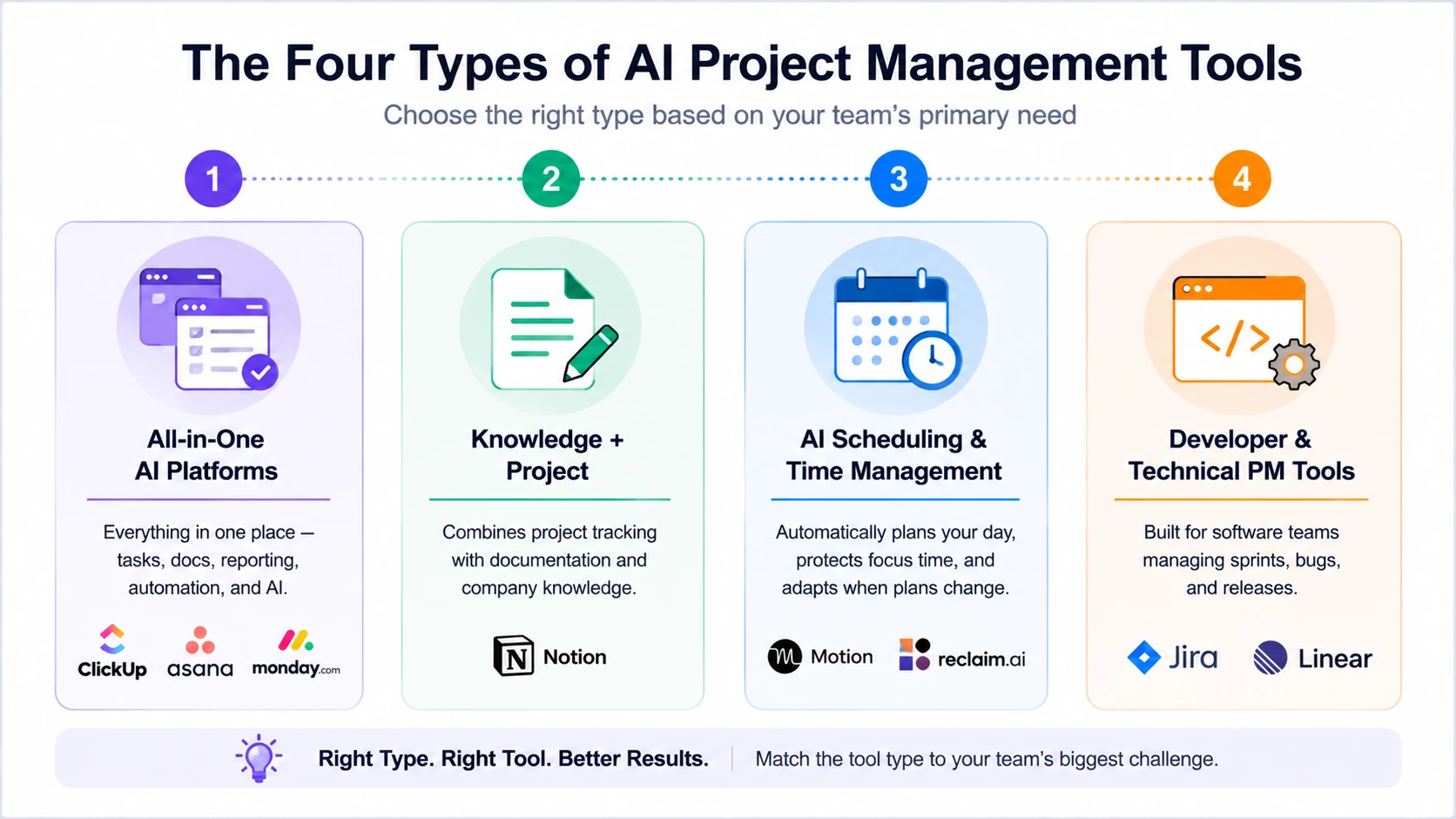
The four major categories of AI project management tools for startups, remote teams, and technical workflows in 2026.
1. All-in-One AI Platforms
ClickUp, Monday.com, Asana
Does everything in one place — tasks, docs, reporting, automation, and now AI features layered on top. Best for teams that want a single source of truth and don't want to manage integrations between five different tools.
2. Knowledge + Project
Notion
Combines a project tracker with a company wiki. Strong for startups building processes and documentation alongside active work. The AI features handle writing, summarizing, and search across your entire knowledge base.
3. AI Scheduling & Time Management
Motion, Reclaim.ai
Automatically plans your day around your tasks and calendar. If your biggest PM problem is that work keeps getting pushed because meetings keep expanding, these tools address it directly.
4. Developer & Technical PM Tools
Jira, Linear
Built specifically for software teams managing sprints, bugs, and releases. Better GitHub integration, better sprint velocity tracking, and reporting that makes sense to engineers rather than business managers.
Best AI Project Management Tools in 2026
1. ClickUp — Best Overall AI Project Management Tool
Best for: Startups and growing teams that want one tool to replace five
ClickUp has earned its reputation as the most versatile PM tool for small and mid-sized teams. What sets it apart in 2026 is how AI is embedded into actual workflows — not just a chatbot panel bolted onto the side. You can generate tasks from a brief, summarize threads, auto-write status updates, and build automation rules without touching a line of code.
The learning curve is real. ClickUp has more features than most teams will ever use, and that can make initial setup feel overwhelming. The answer is to start with one workspace and one project, get the basics running, and expand from there. Teams that try to configure everything on day one tend to abandon it.
Core AI Features:
- AI task generation from plain-text descriptions
- AI doc writing and summarization
- Automated workflows triggered by task status changes
- AI-assisted sprint planning and workload balancing
- Smart priority suggestions based on deadlines and dependencies
Pricing: Free plan available → Unlimited at $7/user/month → Business at $12/user/month → AI add-on at $5/user/month
SMB Fit: ⭐⭐⭐⭐⭐
Ideal Use Case: A 5–20 person startup managing product development, marketing campaigns, and operations that wants everything visible in one workspace.
2. Asana — Best for Remote and Cross-Functional Teams
Best for: Remote teams managing multi-department projects and OKRs
Asana has always been strong on structure — clear ownership, clear deadlines, clear dependencies. The AI layer added in 2025–2026 makes it noticeably smarter. Smart summaries condense long comment threads into a paragraph. AI-generated status reports pull from task completion data so nobody has to write them manually. Workflow Builder now suggests automation rules based on how your team already works.
Where Asana earns its keep for remote teams specifically: visibility. Everyone knows what everyone else is working on, where blockers are, and what's slipping — without needing a daily standup to surface it.
Core AI Features:
- AI Smart Goals linked to project milestones
- Automated status reporting from task data
- Smart workflow suggestions based on usage patterns
- AI workload balancing across team members
- Natural language task creation
Pricing: Free plan (up to 10 users) → Starter at $10.99/user/month → Advanced at $24.99/user/month
SMB Fit: ⭐⭐⭐⭐⭐
Ideal Use Case: A distributed team across multiple time zones managing product launches, marketing calendars, or cross-functional OKRs.
3. Monday.com — Best for Workflow Automation and Operations
Best for: Operations teams and agencies running repeatable processes
Monday.com's strength is visual workflow automation. The drag-and-drop automation builder lets non-technical teams build surprisingly complex trigger-action rules — and the AI layer now writes those automation rules from plain language descriptions. Tell it "when a task moves to Review, notify the approver and set a 48-hour deadline," and it builds the rule for you.
For agencies managing client projects on repeatable workflows, Monday is particularly effective. You can template an entire client onboarding workflow and deploy it as a new project in about 30 seconds.
Core AI Features:
- AI-generated automation rules from text descriptions
- AI Blocks for summarizing updates and generating content
- Predictive deadline risk alerts
- Smart column suggestions based on project type
- AI-assisted project templates
Pricing: Free plan (2 seats) → Basic at $9/user/month → Standard at $12/user/month → Pro at $19/user/month
SMB Fit: ⭐⭐⭐⭐
Ideal Use Case: A marketing agency or operations team running multiple client projects on recurring workflows that need to scale without proportionally more management overhead.
4. Notion — Best for Startups and Knowledge Management
Best for: Early-stage startups that need docs, wikis, and project tracking in one place
Notion sits slightly differently from the others. It's not purely a PM tool — it's a connected workspace that handles project tracking, company documentation, meeting notes, and team wikis all in one place. For early-stage startups that are building their processes while running them, that flexibility is genuinely useful.
The AI features are strong for writing and summarization. Notion AI drafts documents, summarizes meeting notes, generates project briefs from bullet points, and answers questions about your company knowledge base. Where it's weaker: complex dependency tracking and native reporting. If your team is managing 50+ active tasks with multi-level dependencies, Asana or ClickUp will serve you better.
Core AI Features:
- AI writing and content generation across docs and pages
- Smart summarization of long documents and meeting notes
- AI-powered search across your entire workspace
- Auto-fill database properties from existing content
- AI Q&A — ask questions, get answers from your own company docs
Pricing: Free plan → Plus at $10/user/month → Business at $15/user/month → AI included in all paid plans
SMB Fit: ⭐⭐⭐⭐
Ideal Use Case: A seed-stage startup of 3–15 people that wants one place for their roadmap, SOPs, meeting notes, and team projects — without managing multiple tools.
5. Motion — Best AI Scheduling Tool
Best for: Individual contributors and small teams whose biggest problem is time, not task tracking
Motion takes a different approach. Instead of asking you to manage your tasks manually, it manages them for you. Connect your calendar, add your tasks with estimated durations, and Motion builds your daily schedule automatically — blocking focus time, adjusting when meetings move, and rescheduling automatically when something overruns.
It's not a full project management platform — you won't get granular dependency tracking or enterprise reporting. But if your team's real problem is that projects drift because nobody's work is properly time-blocked, Motion addresses it directly in a way the other tools don't.
Core AI Features:
- Auto-planning: tasks scheduled around meetings automatically
- Dynamic rescheduling when calendar changes
- AI meeting scheduler (finds best time across team calendars)
- Intelligent deadline prioritization
- Focus time protection during deep work blocks
Pricing: Individual at $19/month → Team plan at $12/user/month
SMB Fit: ⭐⭐⭐⭐
Ideal Use Case: A solo founder or small team where the biggest issue isn't task tracking — it's that nobody ever has protected time to actually complete the tasks.
6. Wrike — Best for Enterprise Teams
Best for: Larger organizations managing complex projects, approvals, compliance, and cross-department operations
Wrike offers predictive analytics, advanced resource management, and approval workflows at a depth that smaller tools don't match. It's genuinely enterprise-grade — which also means it's priced and configured for enterprise budgets and IT teams.
Core AI Features:
- Predictive project risk analysis
- AI-powered workload and resource planning
- Smart approval workflows
- Automated reporting and dashboard generation
- AI recommendations for task prioritization
Pricing: Team plan at $9.80/user/month → Business and Enterprise custom pricing
SMB Fit: ⭐⭐⭐
Ideal Use Case: A scaling company with multiple departments, approval chains, and governance requirements needing structured enterprise-level project management.
Honest take: If your team is under 25 people, ClickUp or Asana will handle 95% of what Wrike does at a fraction of the cost. Revisit Wrike when you have a dedicated project management office (PMO) and cross-department governance needs.
Explore Wrike's AI project management features
7. Jira — Best for Developer Teams
Best for: Software development teams running agile sprints, bug tracking, and release management
Jira is the industry standard for software teams and has been for over a decade. The AI features added in 2025–2026 — sprint planning assistance, AI-generated ticket descriptions, and automated release notes — make it notably faster for developer workflows. The reporting is strong. GitHub and CI/CD integrations are deep.
Core AI Features:
- AI-assisted sprint planning
- Automated issue and ticket generation
- AI-generated release notes
- Smart backlog prioritization
- Developer-focused analytics and velocity tracking
Pricing: Free plan available → Standard at $8.15/user/month → Premium at $16/user/month
SMB Fit: ⭐⭐⭐⭐
Ideal Use Case: Engineering teams managing agile development, bug tracking, product releases, and technical roadmaps.
For non-technical teams, it's overkill. The interface is built for engineers, and getting non-technical stakeholders to use it consistently is an uphill battle most teams eventually lose.
8. Taskade — Best Budget AI PM Tool
Best for: Freelancers and small teams wanting full AI features without enterprise pricing
Taskade packs AI task generation, AI agents, workflow templates, and video calling into one surprisingly affordable platform. The AI agent feature lets you set up autonomous task runners that work through a checklist on their own — genuinely useful for content teams and solopreneurs who have repeatable research or production workflows.
Core AI Features:
- AI workflow and task generation
- Autonomous AI agents
- AI writing and brainstorming tools
- Smart project templates
- AI-powered collaboration workspace
Pricing: Free plan available → Pro at $8/month → Business at $16/month
SMB Fit: ⭐⭐⭐⭐⭐
Ideal Use Case: Freelancers, creators, and lean startup teams needing AI-powered task management without expensive per-user pricing.
Explore Taskade for small teams
9. Smartsheet — Best for PMOs and Spreadsheet-Heavy Teams
Best for: Operations, finance, and PMO teams that rely heavily on spreadsheets and structured reporting
Smartsheet is the bridge between Excel and proper project management software. If your team already manages work in complex spreadsheets and isn't ready to abandon that mental model, Smartsheet adds workflow automation, AI formulas, and reporting on top of a familiar grid interface.
Core AI Features:
- AI-generated formulas and workflows
- Automated approval and reporting systems
- Predictive project insights
- Smart spreadsheet automation
- AI-assisted dashboard generation
Pricing: Pro at $9/user/month → Business at $19/user/month → Enterprise custom pricing
SMB Fit: ⭐⭐⭐
Ideal Use Case: Operations, finance, and PMO teams transitioning from spreadsheet-based project management to automated workflows.
10. Reclaim.ai — Best Calendar-Based Productivity Tool
Best for: Professionals and teams optimizing focused work time and calendar management
Reclaim is a narrower tool than the others — it focuses entirely on intelligent calendar management. It protects your focus time, automatically finds time for recurring habits and 1:1s, and syncs task priorities from tools like Asana and ClickUp.
Core AI Features:
- AI-powered calendar scheduling
- Automatic focus-time protection
- Smart habit and routine scheduling
- Dynamic task rescheduling
- Calendar sync with PM tools
Pricing: Free Lite plan → Starter at $8/user/month → Business at $12/user/month
SMB Fit: ⭐⭐⭐⭐
Ideal Use Case: Busy founders, managers, and remote teams struggling to protect deep work time while balancing meetings and project deadlines.
Think of it as the AI layer that sits between your task manager and your calendar.
Try Reclaim.ai scheduling automation
AI Project Management Tools Comparison Table
| Tool | Best For | Key AI Features | Free Plan | Starting Price |
|---|---|---|---|---|
| ClickUp | Startups & agencies | Task gen, automation, doc AI | ✅ Yes | $7/user/mo + $5 AI |
| Asana | Remote teams | Smart reporting, AI workflows | ✅ Yes | $10.99/user/mo |
| Monday.com | Workflow automation | AI blocks, automation builder | ✅ Limited | $9/user/mo |
| Notion | Knowledge management | AI docs, search, Q&A | ✅ Yes | $10/user/mo |
| Motion | AI scheduling | Auto-planning, rescheduling | ❌ No | $19/mo |
| Jira | Developer teams | AI sprint insights, ticket gen | ✅ Yes | $8.15/user/mo |
| Wrike | Enterprise PMOs | Predictive analytics | ❌ No | $9.80/user/mo |
| Taskade | Budget AI PM | AI agents, workflow gen | ✅ Yes | $8/mo |
| Smartsheet | Operations & PMOs | AI formulas, workflows | ❌ No | $9/user/mo |
| Reclaim.ai | Calendar planning | Smart scheduling | ✅ Yes | $8/user/mo |
The best PM tool is the one your team will actually use consistently. A powerful tool with low adoption is worse than a simple tool everyone uses every day. Before choosing based on features, ask: will my team open this every morning without being reminded?
Best AI PM Tools by Use Case
| Your Situation | Best Pick |
|---|---|
| Early-stage startup, building processes | Notion — docs and projects in one place |
| Remote team, multi-department OKRs | Asana — clear ownership and visibility |
| Agency running client projects | Monday.com — repeatable automation |
| Developer team managing sprints | Jira — built for engineering workflows |
| Scheduling is your main problem | Motion — AI handles your calendar |
| Need everything in one tool | ClickUp — most complete single platform |
| Small team, tight budget | Taskade — AI features at lowest price |
AI Project Management Features That Actually Matter in 2026
AI Workflow Automation
The most impactful feature in practice. When a task moves to "In Review," the tool automatically notifies the reviewer, sets a 48-hour deadline, and logs the status update — without anyone manually doing any of those steps. ClickUp and Monday.com lead here.
AI Task Prioritization
The tool looks at your deadlines, dependencies, and workload and tells you what to work on today. Motion does this most aggressively. ClickUp and Asana do it more passively through smart suggestions.
AI Meeting Summaries
A meeting ends, and the tool generates a structured summary with action items already assigned to the right people. Asana has this. ClickUp integrates it through third-party connectors. For standalone meeting intelligence, see Best AI Note-Taking Tools for Meetings in 2026.
AI Project Reporting
Status reports written by the tool, not by the project manager. Asana's AI reporting is the strongest here — it generates executive-level summaries from raw task completion data. A genuine time-saver for teams doing weekly stakeholder updates.
Predictive Analytics and Risk Detection
The tool flags when a deadline is mathematically at risk based on current velocity — before it's already missed. Wrike does this at the most sophisticated level. ClickUp and Asana offer lighter versions.
Natural Language Task Creation
Type "Set up onboarding doc for new designer by Friday, assign to Jamie" and the task is created, assigned, and dated — no forms, no dropdowns. Available in ClickUp, Asana, and Notion.
→ Generate workflow prompts faster with the AI Prompt Library for project planning, task automation, SOPs, and AI-powered team workflows.
How to Choose the Right AI PM Tool
Team Size
Under 5 people: Notion or Taskade. Under 20 people: ClickUp or Asana. 20–100 people: Asana, Monday.com, or Wrike. 100+ people: Wrike, Smartsheet, or enterprise Asana.
Workflow Complexity
Simple tasks and deadlines → any tool works. Multi-level dependencies, cross-team handoffs → ClickUp or Asana. Complex resource allocation and PMO governance → Wrike or Smartsheet.
AI Automation Requirements
Light automation (notifications, status updates) → Monday.com or Asana. Heavy automation (AI agents, autonomous workflows) → ClickUp or Taskade.
Budget and Scaling
Under $20/month total → Notion or Taskade free tiers. Under $50/month for a 5-person team → ClickUp Unlimited. Under $100/month → Asana Starter or Monday.com Standard.
Best AI PM Stacks for Small Teams
Don't start by configuring everything at once. Start with the stack that matches where you are right now.
Starter Stack — Under $30/month
ClickUp Free + Notion Free
- Total: $0/month (free tiers)
- Covers: Active task tracking (ClickUp) + documentation and SOPs (Notion)
- Best for: A 1–5 person team getting structure in place for the first time
Get both tools working before you pay for anything. Most early-stage teams can run on free tiers for 3–6 months.
For teams looking to reduce software costs, check out our guide to Best AI Tools Lifetime Deals in 2026 for long-term AI software investments with one-time pricing.
Growth Stack — Under $80/month (5-person team)
ClickUp Business + Reclaim.ai
- Total: ~$68/month for 5 users
- Covers: Full AI project management + calendar-based time protection
- Best for: A growing startup that needs task tracking, automation, and protected focus time
Complete Stack — Under $120/month (5-person team)
Asana Starter + Notion Plus + Motion (individual)
- Total: ~$105/month
- Covers: Team project management, company knowledge base, and individual scheduling
- Best for: A remote-first team that treats documentation as seriously as execution
AI Project Management Trends in 2026
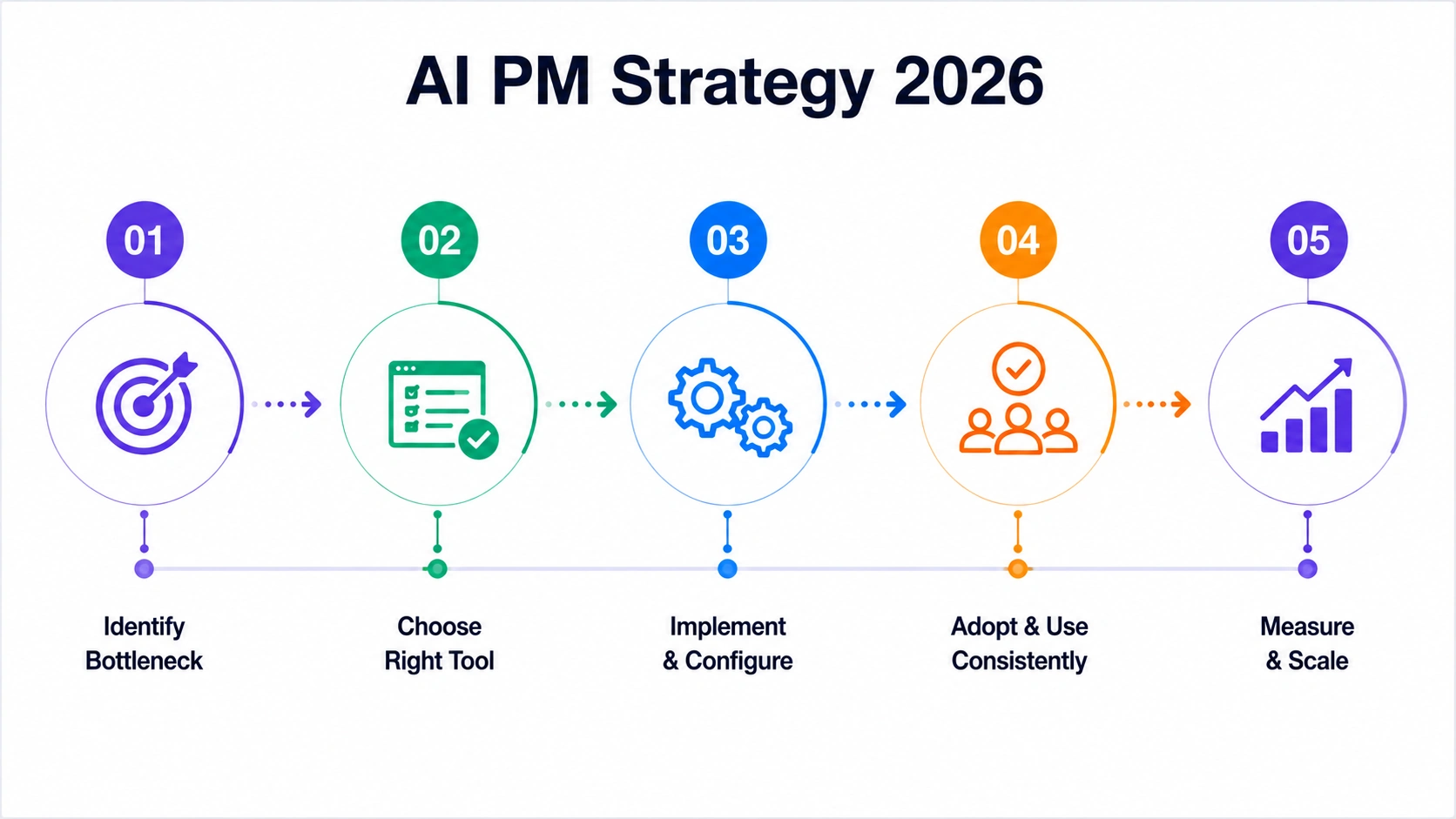
Simple AI project management strategy workflow for startups and growing teams in 2026.
AI Agents and Autonomous Workflows
The biggest shift in 2026 is agentic AI — PM tools that don't just suggest actions but take them. Taskade's AI agents can run through a multi-step research workflow autonomously. ClickUp is building similar features. This is still early, but the direction is clear: the tool will eventually handle entire project phases with minimal human input.
Context-Aware Collaboration
Tools are getting better at understanding why a project is structured the way it is, not just what tasks exist. Notion AI can now answer questions about your company's processes using your own documentation as context. That's a meaningful jump in practical usefulness.
Predictive Project Intelligence
Moving from descriptive ("here's what happened") to predictive ("here's what will happen if you don't change something"). Wrike and Smartsheet lead here today. Expect ClickUp and Asana to close the gap by Q4 2026.
Calendar-Centric Productivity
The rise of Motion and Reclaim.ai reflects a real insight: most knowledge workers don't fail at task creation — they fail at protecting time to complete tasks. The next phase of AI PM tools integrates task management and calendar management more tightly than ever before.
Pros and Cons of AI Project Management Tools
What They Do Well
- Automated status updates save 3–5 hours per manager per week
- AI task generation reduces planning time for recurring projects
- Smart scheduling removes the "when do I work on this?" decision
- AI reporting creates executive summaries without manual work
- Predictive alerts flag deadline risks before they become missed deadlines
Honest Limitations
AI credit systems. Most tools gate their best AI features behind credit limits or add-on pricing. ClickUp AI costs an extra $5/user/month on top of the base plan. Read the pricing carefully before committing.
Learning curve for full adoption. ClickUp especially — it takes 2–3 weeks before a team is consistently using it without friction. Expecting ROI in week one is unrealistic.
Automation dependency risk. When automation rules aren't configured correctly, tasks fall through the cracks silently. Audit your automations monthly.
Not a substitute for process. An AI tool running on a broken workflow produces broken results faster. Fix the process first, then automate it.
ROI Modeling: What AI PM Tools Actually Return
⚠️ Hypothetical estimates only. The figures in this section are illustrative examples based on industry averages and publicly available data. Actual results vary significantly by business size, industry, tool configuration, and team adoption. These numbers are not guarantees of return.
| ROI Driver | Calculation | Monthly Value |
|---|---|---|
| Labour recovered (ClickUp + Reclaim.ai: 5 hrs/week) | 20 hrs × $35/hr | $700 |
| Content cost eliminated (AI status reports + client docs) | 8 reports × $60 contractor equiv | $480 |
| Support deflection (deadline alerts: 3 escalation calls prevented) | 3 × $300 resolution cost | $900 |
| Churn reduction (project health scores: 2 at-risk clients flagged) | 0.5 retained × $2,400 value | $1,200 |
| Total Monthly Return | $3,280 | |
| Stack Cost | ClickUp Business + Reclaim.ai | ~$72/mo |
| ROI | ~4,456% |
Conservative assumptions. Actual results depend on team adoption and baseline process quality.
→ Run your own numbers with the AI ROI Calculator before committing to a stack.
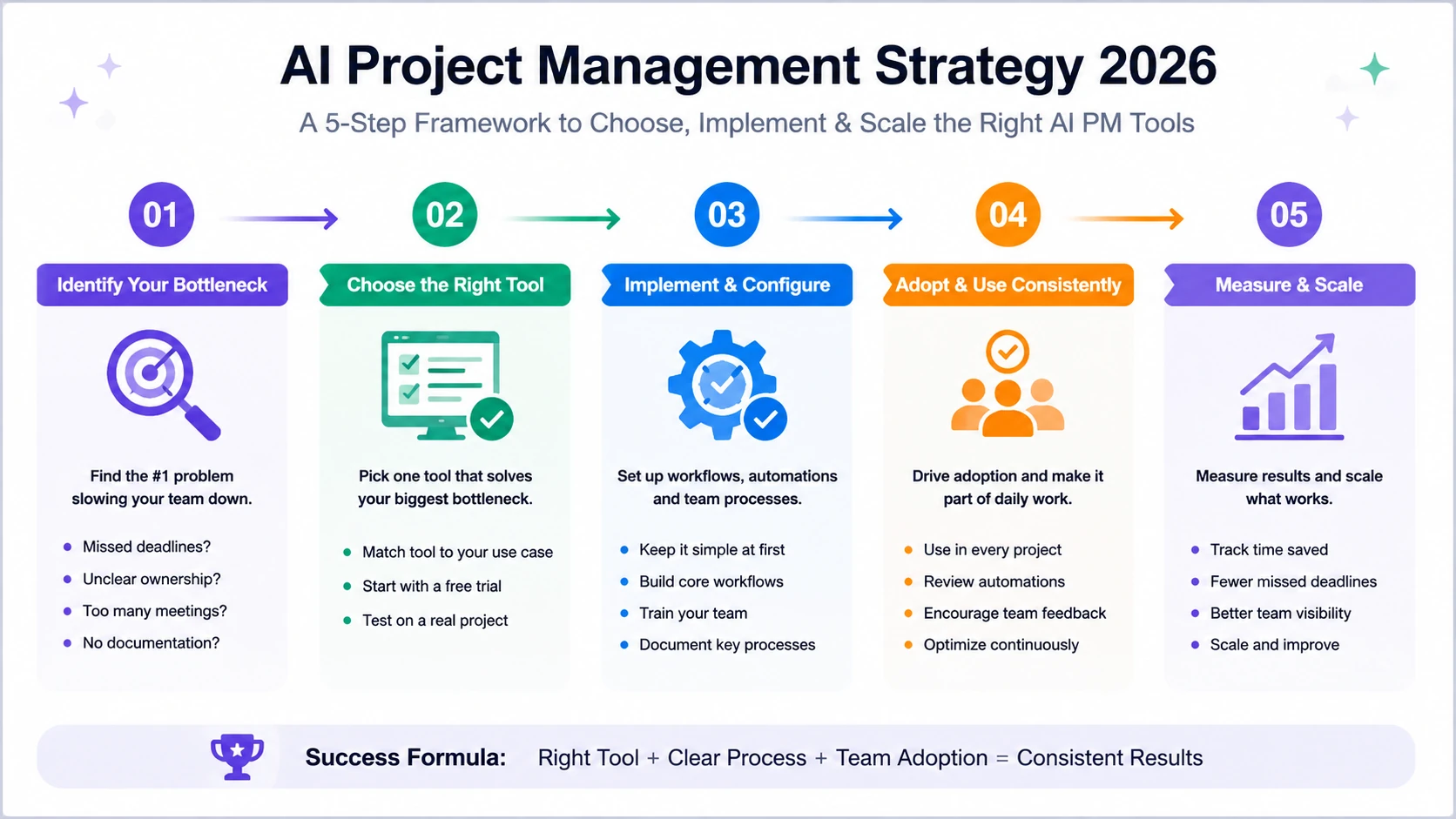
Simple 5-step AI project management strategy framework for startups and growing teams in 2026.
Your 2026 AI PM Tool Action Plan
| Timeframe | Action |
|---|---|
| This week | Identify your team's single biggest PM bottleneck (missed deadlines, unclear ownership, too many status meetings, or no documentation) |
| This month | Pick one tool that addresses that bottleneck. Start with a free trial on a real active project — not a sandbox. |
| 60 days | Measure two things: time saved on admin, and reduction in missed deadlines |
| Quarter 2 | Add a second tool only after the first shows consistent adoption and measurable improvement |
Tool selection is 20% of the outcome. Adoption and consistency account for the other 80%.
Final Verdict: Which AI PM Tool Is Best?
- Best Overall → ClickUp — most complete single platform for startups
- Best for Remote Teams → Asana — clearest ownership and visibility
- Best for Automation → Monday.com — strongest workflow automation builder
- Best for Startups → Notion — docs plus projects in one place
- Best for Scheduling → Motion — AI-managed calendar and task planning
- Best for Developers → Jira — built for engineering workflows
- Best Budget Pick → Taskade — AI features at the lowest price point
The Bottom Line
These tools aren't a substitute for a well-run team. They're infrastructure that removes the coordination overhead that slows even well-run teams down.
ClickUp handles the most ground in one place. Asana gives remote teams the clearest picture of who owns what. Monday.com builds the most powerful automation for repeatable workflows. Notion connects project work to company knowledge. Motion protects the time to actually execute.
None of them require a technical background to set up. None of them require a large team to justify. What they do require is consistent adoption — and that comes from picking one tool that solves your real bottleneck, not the one with the longest feature list.
Pick the tool that addresses your team's single biggest PM failure. Run it with real work for 30 days. Measure two things. Expand only after you see results.