The Stakes Have Never Been Higher—And Neither Has the Opportunity
Artificial intelligence is no longer a futuristic concept reserved for tech giants. In 2026, AI software is accessible, affordable, and increasingly essential for small and medium-sized businesses worldwide.
Yet the majority of businesses that experiment with AI fail to operationalize it effectively. They purchase tools without defined goals, deploy without measurement, and cancel subscriptions before value compounds.
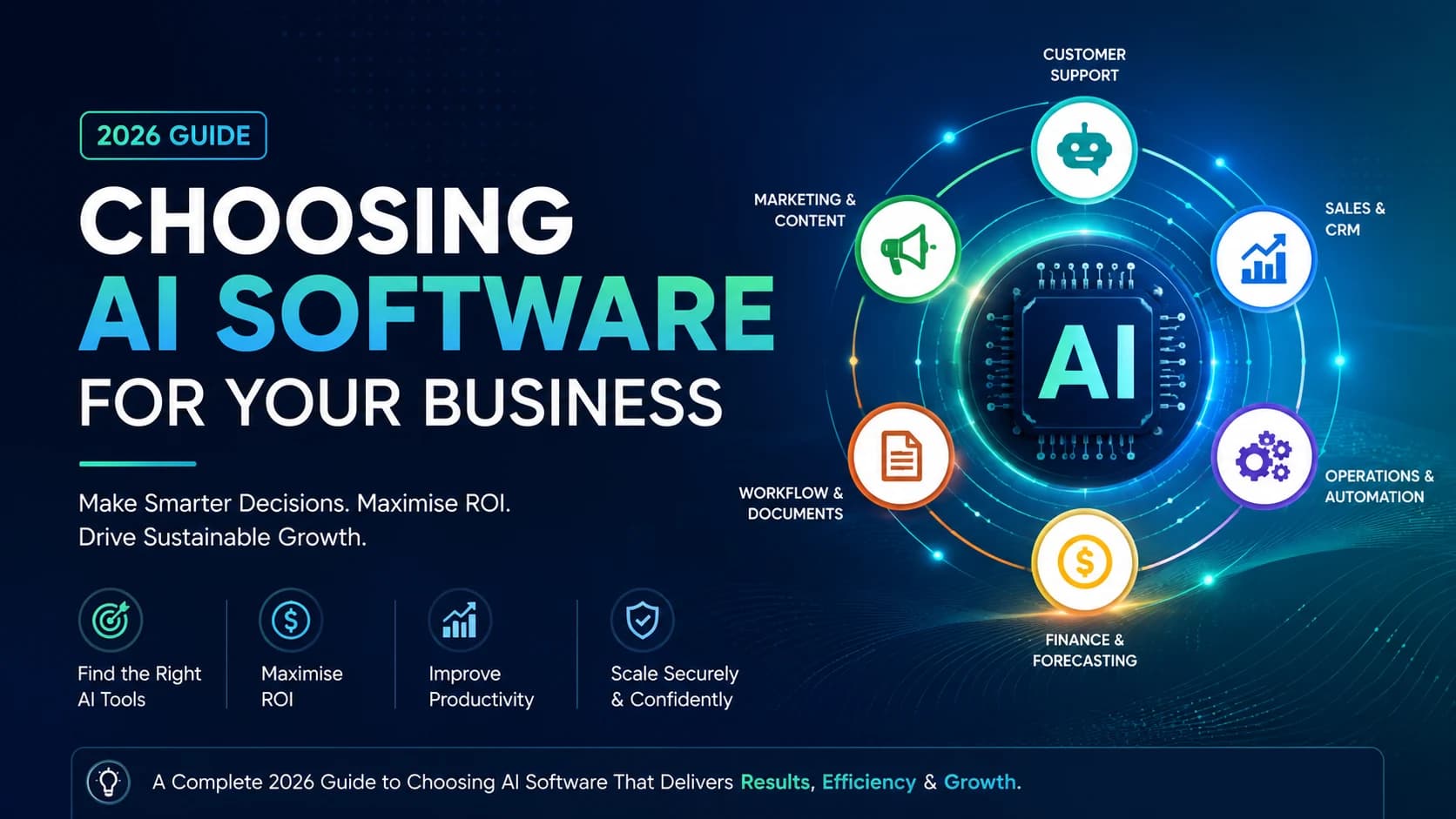
This guide gives you the framework to avoid that outcome. Whether you're evaluating your first AI tool or rationalizing an existing stack, what follows is a structured, decision-focused process for choosing AI software that aligns with your business goals—without wasted spend or unnecessary complexity.
What This Article Covers
In this comprehensive 2026 edition, we break down the AI software selection process into actionable phases:
- Market Shift: Why traditional automation is dead and intelligent systems are the new standard.
- Selection Framework: A 5-step checklist to evaluate ROI and scalability.
- Top 5 Tools: Hand-picked recommendations for SaaS and SMB workflows.
- Implementation: How to pilot tools without disrupting your current operations.
Industry Context: Why the AI Software Market Has Fundamentally Shifted
Gartner predicts that by 2026, over 80% of enterprise software will embed AI capabilities as a core feature rather than an add-on.
AI adoption is shifting from experimentation to core infrastructure, meaning businesses without AI integration risk falling behind competitors.
From Automation to Intelligent Systems
Traditional automation replaced repetitive, rule-based tasks—scheduling emails, exporting reports, routing support tickets. AI goes further. Intelligent systems learn from data, adapt to new inputs, and make decisions without manual reprogramming.
The difference is significant: a rule-based chatbot answers fixed questions; an AI-powered chatbot understands context, resolves complaints, and improves with every conversation. This shift means AI is no longer just a cost-reduction lever. It is now a revenue driver.
Businesses that implement AI in sales forecasting, content personalisation, or customer retention report measurable gains in revenue—not just lower overhead.
Market Data That Defines the 2026 Landscape
According to McKinsey’s Global AI Research, companies implementing AI at scale report measurable cost reductions and revenue growth improvements within the first year.
- 70–90% of businesses now use at least one AI tool
- 77% of SMBs report saving 100+ hours annually per employee
- Companies generate $3.50–$4 ROI for every $1 invested in AI
According to McKinsey's Global AI research, companies implementing AI at scale report measurable cost reductions and revenue growth improvements within the first year. Gartner predicts that by 2026, over 80% of enterprise software will embed AI capabilities as a core feature rather than an add-on.
AI is not a cost. It is a multiplier.
The 2026 trends reshaping how companies compete include AI agents capable of executing multi-step autonomous tasks, hyper-personalisation at SMB scale, and vertical-specific platforms purpose-built for industries like legal, healthcare, and logistics.
Industries Seeing the Fastest AI Adoption
AI adoption is accelerating across sectors, but several industries are seeing particularly rapid uptake:
- Retail and eCommerce: Personalised recommendations, inventory forecasting, fraud detection
- Healthcare: Administrative automation, patient triage support, claims processing
- Financial services: Credit risk assessment, fraud prevention, automated reporting
- Marketing agencies: AI content generation, campaign optimisation, audience segmentation
- Logistics and supply chain: Route optimisation, demand forecasting, warehouse automation
Key Business Benefits of AI in 2026
- Cost reduction: Automating manual processes reduces headcount costs and human error
- Productivity gains: Employees using AI tools complete tasks faster and focus on higher-value work
- Data-driven decisions: AI surfaces insights from large datasets that humans would miss
- Competitive advantage: Businesses using AI respond to market changes faster than those that do not
Strategic Alignment: The HBR Perspective
A key reason for this failure is strategic misalignment. According to research published in Harvard Business Review (HBR), the primary reason AI projects fail is not the technology itself, but a lack of alignment with business goals.
Successful companies treat AI as a "capability multiplier" rather than a standalone IT expense. This reinforces why a structured selection process is non-negotiable in 2026.
Example Evaluation Workflow
While researching this guide, I compared multiple AI software categories and vendor offerings to understand how pricing, integrations, and business use cases differ across platforms.
The comparison process included:
- Reviewing product documentation
- Comparing pricing tiers
- Analyzing feature availability
- Reviewing customer feedback from public review platforms
- Mapping tools to SMB use cases
This helped validate the evaluation framework used throughout this guide.
The Core Problem: Why Most Businesses Choose AI Software Wrong
With hundreds of tools on the market, choosing the right AI software feels overwhelming. Some platforms promise instant results. Others require deep technical expertise or large budgets. Not every solution is built with small businesses in mind.
The most common failure pattern is straightforward: businesses purchase tools reactively—driven by competitor pressure or vendor marketing—without defining the problem the tool must solve, without establishing measurement frameworks, and without redesigning workflows to leverage AI effectively.
The result is predictable. Tools go unused. Subscriptions are canceled. Teams conclude that AI doesn't work for their business—when the actual failure was in the selection and implementation process, not the technology.
This guide exists to break that pattern. The following sections provide a complete framework: from understanding what AI software actually does, to evaluating readiness, selecting tools, running pilots, and scaling what works.
Complete Concept Explanation: What AI Software Actually Does
Plain-English Definitions
Before evaluating tools, it's essential to understand what different types of AI actually do. The term "AI software" covers a wide range of capabilities, and confusing them leads to poor purchasing decisions.
Machine Learning (ML) Systems that learn patterns from historical data to make predictions. Used in demand forecasting, credit scoring, and churn prediction.
Generative AI Models that create original content—text, images, code, or audio—from prompts. Powers writing assistants, design tools, and code copilots.
Natural Language Processing (NLP) Enables computers to understand and respond to human language. Found in chatbots, voice assistants, and sentiment analysis tools.
Computer Vision Allows AI to interpret images and video. Used in quality control, security monitoring, and document scanning.
Predictive Analytics Analyses current and historical data to forecast outcomes. Commonly used in sales forecasting, inventory planning, and financial modelling.
AI Tools vs AI Platforms vs Custom AI Solutions
Not all AI products are the same. Understanding the difference helps you match the right solution to your business stage and budget.
| Criteria | SaaS AI Tools | Enterprise AI | Custom AI |
|---|---|---|---|
| Cost | Low–Moderate | High | Very High |
| Setup Time | Fast | Medium | Long |
| Best For | SMBs | Large Teams | Unique Needs |
| Technical Skill | Low | Medium–High | High |
| Scalability | Moderate | High | Fully Custom |
SaaS AI tools: Ready-to-use software with AI built in. Low cost, fast deployment, minimal technical skill required. Appropriate starting point for most SMBs.
AI integrations: Add-on AI features embedded into existing platforms. Best for extending tools you already use without replacing them.
Enterprise AI platforms: Comprehensive platforms combining multiple AI capabilities with customisation. Suitable for larger SMBs with dedicated technical resources.
Custom AI models: Built from scratch using your own data. Highest cost and complexity, delivers maximum specificity for unique use cases.
→ Looking for budget-friendly options? Read: Affordable AI Software for Startups (2026 Guide to High-ROI Tools Under $100/Month)
How to Determine If Your Business Is Actually Ready for AI
Signs You Are Ready
- You have repetitive, time-consuming manual processes that slow your team down
- Your customer support volume is growing faster than your team capacity
- You are sitting on large amounts of data but struggling to extract useful insights
- Your marketing spend is high but conversion rates are flat or declining
- Competitors are responding to customers or market changes faster than you
When AI May Not Be the Right Fit
AI is not universally appropriate. Consider waiting if:
- You are an early-stage business without consistent processes or data yet
- You cannot clearly define the problem you want AI to solve in one sentence
- You lack the minimum data volume required for AI to learn effectively
- Your team has no capacity to manage onboarding, testing, or change management
AI Readiness Checklist
Before investing in software, you must assess your current infrastructure. Using a strategic configurator helps identify gaps in your data foundation and security protocols.
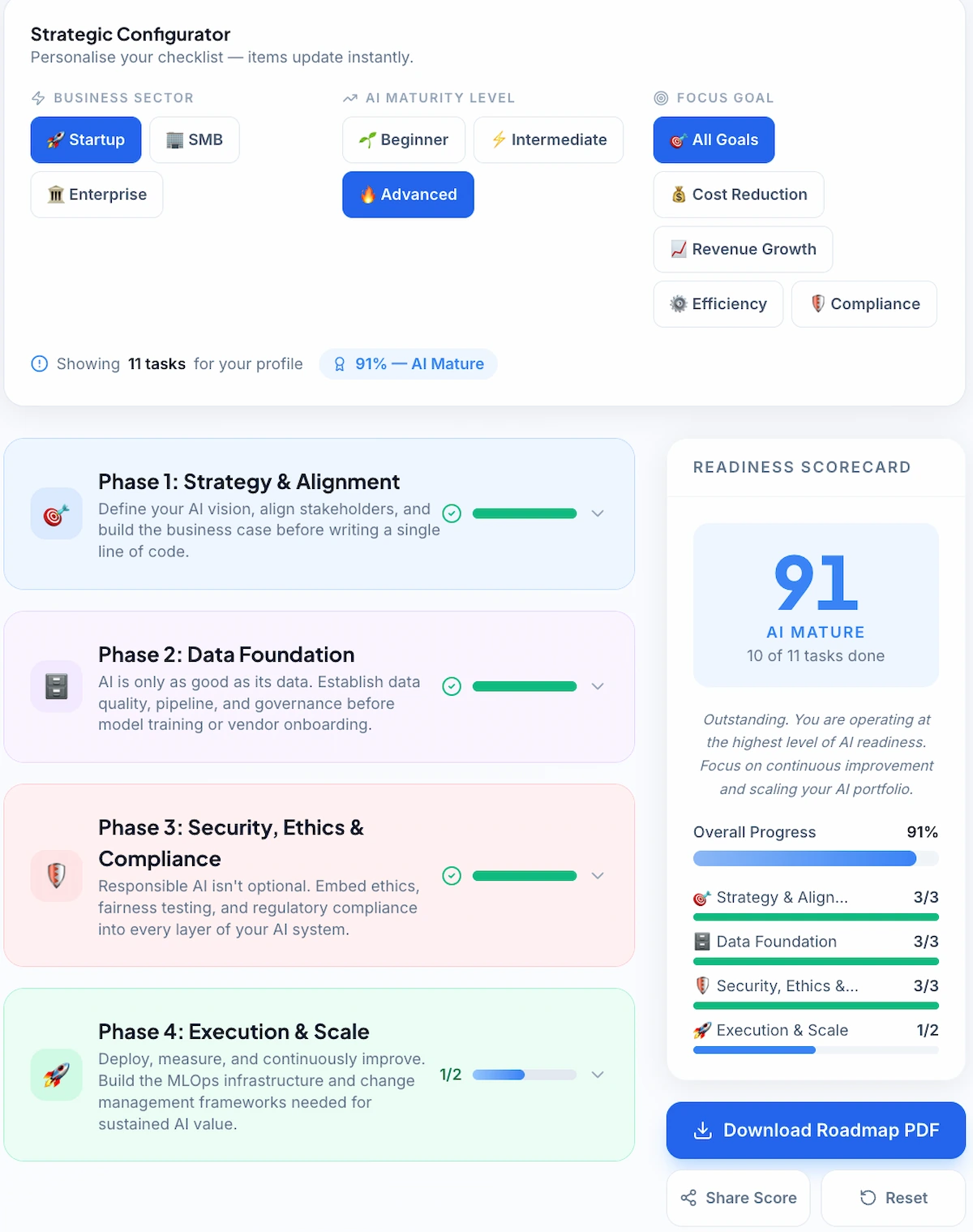
Example readiness assessment performed while evaluating AI implementation workflows for this guide.
| Question | Ready? |
|---|---|
| Can I describe the business problem in one sentence? | Yes / No |
| Do I have a budget for 6–12 months of AI investment? | Yes / No |
| Do I have existing data to feed the AI system? | Yes / No |
| Does my team have the capacity to manage implementation? | Yes / No |
| Can I measure success with clear KPIs? | Yes / No |
| Is the expected ROI justifiable within 6 months? | Yes / No |
Scoring: Four or more "Yes" answers indicates a solid foundation for AI adoption. Fewer than four? Address those gaps before evaluating tools.
→ Not sure if you're ready? Use our AI Implementation Checklist to evaluate your readiness step-by-step.
Step-by-Step Framework: How to Select the Right AI Software
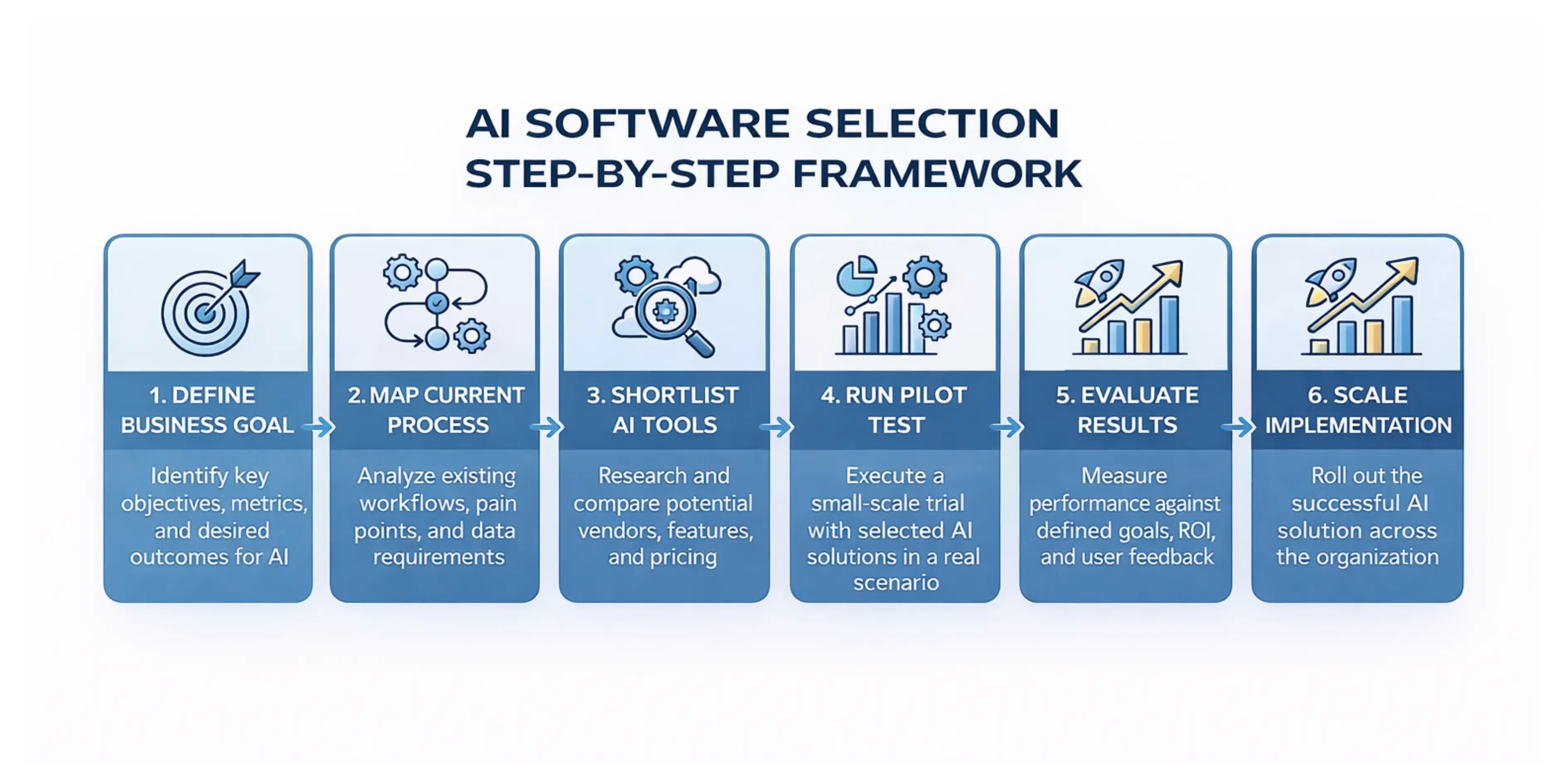
Step 1: Define Your Primary Business Goal
Identify one specific, measurable problem that AI will help solve. Write it as a single sentence: "Reduce customer support first-response time from 6 hours to under 1 hour".
This goal becomes your evaluation filter for every tool you consider. If you can't tie a tool directly to this outcome, it doesn't belong on your shortlist.
Decision Rule: If you can't explain the goal in one sentence,you're not ready to buy.
Step 2: Map the Processes That Could Be Improved
Document the current workflow in the target area—who does what, how long it takes, where errors occur, and what data is involved.
This process map tells you exactly what capabilities the AI tool must have and what integrations are required. Teams that complete this mapping step select tools more accurately and achieve faster deployment.
Step 3: Shortlist 3 to 5 Vendors
Research vendors specialising in your use case. Use independent review platforms, ask peers in your industry for recommendations, and verify that each vendor has demonstrable experience with businesses at your scale.
Eliminate any vendor that cannot provide case studies or reference customers at comparable business size.
→ Compare tools faster using our AI Tool Selector to find the best fit for your business.
Step 4: Request Demos or Free Trials with Real Data
Never purchase AI software without testing it yourself. Request a live demo tailored to your use case—not a generic product walkthrough.
Where free trials are available, use them with real data and real team members—not a simplified demo scenario. Test vendor support response times during the trial period. This reflects real-world reliability more accurately than any SLA document.
Step 5: Run a Controlled Pilot Programme
Before full deployment, run a controlled pilot in one team or one workflow. Set a defined timeframe—typically four to eight weeks—and measure your pre-defined KPIs.
Pilot parameters:
- Scope: One team, one workflow
- Duration: 4–8 weeks with weekly check-ins
- Measurement: 2–3 KPIs defined before launch
- Documentation: Record what works, what doesn't, what requires adjustment
A successful pilot provides both proof of ROI and a deployment playbook for scaling.
→ Follow our full guide: How to Implement AI in a Small Business 2026 Guide
Step 6: Evaluate Results and Scale Strategically
After the pilot, compare results against your original KPIs.
- If the tool delivers expected value: Build a phased expansion plan
- If results fall short: Identify whether the gap is in implementation, data quality, or the tool itself before investing further.
Scale gradually, adding use cases as each layer proves its value. Businesses scaling too quickly encounter 3–4x higher failure rates than those expanding methodically.
Tools and Methods Overview: Best Types of AI Software for SMBs in 2026
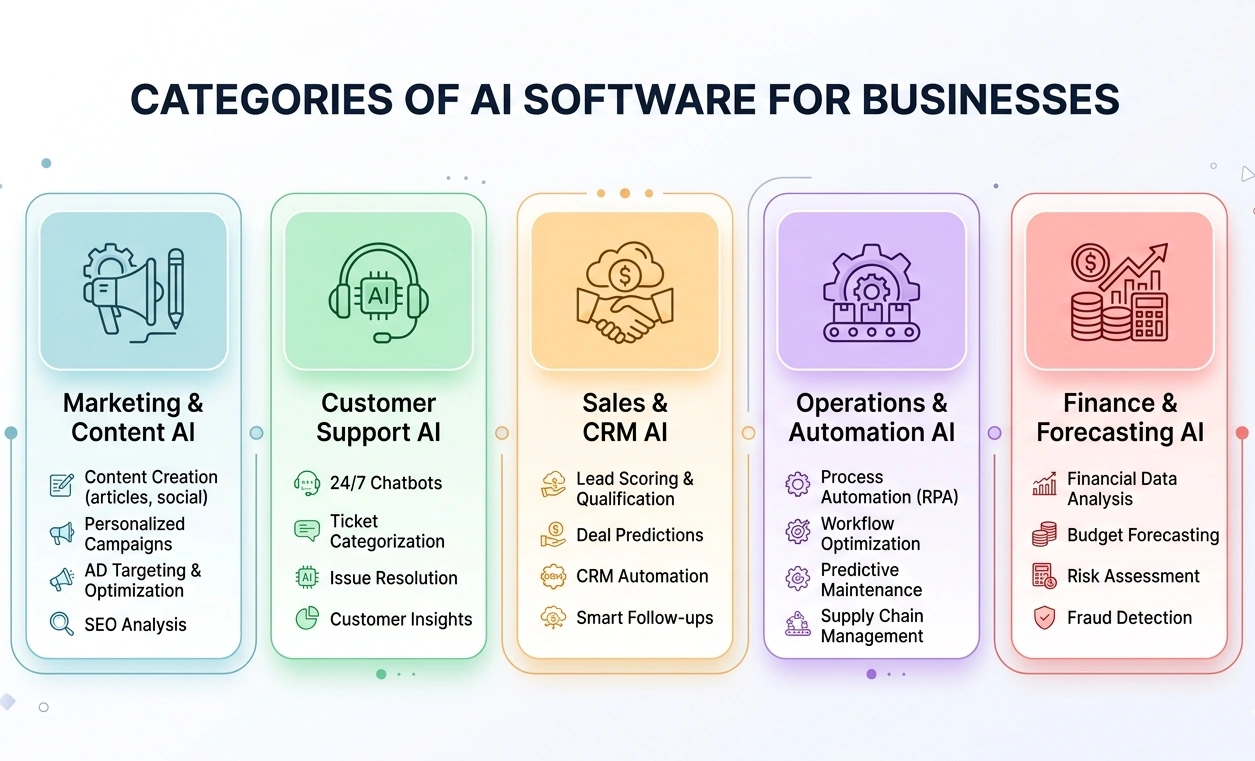
AI for Marketing and Content Creation
- AI copywriting tools: Generate blog posts, ad copy, product descriptions, and email sequences at scale
- SEO optimisation tools: Identify keyword opportunities, optimise existing content, and track ranking performance
- Social media automation: Schedule posts, generate captions, and analyse engagement patterns automatically
Best for: Businesses spending heavily on content production or struggling with marketing consistency
AI for Customer Support
- AI chatbots: Handle frequently asked questions, order status checks, and basic troubleshooting 24/7
- Automated ticket routing: Classify and assign support requests to the right team member instantly
- Voice AI assistants: Resolve common customer queries over phone without human agents
Best for: Businesses with growing support volume or high out-of-hours demand
AI for Sales and CRM
- Lead scoring: Rank prospects by conversion likelihood based on behaviour and firmographic data
- Sales forecasting: Predict monthly and quarterly revenue with greater accuracy than spreadsheet models
- Email personalisation: Send tailored follow-up sequences based on buyer stage and engagement history
Best for: Sales teams spending too much time on low-probability leads
→ Estimate your CRM investment using our CRM Cost Calculator before choosing a platform.
AI for Operations and Workflow Automation
- Workflow automation: Connect apps and trigger actions across your tech stack without manual steps
- Document processing: Extract data from invoices, contracts, and forms automatically
- AI meeting assistants: Transcribe meetings, summarise action items, and integrate with project management tools
Best for: Operations teams buried in manual admin or document-heavy processes
AI for Finance and Forecasting
- Expense tracking: Categorise and reconcile business expenses automatically
- Fraud detection: Flag unusual transaction patterns in real time
- Cash flow forecasting: Model future cash positions based on receivables, payables, and historical data
Best for: Finance teams managing complex reporting cycles or high transaction volumes
→ Explore our full breakdown:Best AI Tools for Small Businesses in 2026
AI Software Feature Evaluation Guide
Use this table when comparing platforms. Each factor represents a critical evaluation dimension that separates high-value tools from expensive experiments.
| Feature | Why It Matters | What to Check |
|---|---|---|
| Ease of Use | Reduces training time and speeds adoption | No-code / low-code? Onboarding tutorials included? |
| Integration Capabilities | Prevents workflow disruption and manual data entry | Native CRM/ERP integrations? API access available? |
| Scalability | Supports long-term growth without switching tools | Pricing tiers? User limits? Data volume handling? |
| Customisation | Ensures the tool fits your specific workflows | Adjustable automation rules, prompts, dashboards? |
| Data Security | Protects sensitive business and customer data | Encryption? GDPR/SOC 2/ISO 27001 compliance? |
| Pricing Structure | Impacts total cost and ROI over time | Subscription vs usage-based? Hidden fees? |
| Analytics & Reporting | Helps measure ROI and track performance | Built-in dashboards? Exportable reports? |
| Customer Support | Reduces downtime and implementation risk | Live chat? SLA? Response time during trial? |
Real-World Examples: AI Software ROI in Practice
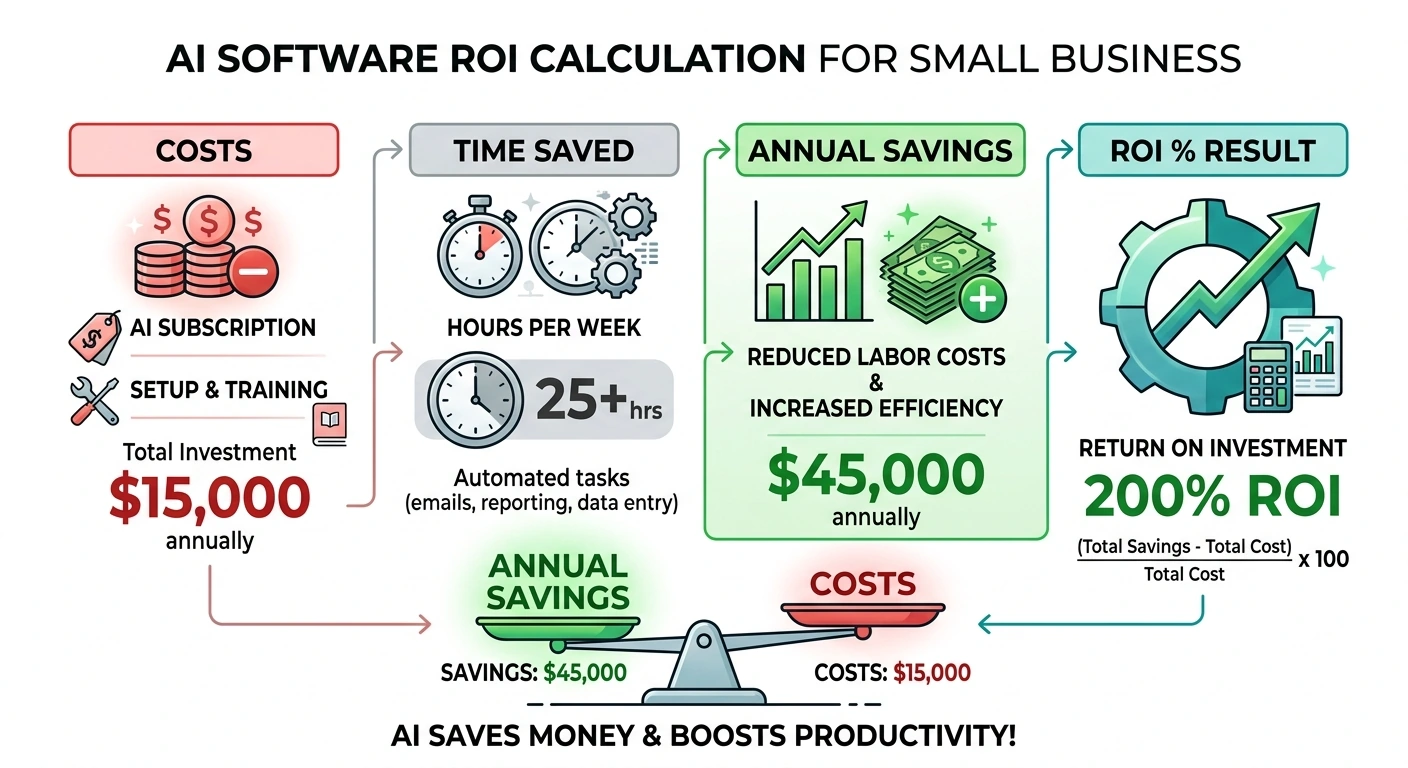
ROI Calculation Framework
⚠️ Hypothetical estimates only. The figures in this section are illustrative examples based on industry averages and publicly available data. Actual results vary significantly by business size, industry, tool configuration, and team adoption. These numbers are not guarantees of return.
A practical ROI calculation for AI software follows this structure:
- Quantify the current cost: Calculate the time (in hours) and cost (in payroll) of the process AI will improve
- Estimate the AI-driven improvement: Use vendor case studies or pilot data to project a realistic percentage improvement
- Calculate annual savings: (Hours saved per week × hourly cost) × 52 weeks
- Subtract total AI cost: Annual subscription + setup + training + integration
- Calculate ROI: (Annual savings − Total AI cost) ÷ Total AI cost × 100 = ROI%
Quick ROI Analysis: AI Implementation (SMB Example)
Before you sign an annual contract, run this simple 12-month projection:
| ROI Component | Calculation / Metric | Total Value (Annual) |
|---|---|---|
| Manual Labor Cost | 15 hours/week × $30/hr × 52 weeks | $23,400 |
| AI Software Cost | $500 monthly sub + $2,400 setup/training | ($8,400) |
| Net Productivity Gain | Labor Cost - AI Cost | $15,000 |
| Annual ROI % | ($15,000 ÷ $8,400) × 100 | 178% 🚀 |
Worked Example
A business saves 15 hours per week at $30 per hour = $23,400 per year in recovered labour value. Total AI cost including subscription, setup, and training = $8,400 per year.
ROI Calculation: ROI = [(23,400 - 8,400) / 8,400] × 100 = 178%
This is a defensible, conservative investment with measurable return within the first year.
→ Ready to see your own numbers? Check out our AI ROI Calculator to get a custom breakdown for your team size.
Typical AI Software Costs for SMBs (2026)
| Category | Typical Monthly Cost (USD) | Best For |
|---|---|---|
| Entry-level SaaS AI tools | $20–$100 | Solopreneurs, micro-businesses |
| Mid-range SMB AI platforms | $100–$500 | Growing teams, 10–50 employees |
| Advanced SMB / multi-tool | $500–$2,000 | Established SMBs, multi-dept use |
| Enterprise AI platforms | $2,000–$10,000+ | Scaling businesses, custom needs |
| Custom AI development | $20,000–$150,000+ (one-off) | Unique, proprietary requirements |
Expected Time Savings by Business Function
| Function | Monthly Time Saved | Typical Tool Category |
|---|---|---|
| Marketing | 15–25 hours | AI content and copywriting tools |
| Customer Support | 20+ hours | AI chatbots and ticket routing |
| Operations | 10–20 hours | Workflow automation platforms |
| Sales | 10–15 hours | CRM AI and lead scoring tools |
| Finance | 12–16 hours | AI accounting and forecasting |
Budget Planning Principles
- Allocate a minimum of six months of budget before expecting documented returns from most AI implementations
- Include a 20–30 percent buffer for integration, training, and change management costs beyond the subscription fee
- Prioritise tools with month-to-month contracts during the evaluation phase before committing to annual pricing
- Build your own ROI model based on actual labour costs and process times—don't rely solely on vendor-provided calculators
Tip: Request a pricing estimate at 2x your current usage volume before signing any annual contract. Usage-based pricing scales quickly.
→ Plan your long-term costs with our SaaS Pricing Calculator.
My Evaluation Process
To prepare this guide, I reviewed the official documentation, pricing pages, feature lists, and publicly available resources for the AI software discussed throughout this article. I also compared multiple AI tools to better understand their strengths, limitations, pricing models, and suitability for different business needs.
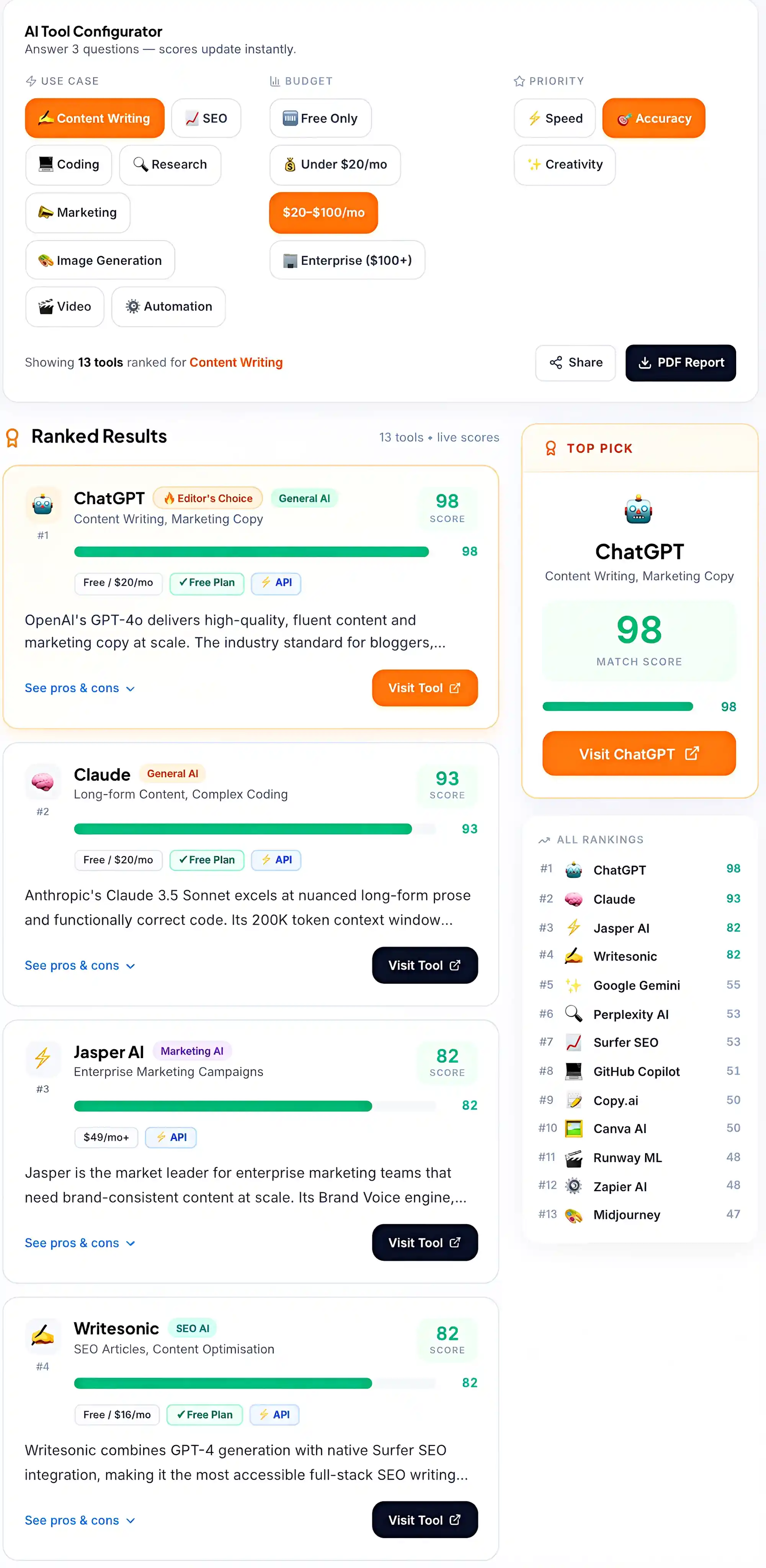
Example comparison created during my evaluation process using the Techaigoz AI Tool Selector
My evaluation focused on the factors that matter most when choosing AI software for a business:
Ease of setup and onboarding Core features and capabilities Pricing transparency Integration options Suitability for different business use cases Potential long-term value and scalability
The comparison above helped me identify common differences between AI tools and informed the evaluation framework used throughout this guide.
Common Mistakes Businesses Make When Buying AI Software
Mistake 1: Buying AI Because It Is Trendy
Jumping on AI because competitors appear to be using it, or because vendor marketing is compelling, leads to wasted spend. If you cannot tie the tool directly to revenue growth, cost reduction, or a measurable efficiency gain, the purchase is premature. Start with a defined business problem—not a technology.
Mistake 2: Not Defining Success Metrics Before Purchase
Investing in AI without establishing KPIs means you will have no way to measure whether it is working. Define two to three clear metrics before implementation: reduce support ticket volume by 30 percent, increase lead conversion rate by 15 percent, or cut invoice processing time from three days to one. Measure from day one.
Mistake 3: Underestimating Integration Complexity
Even the most powerful AI tool delivers limited value if it does not connect seamlessly with your existing systems. Before purchasing, confirm native integrations, API access, and estimated setup time. Factor integration costs—including developer time—into your total cost of ownership calculation.
Mistake 4: Ignoring Team Adoption
Rolling out AI without adequate training or communication creates resistance. Employees who fear AI will replace their roles will actively avoid new tools. Position AI as a productivity assistant, not a replacement. Run training sessions, celebrate early wins, and involve frontline staff in the pilot phase.
Mistake 5: Starting Too Big
Attempting a full-scale AI transformation across multiple departments simultaneously overwhelms teams and dilutes results. Start with one high-impact, low-risk use case—such as automating FAQ responses or personalising email campaigns. Prove ROI, refine the approach, then expand.
Mistake 6: Overlooking Data Quality
AI output is only as good as the data it learns from. Feeding incomplete, inconsistent, or outdated data into an AI system produces unreliable predictions and erodes trust in the tool. Audit your data quality before implementation and establish data governance practices as part of your AI strategy.
Mistake 7: Focusing on Monthly Cost Instead of Total Value
The cheapest tool is rarely the best investment. A platform that costs more monthly but saves 20 hours of labour per week may deliver substantially stronger ROI than a lower-cost alternative. Always evaluate total value—time saved, revenue enabled, and errors eliminated—not just the subscription fee.
SaaS AI vs Enterprise AI vs Custom AI
| Factor | SaaS AI | Enterprise AI | Custom AI |
|---|---|---|---|
| Setup | Fast | Medium | Slow |
| Cost | Low | High | Very High |
| ROI Speed | Fast | Medium | Slow |
| Technical Skill | Low | Medium | High |
| Best Choice For | SMBs | Mid-Market | Enterprises |
Which Type of AI Software Should You Choose?
Choose SaaS AI if:
- Team under 50 employees
- Budget under $1000/month
- Need results quickly
Choose Enterprise AI if:
- Multiple departments need AI
- Dedicated IT resources available
Choose Custom AI if:
- Proprietary workflows exist
- Existing solutions cannot solve the problem
Advanced Strategy: Eight Key Factors for Sophisticated AI Software Evaluation
For businesses moving beyond initial experimentation to strategic AI adoption, these eight factors separate high-value implementations from expensive experiments.
1. Business Goal Alignment
Define the specific problem you want to solve before evaluating any tool. Every feature should map back to a measurable outcome: reduce support response time, increase lead conversion, or cut invoice processing time by 50 percent.
If you cannot tie the tool to a clear business outcome, reconsider the purchase entirely.
2. Ease of Use and Learning Curve
A powerful AI tool that your team cannot use effectively delivers no value. Assess whether the platform requires technical expertise or is designed for non-technical users.
Look for no-code or low-code options, built-in onboarding, video tutorials, and responsive customer support. A 10-person business will often get better results from a simple, focused tool than from a complex enterprise platform.
3. Integration Capabilities
Your AI tool must connect smoothly with the systems you already use CRM, ERP, marketing automation, accounting software. Confirm native integrations are available, that API access is included in your pricing tier, and get an honest estimate of setup time from the vendor.
An AI sales tool that does not sync with your CRM creates more manual work, not less. Compatibility with major cloud infrastructure—AWS, Microsoft Azure, and Google Cloud—is worth confirming for scalability.
4. Scalability and Future Growth
Choose a solution that grows with your business over the next two to five years. Check whether pricing tiers exist for expanding users or data volume, whether the architecture is modular, and whether the vendor has a proven track record with growing businesses.
Avoid solutions you will outgrow within 12 months—migration costs and retraining expenses consistently exceed the initial savings from choosing the cheaper option.
5. Data Security and International Compliance
Data security is non-negotiable—particularly for businesses handling customer personal data, financial records, or health information.
Verify that the vendor complies with relevant regulations in your operating regions: GDPR for European customers, HIPAA for healthcare data, SOC 2 for cloud security assurance, and ISO 27001 for information security management. Ask explicitly where your data is stored, who owns it, and how it is encrypted in transit and at rest.
6. Pricing Models and Total Cost of Ownership
Most AI tools use subscription, usage-based, or per-seat pricing. A tool that appears affordable at $49/month can become $300/month once you scale usage, add users, or enable premium integrations.
Always calculate the total cost of ownership—including setup fees, training costs, integration development, and anticipated growth in usage volume—before committing to any contract.
7. Vendor Reliability and Support
Check independent reviews, published case studies, and service level agreements. Test the vendor's support response time during your trial period—this reflects real-world reliability far more accurately than any marketing claim.
Look for vendors with a clear product roadmap, active development cycles, and responsive account management. A vendor that disappears after the sale is a serious operational risk.
8. Free vs Paid AI Tools
Several capable free-tier AI tools exist in 2026, particularly for content generation, basic automation, and analytics. Free tools are appropriate for exploration and initial testing.
However, free tiers typically impose usage limits, restrict integrations, and offer minimal support. For any AI use case that touches customer data or revenue-critical processes, invest in a paid plan with documented security certifications.
Notes From My Research
Before writing this guide, I reviewed the official documentation, feature pages, pricing information, and publicly available resources for the tools covered in this article.
During my research, I noticed that many AI vendors emphasize features and capabilities, while practical topics such as implementation, onboarding, and long-term adoption often receive less attention.
I also compared documentation, product updates, and feature availability to better understand how each tool is positioned and where it may be most useful.
These research findings helped shape the comparisons, recommendations, and framework presented throughout this guide.
Final Verdict: How to Confidently Choose AI Software in 2026
Choosing AI software is one of the most consequential technology decisions a small or medium business can make in 2026. The right tool, implemented well, can transform productivity, improve customer experience, and create measurable competitive advantage. The wrong tool—purchased reactively or deployed without a clear goal—becomes an expensive distraction.
The Compounding Advantage of Strategic Implementation
The gap between businesses that implement AI strategically and those that experiment without structure is not static—it compounds. A business that implements AI effectively in year one generates better data, refines processes faster, and develops internal expertise that accelerates every subsequent deployment.
By year three, strategic implementers have operational capabilities that late adopters would take years to replicate even if they started immediately. Early movers are not just ahead. They are building structural advantages that widen every quarter.
The Reshaping of Customer Expectations
The competitive dynamic is also reshaping what customers expect. Businesses receiving instant, accurate, personalized responses from AI-enabled competitors increasingly interpret slower responses not as normal practice—but as poor service. Response time expectations, content quality baselines, and personalization standards are all being reset upward by businesses that have operationalized AI effectively.
Competing manually against AI-augmented businesses in customer-facing functions becomes progressively harder regardless of product or pricing advantages.
Final Strategic Recommendation for 2026
Start with one clearly defined use case. Run a controlled pilot for 60–90 days. Track performance against pre-defined KPIs. Scale only after clear ROI validation.
Businesses that approach AI as a long-term operational capability—rather than a short-term trend—will outperform competitors over the next decade.
The framework is straightforward, even if the decision is not. Define a specific business problem before evaluating any technology. Assess tools against the eight key factors outlined above. Pilot before you scale. Measure relentlessly. Treat AI adoption as a strategic programme—not a one-time software purchase.
The businesses that benefit most from AI are not necessarily those with the largest budgets or the most technical expertise. They are the ones that approach adoption with clarity of purpose, rigorous evaluation, and a genuine commitment to learning from results.
Start small. Prove value. Build from there. That is how AI becomes a durable competitive advantage—not a costly experiment.