Why Selection Matters More Than Spend
Affordable AI software for startups is no longer a niche category — AI tool adoption among early-stage companies has accelerated sharply over the past two years. Global AI software spending continues to grow at a double-digit rate, with the steepest adoption curve among companies under 50 employees. The barrier to entry has collapsed — and with it, the excuse to delay.
The challenge for early-stage founders evaluating low-cost AI tools for startups isn't access. It's selection. The wrong tool at $49/month that sits unused is more expensive than the right tool at $99/month that saves 15 hours a week. This guide cuts through the noise with an ROI-first framework, a curated comparison of the best AI tools for early-stage startups, and budget stack templates built for bootstrapped, seed, and pre-Series A teams.
- Improved productivity: Many startups use AI tools to reduce repetitive work and increase team efficiency.
- Time savings: Automation and AI assistants can help founders spend less time on routine operational tasks.
- Lower operating costs: AI software often helps small teams accomplish work that would otherwise require additional contractors or manual effort.
- Faster execution: Startups that successfully integrate AI into daily workflows can often move from idea to execution more quickly than teams relying entirely on manual processes.
The goal: build an AI stack under $100/month that operates like a $3,000/month team expansion.
For a broader view of AI software selection strategy, see: Complete Guide to Choosing AI Software for Your Business (2026 Edition).
How to Evaluate Affordable AI Tools: An ROI Framework
Price is the wrong starting metric. Before selecting any AI software for your startup, run it through four filters:
-
Time ROI: How many hours per week does this save? A tool recovering 10 hours at a $30/hour equivalent creates $1,200/month in value. A $20/month subscription at that return is a 60x investment.
-
Revenue ROI: Does it generate pipeline or improve conversion? AI email personalization typically lifts open rates 15–25%. At $20,000 MRR, a 2% conversion improvement is worth $400/month — enough to justify most starter plans.
-
Scaling cost: Map seat-based pricing to your 12-month headcount plan, not today's team. A $14/user tool affordable at 2 users costs $280/month at 20. Know the curve before you commit.
-
Deployment cost: A $15/month tool requiring two weeks of developer integration is not cheap. Prioritize tools deployable within 48 hours without engineering support.
Apply these four filters before every purchase decision. They eliminate budget AI tools for founders that look affordable on the surface but erode ROI silently over time.
Affordability should always be measured against ROI generated — not sticker price alone. A $99/month tool that saves 15 hours a week at $30/hour equivalent delivers $1,350/month in recovered capacity — a 13.6x return before any revenue impact is counted.
My Testing Notes
Testing Period: June 2026
To evaluate the affordability and practicality of these tools for startups, I tested the available free plans, trial accounts, and demo environments of ChatGPT, HubSpot CRM, Zapier, Canva, Notion AI, and Brevo during June 2026.
My evaluation focused on:
- Cost-to-value ratio
- Setup time
- Ease of use for founders
- Automation capabilities
- Scalability as a startup grows
During testing, ChatGPT and Canva delivered the fastest time-to-value because they required almost no setup and produced useful results immediately.
HubSpot CRM provided the strongest free CRM experience, while Zapier offered the greatest automation flexibility for reducing repetitive work.
Notion AI worked well for documentation and planning workflows, although some advanced AI features were more useful for teams with established processes.
Testing Methodology: Each platform was evaluated using publicly available free plans, trial accounts, or demo environments. I explored common startup use cases including content creation, CRM management, workflow automation, team collaboration, and customer communication.
These observations reflect my personal testing experience and should be considered practical usage insights rather than controlled benchmark results.
Top Affordable AI Software for Startups: Tools Under $100/Month (2026)
All tools reflect official starting plan pricing. Free tier availability and startup-specific use cases are prioritized.
| Tool | Starting Price | Best For | Free Tier? | Key Feature |
|---|---|---|---|---|
| ChatGPT (OpenAI) | $20/mo (Plus) | Content, research, code | ✅ Yes | General AI assistant |
| Notion AI | $10/mo add-on | Docs & project mgmt | ✅ Yes | AI summaries & wikis |
| Canva AI (Magic Studio) | $15/mo (Pro) | Design & marketing | ✅ Yes | AI image generation |
| Zapier | $20/mo (Starter) | Workflow automation | ✅ Limited | 7,000+ integrations |
| HubSpot CRM | $20/mo (Starter) | CRM & sales | ✅ Full CRM | AI email + lead scoring |
| Grammarly | $12/mo (Premium) | Writing quality | ✅ Yes | Tone & grammar AI |
| Brevo | $25/mo (Starter) | Email marketing | ✅ Yes | AI copy + segmentation |
| Fireflies.ai | $10/mo (Pro) | Meeting notes | ✅ Yes | AI transcription |
| Tidio | $29/mo (Starter) | Customer support | ✅ Yes | AI chatbots |
| Mixpanel | $25/mo (Growth) | Product analytics | ✅ Yes | Behavioral AI insights |
| Zoho CRM (Zia AI) | $14/user/mo | Budget CRM + AI | ✅ Limited | Predictive lead scoring |
| Pipedrive | $14/user/mo | B2B sales pipeline | Trial only | AI deal predictions |
→ Not sure where to start? Use our AI Tool Selector to get a personalized stack recommendation in under 30 seconds.
Best Affordable AI Software by Startup Function
Content and Marketing
ChatGPT Plus ($20/month) is the highest-leverage content tool available at any price point. A single founder using structured prompts can produce 3–5 blog posts per week, eliminating $800–$1,500/month in freelance costs. Pair it with Canva Pro ($15/month) for visual assets and Grammarly Premium ($12/month) for communication quality. Add Brevo ($25/month) for AI-powered email sequences — its free tier handles 300 emails/day before you spend anything. Founders scaling beyond these entry points should explore dedicated AI marketing automation tools for multi-channel campaign orchestration and deeper behavioral segmentation.
CRM and Sales
HubSpot's free CRM covers most seed-stage needs: AI email drafting, lead scoring, pipeline views, and chatbot integration. Upgrade to Starter ($20/month) when you need more automation or need to remove HubSpot branding. For teams seeking low-cost AI tools for startups in the CRM category, Zoho CRM with Zia AI ($14/user/month) is the strongest budget alternative — predictive lead scoring and deal risk flagging without the HubSpot price ladder. Pipedrive ($14/user/month) suits B2B teams with a defined sales process, surfacing stalled deals and AI-driven next-action recommendations. For a detailed feature and pricing breakdown across the full AI CRM landscape, see the Best AI CRM Software for Small Businesses (2026 Guide).
Workflow Automation
Zapier ($20/month Starter) connects 7,000+ apps with no-code logic and AI actions. A well-configured Zapier setup routinely replaces 10–20 hours of weekly manual work — the cost equivalent of a part-time ops hire at $2,500/month. Activepieces is the open-source alternative (free to self-host, $49/month hosted), better suited to technically capable founders who want lower long-term costs and no vendor lock-in.
Product Analytics
Among the best AI tools for early-stage startups, product analytics platforms offer some of the highest compounding ROI. Mixpanel's free tier (20M monthly events) and Amplitude's free Starter plan (10M events) are both strong enough to carry a startup through its first growth phase. The paid tiers — Mixpanel at $25/month, Amplitude at $49/month — unlock behavioral cohorts and predictive churn signals that directly inform retention strategy.
A practical example: identifying users who don't complete three key activation steps within 14 days and triggering an automated re-engagement email. One startup running this cohort intervention reduced 14-day churn by 22%, recovering $4,300/month in MRR at a $49/month tool cost. Google Analytics 4 remains the free baseline for web traffic and AI anomaly detection.
Customer Support
Tidio ($29/month Starter) deflects 40–60% of inbound support queries with AI chatbots, integrates natively with Shopify and WordPress, and provides per-conversation deflection reporting so ROI is visible from week one. Freshworks (Freddy AI) scales from a free plan to $19/agent/month with AI ticket categorization, suggested replies, and auto-resolution for repeated queries. For a side-by-side evaluation of AI customer support platforms — including Intercom, Zendesk AI, and Freshdesk — a dedicated AI customer support software comparison covers automation depth, pricing tiers, and handoff quality.
Best AI Stacks for Startups Under $100/Month
| Startup Type | Tools Included | Monthly Cost | Primary ROI Driver |
|---|---|---|---|
| Bootstrapped SaaS | ChatGPT Plus + Notion AI + Zapier + GA4 | ~$50–60/mo | Content output + workflow automation |
| D2C / E-commerce | HubSpot CRM + Brevo + Canva Pro + Tidio | ~$89/mo | Acquisition, email retention + support deflection |
| B2B SaaS (Seed) | Zoho CRM + Zapier + Mixpanel + ChatGPT | ~$85–95/mo | Lead scoring + churn prediction + pipeline velocity |
| India / Cost-Optimised | Zoho CRM + Activepieces (self-hosted) + GA4 + Brevo Free | ~$14–30/mo | Full CRM + automation at minimum cost |
| Pre-Revenue | ChatGPT Free + Notion Free + GA4 + HubSpot CRM Free | $0–20/mo | Validate product + build audience |
| Content-First Startup | ChatGPT Plus + Canva Pro + Grammarly + Brevo | ~$72/mo | 3–5x content output + email-driven growth |
Start with the stack that matches your current stage, not your aspirational one. Overbuilding your AI stack early is as damaging as underbuilding — every unused subscription is pure overhead.
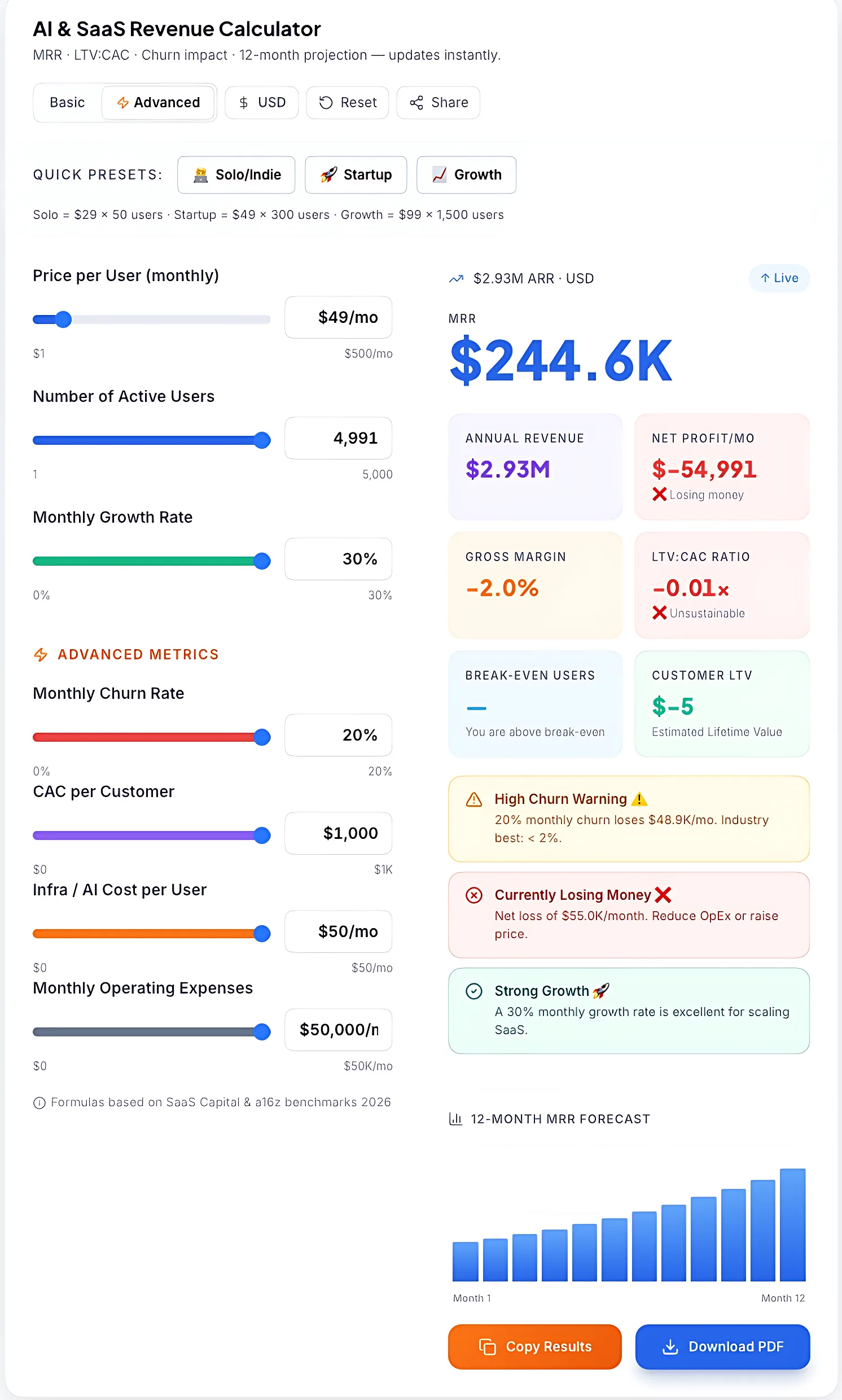
Professional-grade dashboard for modeling startup MRR, LTV:CAC ratios, and 12-month growth projections.
→ Calculate your exact stack cost before committing: Use the SaaS Pricing Calculator to model monthly spend by team size and tool combination.
Where “Cheap AI Pricing” Becomes Expensive in Reality
Many AI tools advertise low starting prices to attract users, but the actual cost structure often changes once you begin using them in real workflows. The true expense is usually hidden in scaling, usage, and operational limits rather than the subscription fee itself.
-
Unexpected usage-based escalation: Some platforms start with flat pricing but quietly shift heavy workloads into usage-based billing. As automation or traffic increases, costs no longer stay predictable month to month.
-
Team expansion multiplier effect: Pricing per seat may look reasonable initially, but as teams grow, costs don’t increase linearly—they multiply. What starts as a small monthly expense can become a significant operational cost within a year.
-
Limited AI usage allowances: Many SaaS tools include AI features under restricted quotas. Once those internal limits are reached, users are pushed toward higher plans or add-on purchases to continue using the same functionality.
-
Growth-linked billing models: Services like CRMs and email platforms scale pricing based on contacts, data volume, or activity levels. This means business growth itself directly increases software costs, even without changing features.
-
Premium-only operational features: Critical business requirements such as advanced security controls, role management, or compliance features are often locked behind enterprise tiers, forcing upgrades when scaling beyond small use cases.
-
Hidden dependency costs: Some integrations that appear “built-in” actually depend on third-party services or paid connectors. These extra dependencies only become visible when you start building real workflows across multiple tools.
How Startups Can Build an AI Stack Without Wasting Budget
Most startups fail with AI because they deploy too many tools too early. The goal isn't to build the largest AI stack possible — it's to identify one bottleneck, solve it, measure the impact, and expand from there.
Week 1–2: Build Your Foundation
Start with a small set of tools that support your core operations without adding complexity.
- Set up ChatGPT for content creation, research, and day-to-day productivity tasks.
- Install Google Analytics 4 to establish baseline traffic, conversion, and user behavior metrics.
- Create a centralized workspace in Notion or your preferred project management platform.
- Define a single KPI that your AI investments should improve, such as time saved, leads generated, or customer acquisition cost.
Week 3–5: Reduce Manual Work
Once your foundation is in place, focus on eliminating repetitive tasks that consume valuable founder time.
- Connect your most-used apps with Zapier or Activepieces.
- Automate lead capture, CRM updates, and internal notifications.
- Create reusable AI workflows for email writing, social media content, and customer communication.
- Track weekly time savings to identify which automations deliver the greatest impact.
Week 6–8: Scale What Works
Only expand your AI stack after you've identified tools that are generating measurable value.
- Review tool usage and cancel subscriptions that aren't producing results.
- Upgrade free plans only when clear limitations begin slowing growth.
- Expand successful automations into additional business processes.
- Compare monthly AI costs against time savings, revenue impact, and operational efficiency improvements.
The startups that see the highest returns from AI aren't necessarily using the most tools. They're the ones that measure outcomes, eliminate waste, and invest more heavily in the systems that consistently produce value.
Designing a High-ROI AI Strategy
Before diving into the math, it’s critical to understand the framework behind a winning AI strategy. It’s not just about cost; it’s about balancing value, vision, and risk mitigation.
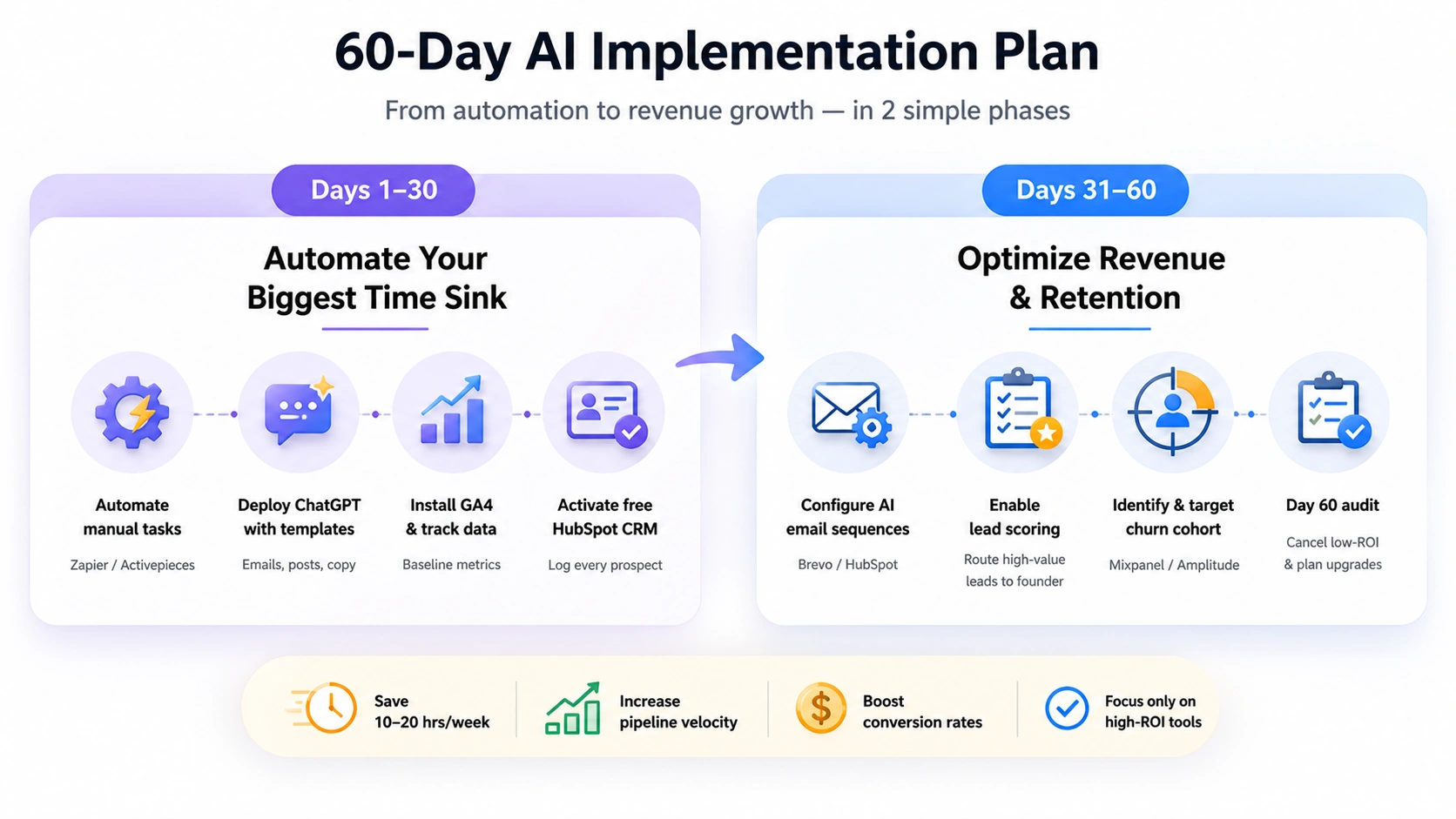
A practical 60-day AI implementation roadmap showing how small businesses move from automation to revenue growth and retention using AI tools.
ROI Modeling: What a $100/Month AI Stack Is Actually Worth
⚠️ Hypothetical estimates only. The figures in this section are illustrative examples based on industry averages and publicly available data. Actual results vary significantly by business size, industry, tool configuration, and team adoption. These numbers are not guarantees of return.
Most startups underestimate AI ROI because they measure tool cost but not the value of recovered time, prevented revenue leakage, and improved conversion.
Teams that define clear KPIs before deployment and measure consistently within the first 60 days tend to see the strongest ROI — often recovering their first month's subscription cost through a single workflow improvement.
A practical illustration for a 5-person seed-stage SaaS team:
| ROI Driver | Calculation | Monthly Value |
|---|---|---|
| Labour recovered (Zapier: 15 hrs/week) | 15 hrs × 4 weeks × $25/hr | $1,500 |
| Content cost eliminated (ChatGPT: 4 posts/week) | 16 posts × $75 freelance equivalent | $1,200 |
| Support deflection (Tidio: 55% on 200 tickets) | 110 tickets × $3.50 saved | $385 |
| Churn reduction (Mixpanel re-engagement trigger) | 22% reduction on 10 at-risk users × $50 MRR | $110 |
| Total Monthly Return | $3,195 | |
| Total Stack Cost | ChatGPT + Zapier + Tidio + Mixpanel | ~$94/mo |
| ROI | ((3,195 − 94) / 94) × 100 | ~3,300% |
Conservative assumptions throughout. Actual returns depend on implementation discipline, data quality, and consistent measurement — not tool selection alone.
→ Want real numbers for your specific setup? Use the AI ROI Calculator to model your returns before investing.
Invest in ROI — Not Just Cheap AI
The startups winning with AI in 2026 aren't the ones using the most tools or spending the most money. They're the ones who treat AI selection as a capital allocation decision — with the same discipline they apply to hiring, product, and go-to-market.
A $60–$100/month stack, built against your actual operational bottlenecks, can eliminate the need for your first two or three hires. That's not a feature claim — it's arithmetic. Recovered hours times your cost of labor, minus the tool subscription, is the only calculation that matters.
The framework above gives you the structure to make those decisions well: evaluate on ROI, deploy in phases, measure before expanding, and cut fast when tools don't perform. Start with your biggest time sink or your most expensive manual process. Solve that first. Then scale.
The best AI tools under $100/month don't succeed because they're cheap. They succeed because the founders using them are disciplined enough to measure, iterate, and double down on what works. That discipline — not the tools themselves — is the real competitive advantage.
Organizations that formalize their AI tool evaluation process — with defined KPIs, pilot periods, and expansion gates — consistently outperform those deploying tools reactively without a measurement plan.
What This Means for Your Business
Affordable AI software is not about finding the cheapest tools — it's about building a stack that pays for itself from day one.
A startup spending $60–$100/month on the right combination of AI tools can unlock the equivalent productivity of a small team. But the advantage doesn’t come from the tools alone — it comes from how you implement, measure, and optimize them over time.
Start simple:
- Solve your biggest time drain first
- Track ROI weekly
- Remove tools that don’t deliver results
Then scale only what works.
The founders who win with AI in 2026 are not the ones using the most tools — they’re the ones making the smartest decisions with the least spend.
Evaluate rigorously. Implement deliberately. Measure from day one.