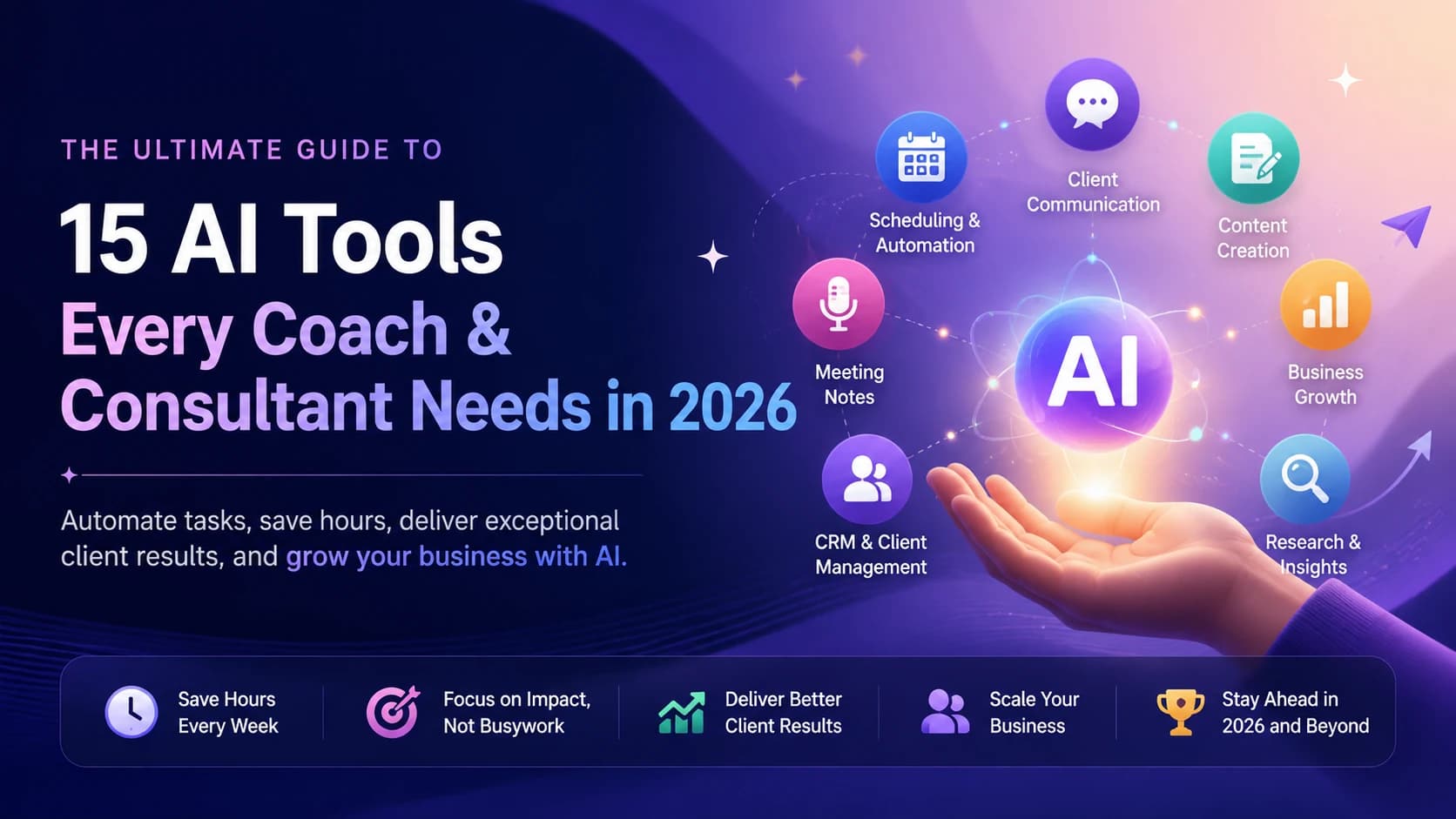
The Real Problem With How Coaches and Consultants Use AI
Most coaches who've tried AI tools fall into one of two camps. Either they've dismissed it after getting a few generic LinkedIn posts out of ChatGPT and deciding it's not for them. Or they're subscribed to eight different tools and using none of them consistently enough to see results.
Neither works.
The coaches and consultants getting real value from AI in 2026 are doing something simpler: they identified the one task consuming the most time each week, found the right tool for that specific task, and used it every single day until it became automatic. Then they added a second tool.
Administration and content creation together eat 30–50% of a typical coach's working hours. AI doesn't eliminate that entirely — but the right two or three tools can cut it roughly in half. That's five to ten hours back per week. For someone billing $234/hour, that's meaningful.
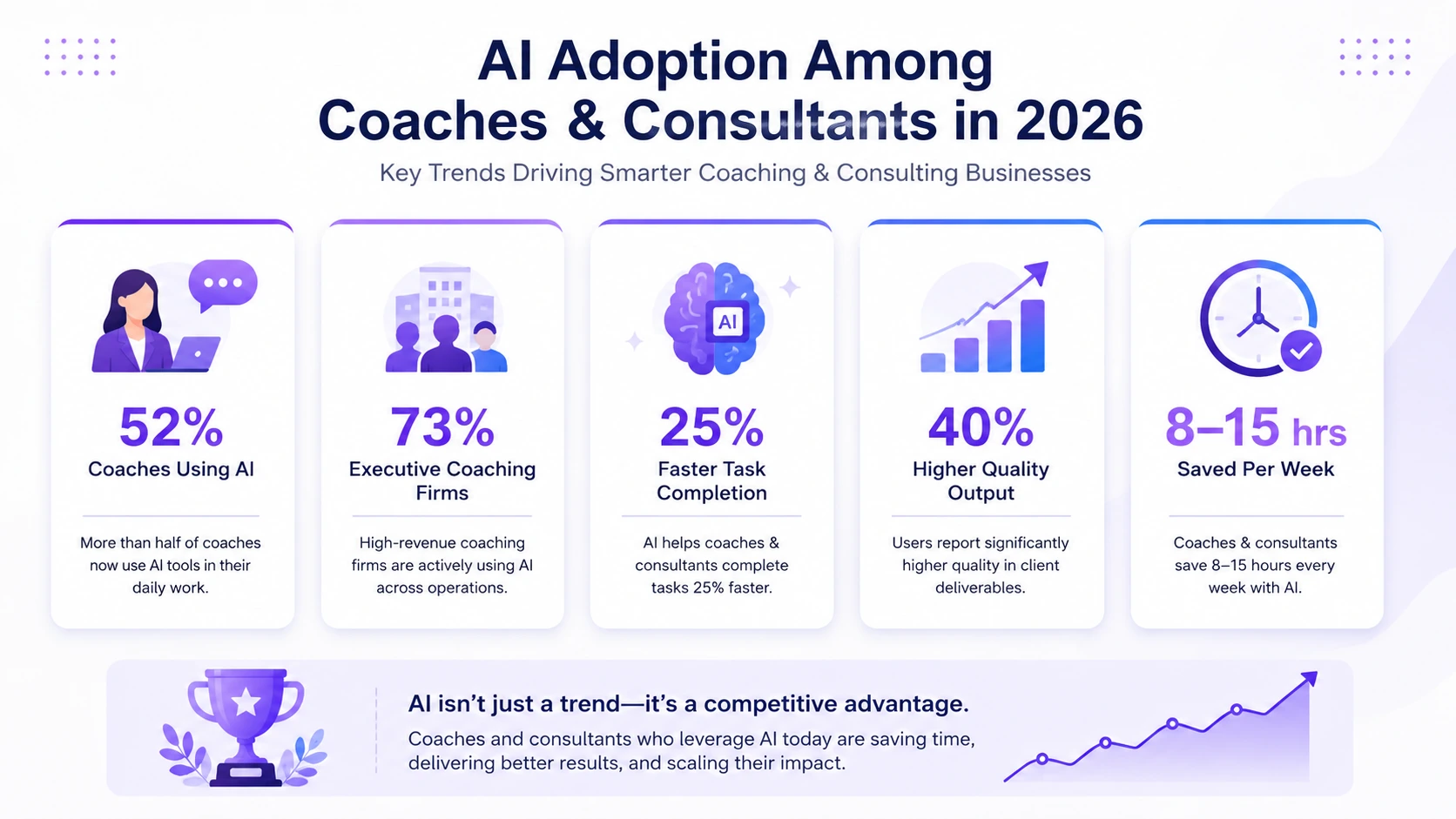
- 52% of coaches now use AI tools — up from 15% in 2020 (Gitnux)
- Harvard Business School study of 758 consultants: AI users completed tasks 25.1% faster with 40% higher quality
- Coaches using optimized AI stacks recover 8–15 hours per week on scheduling, notes, and content
- The global coaching industry generated approximately $5.34 billion in revenue according to the latest ICF Global Coaching Study
How We Evaluated These Tools
Each tool was assessed on time-to-value (how fast you see results), integration with existing coaching workflows, pricing transparency, and whether it actually does what the vendor claims. Generic AI tools like ChatGPT were included only where they solve a specific problem better than purpose-built alternatives.
For a broader framework on choosing the right AI software, see: Complete Guide to Choosing AI Software for Your Business (2026 Edition).
Best AI Tools for Coaches & Consultants at a Glance
| Tool | Category | Best For | Starting Price | Rating |
|---|---|---|---|---|
| Meet Sona | Content Creation | Authentic LinkedIn content | $24/month | 9.6/10 |
| Claude | AI Assistant | Strategy & client deliverables | $20/month | 9.4/10 |
| Granola AI | Meeting Notes | Client-facing calls | $14/month | 9.3/10 |
| Canva | Design | Social graphics & visuals | $15/month | 9.2/10 |
| Riverside | Video Recording | Podcasts & video content | $19/month | 9.1/10 |
| Beautiful AI | Presentations | Pitch decks & workshops | $12/month | 9.0/10 |
| Fireflies.ai | Meeting Notes | Detailed notes with CRM sync | $10/month | 8.8/10 |
| Paperbell | Coaching Platform | All-in-one coaching ops | $49/month | 8.7/10 |
| HubSpot CRM | CRM | Solo coaches & consultants | Free | 8.6/10 |
| Flowcase | Proposals / RFP | Consulting firms & RFP work | Custom | 8.1/10 |
| CoachAccountable | Coaching Platform | Accountability & habit tracking | $20/month | 8.0/10 |
| Practice | Coaching Platform | Modern coaching operations | $10/month | 7.9/10 |
| Perplexity | Research | Client research & preparation | $20/month | 7.8/10 |
| Simply.Coach | Executive Coaching | Enterprise coaching engagements | Custom | 7.7/10 |
| UpCoach | Group Coaching | Communities & cohort programs | $10/month | 7.6/10 |
15 Best AI Tools for Coaches & Consultants in 2026 (Reviewed & Ranked)
1. Meet Sona — Best for Authentic Content Creation
Best for: Coaches and consultants who need a consistent LinkedIn presence but can't stand how generic AI-written content sounds
The content authenticity problem is real. Coaches who post ChatGPT-generated content regularly see engagement drop because readers can feel the difference between a post that reflects a real opinion and one that was assembled from a prompt. Meet Sona approaches this differently. It interviews you by voice — a guided 10-minute conversation — and its Verbal Identity Engine learns how you actually phrase things, which opinions you hold firmly, and what your natural communication patterns look like. The content it drafts afterward sounds like you wrote it, not like a language model averaged across a million LinkedIn posts.
One interview generates LinkedIn posts, newsletter sections, blog drafts, and social snippets. The built-in scheduling means you don't need a separate publishing tool on top.
What Works: Voice interview format pulls out specific opinions and stories that text prompts typically miss. Verbal Identity Engine improves over time. LinkedIn scheduling is included at the base price.
Where It Falls Short: Founded in 2025, so the platform is still maturing. Limited enterprise features. The voice interview format takes adjustment if you're used to typing prompts.
Mini Verdict: If the reason you haven't committed to LinkedIn content is that everything you produce sounds like everyone else's AI content, Meet Sona is the tool that actually solves this. Worth the 7-day trial before dismissing it.
2. Claude — Best AI Assistant for Client Work
Best for: Coaches and consultants who need a thinking partner for strategy documents, client deliverables, and research-heavy work
Claude's Artifacts feature is what separates it from ChatGPT for professional service work. You can build client reports, framework visualizations, interactive prototypes, and structured deliverables directly in the conversation — without needing to copy output into a separate tool and reformat everything. Projects let you maintain separate knowledge bases for different clients, so context from one engagement doesn't bleed into another.
The conversational quality also matters. When you're working through a complex client problem and you need the AI to push back on weak assumptions rather than just confirm whatever you've said, Claude is noticeably better at that.
What Works: Artifacts for polished client deliverables. Projects for multi-client context management. Strong analytical reasoning. Web search included. Free tier available.
Many coaches and consultants never get full value from AI because they struggle to write effective prompts. If you're unsure how to structure prompts for client deliverables, content creation, research, or strategy work, try our AI Prompt Generator to create optimized prompts in seconds.
Where It Falls Short: Message limits apply during peak usage on the Pro plan. Not a specialist tool — for cited research with verifiable sources, Perplexity is more appropriate.
Mini Verdict: The most practical all-purpose AI assistant for client-facing professional work. The $20/month Pro plan is one of the clearer value propositions in this entire category.
3. Granola AI — Best Meeting Notes Tool for Client Calls
Best for: Consultants who spend most of their day on client calls and need accurate notes without a visible bot joining the meeting
There's a specific professional situation that Granola AI solves: you're on a sensitive client call — a C-suite engagement, a confidential briefing, a negotiation — and having "Otter.ai has joined the meeting" appear in the participants list is genuinely awkward. Granola records locally on your device without joining as a participant. Nobody sees it. The notes it produces are cleaner than most competitors, and the AI chat feature lets you query the meeting content afterward without re-reading a full transcript.
It integrates with Slack, Notion, HubSpot, and Salesforce, which matters if you need meeting notes to flow directly into your CRM without manual copy-pasting.
What Works: Invisible recording is the key differentiator. Note quality is consistently high. Integrations are practical for consulting workflows. $14/month is reasonable.
Where It Falls Short: Free plan limits meeting history to 30 days. Less useful if you primarily conduct coaching sessions rather than consulting calls, since coaching conversations often benefit from a more structured session note format.
Mini Verdict: The best meeting notes tool for consultants specifically. If visible bots on client calls make you uncomfortable, Granola AI solves that problem entirely.
4. Canva — Best Design Tool for Non-Designers
Best for: Any coach or consultant who needs professional-looking graphics but has no interest in learning design software
Canva's free tier is genuinely capable — not a stripped version designed to frustrate you into upgrading. The 2M+ templates cover social graphics, presentation slides, lead magnets, email headers, and most other visual needs a coaching or consulting business has. The Brand Kit feature keeps your colors, fonts, and logo consistent across everything you create, which matters more than most coaches realize until they see their visual content looking coherent for the first time.
Magic Write and Magic Design in Canva Pro add AI-assisted content and layout generation. They're useful but not transformative — the underlying template quality is the real value.
What Works: Free tier covers most needs. Brand Kit enforces visual consistency. Template depth is unmatched. 260M+ monthly users means the community support and tutorial resources are excellent.
Where It Falls Short: Complex design work hits Canva's limits quickly. Premium elements require the paid plan. If you're already comfortable in Figma or Adobe tools, Canva adds limited value.
Mini Verdict: Start with the free tier and only upgrade to Pro ($15/month) if you find yourself wanting premium templates or Brand Kit features. Most solo coaches never need to.
5. Riverside — Best for Video and Podcast Content
Best for: Coaches who run a podcast or publish regular video content and want studio-quality output without studio equipment
Riverside records locally on each participant's device rather than over the internet connection — which is why your recording stays crisp even when someone's WiFi drops mid-conversation. The AI Co-Creator automatically generates short clips from longer recordings, removes filler words, and produces transcripts. For coaches who repurpose long-form content into social snippets, this eliminates what typically takes 10–15 hours per episode of manual editing.
The free plan offers 2 hours of multi-track recording at 720p with a watermark — enough to evaluate whether it fits your workflow before committing.
What Works: Local recording quality is consistently excellent. AI clip generation and filler word removal are both genuinely useful. Live streaming support is included.
Where It Falls Short: The jump from individual to business plan pricing is steep. Less relevant if you're not actively producing video or podcast content.
Mini Verdict: If you're publishing video content weekly, Riverside pays for itself in editing time saved within the first month. If you post video occasionally, it's not worth the subscription.
6. Beautiful AI — Best Presentation Tool for Pitch Decks
Best for: Consultants and coaches who regularly deliver workshops, pitch clients, or present proposals and want slides that look professional without spending hours in PowerPoint
Smart Slides is Beautiful AI's core differentiator — the layouts automatically adjust when you add content, so you're not manually resizing boxes and realigning text every time you update a deck. AI content generation builds slide drafts from a brief, which gives you a starting structure rather than a blank canvas. Viewer analytics tell you which slides got the most attention and where viewers dropped off, which is actually useful for refining pitch decks over time.
The $12/month annual plan is low enough that it replaces PowerPoint for most coaching and consulting use cases without a meaningful cost increase.
What Works: Smart Slides removes most of the formatting busywork from deck creation. Viewer analytics are genuinely useful for sales and pitch work. PowerPoint import/export works cleanly.
Where It Falls Short: Smart Slides can feel rigid if you want to break from the predefined layout structure. Not suitable for highly custom visual design work.
Mini Verdict: A clear upgrade from PowerPoint for anyone who builds client-facing decks regularly. The design time savings alone justify the cost within the first two or three presentations.
7. Fireflies.ai — Best Budget Meeting Notes Tool
Best for: Consultants who need detailed, searchable meeting notes with CRM integration and don't need Granola AI's invisible recording feature
Fireflies joins your meeting as a participant — which is fine in most internal and client contexts — and produces detailed transcripts, summaries, and action item lists. The searchable history across all past sessions is genuinely useful for consulting work where you need to pull a specific quote or decision from a meeting three months ago. CRM integrations log notes automatically, which saves the manual step of updating client records after every call.
At $10/month, it's the most affordable dedicated meeting notes tool in the category.
What Works: Searchable meeting history is a strong practical feature. CRM integrations work reliably. Action item extraction is accurate. $10/month is accessible for solo operators.
Where It Falls Short: Visible bot joining matters in some professional contexts — that's where Granola AI has the edge. Learning curve for the more advanced search and automation features.
Mini Verdict: The right choice if Granola AI's invisible recording isn't a priority for your client relationships and you want the lowest-cost meeting notes solution with CRM integration.
8. Paperbell — Best All-in-One Platform for Coaches
Best for: Coaches who want scheduling, contracts, invoicing, client portals, and session notes in one place rather than across five separate tools
Paperbell is built specifically for coaches, which shows in how the features fit together. Session notes connect to client records. Contracts attach to bookings. Invoicing ties to the client portal. Nothing is bolted on from a generic business tool. For coaches running five or more active clients, the consolidation is worth the $49/month.
The tradeoff is specificity — Paperbell is purpose-built for coaching relationships and isn't useful for consultants managing project-based engagements, RFP processes, or multi-stakeholder client work.
What Works: Purpose-built for coaching means the workflow actually matches how coaches operate. All-in-one consolidation reduces tool-switching friction. Client portals are a professional touch that solo coaches rarely have outside Paperbell.
Where It Falls Short: Consultants won't find it useful. The $49/month price point is harder to justify below five active clients. Less flexible than assembling separate best-in-class tools.
Mini Verdict: Worth it for coaches running a consistent client volume. Below five active clients, Calendly free plus HubSpot CRM free covers 90% of the same ground for nothing.
9. HubSpot CRM — Best Free CRM for Solo Coaches and Consultants
Best for: Solo coaches and independent consultants who need pipeline tracking, contact management, and email sequences without paying for a CRM
The free tier is the pitch here, and it holds up better than most free tiers in the category. Pipeline management, contact records, deal tracking, and basic email sequences are all available without a subscription. For a solo coach managing 10–20 active leads and a handful of clients, that covers the core CRM workflow. AI-powered pipeline features are available, though the more powerful automation requires a paid plan.
The main limitation isn't features — it's complexity. HubSpot can grow into a full marketing and sales platform, which means the interface is more involved than a simple coaching CRM like Paperbell.
What Works: Free tier is legitimately useful, not a bait-and-switch. Pipeline and deal tracking work well for solo operators. Email sequence automation is included at no cost.
Where It Falls Short: More complex than necessary for straightforward coaching businesses. Upgrading to paid tiers adds up quickly for small practices. Designed for sales and marketing teams, not coaching-specific workflows.
Mini Verdict: The best starting point for any coach or consultant who needs CRM functionality without a budget for it. Use it until you outgrow it, then evaluate whether Attio or a coaching-specific platform fits better.For a full comparison of CRM options, see our guide to the best AI CRM software for small businesses.
10. Flowcase — Best Proposal and RFP Tool for Consulting Firms
Best for: Consulting firms and independent consultants who respond to RFPs requiring CVs, credentials, and tailored proposals
Flowcase solves a specific problem that coaches will never encounter but that consultants know well: the RFP process requires submitting staff CVs, credentials, and case studies in specific formats, often under tight deadlines, and building each submission from scratch is expensive and error-prone. Flowcase centralizes all credentials in one place and assembles tailored proposals from that library. It exports in whatever format the client requires and integrates with Salesforce and Workday.
Custom pricing makes it a harder evaluation without a direct conversation with the vendor. But for firms where RFP work is a significant revenue channel, the time savings on credential assembly alone justify the investment.
What Works: Solves a real and underserved problem in the consulting market. Credential centralization prevents the chaos of maintaining separate CV documents across the team. Integration with enterprise sales and HR systems is practical for larger firms.
Where It Falls Short: Enterprise focus means it's not relevant for solo consultants or coaches. Custom pricing creates friction in the evaluation process.
Mini Verdict: The only tool on this list that's consultants-only — coaches have no use for it. For firms regularly submitting RFPs, it's worth a direct evaluation call with Flowcase.
11. CoachAccountable — Best for Client Accountability & Progress Tracking
Best For: Coaches running structured programs with homework, habit tracking, and measurable client outcomes
Most coaching platforms focus on scheduling and session management. CoachAccountable focuses on what happens between sessions. Coaches can assign action items, track habits, monitor milestones, and automate accountability check-ins so clients stay engaged throughout the coaching journey.
For coaches whose success depends on client follow-through rather than motivation alone, this is one of the most practical platforms available.
What Works: Goal tracking, habit monitoring, automated reminders, coaching worksheets, and progress dashboards create a highly structured coaching experience.
Where It Falls Short: The interface feels less modern than newer coaching platforms. Setup takes longer than tools like Paperbell.
Mini Verdict: One of the strongest coaching-specific platforms for accountability-driven programs and long-term client transformation.
12. Practice — Best for Running a Modern Coaching Business
Best For: Independent coaches who want client management, scheduling, notes, contracts, and communication in one place
Practice is designed to replace multiple disconnected tools with a single coaching workspace. Instead of juggling separate apps for scheduling, invoicing, messaging, and client records, everything lives inside one platform.
Its biggest strength is simplicity. Most coaches can get started quickly without spending days configuring workflows.
What Works: Client portals, contracts, scheduling, invoicing, session notes, and communication tools are all integrated into one clean experience.
Where It Falls Short: Advanced customization options are limited. Larger consulting firms may outgrow the platform over time.
Mini Verdict: A great all-in-one platform for coaches who value simplicity and want to reduce operational complexity.
13. Perplexity — Best for Research and Client Preparation
Best For: Consultants, executive coaches, and business coaches who regularly perform research before meetings and strategy sessions
Perplexity has become one of the most useful AI research tools because it provides source-backed answers rather than simply generating responses. This makes it particularly valuable for professionals who need reliable information for client recommendations, industry analysis, and workshop preparation.
Instead of opening ten browser tabs before every client engagement, consultants can often get a high-quality starting point in minutes.
What Works: Fast research, cited sources, competitor analysis, industry trends, and market intelligence.
Where It Falls Short: Not built specifically for coaching workflows. Less useful for client management or operational tasks.
Mini Verdict: An excellent research companion for consultants and coaches who want faster access to trustworthy information.
14. Simply.Coach — Best for Executive Coaching Engagements
Best For: Executive coaches, leadership coaches, and enterprise coaching practices
Simply.Coach is built for professional coaching engagements that require more structure, reporting, and stakeholder visibility than traditional coaching platforms provide. It supports assessments, coaching plans, goal tracking, progress reviews, and enterprise-level engagement management.
The platform is particularly valuable when coaching relationships involve HR teams, leadership groups, or organizational stakeholders.
What Works: Coaching lifecycle management, assessments, goal tracking, stakeholder reporting, and enterprise-ready workflows.
Where It Falls Short: Higher pricing and a steeper learning curve than tools aimed at solo coaches.
Mini Verdict: One of the most complete platforms available for executive and leadership coaching professionals.
15. UpCoach — Best for Group Coaching Programs and Communities
Best For: Coaches running cohorts, mastermind groups, memberships, and community-based programs
UpCoach combines coaching delivery, learning resources, accountability, and community engagement inside a single platform. Rather than relying on separate tools for courses, discussions, resources, and coaching interactions, everything is managed in one place.
This makes it especially appealing for coaches whose business model revolves around group transformation rather than one-to-one sessions.
What Works: Community management, program delivery, learning paths, accountability systems, and resource sharing.
Where It Falls Short: Not ideal for consulting workflows or businesses requiring advanced CRM capabilities.
Mini Verdict: A strong choice for coaches building scalable group programs and membership-based coaching businesses.
AI Adoption Among Coaches and Consultants in 2026
A landmark Harvard Business School study involving 758 consultants found that professionals using AI completed tasks 25.1% faster while producing 40% higher-quality output. Those findings help explain why AI adoption continues to accelerate across coaching and consulting businesses.
| Metric | Value | Source |
|---|---|---|
| Coaches using AI tools | 52% (up from 15% in 2020) | Gitnux, 2026 |
| Executive coaching firms with full AI integration | 73% | Gitnux, 2026 |
| Time saved per week with full AI stack | 8–15 hours | Industry data |
| AI coaching market by 2028 | $2.4 billion | CareerTrainer AI |
| Client retention: AI-augmented vs. traditional | 92% vs. 78% | Gitnux, 2026 |
| Consulting task speed improvement (HBS study) | 25.1% faster, 40% higher quality | HBS, 758 consultants |
| Global coaching industry valuation | $5.34 billion | ICF / Coordinatesport |
Which Tools Fit Your Coaching or Consulting Type?
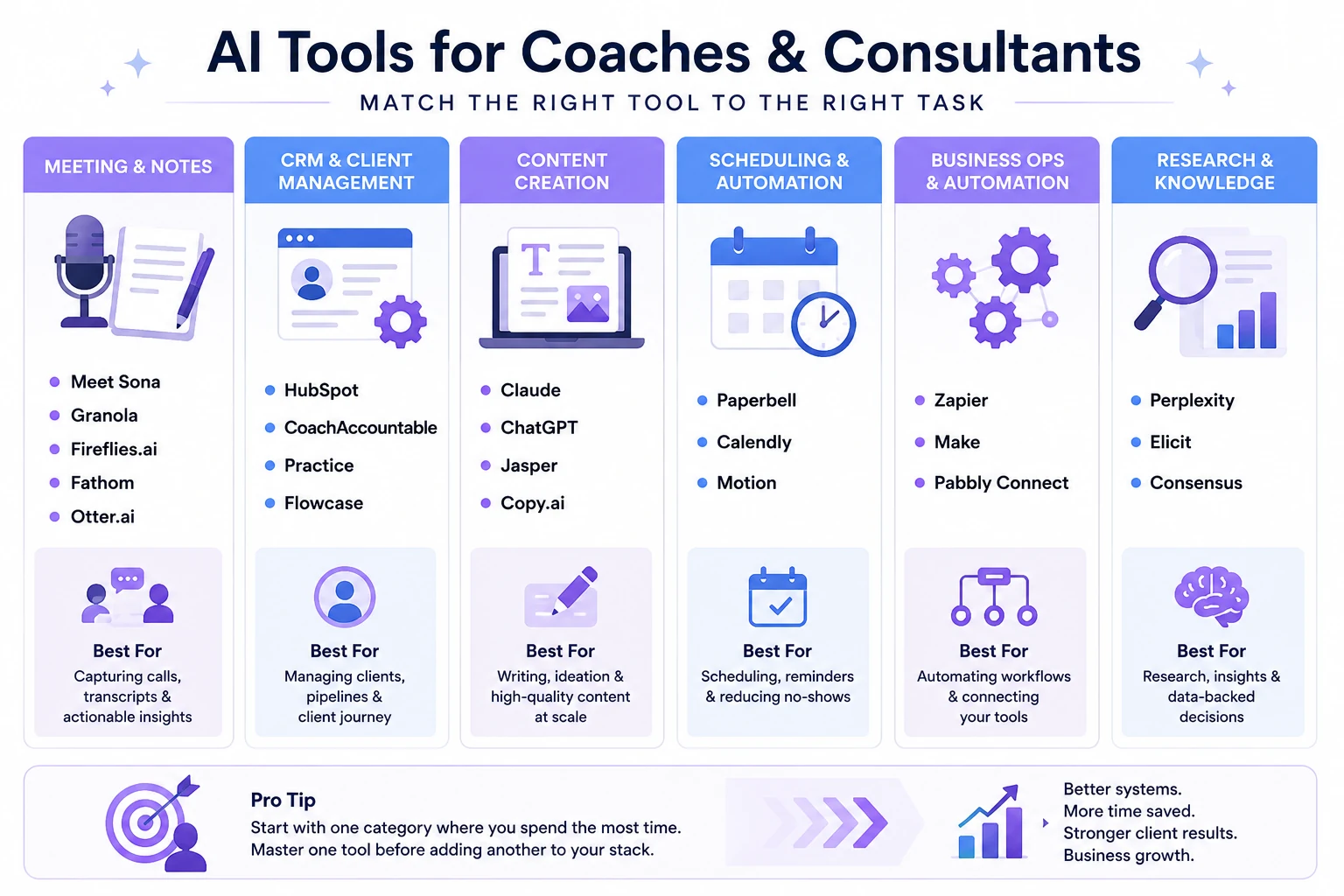
AI tool categories for coaches and consultants, highlighting the best software for meeting notes, client management, content creation, scheduling, automation, and research workflows.
| Business Type | Start With | Add When Ready |
|---|---|---|
| Solo coach (under 5 clients) | HubSpot CRM free + Canva free | Claude Pro ($20/mo) |
| Life or career coach | Meet Sona + Canva Pro | Paperbell ($49/mo) |
| Business coach (scaling) | Paperbell + Claude Pro | Riverside + Copy.ai |
| Executive coach | SavvyCal + Claude Pro | Kajabi + Perplexity |
| Independent consultant | Granola AI + Claude Pro | Beautiful AI + HubSpot Starter |
| Consulting agency (5+ people) | Granola + Attio + M365 Copilot | Flowcase + Copy.ai Pro |
Consultants working with restaurant groups, franchise operators, and hospitality businesses may also benefit from our guide to Best AI Tools for Restaurants & Food Businesses in 2026, which highlights AI platforms designed for restaurant operations, customer engagement, and business growth.
How to Build Your AI Stack Without Wasting Money
The single most effective thing you can do is resist the urge to subscribe to everything that looks useful. Most coaches who have tried AI and given up did so because they spread attention across too many tools and saw results from none of them.
One AI tool used every day for 60 days will do more for your business than six tools opened occasionally. The adoption curve is real — most tools take two to four weeks before the time savings become obvious. Coaches who quit at week one never see that inflection point.
For solo coaches: Start with HubSpot CRM free and Canva free. Both solve real problems with zero cost and zero commitment. Add Claude Pro ($20/month) once you're using AI regularly enough to hit the free tier limits. That's a $20/month stack that covers client management, content creation, and strategy work.
For coaches scaling past five clients: Paperbell at $49/month is worth it at this volume because the consolidated workflow — scheduling, contracts, invoicing, client portals — eliminates multiple separate subscriptions. Meet Sona at $24/month solves the content consistency problem that most coaches hit when they're trying to build a LinkedIn presence while also running a full client load.
For independent consultants: The stack looks different. Granola AI for invisible meeting notes, Claude for deliverables and strategy, Beautiful AI for client presentations. If you're doing RFP work, add Flowcase — it's the only tool in this market that specifically addresses the credential assembly problem.
For consulting agencies: Microsoft 365 Copilot at $30/user/month makes sense if the team is already in the Microsoft ecosystem. Attio at $35/month handles the CRM for scaling practices. Flowcase becomes near-essential once you're submitting RFPs regularly.
The connecting principle across all of these is the same: identify the task costing you the most time this week. Buy the tool that solves that task specifically. Use it every day for four weeks before evaluating whether it worked.
A practical AI workflow for coaches and consultants showing how content creation, meeting notes, CRM management, scheduling, and client delivery tools work together to save time and improve productivity.
What ROI Actually Looks Like
Time savings from AI tools in coaching and consulting are real, but they show up in specific places — not everywhere at once.
Meeting notes are the clearest win. Granola AI or Fireflies reduces post-call documentation from 20–30 minutes per meeting to two minutes of reviewing an AI-generated summary. For a consultant on four client calls a day, that's an hour or more recovered daily.
Content creation takes longer to show ROI because the calibration period is real. Meet Sona's Verbal Identity Engine needs several voice interviews before the output sounds genuinely like you. But once calibrated, producing a week's worth of LinkedIn content from a single 10-minute interview is a meaningful time reduction compared to sitting down to write posts from scratch.
Scheduling automation (Calendly, Paperbell) pays back within days. The back-and-forth email thread to find a meeting time that both parties can do — eliminated immediately.
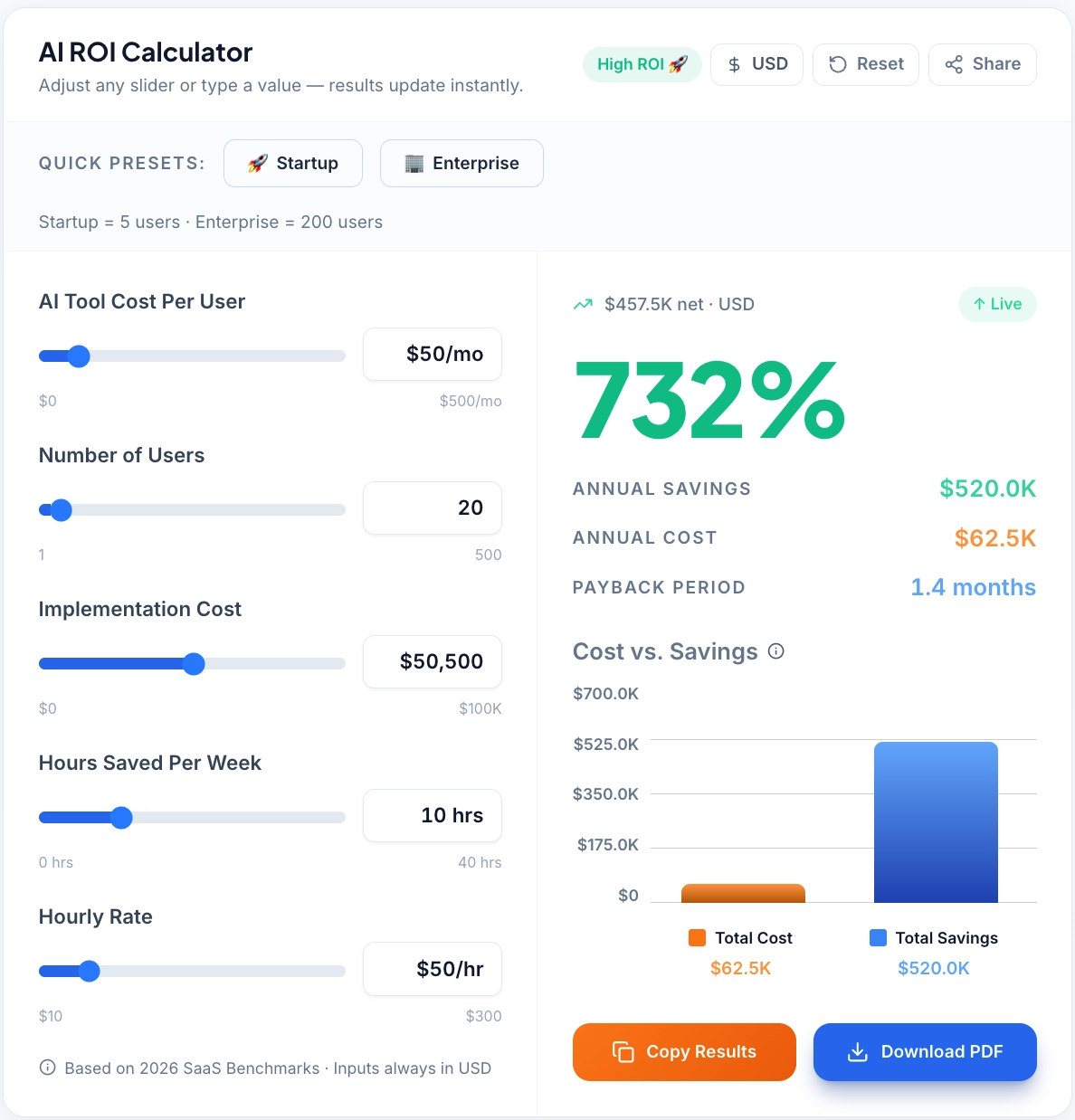
Estimate the financial impact of AI adoption using projected time savings, implementation costs, annual ROI, and payback period metrics.
→ Want to see what a specific stack would save in your practice? Use the AI ROI Calculator to run the numbers before committing to a subscription.
Buying Guide
Start with free tiers. HubSpot CRM, Canva, Claude, and Calendly all have free versions that deliver genuine value. Use them for 30 days before paying for anything.
Match the tool to the problem, not the category. "I need an AI content tool" is too broad. "I need to publish three LinkedIn posts a week without spending three hours on it" points directly to Meet Sona or Copy.ai.
Verify integrations during trial. Most tools claim they integrate with your CRM or calendar. Confirm that the specific data flow you need actually works before your trial ends.
Budget by revenue stage. Solo coaches under $5K/month: stay under $50/month in subscriptions. $5K–$15K/month: $100–$200/month is reasonable. Above $15K/month: $300–$500/month for a full stack makes sense given the time value it returns.
For consultants specifically: Don't skip Flowcase if RFP work is part of your revenue. Every other tool on this list has a cheaper or free alternative. Flowcase solves a problem that nothing else in the market addresses.
→ Not sure which tools match your specific coaching or consulting model? Use the AI Tool Selector to get a personalized recommendation based on your business type, budget, and current workflow.
The ICF's 2026 coaching industry report puts the global coaching market at $5.34 billion, growing at 8.53% annually through 2032. A meaningful share of that growth is coming from coaches who've found ways to take on more clients without proportionally increasing their workload — which is exactly what a well-chosen AI stack enables.