How I Evaluated These AI Coding Tools
To build this comparison, I reviewed each tool across practical developer workflows including inline code completion, multi-file editing, agentic task execution, code review, and codebase navigation.
Each tool was assessed across:
- autocomplete quality and latency
- context awareness (file-level vs. repo-level)
- agent mode capability
- IDE and language support
- pricing transparency
- enterprise security features
- real-world productivity impact
I also reviewed Stack Overflow's 2025 Developer Survey (49,000+ respondents), GitHub Octoverse 2025 data, and PE Collective's independent 27-tool evaluation. Rather than vendor claims, I prioritised tools that demonstrably change how developers work.
AI coding assistants are just one category of business AI software. If you're evaluating AI solutions across multiple departments, read our guide on Choosing AI Software for Your Business to learn a practical framework for comparing AI tools based on ROI, implementation complexity, and business impact.
Why Developers Are Using AI Coding Tools in 2026
84% of developers are using or planning to use AI coding tools — up from 44% in 2023. That's not a trend. 51% use them daily. 73% of engineering teams use AI coding tools every day, compared to 18% just two years ago.
The productivity case isn't as clean as vendors claim. Independent research puts actual productivity gains at around 10% on average — far short of the 55% figure in most marketing materials. McKinsey's research shows up to 2× faster task completion for specific development tasks. The honest reality: it depends on which tasks, which developer, and how well the tool integrates into the actual workflow.
What's not in dispute: 27% of production code is now AI-generated. Teams not using these tools are competing against teams that are.
According to the Stack Overflow Developer Survey 2025, AI adoption among developers continues to rise, with most professionals now using AI tools as part of their daily workflow.
- 84% of developers are using or planning to use AI tools — up from 44% in 2023 (Stack Overflow Developer Survey 2025).
- 73% of engineering teams use AI coding tools daily, compared to 18% in 2024.
- 27% of production code is now AI-generated; Copilot accounts for 46% of code written by active users.
- 40–62% of AI-generated code contains security flaws — only 29–46% of developers trust AI code without review.
- 92.6% of developers use AI coding tools at least monthly.
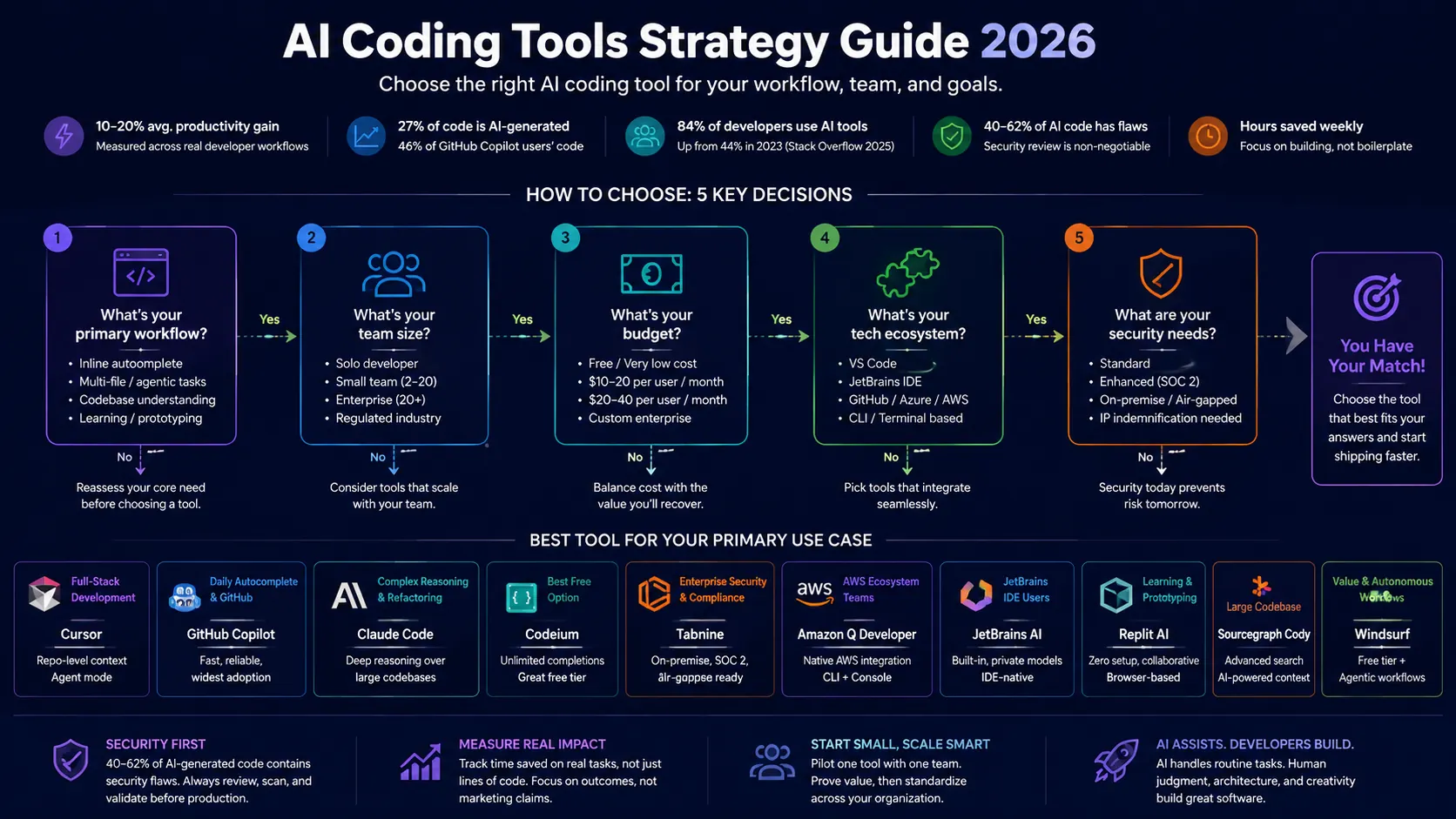
AI coding tools have moved from optional productivity aids to core development infrastructure, with adoption and AI-generated code output increasing rapidly across engineering teams.
Quick Comparison: 10 Best AI Coding Tools in 2026
| Tool | Free Plan | Starting Price | Best For | Agent Mode |
|---|---|---|---|---|
| Cursor | ✓ (3K credits) | $20/mo | Full-stack, large projects | ✓ |
| GitHub Copilot | ✓ (limited) | $10/mo | Daily autocomplete, GitHub teams | ✓ |
| Claude Code | ✓ (limited) | $20/mo | Complex reasoning, large codebases | ✓ |
| Windsurf | ✓ (unlimited light) | Free | Autonomous workflows, value | ✓ |
| Codeium | ✓ (unlimited) | $12/mo | Free option, budget teams | ✗ |
| Tabnine | Limited | $12/mo | Enterprise security, on-premises | ✓ |
| Amazon Q Developer | ✓ (perpetual) | Custom | AWS ecosystem | ✗ |
| JetBrains AI | ✓ (3 credits/mo) | $10/mo | JetBrains IDE users | ✗ |
| Replit AI | ✓ (limited) | Custom | Learning, browser-based collaboration | ✓ |
| Sourcegraph Cody | ✗ (no) | $19/user/mo | Large codebases, enterprise | ✗ |
The 10 Best AI Coding Tools for Developers in 2026
1. Cursor — Best Overall for Full-Stack Development
Best for: Full-stack developers, large projects, AI-first development workflow
Cursor is a VS Code fork with AI built into the architecture rather than bolted on as a plugin. The core difference from Copilot: Cursor indexes your entire repository and reasons over the full project context — frontend, backend, database schemas, configuration files. That scope of awareness is what makes its Agent mode actually useful rather than just impressive in demos.
The Cmd+K inline edit, chat panel, and Agent mode work together as a coherent workflow rather than disconnected features. Describe a feature and the agent plans, implements, and tests across multiple files. It's not perfect — it still hallucinates on complex logic, and the June 2025 shift to usage-based credits means heavy users need to watch their consumption — but no other tool currently matches the full-project awareness at this price point.
Key AI Features:
- Full repo indexing for deep context awareness
- Agent mode for autonomous multi-step task execution
- Cmd+K inline edits without switching context
- Access to multiple LLM models (GPT-4o, Claude, Gemini)
Pricing: Hobby (free, 3K credits) → Pro at $20/month → Teams at $40/user/month
Pros:
- Best repo-level context of any IDE-based tool
- Agent mode is the most capable in this category
- VS Code compatibility — no workflow migration required
- Multi-model flexibility
Cons:
- Usage-based credits since June 2025 — overages bill at API rates
- Teams pricing ($40/user) is double Copilot Business ($19/user)
- No native JetBrains support
Best Alternative: Windsurf for similar AI-native IDE at lower cost; GitHub Copilot for a more mature ecosystem
Mini Verdict: Cursor is the best AI coding tool for full-stack developers in 2026. If you've outgrown single-line autocomplete and want AI that understands your entire project, this is where to start.
2. GitHub Copilot — Best for Everyday Autocomplete and GitHub Integration
Best for: Developers embedded in the GitHub ecosystem, general-purpose daily coding
GitHub Copilot is the most widely adopted AI coding tool by a significant margin — 80% of new developers use it within their first week on GitHub, and it accounts for 46% of code written by active users. That's not an adoption stat. That's workflow dependency.
Inline suggestion quality at the line and block level is consistently excellent. Copilot Chat handles explanations, debugging, and PR-ready diff generation well for teams inside GitHub's ecosystem. The honest limitation: Copilot doesn't index your entire repo by default, so multi-file reasoning is shallower than Cursor. For teams using GitHub Actions, Codespaces, and the full GitHub workflow, that tradeoff rarely matters.
Pricing: Free (2K suggestions/month, 50 premium requests) → Pro at $10/month → Business at $19/user/month → Enterprise at $39/user/month
Why I Like It:
Copilot has the widest language support, the fastest suggestion latency, and the deepest GitHub integration of any tool in this list. The $10/month Pro tier is the most accessible paid option in the category.
Where It Falls Short:
Premium requests ($0.04 each) add up on lower tiers. The context window is narrower than Cursor, which shows on larger projects. Enterprise pricing at $39/user requires GitHub Enterprise Cloud — not every team is there yet.
Best Alternative: Cursor for better context; Codeium for free unlimited completions
The Bottom Line: GitHub Copilot is the right default for most developers. It's fast, reliable, and deeply integrated. The cases where you'd leave it are specific — large codebases, complex refactors, or teams that need full-project agent mode.
GitHub's Octoverse Report highlights how AI-assisted development is becoming a core part of modern software engineering workflows across teams of all sizes.
3. Claude Code — Best for Complex Reasoning and Large Codebases
Best for: Architecture work, large or legacy codebases, complex refactors requiring deep reasoning
Claude Code is a terminal-based CLI agent, not an IDE plugin. That distinction is both its greatest strength and its primary barrier to adoption. The architecture allows it to read an entire codebase before making changes, rather than working from a sliding context window. The result is reasoning quality over large projects that other tools simply don't match.
Complex refactors, security pattern analysis, understanding how changes in one module ripple through the rest of the system — Claude Code handles these more reliably than Cursor or Copilot. For developers working on architecture, infrastructure, or large established codebases, this is the tool that most improves output quality rather than just speed.
Key AI Features:
- MCP integration for secure, local codebase access
- Full repo reading before making changes — not a sliding window
- Complex refactoring with architectural pattern consistency
- Security analysis and code review across large projects
Pricing: Free (limited daily) → Pro at $20/month (includes Claude Code) → Max at $100–200/month → Team at $25–150/user/month
What Stands Out:
The reasoning depth. When you give Claude Code a complex refactoring task, it reads how the whole system fits together first — then makes changes that hold up across dependencies. That's meaningfully different from an IDE tool that works file by file.
Drawbacks:
CLI-only is a genuine workflow friction point. There's no native IDE integration — setup requires manual configuration. And it's not the tool for inline autocomplete. If you want AI suggestions as you type, this isn't it.
Best Alternative: Cursor for IDE-native context awareness; Sourcegraph Cody for navigating large codebases
Verdict: Claude Code is the right tool when the task genuinely requires reasoning over a large codebase, not pattern-matching on recent context. The CLI interface is real friction — the output quality justifies it for the right use cases.
Want Better Results From Claude Code?
The quality of AI-generated code often depends on the quality of the instructions you provide. Before assuming a coding assistant is underperforming, improve the prompt.
→ Use our AI Prompt Library to create structured coding, debugging, refactoring, and code review prompts.
4. Windsurf — Best Value AI Coding IDE
Best for: Developers wanting autonomous workflows at the lowest price point
Windsurf is Codeium's AI-native IDE built on a VS Code fork, with Cascade — its agentic engine — at the centre. The headline story is pricing: a genuinely free tier with unlimited light usage and predictable quota-based limits (since March 2026) instead of credits that run out unexpectedly.
Cascade handles multi-file editing, real-time previews, and end-to-end feature implementation with less friction than most tools at this price. The ecosystem is less mature than Cursor — fewer integrations, smaller community — but for developers who want AI-native development without paying $20–40/month, it's the most capable option available.
Pricing: Free (unlimited light usage) → Pro/Max/Teams: available on request
Strengths:
- Best free tier of any AI-native IDE
- Quota model replaces unpredictable credits
- Cascade handles autonomous multi-step workflows effectively
- Competitive capability vs Cursor at a fraction of the cost
Limitations:
- Smaller ecosystem and community than Cursor or Copilot
- Less established for enterprise-scale use
- Fewer third-party integrations
Mini Verdict: The best value AI coding IDE in 2026. If Cursor's credit-based billing feels risky or $20/month isn't justified yet, Windsurf is a serious alternative — not a consolation prize.
5. Codeium — Best Free AI Coding Assistant
Best for: Budget-conscious developers, students, teams needing the best free option
Codeium's free tier is the most compelling in this category: unlimited code completions, 10 chat messages per day, support for 70+ IDEs. No monthly cap. No credit card. For developers who mainly need autocomplete and occasional chat, the free tier covers most daily use cases without spending anything.
The paid tier ($12/month) is meaningfully cheaper than GitHub Copilot Pro ($20/month) with comparable completion quality. Codeium Teams at $15–24/user/month undercuts most competitors at the team level.
Key Features:
- Unlimited code completions on the free tier
- 100K token context window
- 70+ IDE and editor support
- Enterprise on-premise deployment available
Pricing: Free (unlimited completions, 10 chat/day) → Pro at $12/month → Teams at $15–24/user/month → Enterprise: custom
Pros:
- The strongest free tier in the category — no completion limits
- Wider IDE support (70+) than most alternatives
- Every paid tier cheaper than Copilot equivalent
- Enterprise-grade on-premise deployment available
Cons:
- 10 chat messages per day on free is limiting for heavy chat use
- Advanced agent mode trails Cursor and Windsurf
- Less polished than Copilot on edge-case completions
Mini Verdict: The default choice for any developer who wants AI code completion without a subscription. For teams watching budget, the paid tiers deliver solid capability at a price that's hard to argue with.
6. Tabnine — Best for Enterprise Security and Private Deployment
Best for: Enterprises, regulated industries, security-sensitive codebases
Tabnine occupies a specific lane: on-premises deployment, SOC 2 Type II compliance, air-gapped environment support, private model hosting, self-managed fine-tuning on your own codebase. Banking, healthcare, legal, and government teams working with sensitive code have options here that cloud-based tools simply can't match.
The free tier was discontinued in 2025. The $12/month entry is higher than Codeium for comparable individual functionality, and the agentic platform at $59/user/month is expensive. Justified when compliance requirements rule out the alternatives. Less justified for standard commercial teams that don't have those constraints.
Pricing: Basic (limited) → Dev at $12/month → Code Assistant at $39/user/month → Agentic Platform at $59/user/month → Enterprise: custom
Where It Leads the Category:
Enterprise security. Nothing else offers the same combination of on-premises, air-gapped, SOC 2, and private model fine-tuning. For regulated industries, this is the only serious option.
The Honest Tradeoff:
If you're not in a regulated industry with hard compliance requirements, Codeium and Copilot deliver more at lower cost. Tabnine's pricing reflects a security premium — only pay it if you actually need the security.
The Call: Enterprise teams in regulated industries should default here. Everyone else should start with Codeium or Copilot and only revisit if compliance requirements change.
7. Amazon Q Developer — Best for AWS Ecosystem Teams
Best for: Teams building on AWS services and cloud-native infrastructure
Amazon Q Developer integrates directly into AWS — CLI, Console, and major IDEs — with code suggestions that are contextually aware of AWS services. The licence review and reference tracking features address a compliance gap most AI coding tools ignore entirely. The perpetual free tier is genuinely generous for individual developers.
Outside AWS, the tool is less compelling. Agent mode doesn't match Cursor. Reasoning depth doesn't match Claude Code. But for a team whose daily workflow runs through AWS services, the native integration earns its place.
Pricing: Free tier (perpetual with monthly limits) → Pro: custom
What's Good: Native AWS awareness in code suggestions, CLI completions, licence tracking, and a free tier that doesn't expire. For AWS-heavy teams, no other tool matches the integration depth.
What's Not: Outside the AWS context, capability drops noticeably. Enterprise pricing is undisclosed, which makes budget planning harder than it should be.
Mini Verdict: The obvious choice for AWS-native teams. The AWS focus is an advantage if you live there — a limitation if you don't.
8. JetBrains AI Assistant — Best for JetBrains IDE Users
Best for: Developers already on IntelliJ IDEA, PyCharm, WebStorm, or any JetBrains IDE
JetBrains AI Assistant is bundled with JetBrains subscriptions — effectively free for existing subscribers. The advantage is depth of integration: suggestions, refactoring, and chat are native to the IDE experience, not plugin-adjacent. Local model support via Ollama and LM Studio adds a privacy-conscious offline option that most cloud tools don't offer.
The free tier (3 AI credits per 30 days) is very limited, but unlimited code completion is included. For JetBrains subscribers who haven't added an AI tool, this is the logical first step before spending on something separate.
Pricing: AI Free (3 credits/30 days, unlimited completion) → AI Pro at $10/month → AI Ultimate at $30/month → Enterprise: custom
Why JetBrains Users Should Start Here:
It's already in your IDE. Zero setup. Deep integration with refactoring, navigation, and code review tools you're already using. Local model support is a genuine differentiator for teams with data handling requirements.
Where It Has Limits:
The free tier's 3 AI credits per month is barely functional for regular use. And if you're looking for agentic multi-file workflows, this isn't the tool — Cursor handles those better. Think of this as the AI layer on top of JetBrains productivity, not a standalone agentic coding environment.
Bottom Line: Start here if you're on a JetBrains subscription. Evaluate Cursor alongside it once you know where the gaps are.
9. Replit AI — Best for Learning and Collaborative Development
Best for: Students, bootcamp learners, rapid prototyping without local environment setup
Replit AI removes every barrier between a developer and a working environment. Browser-based, no installation required, multiplayer editing built in, and an AI agent that builds and deploys full applications from a prompt. For education and quick exploration, the experience genuinely is unmatched.
The trade-off is equally obvious: browser-only, performance limitations, and not suited for complex production codebases.
Pricing: Free (limited) → Ghostwriter: paid subscription
What Makes It Work for Learning:
Zero setup friction. A student or junior developer can go from "I want to try this idea" to running code in under a minute, with AI that handles deployment — not just generation. Multiplayer editing makes it practical for pair programming and teaching environments.
What Rules It Out for Production:
The browser constraint is a hard ceiling. Performance on larger projects degrades. Context awareness isn't at the level of Cursor or Claude Code. This is a tool for learning the craft and validating ideas, not shipping production software.
Mini Verdict: The best tool for learning and rapid prototyping. For production workflows, the browser limitation ends the conversation.
10. Sourcegraph Cody — Best for Large Codebase Navigation
Best for: Enterprise engineering teams managing large or complex legacy codebases
Sourcegraph Cody combines enterprise-grade code search with AI — specifically valuable when understanding how code relates across thousands of files matters as much as generating new code. That's a different problem than autocomplete, and Cody solves it better than anything else on this list.
The free tier was discontinued in July 2025. Minimum entry is now $19/user/month. For teams already evaluating Sourcegraph for code search, the AI features are a natural add-on. For teams who only need AI completion, other options deliver more value at lower cost.
Pricing: Enterprise Starter at $19/user/month (up to 50 developers, 100 repos) → Enterprise: custom
The Genuine Advantage:
Advanced code search combined with AI context. When you're working on a legacy codebase with millions of lines, being able to search, navigate, and understand existing code is as important as generating new code. Cody handles that combination better than tools built primarily for generation.
The Reality Check:
$19/user is the floor, with no free option. For small teams or greenfield projects, that's hard to justify when Codeium and Copilot cover most development needs at lower cost.
Verdict: The right choice for enterprise teams where the primary challenge is understanding a large existing codebase, not generating code from scratch. For smaller teams or newer projects, the cost doesn't match the value.
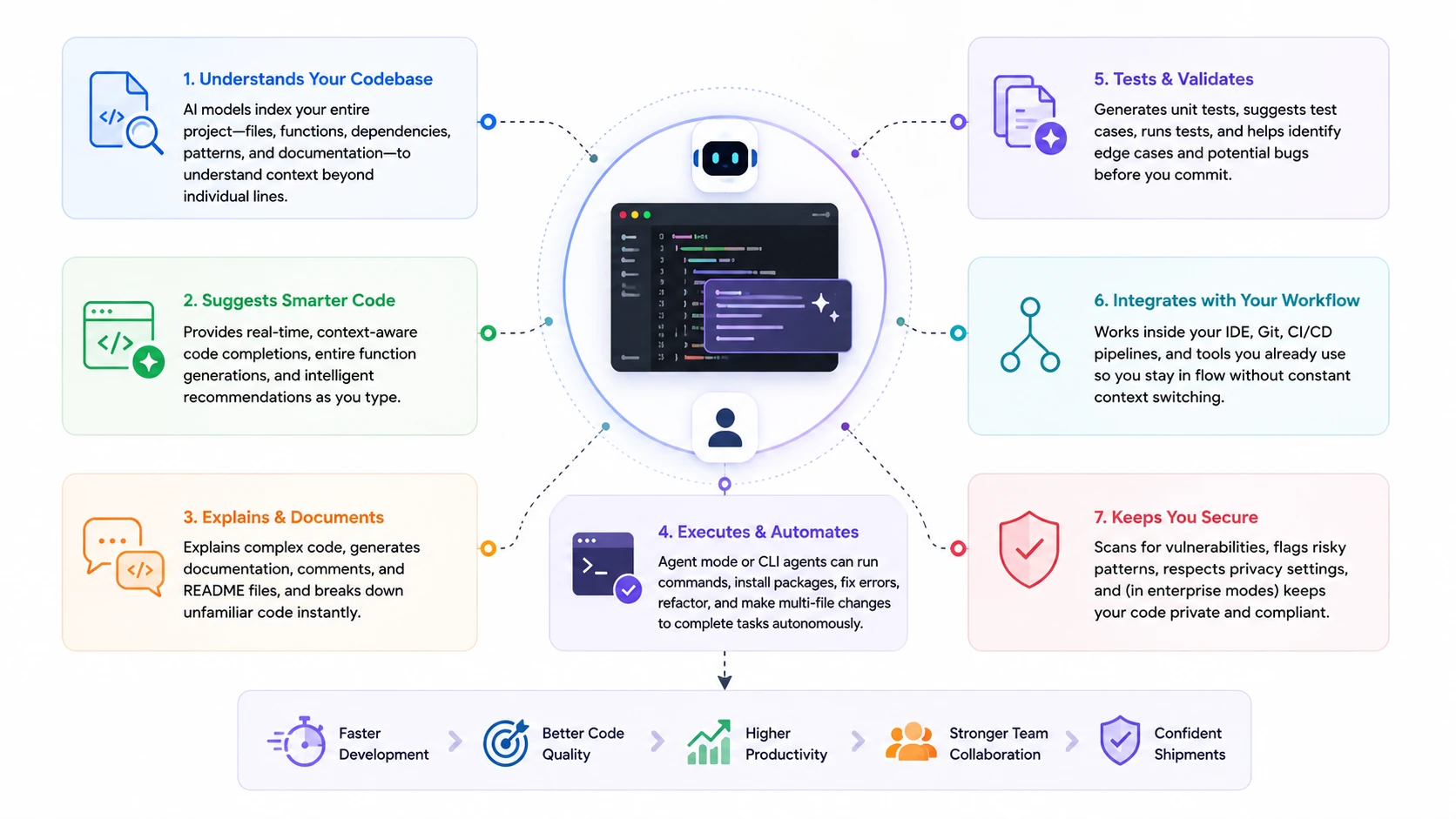
AI coding assistants now support the entire software development lifecycle—from planning and implementation to testing, debugging, and code review—rather than simple autocomplete alone.
Tool Cost vs Developer Productivity Recovery
| Workflow | Time Without AI | With AI | Saved/Week | Tool Cost/Month | Est. Monthly Value |
|---|---|---|---|---|---|
| Boilerplate generation | 4–6 hrs | 1–2 hrs | 3–4 hrs | $10–20 | ~$300–400 |
| Multi-file feature implementation | 8–12 hrs | 3–5 hrs | 5–7 hrs | $20–40 | ~$500–700 |
| Code review and explanation | 3–5 hrs | 1–2 hrs | 2–3 hrs | $10–20 | ~$200–300 |
| Architecture refactoring | 10–15 hrs | 4–7 hrs | 6–8 hrs | $20–200 | ~$600–800 |
Time estimates based on Stack Overflow 2025 data and independent developer workflow research. Developer rate assumed at $100/hour. Actual results depend on codebase complexity and tool integration quality.
The highest-value use cases are the most complex tasks — architecture work, multi-file implementation, and large-scale refactors — where AI reasoning over full project context makes the largest difference.
→ Use the AI Tool Selector to get a personalised recommendation based on your IDE, team size, and primary development workflow.
Security Risks Every Developer Should Know
40–62% of AI-generated code contains security flaws. Only 29–46% of developers trust AI-generated code without review. The most common risk isn't obviously broken code — it's syntactically correct code with subtle vulnerabilities (injection flaws, insecure defaults, improper input validation) that passes casual code review.
AI tools are most likely to introduce security issues in authentication, authorisation, data handling, and input validation paths — exactly where the consequences are most serious. Always apply manual security review to AI-generated code in these areas, not just functional testing.
Practical security practices for teams using AI coding tools:
- Never commit AI-generated code to production without review — make this a team policy, not an individual judgement call
- Run security scanning on AI-generated output; GitHub Copilot Enterprise, Amazon Q Developer, and Tabnine include built-in scanning
- For regulated industries, use Tabnine (SOC 2, on-premises), GitHub Copilot Enterprise (IP indemnification), or Codeium Enterprise (on-premise deployment)
- Verify data handling policies before connecting any AI tool to codebases containing sensitive IP or customer data
Which AI Coding Tool Is Right for You?
Best AI Coding Tools by Developer Type
| Developer Type | Recommended Tool | Primary Reason |
|---|---|---|
| Full-Stack Developer | Cursor | Repo-level context, agent mode, MERN/Next.js excellence |
| Individual (Budget) | Codeium Free | Unlimited completions, no subscription required |
| Enterprise Engineering Team | Tabnine or GitHub Copilot Enterprise | Security compliance, on-premises, admin controls |
| AWS Cloud Developer | Amazon Q Developer | Native AWS integration, CLI support |
| JetBrains User | JetBrains AI Assistant | Free with subscription, deep IDE integration |
| Architecture / Large Codebase | Claude Code | Superior reasoning, full-codebase context |
| Student / Learning | Replit AI | Zero setup, browser-based, collaborative |
| Value-Seeking Team | Windsurf | Free tier + autonomous workflows |
| Large Legacy Codebase | Sourcegraph Cody | Advanced code search + AI navigation |
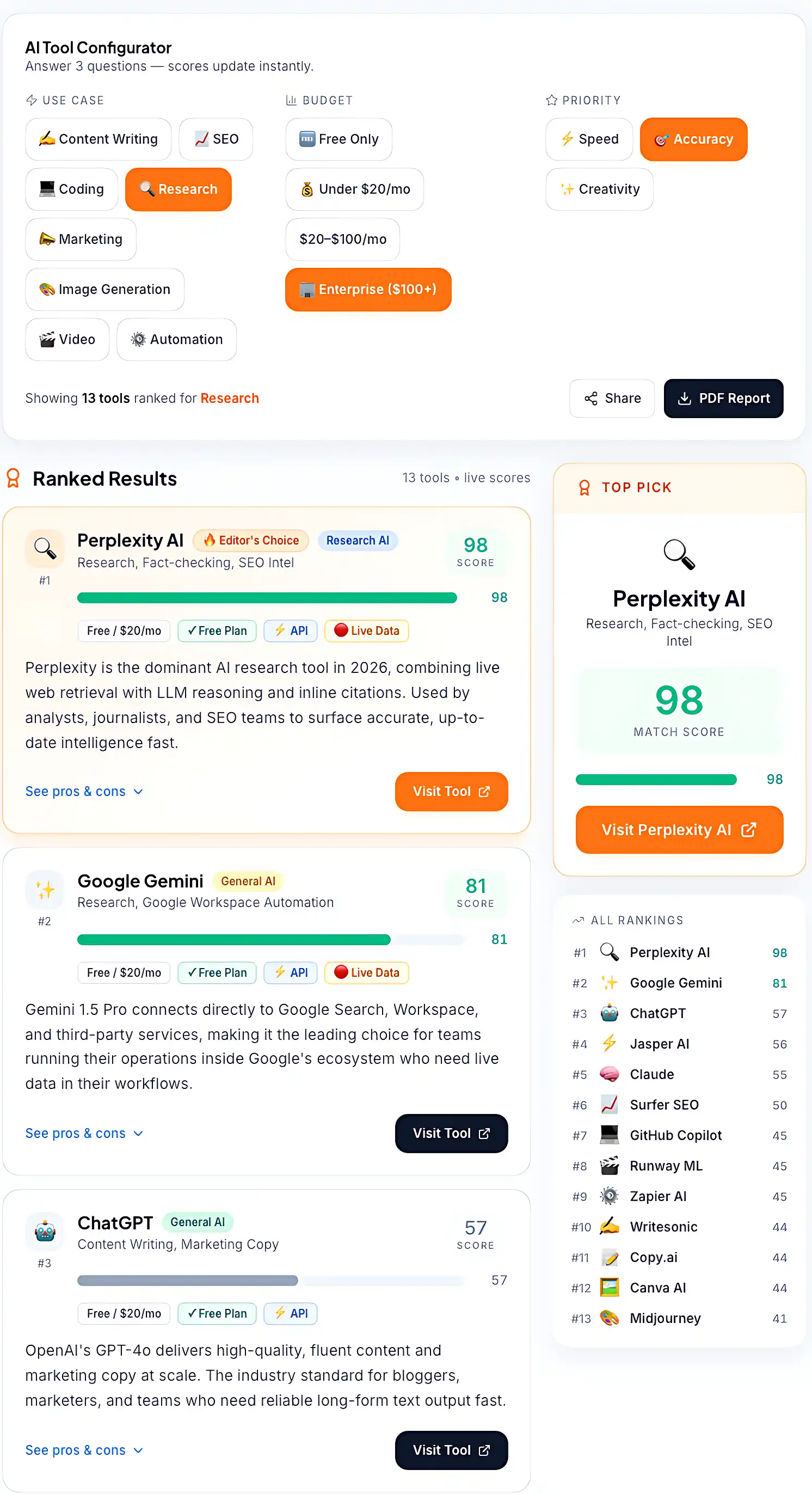
The AI Tool Selector matches developers and teams with the most suitable AI software based on workflow, budget, and productivity goals.
While coding assistants are transforming software development, many organisations are also deploying AI tools to automate reporting, documentation, customer support, scheduling, and other repetitive processes. Explore our guide to the Best AI Tools Replacing Repetitive Business Work to see where AI delivers the biggest productivity gains outside engineering teams.
Key Takeaways
Cursor handles the full-stack developer's workflow better than anything else at its price point. GitHub Copilot remains the most reliable daily autocomplete for the broadest range of developers. Claude Code reasons over your entire codebase and executes complex changes with a consistency IDE-based tools don't yet match. Codeium makes most of this accessible for free.
The teams seeing the strongest improvements aren't running the most complex stacks. They're using the right one or two tools, consistently, on the workflows where AI genuinely changes output quality — not just speed.
Start with the free tier that best matches your primary workflow. Pilot on a real project. Measure against a baseline. Then decide whether the paid tier or a second tool is justified.
Most developers don't need four AI coding tools. They need one tool that addresses their highest-friction workflow, integrated well enough to actually change how they work.