What Are AI Cold Email Tools for Sales Outreach?
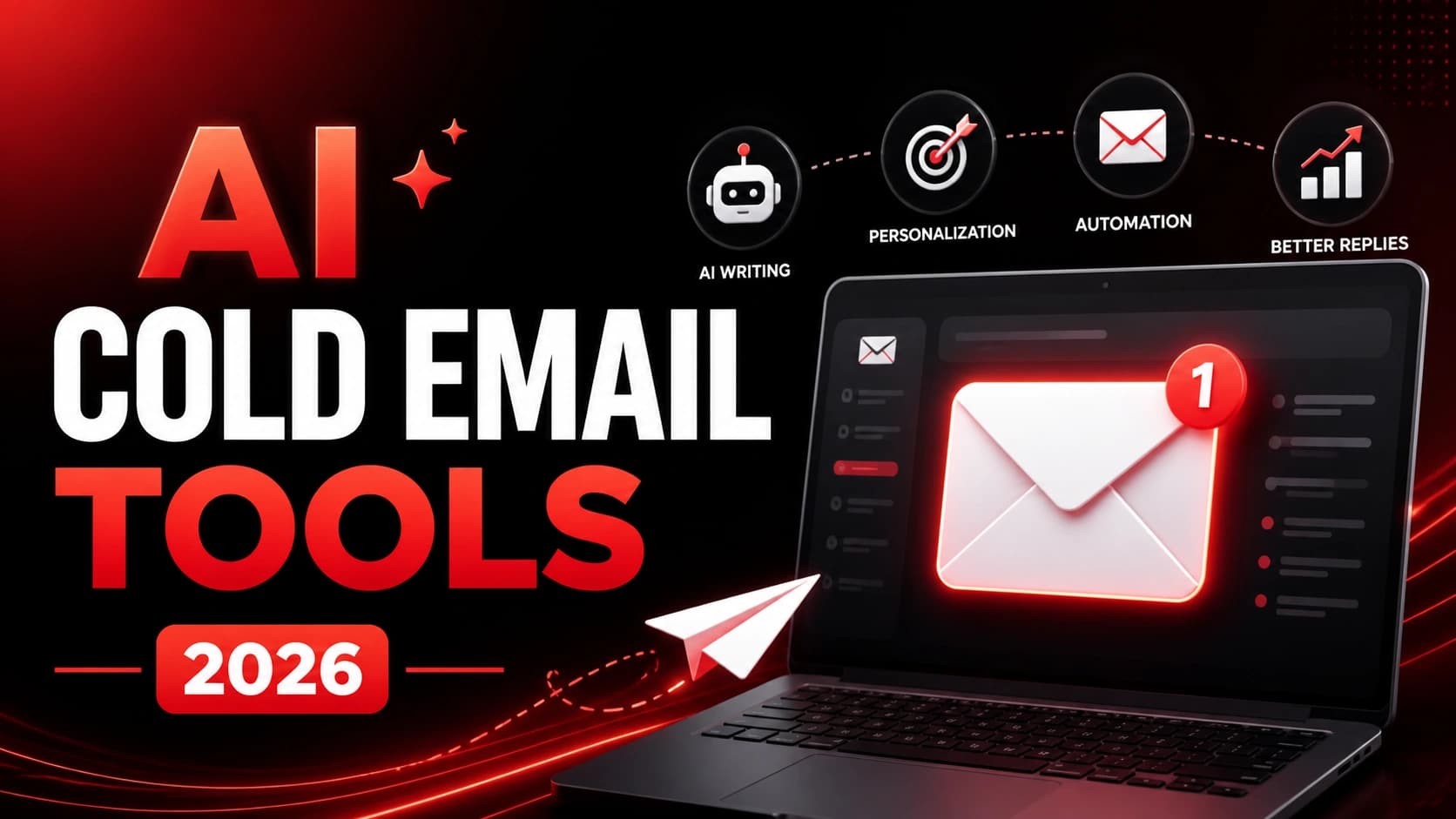
AI cold email tools are platforms that use artificial intelligence to help you write, personalize, send, and follow up on cold emails — automatically, and at scale.
Without AI, the process is manual and slow: write an email, swap the name and company, hit send, repeat. It works, but it doesn't scale — and it won't get you above a 3–5% reply rate without a lot of testing and luck.
With AI, the tool pulls real data about each prospect — their role, company news, LinkedIn activity — and uses it to generate a genuinely personalized message. Then it schedules the send, monitors behavior, and triggers follow-ups automatically. No inbox juggling. No missed touchpoints.
Here's what that looks like in practice:
- AI writes the email: You set the context, the tool drafts a personalized message per prospect
- Automated sequences: Follow-ups go out on schedule — Day 1, Day 3, Day 7 — without manual work
- Deliverability protection: Domain warm-up and send throttling keep you out of spam folders
- Analytics: You see exactly who opened, clicked, and replied — so you know what to improve
For founders and sales teams doing outbound, this is the difference between sending 50 emails a week and sending 500 — without adding headcount.
If you're still evaluating where cold email fits into your overall stack, start with this guide: Choosing AI Software for Business (2026 Guide).
Cold Email Benchmarks (2026 Data)
Before picking a tool, you need to know what good looks like.
- Open rate: 25–30% average / 40–60% for top performers
- Reply rate: 3–5% average / 10–40% for top performers
- AI personalization boost: +32% to +140% increase in reply rates
- Follow-up impact: +42–65% more replies when sequences are used
- ROI per $1 spent: $36–$42 in pipeline value generated
The gap between average and top performers isn't luck. It comes down to three things: deliverability (your emails actually reaching inboxes), personalization (your emails feeling relevant), and follow-up (not giving up after one send).
AI improves all three at once. It personalizes at scale — something no human can do manually for hundreds of prospects. It maintains sender reputation through warm-up and throttling. And it automates follow-ups so opportunities don't fall through because someone forgot to send a third email.
If you're currently at a 3% reply rate and AI pushes that to 6%, you've doubled your pipeline from the same effort. That's why 2026 is the year most serious outbound teams stopped treating AI cold email tools as optional.
Industry research from HubSpot consistently shows that follow-up sequences and personalization are key drivers of reply rate improvements in cold outreach.
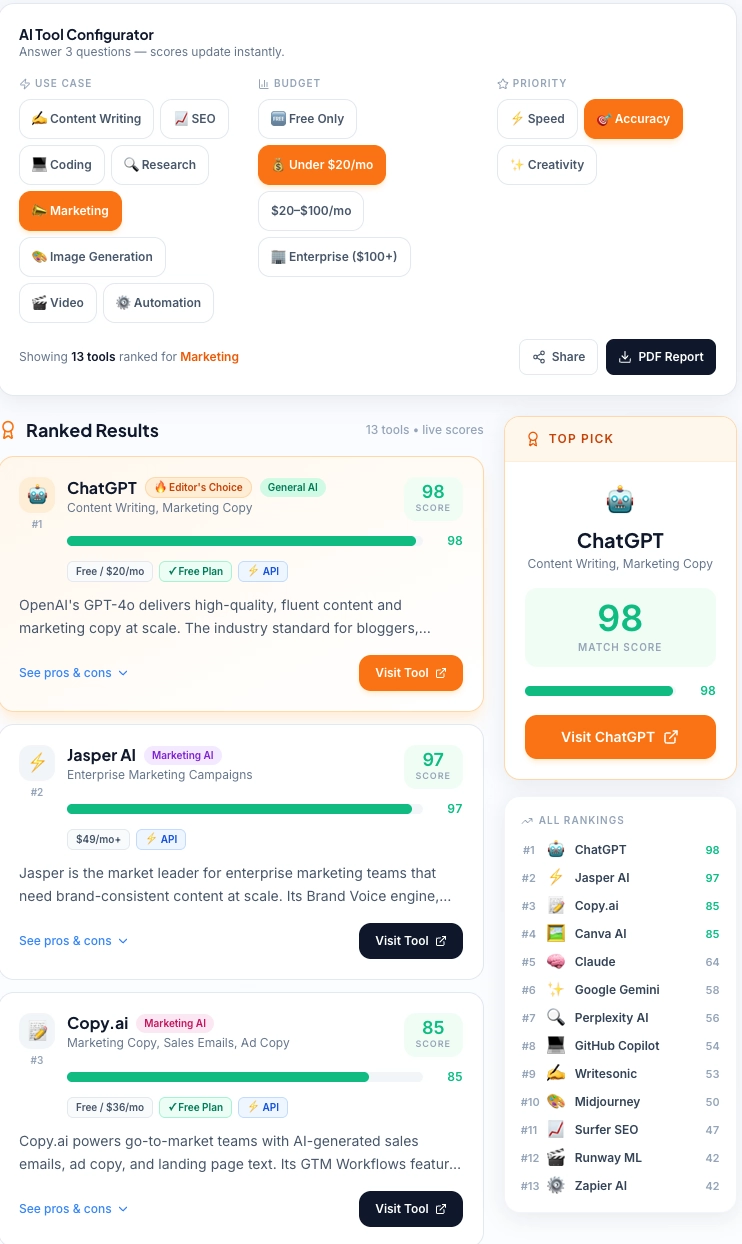
TechAiGoz Tool Configurator: Instantly find the best-ranked AI tools for your specific sales and marketing needs based on budget, use case, and accuracy requirements.
13 Best AI Cold Email Tools for Sales Outreach (2026)
All pricing in USD. Free tiers and trials noted where available.
1. Saleshandy
Saleshandy is the best all-around AI cold email platform for most sales teams. It covers every part of the outreach workflow — warm-up, personalization, sequences, analytics — without overcomplicating things or overcharging.
What sets it apart is the genuine focus on deliverability. Most budget tools treat this as an afterthought. Saleshandy has a built-in warm-up feature that gradually increases sending volume and protects your sender reputation as you scale. That means more emails landing in inboxes — which directly translates to more replies.
Key Features: AI cold email personalization, automated multi-step sequences, built-in email warm-up, A/B testing, detailed reply analytics, unlimited email accounts on higher plans
Pricing (USD): Free trial available · Outreach Starter: $25/month · Outreach Pro: $74/month · Outreach Scale: $149/month
Pros: Strong deliverability features by default · Affordable entry point · Clean interface · Reliable customer support
Cons: Not a CRM — pipeline tracking needs a separate tool · No built-in contact database
Best For: Sales teams and founders running cold email campaigns who want deliverability, automation, and simplicity in one place.
Reality Check: Saleshandy works best if your domain is already warmed. If you're starting from zero, Smartlead performs better in the first 14 days.
2. Apollo.io
Apollo.io solves two problems at once: finding the right people to contact and actually contacting them. Most cold email tools require you to bring your own list. Apollo gives you access to 275 million+ verified B2B contacts — then lets you launch email sequences directly from the same platform.
The AI layer handles personalization and sequence optimization, but the real value is in the data. Filter by industry, company size, job title, tech stack, and intent signals — so you're reaching people who match your exact ICP, not just spraying a generic list.
Key Features: 275M+ verified B2B contacts, AI-powered email sequences, LinkedIn integration, intent data, built-in dialer, CRM integrations
Pricing (USD): Free: Limited credits · Basic: $49/month per user · Professional: $99/month per user · Organization: Custom
Pros: Best contact database in the category · Strong outbound automation · Generous free tier · Regularly updated data
Cons: Data quality varies by niche and region · Interface can feel busy for new users
Best For: B2B sales teams doing outbound prospecting who want contact data and automated outreach in a single platform.
3. Lemlist
Lemlist is what agencies and growth teams reach for when generic email won't cut it. You can embed personalized images, videos, and custom landing pages in your outreach — a real differentiator when prospects are getting dozens of identical messages every day.
The platform also supports LinkedIn steps within sequences, combining email and social touches in one coordinated campaign. For agencies managing campaigns across multiple clients, Lemlist's team and white-label features keep everything cleanly organized.
Key Features: Personalized images and videos in emails, multi-channel sequences (email + LinkedIn), AI email writing, Lemwarm deliverability suite included, agency management features
Pricing (USD): Email Outreach: $59/month per user · Multi-Channel: $99/month per user · Agency: Custom
Pros: Best personalization options in the category · Multi-channel outreach in one platform · Active community and templates library
Cons: More expensive than entry-level tools · Steeper learning curve for beginners
Best For: Agencies and growth teams that need to stand out with highly personalized, multi-channel campaigns at scale.
4. Reply.io
Reply.io is a multi-channel sales engagement platform that handles cold email, LinkedIn, SMS, and calls — all coordinated from one sequence. The AI assistant, Jason AI, can write email drafts, suggest follow-ups, and even handle basic inbound replies on your behalf.
For teams that have moved beyond email-only outreach, Reply.io provides the infrastructure to run coordinated multi-touch campaigns without juggling five different tools.
Key Features: Multi-channel sequences (email, LinkedIn, SMS, calls), Jason AI for writing and response handling, AI reply detection, email warm-up, CRM integrations, meeting booking automation
Pricing (USD): Starter: $60/month per user · Professional: $90/month per user · Custom plans available
Pros: Best multi-channel coverage in the category · Jason AI saves real time on reply handling · Strong integration ecosystem
Cons: Higher cost than email-only tools · Can feel complex for solo users
Best For: Sales teams running multi-channel outreach who want email, LinkedIn, and calls coordinated in a single automated workflow.
5. Instantly.ai
Instantly.ai is built for volume. If you're sending at scale — hundreds or thousands of emails per day — and need to do it without destroying your sender reputation, Instantly is designed for exactly that.
The standout feature: you can connect unlimited email accounts and rotate sending across all of them, distributing volume in a way that keeps each inbox healthy. Built-in warm-up handles new domains automatically. At the price point, the value-to-feature ratio is hard to beat.
Key Features: Unlimited email account connections, automated warm-up network, AI personalization, campaign analytics with deliverability scoring, inbox management, A/B testing
Pricing (USD): Growth: $37/month · Hypergrowth: $97/month · Light Speed: $358/month
Pros: Unbeatable for high-volume cold email · Unlimited sending accounts on all plans · Strong warm-up features · Simple interface
Cons: No built-in contact database · Lighter on CRM features · Not ideal for multi-channel sequences
Best For: Teams and agencies doing high-volume cold email who want maximum deliverability and sending capacity without overpaying.
6. Smartlead.ai
Smartlead.ai is what we'd recommend to anyone launching cold email for the first time. The interface is clean, setup is fast, and core features — AI personalization, sequences, warm-up — work reliably without technical expertise.
What makes it beginner-friendly is its AI-powered warm-up pool. New email domains are cycled through a network of real inboxes to build sender reputation before any prospect ever sees your email. That used to require manual configuration. Smartlead automates it completely.
Key Features: AI email personalization, automated warm-up with real inbox network, multi-sequence campaign management, smart inbox rotation, reply detection and categorization, analytics dashboard
Pricing (USD): Basic: $39/month · Pro: $94/month · Custom agency plans available
Pros: Easiest onboarding in the category · Strong warm-up for new senders · Good AI writing for beginners · Reasonable pricing
Cons: Fewer advanced features than Lemlist or Reply.io · Primarily email-focused
Best For: Founders, SDRs, and small teams launching cold email for the first time who want results without a complex setup.
7. Woodpecker
Woodpecker has been a staple in cold email for years — and it earned that reputation through consistency. It does one thing very well: automated email sequences with reliable deliverability. Thousands of B2B sales teams use it specifically because it doesn't surprise them.
The 2026 AI layer adds personalization suggestions, send-time optimization, and condition-based follow-ups that adapt to prospect behavior. Clean integrations with most major CRMs make it easy to fit into an existing stack.
Key Features: Automated sequences with condition-based logic, AI personalization and send-time optimization, email warm-up, multiple sending account support, CRM integrations, agency mode for client management
Pricing (USD): Cold Email: $29/month per slot · Sales Assistant: $49/month per slot · Agency plans available
Pros: Proven reliability over many years · Excellent deliverability track record · Straightforward interface · Good agency features
Cons: Per-slot pricing gets expensive at scale · Less AI-forward than newer platforms · No contact database
Best For: B2B agencies and teams that prioritize deliverability and sequence reliability above all else.
8. Mailshake
Mailshake balances email outreach with phone and social touches — suitable for teams that want a multi-touch prospecting approach without enterprise complexity. The built-in power dialer adds a cold calling layer most pure cold email tools don't offer.
Key Features: AI email writing and templates, multi-channel sequences (email, phone, social), built-in power dialer, A/B testing, lead catcher for reply management, CRM integrations
Pricing (USD): Starter: $29/month · Email Outreach: $59/month · Sales Engagement: $99/month
Pros: Good balance of email and phone outreach · Clean, easy-to-learn interface · Strong template library
Cons: AI features less advanced than Apollo or Lemlist · Power dialer only on higher plans · No prospecting database
Best For: Inside sales teams doing both cold email and cold calling who want both channels managed in one place.
9. Snov.io
Snov.io gives you a complete prospecting workflow in one tool: find email addresses, verify them, then send automated outreach — without switching platforms. For small sales teams that need both data and outreach capability on a tighter budget than Apollo, it's a strong alternative.
Key Features: Email finder with domain and name search, bulk email verification, AI-assisted drip campaign builder, LinkedIn prospecting extension, built-in CRM with pipeline tracking
Pricing (USD): Free: 50 credits/month · Starter: $30/month · Pro: $75/month
Pros: Email finding and outreach in one tool · Very competitive pricing · Good verification accuracy · Functional free tier
Cons: Database smaller than Apollo's · AI features not as advanced as dedicated outreach tools
Best For: Small businesses and freelancers who need an affordable all-in-one tool for finding and reaching B2B prospects.
10. Hunter.io
Hunter.io built its reputation as the most reliable email finder on the market — and that reputation holds. If you need to find email formats for a specific company, verify a list before sending, or enrich prospect data, Hunter is the go-to. The outreach features (Campaigns) are basic, but for teams primarily needing data accuracy with a lightweight sending layer on top, it works cleanly.
Key Features: Email finder by name and domain, bulk email verification, domain search for company email patterns, email campaigns with follow-ups, Chrome extension, API access
Pricing (USD): Free: 25 searches/month · Starter: $34/month · Growth: $104/month
Pros: Most accurate email finder in the category · Excellent verification · Fast, simple interface · Strong API for developers
Cons: Campaign features are basic · Not suitable as a standalone high-volume sending tool
Best For: Teams that need reliable email finding and verification as part of a broader outreach stack.
11. GMass
GMass turns Gmail into a cold email platform. Install it as a Chrome extension and you get sequence automation, mail merge personalization, open tracking, and follow-up scheduling — directly inside your existing Gmail inbox.
For freelancers and small teams who don't want to learn a new platform, GMass removes almost all friction from getting started. You're sending from your actual Gmail account, which naturally supports deliverability. The AI features generate personalized first lines per recipient without leaving your inbox.
Key Features: Gmail-native sequences and automation, AI personalization and first-line generation, mail merge from Google Sheets, automatic follow-ups, open and click tracking
Pricing (USD): Standard: $25/month · Premium: $35/month · Enterprise: $55/month
Pros: Zero learning curve for Gmail users · Strong deliverability (real Gmail sending) · Very affordable
Cons: Gmail and Google Workspace only · Not designed for agency-scale volume · Limited reporting depth
Best For: Solo founders, freelancers, and small teams who want cold email automation directly from Gmail without switching tools.
12. SalesTarget.ai
SalesTarget.ai focuses on hyper-personalization using publicly available data. The tool automatically researches each prospect — pulling from LinkedIn, company news, job postings — and generates personalized email intros at scale. For high-ticket outreach where every email needs to feel individually written, this meaningfully moves reply rates.
Key Features: AI-powered prospect research and personalization, automated sequence builder, multi-signal data enrichment, A/B testing, CRM integrations, deliverability monitoring
Pricing (USD): Starter: $49/month · Growth: $99/month · Agency: Custom
Pros: Deep AI personalization without manual research · Genuinely differentiated emails at scale · Strong for high-ticket B2B outreach
Cons: Higher price point · Quality depends on available prospect data · Smaller user base
Best For: Sales teams targeting high-value accounts where personalization significantly increases response rates.
13. QuickMail
QuickMail prioritizes inbox deliverability above everything else — no unnecessary features, just solid infrastructure. Multiple inboxes, automatic warm-up using real human interaction patterns, and inbox rotation that distributes sends well below spam thresholds. A strong pick for agencies that have learned the hard way how much deliverability matters.
Key Features: Automated sequences with conditional logic, auto-warmer with real inbox interactions, multi-inbox rotation, blacklist monitoring and deliverability alerts, agency client management
Pricing (USD): Basic: $49/month · Pro: $89/month · Expert: $129/month
Pros: Industry-leading deliverability focus · Clean, uncluttered interface · Good agency features · Transparent pricing
Cons: No built-in contact database · AI features less advanced than newer tools
Best For: Agencies and outbound teams that want a platform where deliverability is genuinely the top priority.
AI Cold Email Tools: 2026 Comparison Table
| Tool | Starting Price | Best For | Key Strength | Ease of Use |
|---|---|---|---|---|
| Saleshandy | $25/month | Overall best | Deliverability + sequences | ⭐⭐⭐⭐⭐ |
| Apollo.io | Free / $49/month | B2B data + outreach | 275M+ contact database | ⭐⭐⭐⭐ |
| Lemlist | $59/month | Agencies, personalization | Image/video personalization | ⭐⭐⭐⭐ |
| Reply.io | $60/month | Multi-channel teams | Email + LinkedIn + calls | ⭐⭐⭐⭐ |
| Instantly.ai | $37/month | High-volume sending | Unlimited inbox rotation | ⭐⭐⭐⭐⭐ |
| Smartlead.ai | $39/month | Beginners | AI warm-up + ease of use | ⭐⭐⭐⭐⭐ |
| Woodpecker | $29/month | Reliability-focused | Proven deliverability | ⭐⭐⭐⭐ |
| Mailshake | $29/month | Email + phone | Multi-channel sequences | ⭐⭐⭐⭐ |
| Snov.io | Free / $30/month | Budget all-in-one | Email find + outreach | ⭐⭐⭐⭐ |
| Hunter.io | Free / $34/month | Email finding | Most accurate finder | ⭐⭐⭐⭐⭐ |
| GMass | $25/month | Gmail users | Native Gmail automation | ⭐⭐⭐⭐⭐ |
| SalesTarget.ai | $49/month | High-ticket outreach | AI prospect research | ⭐⭐⭐ |
| QuickMail | $49/month | Deliverability-first | Auto-warmer + rotation | ⭐⭐⭐⭐ |
How to Choose the Right AI Cold Email Tool
The biggest mistake is picking a tool based on features instead of fit. Here's a practical framework.
Budget first. Under $50/month: Saleshandy Starter ($25), Instantly.ai ($37), or Smartlead.ai ($39) all run solid campaigns. Don't let budget be a reason to delay starting.
Do you have your own prospect list? Yes — any tool on this list works. No — go with Apollo.io or Snov.io, which include contact databases alongside outreach automation.
How much volume are you sending? Under 500 emails/month: Saleshandy or GMass. 500–5,000/month: Instantly.ai or Smartlead.ai. 5,000+/month: Instantly.ai higher plans or QuickMail for agencies.
Do you need multi-channel outreach? Email only: Saleshandy or Instantly.ai. Email + LinkedIn: Lemlist or Reply.io. Email + LinkedIn + Phone: Reply.io or Mailshake.
Is personalization your main differentiator? For high-ticket accounts: Lemlist or SalesTarget.ai. For solid personalization at scale: Saleshandy or Apollo.io.
Don't run three cold email tools simultaneously thinking it'll improve results. Pick one, run it for 30 days, and measure reply rates. Only add a second tool when you hit a specific ceiling the first tool can't solve. Complexity kills execution in outreach.
If you're comparing multiple categories before choosing, this list of Best AI Tools for Small Businesses (2026) gives a broader breakdown across marketing, sales, and operations tools.
Cold Email Deliverability Tips
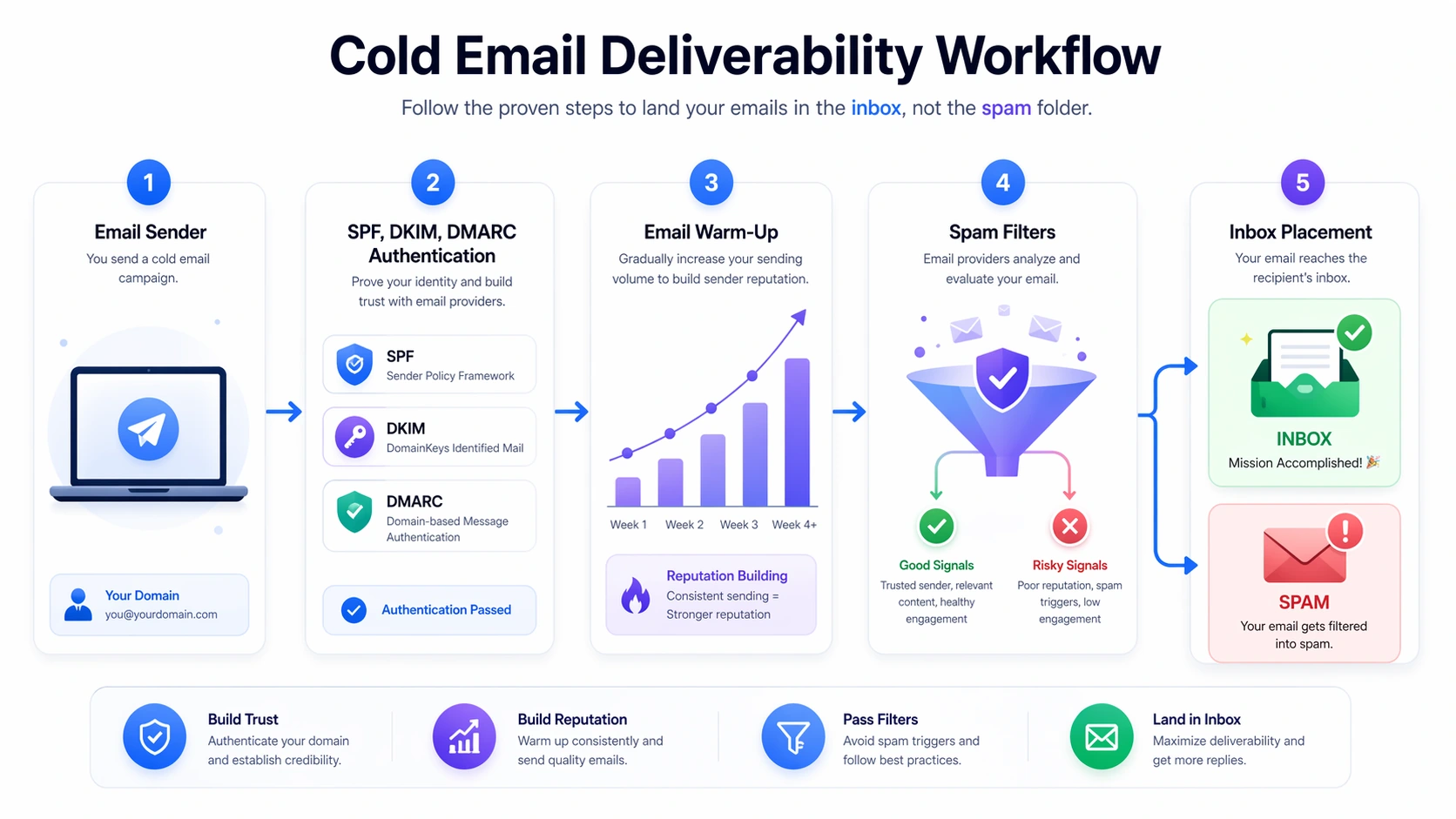
None of these tools work if your emails land in spam. Deliverability is the foundation — and where most failed campaigns actually break down.
Warm up new domains before sending. Never send cold email from a brand-new domain. Use the built-in warm-up in Saleshandy, Smartlead, Instantly, or QuickMail for 2–4 weeks first. This gradually builds sender reputation before any prospect ever sees your email.
Set up SPF, DKIM, and DMARC. These three DNS records are non-negotiable. Missing or misconfigured records mean good emails still get flagged. Every tool on this list has a setup guide — don't skip it.
Keep sending volumes reasonable. New domains: 20–30 emails per day, scaled slowly. Established domains: stay under 150–200 per inbox per day. Use inbox rotation to scale without straining any single account.
Avoid spam trigger words. Words like "free," "guaranteed," "no risk," or excessive ALL CAPS in subject lines trigger spam filters before anyone reads your email. Write like a person having a real conversation — not a marketer running a promotion.
Personalize beyond the first name. Emails that start with "Hi [First Name]" and nothing else don't feel personal anymore. A genuine first line referencing something specific about the prospect's company or role gets 2–3x more replies than a pure template approach.
Clean your list before sending. Bounced emails damage your sender score fast. Run every list through email verification — Hunter.io, Snov.io, or the built-in verifier in your chosen tool — before importing into any sequence.
Best practices recommended by Google and major email providers emphasize authentication (SPF, DKIM, DMARC) and sender reputation as the foundation of inbox placement.
Real Use Cases of AI in Cold Email Outreach
Here's how different businesses are actually running these tools — not theoretically, in practice.
Lead generation for B2B sales teams. Teams use Apollo.io to build prospect lists filtered by exact ICP criteria, then push those contacts into Saleshandy or Instantly.ai for automated sequences. Result: a consistent stream of new conversations without an SDR spending hours manually researching and building lists.
Agency outreach at scale. Agencies use Lemlist or QuickMail to manage campaigns across multiple clients, each with separate deliverability setups. Multi-channel sequences (email → LinkedIn → follow-up email) increase touchpoints without increasing manual workload. Agencies running 10+ client campaigns often do this with just 1–2 people.
SaaS demo booking. SaaS founders use Smartlead.ai or Reply.io to target decision-makers at companies matching their ICP. A three-step sequence ending with a Calendly link consistently books 5–15 demos per week from 500–1,000 emails — more than most early-stage teams can handle manually.
Freelancer client acquisition. Freelancers use GMass or Saleshandy Starter with a personalized intro, one follow-up, and a break-up email. A list of 200–300 contacts in a specific niche consistently generates 2–5 new client conversations per month.
If you're combining outbound with inbound capture strategies, this guide on AI Chatbots for Lead Conversion (2026 Guide) shows how businesses convert that traffic once it arrives.
Real Campaign Example (2026)
A SaaS founder used Smartlead.ai to send 800 emails/week.
- Open rate: 52%
- Reply rate: 11%
- Meetings booked: 9/week
Key difference: AI-generated first lines using LinkedIn activity + 3-step follow-up sequence.
ROI of AI Cold Email Tools
The economics work because tool cost is fixed while output scales. A $74/month Saleshandy Pro subscription running 1,000 emails per week that books two $5,000 deals per month returns over 130x its cost. Even at half that performance, the math is still compelling.
Time savings compound as well. Automating follow-up sequences alone — removing the manual task of checking who hasn't replied and drafting a second or third email — recovers 5–10 hours per week per sales rep. At $50/hour, that's $1,000–$2,000 per month in recovered productivity per person.
If you're scaling outreach and feeding leads into a CRM, use this CRM Cost Calculator to estimate how your outreach volume impacts software costs and overall pipeline efficiency.
Pros and Cons of AI Cold Email Tools
Pros:
- Scale outreach without scaling headcount
- AI personalization meaningfully improves reply rates
- Automated follow-ups capture responses that manual outreach misses
- Deliverability features protect sender reputation at volume
- Detailed analytics show exactly what's working
Cons:
- Deliverability requires proper setup — shortcuts lead to spam
- Over-automation produces generic emails if personalization data is weak
- Tools require ongoing maintenance: list cleaning, sequence updates, A/B testing
- Costs add up if you're stacking multiple platforms without clear purpose
If you're setting this up for the first time, use this step-by-step AI Implementation Checklist to make sure your domain, email authentication, and outreach stack are configured correctly before you start sending.
Common Cold Email Mistakes (That Kill Results)
- Sending from a new domain without warm-up
- Using generic templates without real personalization
- No follow-up sequence (losing 40–60% replies)
- Sending too many emails per day (spam trigger)
- Not verifying email lists before campaigns
How We Evaluated These AI Cold Email Tools
We analyzed 13 tools based on real-world usage and 2026 benchmarks across:
- Deliverability (inbox placement, warm-up systems)
- Personalization quality (AI output realism)
- Ease of use (setup time, learning curve)
- Pricing vs scalability
- Real campaign performance (open + reply rates)
We also compared tool documentation, user feedback, and outbound campaign results across startups, agencies, and SaaS teams.
This guide is updated based on actual usage patterns — not just feature lists.