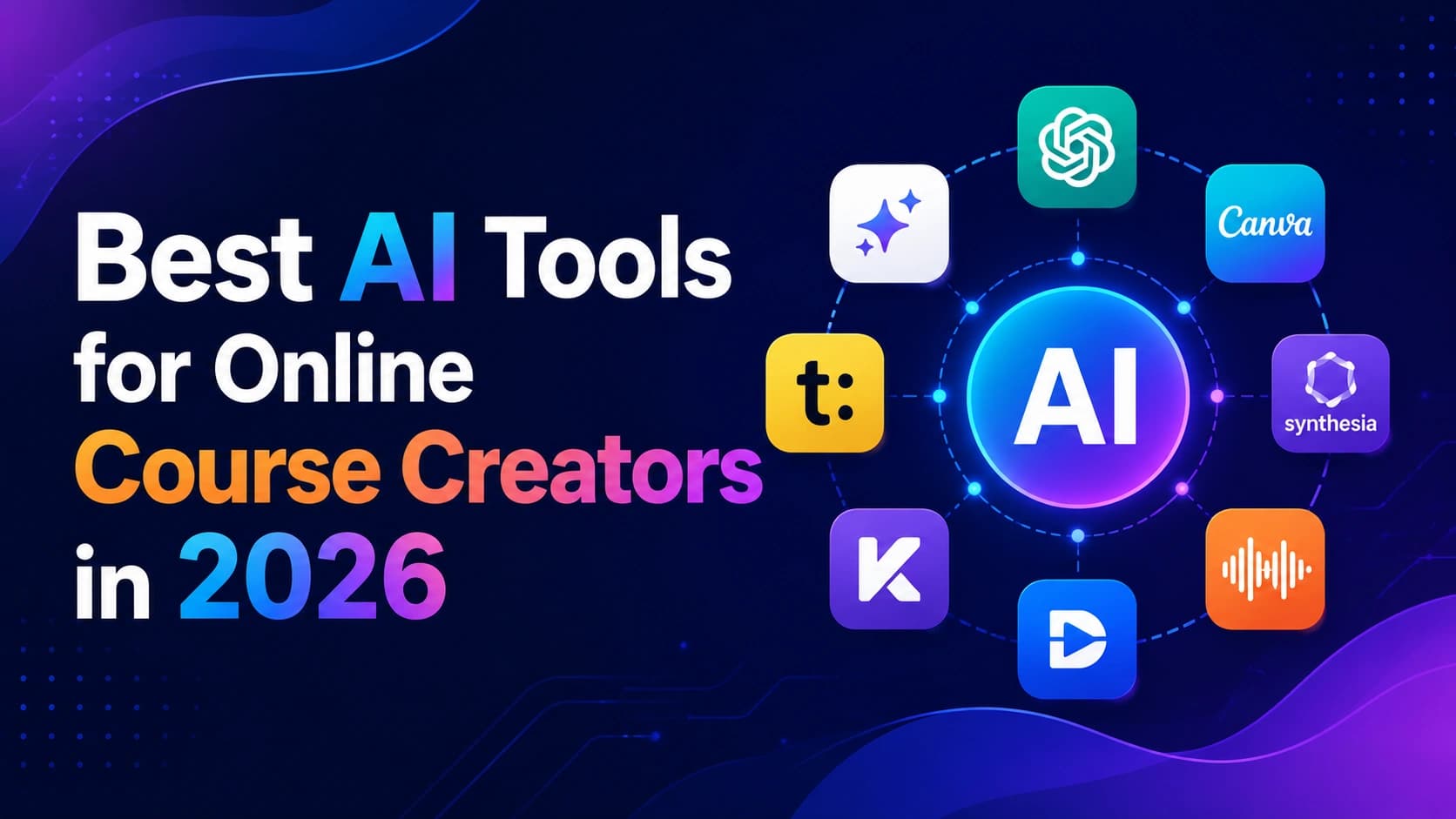
Why AI Is Changing Course Creation
Creating an online course used to involve booking recording space, hiring an editor, and spending months assembling everything. Most independent educators found the production barrier too high.
AI tools have changed that. Not by replacing teaching expertise — that still comes entirely from you — but by compressing the production side. Scripts, voiceovers, slide layouts, quiz generation: AI handles these repetitive tasks so you can focus on what actually makes a course valuable.
- 68% of independent course creators now use at least one AI tool in production — up from 29% in 2023.
- AI video tools reduce course production time by an average of 40–60% for solo creators.
- 54% of learners say they can't distinguish AI-generated from human-recorded voiceovers when quality is well-matched.
- The e-learning market is projected to reach $400 billion by 2026, with AI-assisted content production driving independent creator growth.
The tools are capable. The challenge is knowing which ones to use for which part of the workflow.
What to Look for in an AI Tool for Course Creation
Most course creators need help with some combination of: script writing, video production, voiceovers, slide design, quiz creation, and hosting. Before picking tools, ask:
- Does the AI output actually meet professional standards, or does it need hours of cleanup?
- Can you be productive quickly, or is the setup overhead significant?
- Does it integrate with the other tools in your stack?
- How does pricing scale as your output volume grows?
→ You can also estimate software costs and productivity impact using our AI ROI Calculator before committing to premium AI subscriptions.
Best AI Video Tools for Online Course Creators
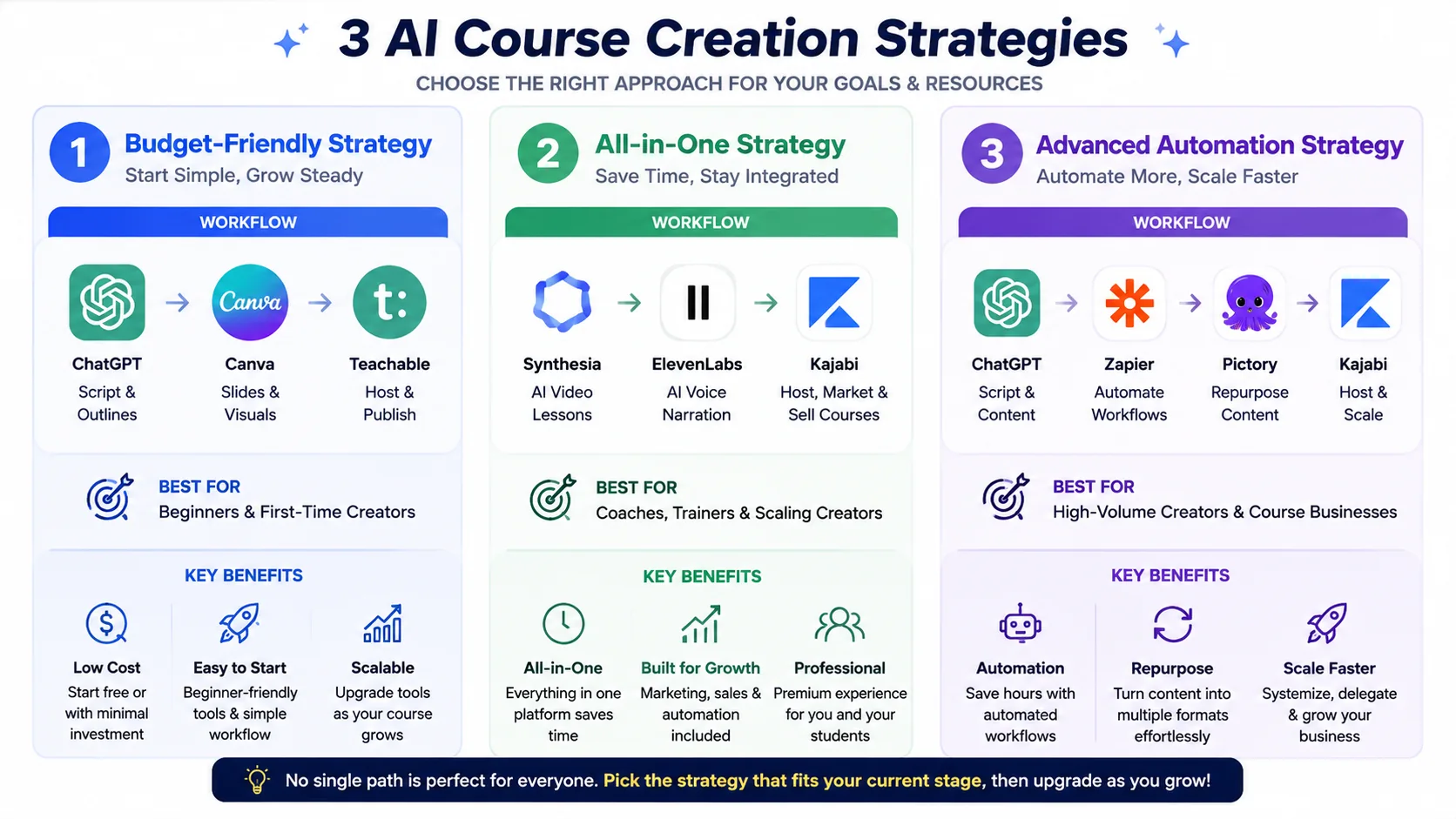
Three common AI course creation strategies in 2026 — beginner-friendly, all-in-one production, and advanced automation workflows for scaling online education businesses.
Synthesia
Best for: Camera-free video production using AI presenters
Synthesia generates video lessons from a written script using AI avatars. No camera, no microphone setup, no reshoot when you mispronounce something. The avatar quality in 2026 is significantly more natural than earlier versions, and the platform supports 140+ languages.
It works well for explainer-style lessons and business training. It's less suited for technical demonstrations or hands-on skill content where screen recording is more appropriate.
Why creators use it:
- Eliminates camera and studio setup
- Speeds up lesson production
- Useful for faceless educational content
- Makes multilingual course creation easier
Core Features:
- 230+ AI avatars including custom avatar from your own likeness
- 140+ language and voice options
- Screen recording integration alongside avatar
- Brand kit support for consistent visual identity
Limitations:
- Less personal than real on-camera teaching
- Not ideal for emotional or personality-driven courses
- Advanced customization requires higher-tier plans
Pricing: Starter at $18/month (10 videos) → Creator at $64/month → Enterprise custom
Creator Fit: ⭐⭐⭐⭐
X-Pilot
Best for: All-in-one course generation from outline to video
X-Pilot positions itself as an end-to-end course builder — input your topic, get a script, slides, and basic video in one workflow. Still maturing compared to Synthesia, but the integrated pipeline appeals to creators who want to move quickly without managing five separate tools.
Why creators use it:
- Faster workflow setup
- Everything stays inside one platform
- Good for creators without editing experience
Core Features:
- AI script generation
- Auto slide creation
- Built-in AI video rendering
- Simple course workflow management
Limitations:
- Smaller template library than Synthesia
- Video polish still behind premium competitors
- Less customization flexibility
Pricing: ~$49/month (verify current pricing on their website)
Creator Fit: ⭐⭐⭐
Pictory
Best for: Turning existing content into course-ready clips
Pictory transforms long-form content — recorded webinars, blog posts, long explainer videos — into shorter, structured video segments. Strong for creators repurposing existing material rather than building from scratch.
Why creators use it:
- Saves time repurposing old content
- Easy social clip generation
- Good automatic scene selection
Core Features:
- Blog-to-video conversion
- AI subtitle generation
- Auto highlight extraction
- Social media clip resizing
Limitations:
- Less effective for original course production
- AI scene matching occasionally feels generic
- Advanced editing tools are limited
Pricing: Starter at $19/month → Standard at $39/month → Premium at $99/month
Creator Fit: ⭐⭐⭐⭐
Descript
Best for: Editing your own recorded video faster
Descript transcribes your recording and lets you edit the video by editing the text. Delete a sentence from the transcript, and that section is cut from the video. Automatic filler word removal, eye contact correction, and noise reduction are included. For creators who record themselves, this tends to become a permanent part of the workflow.
Why creators use it:
- Massive time savings in editing
- Beginner-friendly workflow
- Excellent for podcast and screen-recorded lessons
Core Features:
- Transcript-based editing
- AI filler word removal
- AI eye contact correction
- Screen recording tools
- Voice overdub editing
Limitations:
- Advanced editors may prefer Premiere Pro or Final Cut
- AI eye correction occasionally looks unnatural
- Large projects can become resource-heavy
Pricing: Hobbyist at $12/month → Creator at $24/month → Business at $40/month
Creator Fit: ⭐⭐⭐⭐⭐
AI Video Tools Comparison
| Tool | Best For | Starting Price | Learning Curve |
|---|---|---|---|
| Synthesia | AI avatar videos without camera | $18/month | Low |
| X-Pilot | All-in-one course generation | ~$49/month | Low |
| Pictory | Repurposing existing content | $19/month | Low |
| Descript | Editing recorded video faster | $12/month | Medium |
Best AI Script Writing Tools for Course Creators
ChatGPT
Best for: Script drafting, lesson structuring, quiz writing
ChatGPT remains the most versatile writing tool for course creators. Its strength isn't producing finished, ready-to-record scripts — first drafts always need editing. Its value is in accelerating the structural work: generating lesson outlines, drafting explanations, writing quiz questions, and creating module summaries from bullet-point notes.
Practical uses:
- Generate a 10-module outline from a single topic description
- Draft lesson scripts from your notes
- Write learning objectives for each module
- Create discussion questions and scenario-based exercises
If you're evaluating a broader AI stack beyond course creation, read our Complete Guide to Choosing AI Software for Your Business (2026).
Why creators use it:
- Extremely flexible
- Works across nearly every course niche
- Fast first-draft generation
Core Features:
- Lesson outline generation
- Script drafting
- Quiz and worksheet creation
- Curriculum planning
- Idea expansion and rewriting
Limitations:
- Requires strong prompts for quality output
- First drafts still need editing
- Can sound generic without personalization
Pricing: Free plan available → ChatGPT Plus at $20/month
Creator Fit: ⭐⭐⭐⭐⭐
Notion AI
Best for: Creators managing their content workflow inside Notion
Notion AI lets you highlight lesson notes and expand them into full script drafts without leaving your workspace. If your course production already lives in Notion, the AI layer adds genuine value without adding tool-switching overhead.
Why creators use it:
- Keeps planning and writing centralized
- Good for curriculum organization
- Reduces workflow fragmentation
Core Features:
- AI note expansion
- Lesson summarization
- Outline generation
- Knowledge organization
- Collaborative workspace tools
Limitations:
- Not as powerful as ChatGPT for deep writing tasks
- Best only if already using Notion
- Limited customization compared to standalone AI tools
Pricing: AI included in Plus plan at $10/user/month and above
Creator Fit: ⭐⭐⭐⭐
Prompting Tips for Course Scripts
The quality of AI script output depends almost entirely on the prompt quality:
- Specify learner level — "for complete beginners" vs "for intermediate practitioners" produces very different output.
- Include your teaching approach — "Use problem-first structure: show the mistake, explain why it happens, then give the correct method."
- Set tone explicitly — "Conversational and direct, no academic language."
- Request a specific structure — "Write in three parts: hook, explanation, application exercise."
→ For faster lesson planning, you can also use our AI Prompt library to create structured prompts for course scripts, quizzes, learning objectives, and educational content workflows.
Best AI Voice Generators for Online Courses
ElevenLabs
Best for: Natural-sounding AI narration, including voice cloning
ElevenLabs produces the most natural AI voices available in 2026. The voice cloning feature — record 30–60 seconds of your voice, and it narrates in your style — is particularly useful for creators maintaining a personal brand across courses.
Core Features:
- 120+ AI voices across multiple accents
- Voice cloning from short audio samples
- Multi-language support
- API access for batch processing
Pricing: Free (limited) → Starter at $5/month → Creator at $22/month
Creator Fit: ⭐⭐⭐⭐⭐
Canva AI Voice Tools
Best for: Creators already in Canva who want voiceover without a separate tool
Canva's built-in AI voice generation is convenient if you're already building slides there. Quality is solid for most course contexts, and keeping everything in one platform reduces workflow friction for new creators.
Pricing: Included in Canva Pro at $15/month
Text-to-Speech vs Voice Cloning
Text-to-speech uses a pre-built AI voice — consistent but generic. Good for training content where personal brand is less important.
Voice cloning sounds like you specifically. Worth the extra setup for personal brand courses or premium content where your voice and style are part of the product.
Best AI Presentation and Slide Design Tools
Canva
Best for: Design flexibility with AI assistance for non-designers
Canva's AI features — Magic Design, text-to-image, background removal, brand kit automation — reduce mechanical design time without requiring design expertise. Education templates provide solid starting points for course slides.
Why creators use it:
- Extremely beginner-friendly
- Huge template library
- Fast content creation workflow
Core Features:
- Magic Design AI
- Text-to-image generation
- Background remover
- Presentation templates
- Brand kit automation
Limitations:
- Advanced design control is limited
- AI-generated layouts sometimes need cleanup
- Heavy presentations may feel repetitive visually
Pricing: Free plan available → Pro at $15/month
Creator Fit: ⭐⭐⭐⭐⭐
Gamma
Best for: Generating complete slide decks quickly from an outline
Gamma generates a complete, formatted slide deck from a text prompt in under two minutes. The output needs editing — content will be generic, design may need brand adjustments — but as a structural starting point, it's significantly faster than building from a blank template.
Why creators use it:
- Very fast presentation creation
- Minimal design effort required
- Good starting point for course lessons
Core Features:
- AI slide generation
- Interactive presentation format
- Automatic layout structuring
- Fast prompt-to-deck workflow
Limitations:
- Less design freedom than Canva
- AI-generated copy still needs editing
- Branding flexibility is limited
Pricing: Free (limited) → Plus at $10/month → Pro at $20/month
Creator Fit: ⭐⭐⭐⭐
AI Slide Design Tips
- Build structure first, then apply design — trying to do both at once usually means one suffers.
- Reduce AI-generated text by 30–40% per slide. Less text per slide means better learning retention.
- Use real photography over AI-generated images where credibility matters.
- Apply a consistent brand kit so all slides look like they belong to the same course.
AI Tool by Task
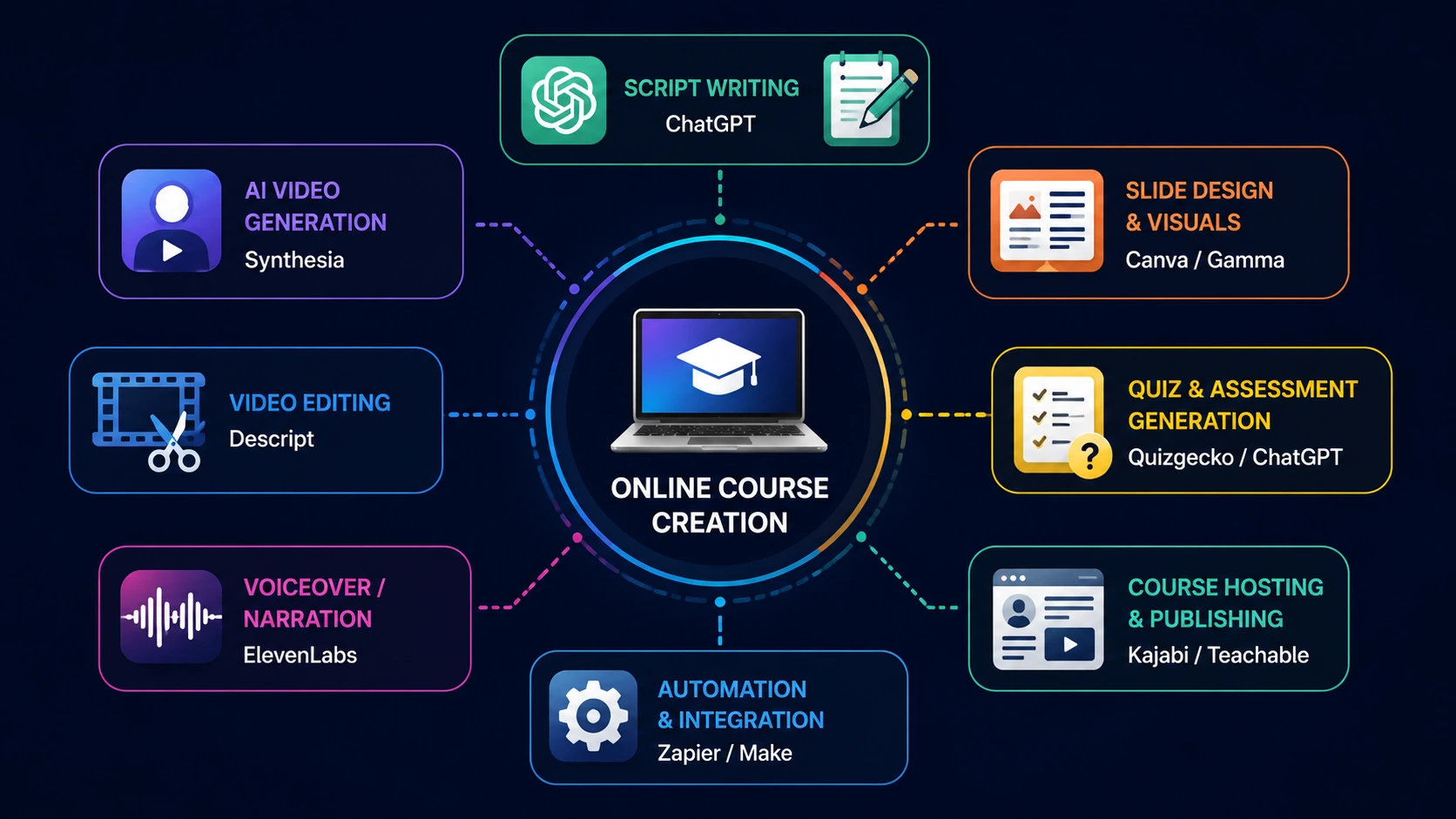
Different AI tools specialize in different stages of the online course creation workflow — from scripting and slide creation to video production, editing, voiceovers, automation, and hosting.
| Task | Recommended Tool | Best For |
|---|---|---|
| Script writing | ChatGPT | Speed and flexibility |
| AI video production | Synthesia | Camera-free lessons |
| Video editing | Descript | Editing recorded content |
| Voiceover narration | ElevenLabs | Natural-sounding audio |
| Slide design | Canva | Full design control |
| Presentation structure | Gamma | Fast outline-to-deck generation |
| Content repurposing | Pictory | Clips from existing content |
Best AI Quiz and Assessment Generators
Assessments are among the most time-consuming parts of course creation. AI helps, with caveats.
Quizgecko generates multiple-choice, true/false, and short-answer questions from pasted text or a URL. Output quality is adequate for knowledge-check questions, though application questions need human crafting.
Practical workflow: Prompt ChatGPT with your lesson script and ask for 10–15 quiz questions per module. Review and edit for accuracy, difficulty balance, and clear answer options. This takes roughly 30 minutes per module versus 2–3 hours of manual question writing.
Best AI Course Hosting Platforms
Kajabi
Best for: Established creators who want hosting, email marketing, and sales pages in one platform
Kajabi handles course hosting, email sequences, payment processing, and community in a single dashboard. AI features include landing page copy generation and course outline assistance — useful starting points that need editing. The pricing makes most sense for creators generating over $1,000/month from courses.
Why creators use it:
- Reduces need for multiple tools
- Strong marketing features
- Reliable for scaling digital products
Core Features:
- Course hosting
- Email automation
- Sales funnel builder
- AI copy assistance
- Membership/community tools
Limitations:
- Expensive for beginners
- Overkill for first-time creators
- Limited customization compared to fully custom setups
Pricing: Basic at $69/month → Growth at $199/month → Pro at $399/month
Creator Fit: ⭐⭐⭐⭐
You can compare Kajabi's hosting, automation, and membership features directly on the Kajabi official website.
Teachable
Best for: New and intermediate creators who want a clean, reliable platform to start
Teachable's course builder is straightforward, the student experience is well-designed, and the free plan lets you test the workflow with one course before paying. AI features are lighter than Kajabi but appropriate for creators not yet needing a full marketing platform.
Why creators use it:
- Easy beginner setup
- Clean student experience
- Affordable entry pricing
Core Features:
- Course hosting
- Payment processing
- Student management
- Basic analytics
- Drip content scheduling
Limitations:
- Marketing tools are lighter than Kajabi
- Less automation flexibility
- Design customization is moderate
Pricing: Free plan (one course, transaction fees) → Basic at $39/month → Pro at $119/month
Creator Fit: ⭐⭐⭐⭐⭐
Explore Teachable's official platform features and pricing on the Teachable website.
Best AI Automation Tools for Course Creators
Zapier connects your course platform, email tool, and payment processor so new enrollments trigger welcome emails, CRM records, and access provisioning automatically. Most creators start with the free plan and upgrade when workflows get complex. Paid plans from $19.99/month.
Make (formerly Integromat) handles more complex multi-step workflows at a lower price point than Zapier. Worth comparing if your automation requirements go beyond simple trigger-action sequences.
For creators managing larger production workflows and collaborative teams, our guide on Best AI Project Management Tools in 2026 covers additional automation and planning platforms.
Beginner-Friendly AI Tools for New Course Creators
Most successful course creators do not use every AI tool listed here. They build a small workflow around their biggest production bottleneck first — usually scripting, editing, or slide creation — and expand only after publishing consistently.
A simpler three-tool stack used consistently almost always outperforms an expensive workflow filled with unused software subscriptions.
Starting with too many tools is a common mistake. Pick two or three, learn them properly, and expand only when there's a clear reason.
Recommended AI Stack by Creator Type
| Creator Type | Recommended AI Stack |
|---|---|
| Solo educator, first course | ChatGPT + Canva + Teachable |
| Business trainer, no camera | Synthesia + ChatGPT + Teachable |
| Repurposing existing content | Pictory + ElevenLabs + Teachable |
| Personal brand course creator | Descript + ElevenLabs (voice clone) + Kajabi |
| High-volume content producer | Synthesia + ChatGPT + Zapier + Kajabi |
| Budget-conscious beginner | ChatGPT (free) + Canva (free) + Teachable (free) |
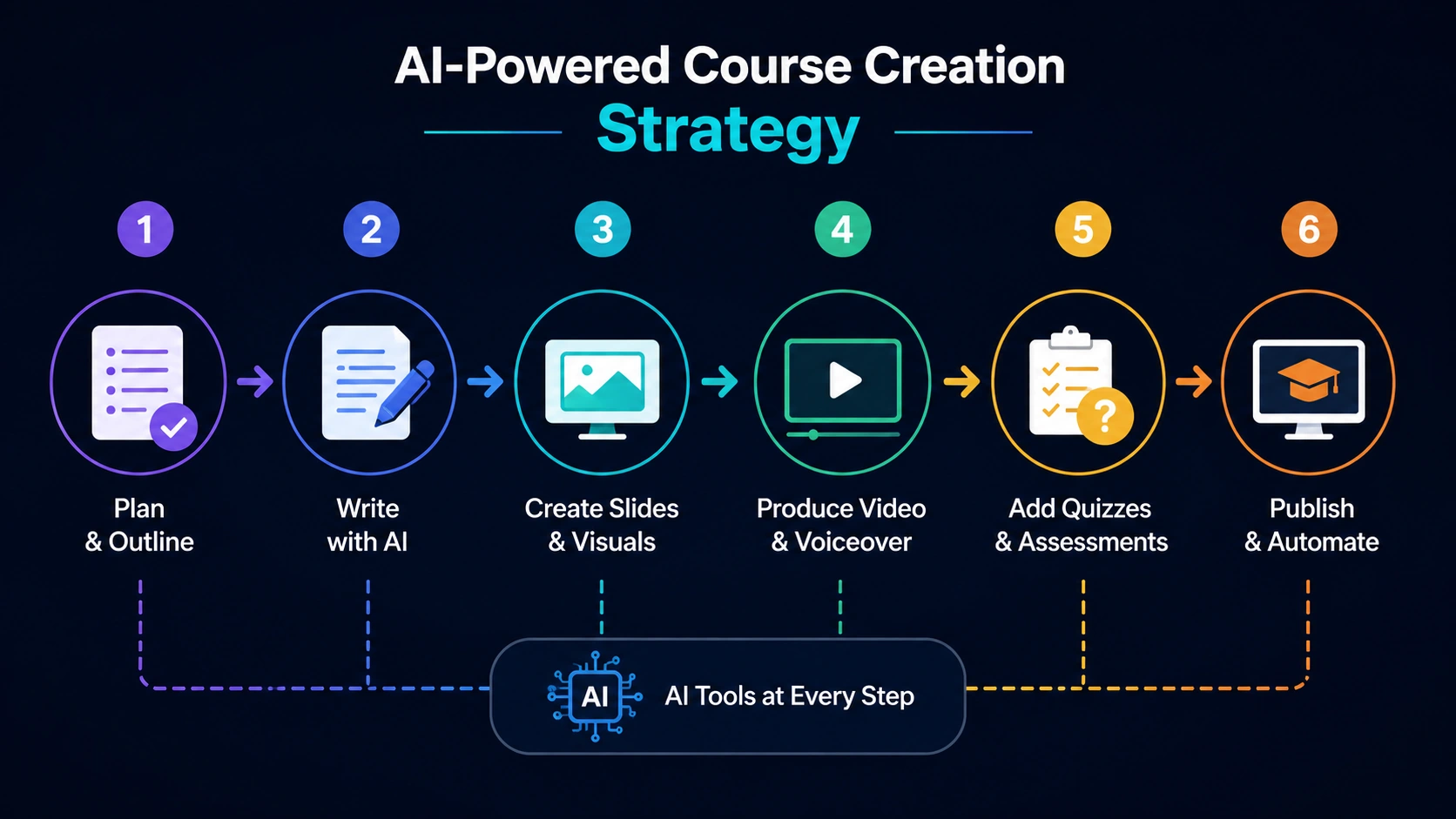
AI-powered course creation workflow for online educators in 2026 — from scripting and slide creation to AI video, quizzes, and course publishing.
How to Build an AI-Powered Course Creation Workflow
A practical six-step workflow most course creators can adapt:
- Outline (ChatGPT) — Generate a module outline with learning objectives. Edit to reflect your actual expertise.
- Script drafting (ChatGPT or Notion AI) — Paste objectives and notes, generate a script draft. Edit heavily — add your own examples and adjust tone.
- Slides (Gamma → Canva) — Use Gamma for the initial structure, then refine in Canva for brand consistency.
- Video or voiceover — Record yourself and edit in Descript, or paste script into Synthesia for AI video. Use ElevenLabs for narration-only content.
- Quiz generation (ChatGPT + Quizgecko) — Generate first-draft questions, review for accuracy and difficulty.
- Upload and automate (Teachable + Zapier) — Publish the course, configure enrollment automations.
Once established, an experienced creator can take a single module from outline to published in 4–6 hours. First-time setup takes longer, but per-module time drops significantly after the first few.
AI vs Human Course Creation: What Still Requires Human Input?
AI handles production well. It doesn't handle teaching.
What AI cannot replace:
- Subject matter expertise — your specific, applied knowledge is the product. AI has general information; you have the depth learners are paying for.
- Instructional design — sequencing learning, knowing where students get stuck, choosing the right analogy for your specific audience. That requires human experience.
- Real examples and case studies — your actual outcomes, mistakes, and client situations make content credible. Generic AI examples don't.
- Voice and personality — learners enroll in courses from specific people. The parts that reflect your thinking and perspective are what build loyalty.
- Quality control — AI scripts, quizzes, and slides all need human review. Factual errors and tone mismatches are common in first-draft output.
The honest framing: AI compresses the production timeline. The expertise, instructional design, and editorial judgment remain yours.
Final Thoughts
The best AI tools for online course creators in 2026 remove production friction — not teaching responsibility.
Descript for creators who record themselves. Synthesia for those who want to skip the camera. ElevenLabs for narration quality. ChatGPT for scripting. Canva for visual design. Teachable for getting started. Kajabi once the business justifies a full platform.
The most effective path: start with the free tiers of ChatGPT, Canva, and Teachable. Build one complete module. Identify where the friction actually is. Then upgrade the specific tool that removes it.
Don't build an expensive stack before you've validated the course concept.
Build one module with free tools. Publish it. Then optimize the workflow.