15 Best AI Tools for Solopreneurs to Run a Business in 2026
Running a business by yourself sounds simple until you actually try it. One day you're the marketer, the next you're the accountant, and somewhere in between you're also supposed to be answering client emails and posting on social media. There's no team to hand things off to, which means every hour you waste on repetitive tasks is an hour you're not spending on the work that actually grows your business.
This is exactly where AI has changed the game for solopreneurs. A well-chosen set of tools can take over the busywork — drafting content, scheduling calls, transcribing meetings, generating designs, chasing invoices — and give you back time to focus on strategy, clients, and growth.
The tools in this guide were selected based on their AI capabilities, ease of use, pricing, free plan availability, integrations, scalability, and overall value for solopreneurs. This isn't a sponsored roundup, and each recommendation includes both strengths and limitations to help readers make informed decisions.
AI is becoming increasingly valuable for one-person businesses. A landmark Harvard Business School study on generative AI in knowledge work found measurable productivity and quality improvements when professionals used AI for appropriate tasks. Those findings help explain why many solopreneurs now rely on AI to automate routine work and spend more time on higher-value business activities.
How These AI Tools Were Selected
Not every "AI tool" deserves a spot on a list like this. A lot of software just bolts a chatbot onto an existing product and calls it AI. To keep this list genuinely useful, each tool was evaluated against a consistent set of criteria.
- AI capabilities — Is the AI functionality core to the product, or just a bonus feature?
- Ease of use — Can a non-technical solopreneur get value from it in the first week?
- Pricing and value — Does the cost match what a one-person business can realistically justify?
- Free plan availability — Is the free tier actually usable, or just a trial in disguise?
- Business integrations — Does it connect with the other tools solopreneurs already rely on?
- Scalability — Can it grow with you if you eventually hire help or expand?
- User reputation — Is it trusted and actively maintained, or a trend that's already fading?
- Overall value for solopreneurs — Does it solve a real, everyday problem for a one-person business?
Those findings align with broader market research. According to the Microsoft 2025 Work Trend Index, AI is rapidly becoming a core part of everyday business operations, with organizations increasingly relying on AI assistants to automate routine work and improve productivity. For solopreneurs, this reinforces the value of choosing AI tools that remove repetitive tasks rather than simply adding another app to manage.
Comparison Table
| Tool | Best For | Free Plan | Starting Price |
|---|---|---|---|
| ChatGPT | Writing & business assistant | Yes | ~$20/mo |
| Perplexity | Research | Yes | ~$20/mo |
| Zapier | Automation | Yes | ~$19.99/mo |
| Grammarly | Writing improvement | Yes | ~$12/mo |
| Jasper | Marketing copy | No | ~$49/mo |
| Canva Magic Studio | Design | Yes | ~$15/mo |
| Midjourney | AI image generation | No | ~$10/mo |
| Descript | Video & podcast editing | Yes | ~$24/mo |
| Fireflies.ai | Meeting transcription | Yes | ~$18/mo |
| Calendly | Scheduling | Yes | ~$12/mo |
| HubSpot | CRM & sales | Yes | Paid tiers vary |
| Framer | Website creation | Yes | ~$10/mo |
| QuickBooks | Accounting | Trial only | Varies by plan |
| Buffer | Social media management | Yes | ~$6/channel |
| ClickUp | Project management | Yes | Paid tiers vary |
Pricing changes frequently, so always confirm current rates on each vendor's official pricing page before subscribing.
The 15 Best AI Tools for Solopreneurs in 2026
1. ChatGPT
Best for: Content creation and general business assistance
ChatGPT has become the default starting point for most solopreneurs, and for good reason. It's flexible enough to draft an email, outline a proposal, brainstorm product names, write code snippets, or just talk through a business decision when you don't have a co-founder to bounce ideas off.
Key features: Conversational AI for writing and problem-solving, multimodal input (text, images, files), custom GPTs for repeatable workflows, and a growing set of integrations through plugins and connectors.
Pros: Extremely versatile, huge community and documentation, useful across nearly every business function.
Cons: Free tier has usage limits, and quality of output still depends heavily on how well you write your prompts.
Pricing: Free tier available; paid plans start around $20/month.
Why It Stands Out: It's the closest thing to a general-purpose assistant that a solopreneur can get, and it plays well with almost every workflow you'll build around the other tools on this list.
Best alternative: Claude, which tends to produce longer, more consistent long-form writing.
2. Perplexity
Best for: Research and market analysis
Perplexity works like a search engine that actually reads the internet for you and gives you a synthesized answer with sources attached. For solopreneurs who don't have a research team, that's a genuinely big time-saver.
Key features: Real-time web search combined with AI summarization, source citations, and focused research modes for deeper topics.
Pros: Fast way to gather market data, competitor information, or background research; citations make it easier to verify claims.
Cons: Not designed for long-form content generation, and results are only as good as the sources it pulls from.
Pricing: Free tier available; Pro plan starts around $20/month.
Why It Stands Out: It removes hours of manual searching when you're validating an idea, checking competitors, or writing anything that needs current information.
Best alternative: ChatGPT with browsing enabled, though Perplexity is generally faster for pure research tasks.
3. Zapier
Best for: Business automation
Zapier connects the apps you already use so they can talk to each other without you manually copying data between them. For a solopreneur, this is often the difference between spending 30 minutes a day on admin work and spending zero.
Key features: Thousands of app integrations, multi-step automated workflows ("Zaps"), and AI-assisted automation suggestions.
Pros: Connects almost any SaaS tool you can think of; no coding required.
Cons: Costs can climb quickly as your automation volume grows, and complex workflows can get confusing to manage.
Pricing: Free tier for basic automations; paid plans start around $19.99/month.
Why It's Worth Considering: Once you have two or more tools that need to share information — like a form submission triggering an email — Zapier pays for itself in saved time.
Best alternative: Make (formerly Integromat), which offers more advanced logic at a similar price point.
4. Grammarly
Best for: Writing improvement
Whether you're sending a client proposal or a quick Slack message, Grammarly checks your writing for clarity, tone, and grammar in real time. It's less flashy than a full AI writer, but it quietly prevents a lot of embarrassing typos.
Key features: Tone detection, rewrite suggestions, plagiarism checking, and browser-wide integration.
Pros: Works everywhere you type — email, docs, social media — and catches mistakes other tools miss.
Cons: Advanced suggestions and tone rewrites are locked behind the paid plan.
Pricing: Free tier available; Premium starts around $12/month.
Why It's Worth Considering: It's a low-cost safety net for anyone who sends a lot of client-facing communication and doesn't have an editor to double-check their work.
Best alternative: ProWritingAid, which some writers prefer for deeper style analysis.
5. Jasper
Best for: Marketing copy
Jasper is built specifically for marketing content — ad copy, landing pages, product descriptions — rather than general writing. It's more expensive than ChatGPT, but it's tuned for output that's ready to publish with less editing.
Key features: Brand voice settings, marketing-specific templates, and team collaboration features.
Pros: Produces more polished marketing copy out of the box than general-purpose chatbots.
Cons: No free plan, and the price is hard to justify if you're not producing marketing content regularly.
Pricing: Starts around $49/month.
Why This Tool Is a Strong Choice: If marketing copy is a core, recurring part of your business — think ecommerce or agency work — the specialization can save real editing time.
Best alternative: ChatGPT with a well-built custom prompt library, which covers similar ground for free.
6. Canva Magic Studio
Best for: Design and branding
Canva has quietly become one of the most useful AI tools for non-designers. Magic Studio adds AI-generated images, automatic layout suggestions, and one-click background removal on top of Canva's already huge template library.
Key features: Text-to-image generation, Magic Write for on-brand captions, and Magic Design for instant layout options.
Pros: Genuinely easy to use even with zero design skills; huge template library.
Cons: The most useful AI features are gated behind the Pro plan.
Pricing: Free tier available; Pro starts around $15/month.
Why This Tool Is a Strong Choice: For solopreneurs who need social graphics, presentations, or simple branding assets without hiring a designer, Canva remains the fastest path to something that looks professional.
Best alternative: Adobe Express, which offers similar AI design tools with tighter Adobe ecosystem integration.
7. Midjourney
Best for: AI image generation
When you need a genuinely original, high-quality image — for a book cover, a unique brand illustration, or standout marketing visuals — Midjourney tends to produce more artistically distinct results than most competitors.
Key features: Text-to-image generation tuned for artistic quality, style customization, and upscaling.
Pros: Consistently high-quality, distinctive visual output.
Cons: No traditional free plan, prompt-writing has a learning curve, and image licensing terms should be reviewed carefully for commercial use.
Pricing: Subscription plans start around $10/month.
Why This Tool Is a Strong Choice: If Canva's templates feel too generic for your brand, Midjourney is worth the investment for a handful of truly custom visuals.
Best alternative: DALL·E, which is more tightly integrated with ChatGPT for quick, casual image needs.
8. Descript
Best for: Video and podcast editing
Descript edits video and audio by editing the transcript — delete a sentence from the text, and it removes that clip from your recording. That single feature makes it dramatically faster than traditional editing software for solopreneurs making tutorials, podcasts, or course content.
Key features: Transcript-based editing, filler-word removal, and AI voice tools for cleanup and narration.
Pros: Editing by text is genuinely faster for beginners than timeline-based software.
Cons: Advanced features require a paid plan, and AI voice cloning raises ethical considerations worth thinking through before use.
Pricing: Free tier available; paid plans start around $24/month.
Why It Stands Out: If you're creating any kind of video or audio content on a regular basis without an editor, Descript will save you hours per episode.
Best alternative: CapCut, which is free and simpler, though less powerful for long-form editing.
9. Fireflies.ai
Best for: Meeting transcription
Fireflies joins your calls, records them, and produces a searchable transcript along with an AI summary of key points and action items. For solopreneurs juggling client calls all day, it removes the need to take notes during a meeting.
Key features: Automatic transcription, AI-generated summaries, and searchable meeting archives.
Pros: Frees you up to actually pay attention during calls instead of scribbling notes.
Cons: Free plan has limited transcription minutes, and accuracy can dip with heavy accents or poor audio.
Pricing: Free tier available; paid plans start around $18/month.
Why It's Worth Considering: Client calls are where a lot of important details get lost. Fireflies makes sure nothing falls through the cracks.
Best alternative: Otter.ai, which offers a similar core feature set.
10. Calendly
Best for: Scheduling automation
Calendly eliminates the back-and-forth of finding a meeting time. You share a link, the other person picks a slot, and it's automatically added to your calendar. Simple, but it saves a surprising amount of time over a year.
Key features: Automated scheduling links, calendar sync, and AI-assisted meeting summaries in some plans.
Pros: Massive time-saver for anyone booking client calls regularly.
Cons: More advanced routing and team features are locked behind paid tiers.
Pricing: Free tier available; paid plans start around $12/month.
Why This Tool Is a Strong Choice: If you spend any time emailing back and forth to schedule calls, this alone justifies the switch.
Best alternative: Cal.com, an open-source alternative with similar core functionality.
11. HubSpot
Best for: CRM and sales
HubSpot's free CRM tier is generous enough that many solopreneurs never need to pay for a customer relationship tool at all — at least until their client list and sales process get more complex.
Key features: Contact and deal tracking, email automation, and AI-assisted content and lead-scoring tools in paid tiers.
Pros: The free tier is genuinely usable for a one-person business, not just a stripped-down demo.
Cons: Costs increase quickly once you need marketing automation or advanced reporting.
Pricing: Free CRM available; paid tiers vary based on features needed.
Why It Stands Out: As soon as you have more than a handful of active clients or leads, tracking them in a spreadsheet stops working. HubSpot's free tier fills that gap without upfront cost.
Best alternative: Pipedrive, which some solopreneurs prefer for its simpler sales-pipeline focus.
12. Framer
Best for: Website creation
Framer lets you build a polished, professional-looking website using AI-assisted design tools, without needing to know how to code. It's aimed more at design quality than WordPress-style flexibility.
Key features: AI website generation from a prompt, responsive design tools, and built-in hosting.
Pros: Produces visually strong websites quickly, even for non-designers.
Cons: Less flexible than WordPress for complex site structures or heavy content management needs.
Pricing: Free tier available; paid plans start around $10/month.
Why It's Worth Considering: For a solopreneur who needs a clean, modern site fast — a portfolio, landing page, or simple business site — Framer gets you there without a developer.
Best alternative: Webflow, which offers more customization at the cost of a steeper learning curve.
13. QuickBooks
Best for: Accounting
QuickBooks remains one of the most trusted names in small business accounting, and its AI features now help categorize expenses, flag anomalies, and speed up invoicing.
Key features: AI-assisted expense categorization, automated invoicing, and financial reporting.
Pros: Well-established, widely accepted by accountants, and integrates with most banking and payment systems.
Cons: No permanent free plan, and pricing can feel steep for a very early-stage solo business.
Pricing: Trial available; paid plans vary depending on features.
Why This Tool Is a Strong Choice: Bookkeeping is one of the least enjoyable parts of running a business alone, and QuickBooks' automation genuinely cuts down the time spent on it.
Best alternative: Wave, which offers a free tier better suited to very early-stage businesses.
14. Buffer
Best for: Social media management
Buffer schedules your social media posts in advance and uses AI to help draft captions and suggest optimal posting times, so you're not manually posting throughout the day.
Key features: AI caption assistance, post scheduling across multiple platforms, and basic analytics.
Pros: Simple interface, reasonably priced per social channel.
Cons: Pricing scales per channel, which adds up if you're active on many platforms.
Pricing: Free tier available; paid plans start around $6 per channel per month.
Why It Stands Out: Batching your social content once a week instead of posting live every day is one of the simplest time-savers on this entire list.
Best alternative: Later, which some creators prefer for its visual content calendar.
15. ClickUp
Best for: Project management
ClickUp combines task management, docs, and goal tracking in one place, with AI features that summarize tasks, draft updates, and help prioritize your to-do list.
Key features: AI task summaries, customizable workflows, and built-in docs and goal tracking.
Pros: Extremely flexible and can replace several separate tools (notes, tasks, docs) at once.
Cons: The flexibility can be overwhelming at first, with a real setup learning curve.
Pricing: Free tier available; paid tiers vary based on features and usage.
Why It's Worth Considering: As your client list and project count grow, a single place to track everything prevents things from slipping through the cracks.
Best alternative: Notion, which offers similar flexibility with a slightly gentler learning curve for note-taking-heavy workflows.
Which AI Tool Fits Your Business Needs?
Not every solopreneur needs the same AI software. The right choice depends on the task you want to simplify first. Use the table below to quickly identify the tool that best matches your current business needs.
| Your Primary Need | Consider This Tool | Reason |
|---|---|---|
| General writing and brainstorming | ChatGPT | Flexible for content creation, planning, email drafting, and everyday business tasks. |
| Market and competitor research | Perplexity | Provides AI-powered research with source-backed answers and web citations. |
| Workflow automation | Zapier | Connects business apps to automate repetitive workflows without coding. |
| Grammar and editing | Grammarly | Improves grammar, clarity, tone, and readability across documents and emails. |
| Marketing copy | Jasper | Designed specifically for marketing campaigns, ads, landing pages, and product descriptions. |
| Graphic design | Canva Magic Studio | Helps create professional graphics, presentations, and social media content quickly. |
| AI-generated images | Midjourney | Produces high-quality AI-generated artwork and custom marketing visuals. |
| Video and podcast editing | Descript | Simplifies video and audio editing with AI-powered transcription and editing tools. |
| Meeting notes and summaries | Fireflies.ai | Automatically records, transcribes, and summarizes virtual meetings. |
| Appointment scheduling | Calendly | Automates meeting scheduling and eliminates back-and-forth emails. |
| Customer relationship management | HubSpot | Organizes contacts, tracks leads, and manages customer interactions. |
| Website creation | Framer | Uses AI-assisted tools to speed up website design and publishing. |
| Accounting and bookkeeping | QuickBooks | Simplifies invoicing, expense tracking, and financial management. |
| Social media scheduling | Buffer | Plans, schedules, and publishes content across multiple social platforms. |
| Project and task management | ClickUp | Organizes projects, documents, and daily tasks in one collaborative workspace. |
Best AI Tool Stacks for Different Solopreneurs
Recommended AI tool stacks for different types of solopreneurs based on their primary business needs.
Freelancers
ChatGPT for writing and client communication, Grammarly for polishing emails and proposals, Calendly for booking calls, and HubSpot's free CRM for tracking leads. This combination covers writing, client management, and scheduling without any major upfront cost.
Content Creators
ChatGPT or Claude for scripting and captions, Canva Magic Studio for thumbnails and graphics, Descript for video and podcast editing, and Buffer for scheduling posts across platforms. This stack covers the full pipeline from idea to published content.
Consultants & Coaches
Fireflies.ai for capturing and summarizing client calls, Calendly for scheduling sessions, HubSpot for tracking client relationships, and ChatGPT for drafting proposals and follow-up notes. This stack is built around the meeting-heavy nature of consulting work.
E-commerce Business Owners
Canva for product graphics, Jasper for product descriptions and ad copy, Zapier to connect your store with email and fulfillment tools, and QuickBooks for tracking revenue and expenses. This combination covers marketing, operations, and finances in one stack.
Best AI Stack Under $50 per Month
A lean but effective stack: ChatGPT ($20), Grammarly free tier, Canva Pro ($15), and Calendly free tier, leaving room for a low-cost automation tool like Zapier's starter plan if needed. This covers writing, design, and scheduling for well under $50 a month, relying on free tiers to fill the gaps.
Best AI Stack Under $100 per Month
Once your budget allows more flexibility: ChatGPT ($20), Canva Pro ($15), Zapier ($19.99), Fireflies.ai ($18), and Calendly Pro ($12) — combining writing, design, automation, meeting notes, and scheduling for roughly $85 a month, with a small buffer left for occasional extras.
Best Free AI Tools for Solopreneurs
Several tools on this list offer free plans that are genuinely usable, not just trial gimmicks: ChatGPT's free tier handles most day-to-day writing needs, Canva's free plan covers basic design work, Calendly's free plan is enough for simple scheduling, and HubSpot's free CRM can manage a modest client list without any cost. The limitations usually show up around usage caps, advanced AI features, and team collaboration — all things that matter less when you're just starting out.
How to Choose the Right AI Tool
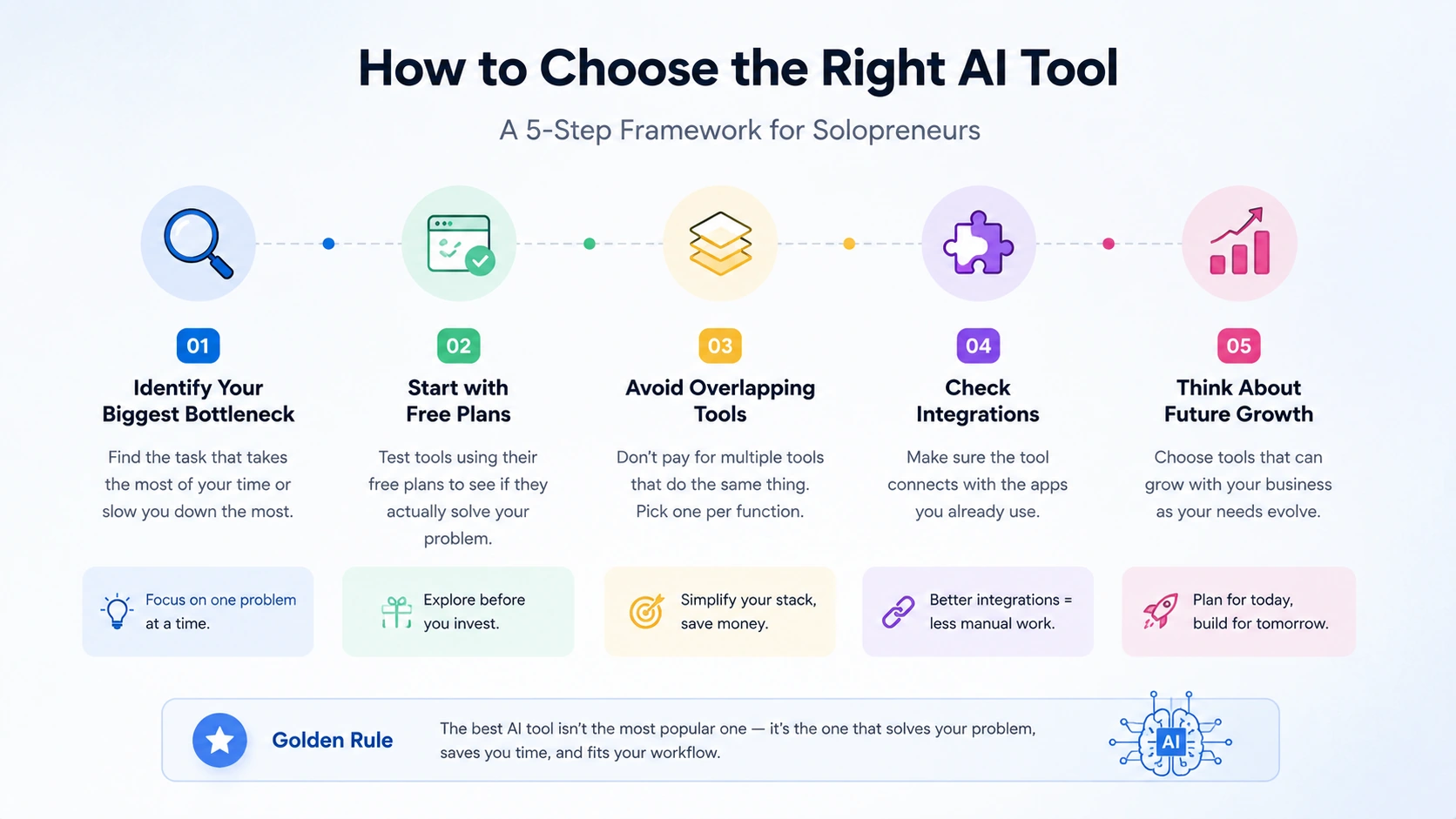
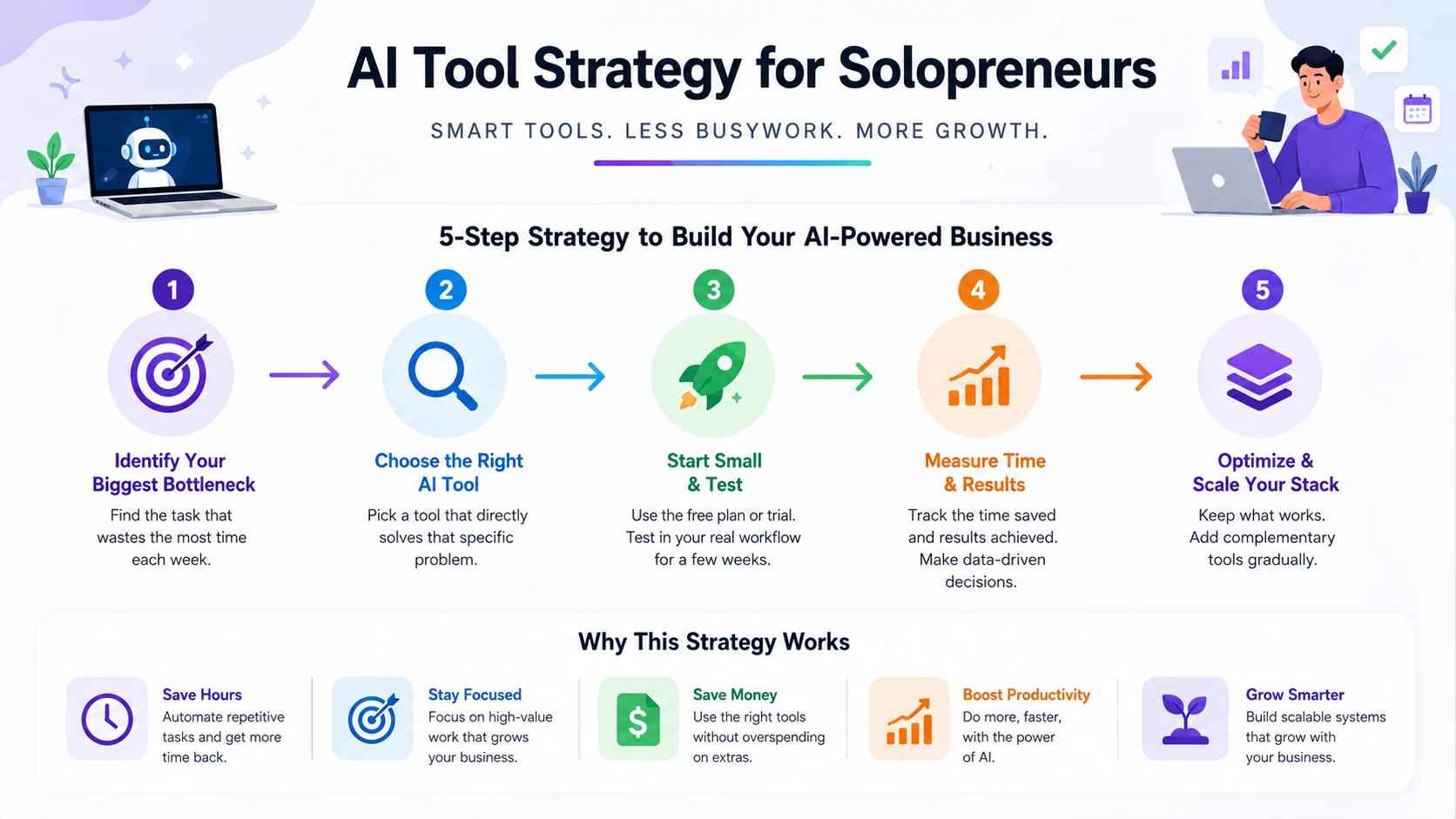
A simple five-step framework to help solopreneurs choose AI tools that match their business needs and future growth.
Identify your biggest bottleneck
Don't buy tools speculatively. Look at where your time actually disappears each week — writing, scheduling, editing, bookkeeping — and start there.
Start with free plans
Most tools on this list have a usable free tier. Test before you commit financially, especially in the first few months of using a new tool.
Avoid overlapping tools
It's easy to end up paying for two writing assistants or two design tools that do almost the same thing. Pick one per function and get comfortable with it before adding more.
Check integrations
A tool that doesn't connect to what you already use creates extra manual work, which defeats the purpose of automating in the first place.
If you work with customer data or sensitive business information, it's also worth evaluating the security features of the AI tools you choose. Read our guide to the best AI cybersecurity tools to learn what protections to look for.
Think about future growth
If you plan to eventually bring on contractors or employees, favor tools with reasonable team pricing rather than ones built purely for solo use.
→ Not sure which AI tool fits your business? Use our AI Tool Selector to get a personalized recommendation in under 30 seconds.
Common Mistakes Solopreneurs Make When Buying AI Tools
- Paying for overlapping software — subscribing to multiple tools that solve the same problem.
- Buying enterprise features too early — paying for team seats or advanced reporting you don't need yet.
- Ignoring integrations — choosing tools in isolation instead of checking how they'll work together.
- Not considering data privacy — especially important if you handle sensitive client information.
- Chasing trends instead of solving problems — adopting the newest AI tool without a clear use case for it.
Final Recommendations
There's no single "best" AI tool for every solopreneur — it depends on what's actually slowing your business down. Someone spending hours on client calls needs a different stack than someone drowning in design work or bookkeeping.
The smartest approach is to start small: pick one or two tools that solve your most immediate bottleneck, use them consistently for a month, and only then decide whether to expand your stack. Building an AI-powered business one deliberate step at a time will serve you far better than subscribing to everything at once and hoping it works out.
If you're still unsure which software fits your business, our complete guide on choosing AI software for business walks through the key factors to consider before making a decision.
The goal isn't to replace yourself with AI—it's to free up more time for the work only you can do