How We Evaluated These AI Automation Tools
To evaluate the tools in this guide, we reviewed them across practical SMB workflows including customer support handling, scheduling automation, CRM updates, bookkeeping operations, content drafting, and internal operational processes.
Each platform was compared based on:
- ease of implementation
- automation capability
- workflow flexibility
- integration ecosystem
- pricing transparency
- learning curve
- operational ROI potential
- suitability for small business teams
We also reviewed public customer feedback, onboarding experience, feature documentation, pricing structures, and real-world workflow fit for businesses operating with lean teams and limited technical resources.
Rather than focusing only on AI features, we prioritised tools that could realistically reduce repetitive operational work without requiring enterprise-level implementation complexity.
What We Noticed While Testing These Tools
Over the past few months, we tested several of these AI tools across common SMB workflows like content drafting, scheduling, CRM automation, and support handling.
The biggest surprise wasn't the raw automation capability — it was how much operational friction came from repetitive coordination work that most teams ignore until they measure it.
For example:
- Zapier removed hours of manual CRM updates and follow-up tasks.
- Claude significantly reduced first-draft writing time for long-form content.
- Xero AI handled recurring reconciliation patterns more accurately after a few weeks of usage history.
- Scheduling automation removed constant back-and-forth emails almost immediately.
The tools that delivered the strongest ROI weren't necessarily the most advanced — they were the ones solving a repetitive task the team already handled every single day.
Why Small Businesses Are Finally Taking Automation Seriously
"Most small business operators aren't failing at strategy — they're drowning in the operational work that surrounds it."
A two-person ecommerce team spending five hours a week copy-pasting customer messages. A consultant manually booking meetings back and forth over email. A four-person agency rewriting the same onboarding documents for every new client. That's not business growth — it's administrative drag dressed up as productivity.
The economics have shifted. In 2026, AI automation tools aren't expensive enterprise software or developer projects. They're monthly subscriptions that cost less than a single contractor hour, and they handle the repetitive parts of operations that no one should be spending their time on.
The global business process automation market is projected to exceed $26 billion by 2028, with small and mid-sized businesses driving the fastest adoption growth. The reason is straightforward — the gap between what these tools cost and what they recover in labour hours has never been larger.
- AI adoption among small businesses has increased rapidly since 2023, especially in customer support, scheduling, content creation, and operational workflows.
- Businesses implementing workflow automation often report measurable reductions in repetitive manual work and administrative overhead.
- Customer support automation tools can significantly reduce response times for common enquiries and repetitive tickets.
- Scheduling, bookkeeping, and CRM automation are among the most commonly adopted AI-assisted workflows for SMBs.
- Many businesses that begin with one automation tool gradually expand into broader operational automation after seeing early ROI.
The businesses that start with one automation almost always expand — not because they're chasing the latest trend, but because the ROI on the first tool justifies the investment in the second.
What "Replacing Repetitive Work" Actually Means
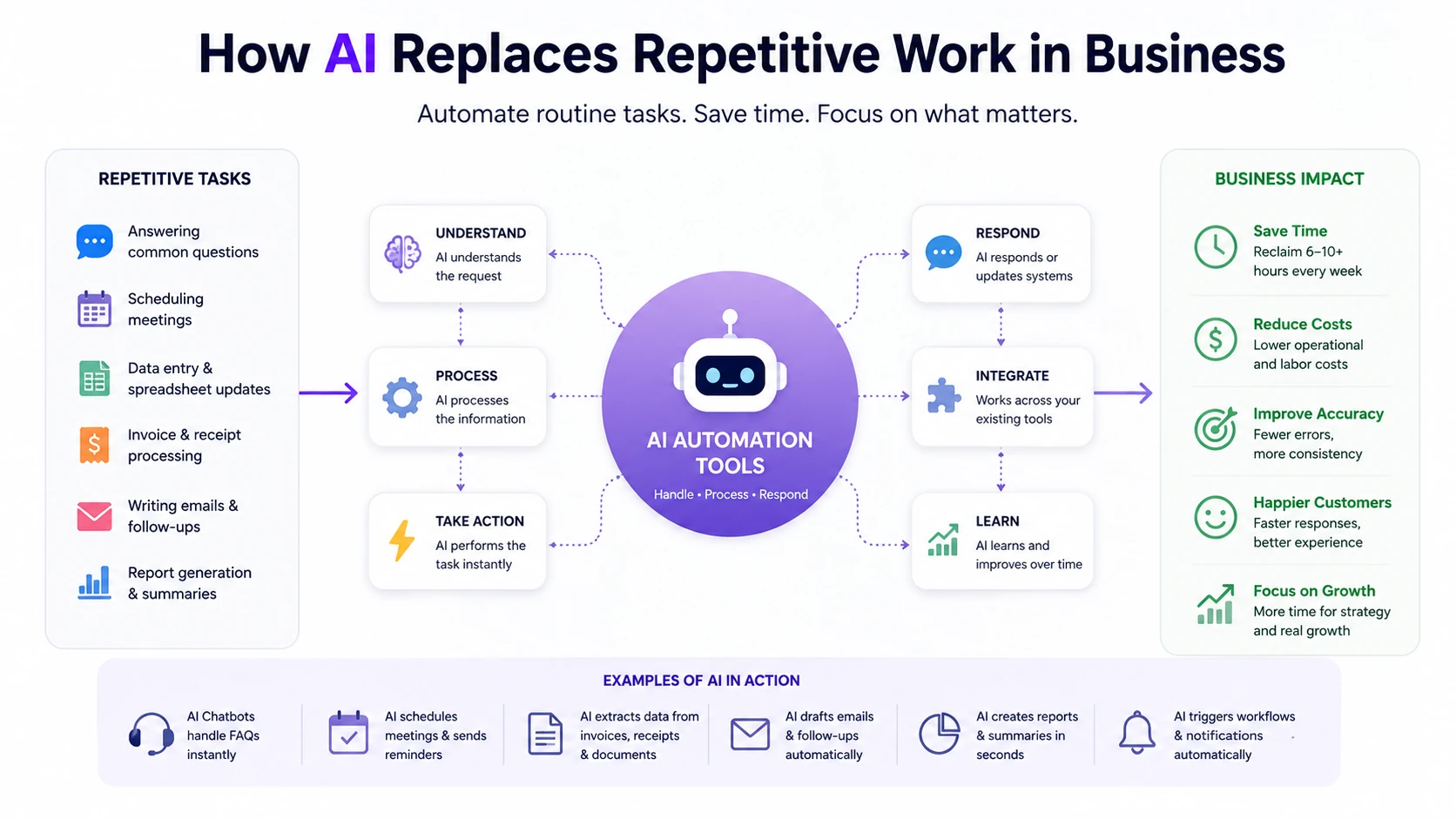
A comprehensive framework of how AI automation replaces routine manual tasks, allowing businesses to focus on growth and ROI in 2026.
There's a lot of noise around AI replacing jobs. That's not what this article is about.
What AI is genuinely good at in a business context:
- Handling inbound volume — customer questions, support tickets, booking requests
- Generating first drafts — documents, emails, reports, summaries
- Processing data — reconciling transactions, categorising expenses, extracting information
- Scheduling coordination — back-and-forth meeting booking, reminders, follow-ups
- Triggering multi-step workflows — when X happens, do Y and notify Z
"AI doesn't eliminate business work — it eliminates the parts of work that shouldn't require a human in the first place."
If a task follows a pattern, repeats frequently, and doesn't require judgment or relationship context, it's automatable. The businesses getting the most value from these tools in 2026 aren't the most technically sophisticated — they're the ones who identified their highest-frequency, lowest-complexity bottlenecks and addressed them first.
If you're evaluating AI tools across multiple categories, this is a useful starting point: Choosing AI Software for Business: Complete 2026 Guide.
The Categories of Repetitive Work AI Is Handling in 2026
Understanding the category matters before buying. The most common and costly mistake is purchasing a tool that doesn't match the problem you actually have.
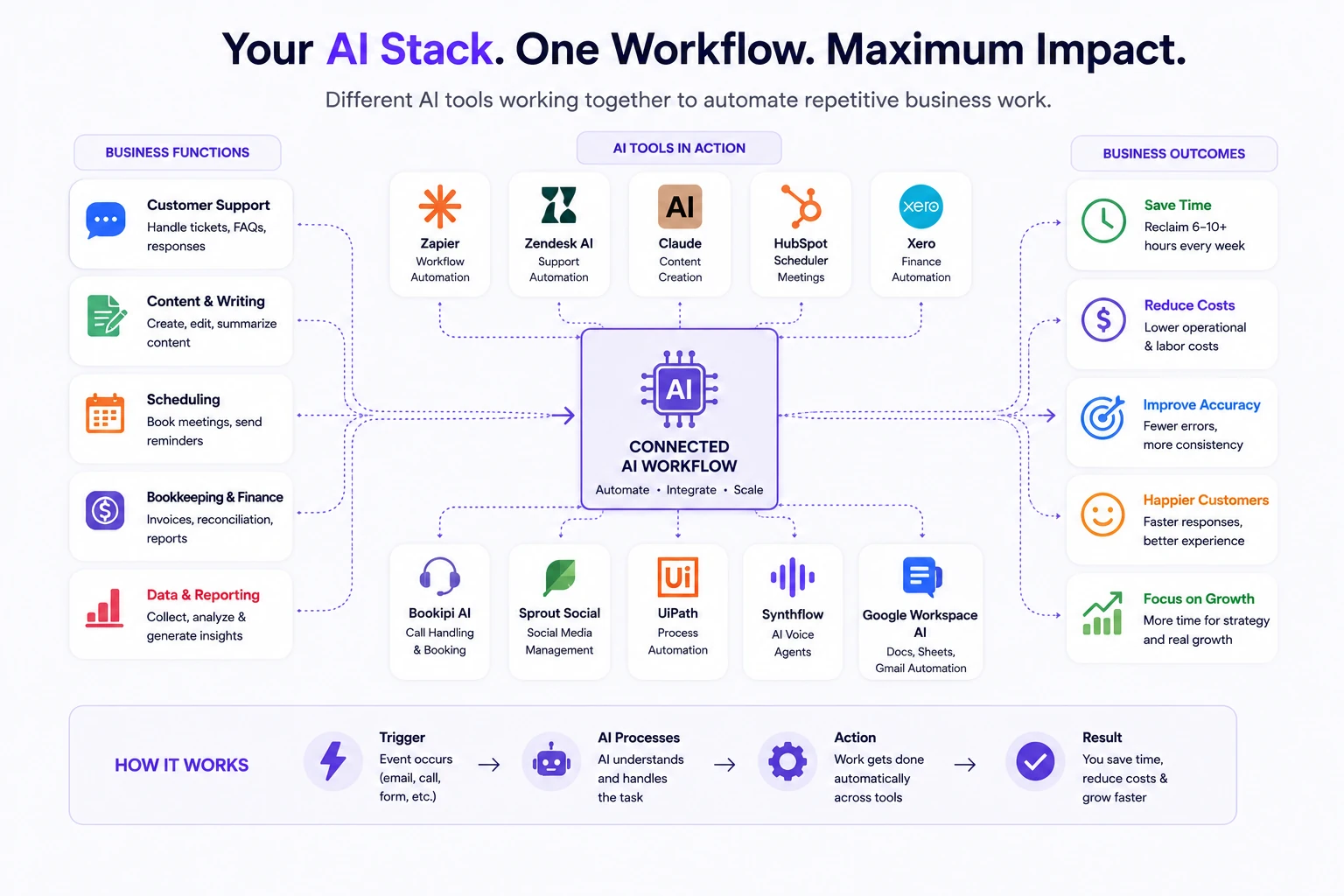
Modern SMB automation stacks usually combine workflow automation, support AI, content systems, and operational tools into one connected process.
1. Workflow Automation
Zapier AI, Make (Integromat)
Connects your apps and triggers actions automatically. When a form is submitted, create a CRM contact, send a confirmation email, and add a row to a spreadsheet — without anyone touching it. This is the connective tissue that makes everything else work together.
2. Customer Support Automation
Zendesk AI, Intercom, Tidio
Handles inbound support volume — FAQs, order status, basic troubleshooting — without requiring a human to respond to every ticket. For e-commerce businesses and SaaS teams with high support volume, this is usually the single highest-ROI automation.
3. Content and Document Work
Claude, Jasper, Copy.ai
Drafts emails, reports, proposals, social posts, and summaries. The value isn't just speed — it's consistency. The same quality output regardless of who on the team handles the task.
4. Financial Operations
Xero AI, QuickBooks AI
Reconciles transactions, categorises expenses, generates invoices, and flags anomalies. Removes the hours bookkeepers spend on data entry and pattern matching that software handles faster and more accurately.
5. Scheduling and Calendar Management
HubSpot Scheduler, Calendly, Motion
Eliminates the back-and-forth of booking meetings, coordinates across time zones, and manages reminders and follow-ups. For client-facing teams, this alone is worth the cost.
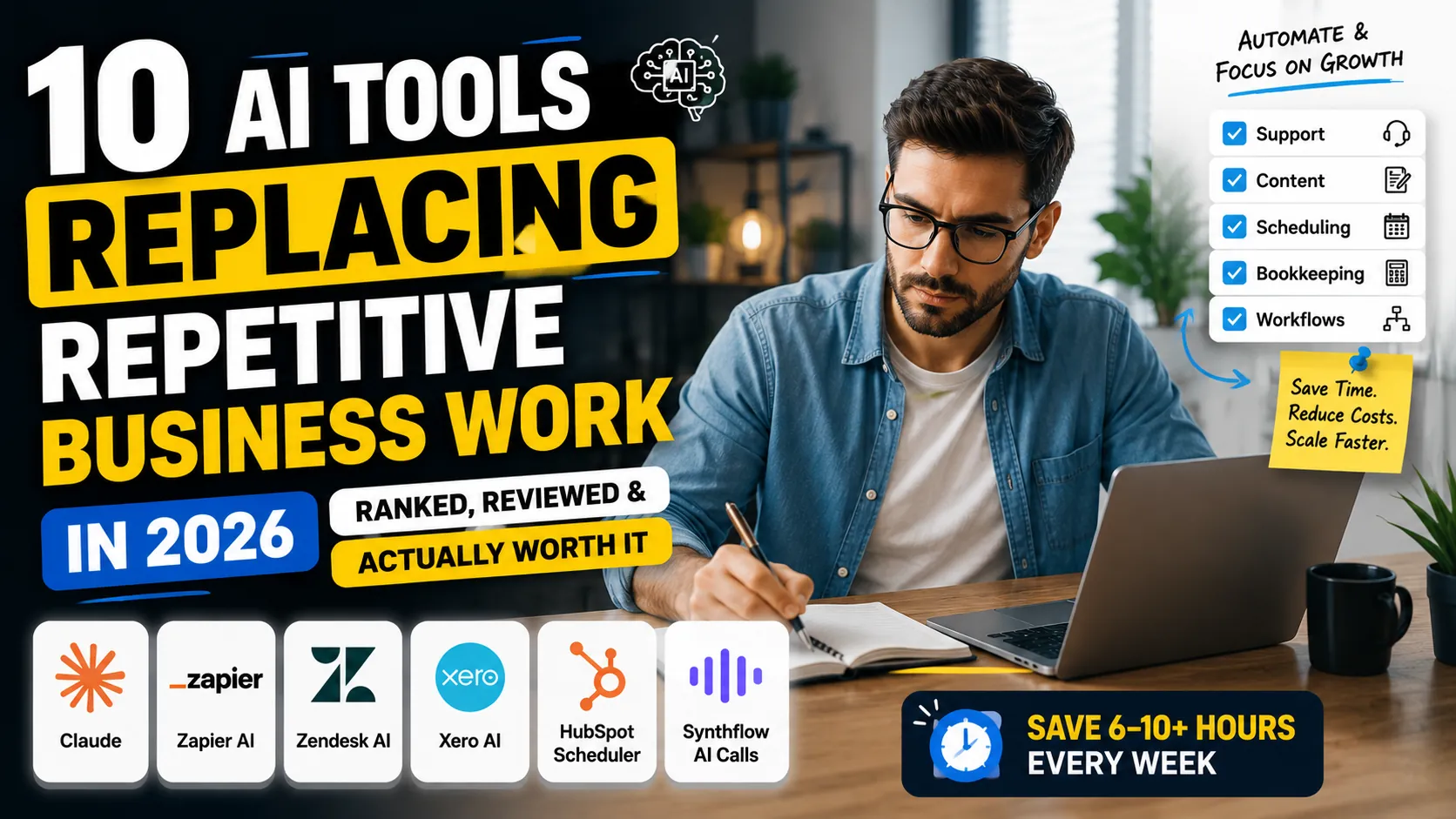
Quick Comparison: 10 AI Tools Replacing Repetitive Business Work
| Tool | Category | Starting Price | Best For | Est. Time Saved/Week |
|---|---|---|---|---|
| Zapier AI | Workflow Automation | Free / $19.99/mo | Cross-app automation | 5–8 hrs |
| Zendesk AI | Customer Support | $55/agent/mo | Support ticket handling | 6–10 hrs |
| Claude | Content & Documents | Free / $20/mo | Writing, analysis, drafts | 4–7 hrs |
| Feather AI | SEO Content | From $59/mo | Blog + SEO automation | 3–6 hrs |
| HubSpot Scheduler | Scheduling | Free | Meeting booking | 2–4 hrs |
| Xero AI | Bookkeeping | From $15/mo | Financial reconciliation | 4–6 hrs |
| Bookipi AI Receptionist | Receptionist | From $29/mo | Calls, booking, intake | 3–5 hrs |
| Sprout Social | Social Media | From $249/mo | Social scheduling + analytics | 3–5 hrs |
| UiPath | RPA / Process Automation | Free / custom | Complex workflow automation | 8–15 hrs |
| Synthflow | AI Phone Calls | From $29/mo | Inbound/outbound calls | 4–8 hrs |
Why More Small Businesses Are Moving Routine Operations to AI
The pressure points are real and they're converging. In the US, UK, Canada, and Australia, payroll costs have risen consistently over the past three years. Finding and keeping reliable staff for administrative roles is harder and more expensive than it was in 2022. Support queues are longer. Content demands are higher. And lean teams are being asked to do more with no additional headcount.
The result: repetitive operational work that used to require three people is increasingly handled by one person with the right tools. Not because the business owner made a philosophical decision about AI — but because the economics forced a practical one.
According to research from McKinsey, generative AI could automate a significant portion of repetitive business activities across customer operations, marketing, finance, and administrative workflows over the next decade.
The tools in this guide aren't addressing a theoretical efficiency problem. They're addressing a real operational cost that most small businesses are already absorbing — just invisibly, as time rather than money.
Most small businesses are no longer adopting AI because it's trendy — they're adopting it because repetitive operational work has become too expensive to handle manually. The businesses seeing the strongest ROI are usually the ones automating high-frequency admin tasks first: customer support, scheduling, bookkeeping, and internal communication workflows.
The 10 Best AI Tools Replacing Repetitive Business Work
1. Zapier AI — Best for Cross-App Workflow Automation
Best for: Any business running multiple tools that need to talk to each other
Zapier has been the backbone of small business automation for years. The 2026 version with AI layers adds something genuinely useful on top: natural language workflow creation, AI-powered data transformation, and smart routing that adjusts based on content rather than just conditions.
The practical use case most SMBs start with: a new lead fills out a form → Zapier creates a CRM contact, sends a personalised welcome email, adds a Slack notification for the team, and schedules a follow-up task — all without anyone touching it. If that sounds basic, multiply it across 20 workflows and consider what it replaces.
What It Automates:
- Multi-step workflows across 7,000+ app integrations
- AI-powered data transformation between apps
- Automated lead routing, notifications, and follow-ups
- Document creation triggered by form submissions or CRM events
Best Use Case: E-commerce businesses connecting Shopify, Gmail, Klaviyo, and a spreadsheet into a single automated order management flow.
Key AI Features:
- Natural language workflow builder (describe a workflow, Zapier builds it)
- AI data formatter — transforms messy inputs into clean structured data
- Smart conditional routing based on content analysis
- AI step suggestions as you build
Real Business Impact: Teams using Zapier for core operational workflows report recovering 5–8 hours per week from manual data entry and notification tasks alone. For a 3-person team at $30/hour, that's over $1,800/month in recovered labour cost.
Pricing: Free plan (5 Zaps) → Starter at $19.99/month → Professional at $49/month → Teams at $69/month
Pros:
- Largest app integration library available (7,000+)
- No coding required for most workflows
- AI builder dramatically reduces setup time
- Reliable and battle-tested for SMB use
Cons:
- Costs can escalate with high task volumes
- Complex multi-step logic still requires some learning curve
- Not suited for heavy data processing (use Make or UiPath instead)
Best Alternative: Make (Integromat) — more powerful for complex logic, steeper learning curve
Ideal Business Size: 1–50 employees
Mini Verdict: Zapier AI is the starting point for most SMB automation stacks. If your apps aren't talking to each other, this is the first tool to implement — full stop.
2. Zendesk AI — Best for Customer Support Automation
Best for: E-commerce, SaaS, and service businesses with high inbound support volume
Customer support is often the first place that breaks as a business scales. Volume goes up, response times lengthen, and the team spends increasing hours answering the same questions. Zendesk AI addresses this at the intake level — automating responses to common enquiries, routing tickets intelligently, and helping agents close tickets faster with AI-assisted replies.
The difference between Zendesk with AI and without it: support teams handling 150 tickets per week typically drop to handling 60–70 tickets that actually require human judgment. The rest are resolved automatically.
What It Automates:
- Tier-1 support responses (FAQs, order status, basic troubleshooting)
- Ticket routing and priority classification
- Agent reply suggestions based on ticket content
- Post-resolution follow-up and satisfaction surveys
Best Use Case: An e-commerce business receiving 200+ support requests per week — where 40–50% are repeat questions about shipping, returns, and product information.
Key AI Features:
- AI-generated response suggestions for agents
- Intelligent ticket triage and routing
- Automated resolution of common request types
- Conversation summaries for agent handoffs
Real Business Impact: Businesses deploying Zendesk AI report a 35–50% reduction in first-response time and an average ticket deflection rate of 30–45% on standard support queues. For a team of two support staff, that's effectively the equivalent of adding a third person.
Pricing: Suite Team at $55/agent/month → Suite Growth at $89/agent/month → Suite Professional at $115/agent/month
Pros:
- Industry-standard support platform with AI well-integrated
- Scales from small teams to enterprise without platform change
- Strong reporting and SLA management
- Large ecosystem of integrations
Cons:
- Higher price point than alternatives for small teams
- AI features require Suite tier or above
- Setup and configuration takes time for full effectiveness
Best Alternative: Intercom — stronger for SaaS/product companies; Tidio — better value for small e-commerce teams
Ideal Business Size: 3–100 employees
Mini Verdict: If customer support is your primary bottleneck, Zendesk AI is the most mature and reliable solution available. The cost is justified once you're handling more than 80 tickets per week.
3. Claude — Best for Content, Documents, and Knowledge Work
Best for: Agencies, consultants, content teams, and any business that produces a lot of written work
Claude is Anthropic's AI assistant, and in a business context it functions as an always-available writing partner, analyst, and document processor. The practical applications for SMBs are immediate: drafting client proposals, rewriting internal documentation, summarising research, generating first-draft content at scale, and handling the written communication that currently takes up a disproportionate amount of operational time.
For technical teams, Claude is also widely used for code generation, debugging assistance, and explaining complex development workflows in plain language.
What makes Claude especially valuable for SMBs: Claude handles nuance, ambiguity, and context better than most AI writing tools. That means outputs require less editing — which is where the actual time savings materialise.
What It Automates:
- First drafts of proposals, reports, emails, and contracts
- Research summarisation and document analysis
- Content creation across formats (blog posts, social, newsletters)
- Internal documentation and process write-ups
Best Use Case: A marketing agency producing 15–20 pieces of client content per week — using Claude to generate first drafts and reduce writing time by 60–70% per piece.
Key AI Features:
- Long context window for processing large documents
- Projects feature for persistent, context-aware workspaces
- Advanced writing and editing capability
- Code generation, debugging assistance, and workflow scripting for technical teams
Real Business Impact: Content-heavy businesses using Claude for draft generation typically reduce per-piece production time from 2–3 hours to 45–60 minutes. Across a team producing 20 pieces per week, that's 20–40 hours recovered per week.
Pricing: Free plan → Claude Pro at $20/month → Claude Team at $30/user/month
Pros:
- Among the strongest writing and reasoning capabilities available
- Handles long, complex documents without losing context
- Projects feature enables team-level consistent outputs
- Highly competitive pricing for the capability level
Cons:
- Not a complete automation platform (pairs with tools like Zapier for workflow integration)
- Some outputs still require human review and brand voice adjustment
- Free plan has usage limits
Best Alternative: ChatGPT Plus — comparable capability; Jasper — more opinionated toward marketing use cases
Ideal Business Size: 1–200 employees
Mini Verdict: Claude is the most versatile AI writing and knowledge tool available for SMBs in 2026. If your team produces documents, content, or written communications at volume, this should be in your stack.
4. Feather AI — Best for SEO Content Automation
Best for: Startups, agencies, and SaaS businesses investing in organic content at scale
Feather AI sits at the intersection of content creation and SEO execution. It drafts SEO-optimised blog posts based on keyword targets, handles the brief-to-publish workflow, and for businesses on Notion, it publishes directly to a Notion-backed blog without a developer involved.
For a business trying to maintain consistent content output without a full-time writer, this is one of the more efficient solutions available.
What It Automates:
- SEO brief creation from target keywords
- Long-form blog post drafting
- Notion-to-blog publishing pipeline
- Content calendar management
Best Use Case: A SaaS startup with a two-person team targeting 8–12 blog posts per month for organic search — using Feather to produce drafts that require light editing before publishing.
Key AI Features:
- Keyword-to-draft generation with SEO structure
- Direct Notion CMS publishing
- Content brief generation
- Internal linking suggestions
Real Business Impact: Teams using Feather for content production report reducing per-article time from 4–5 hours to under 90 minutes after editing. At 10 articles per month, that's 25–35 hours recovered.
Pricing: Starter at $59/month → Pro at $99/month
Pros:
- Tightly integrated with Notion for teams already using it
- SEO structure built into the output
- Reduces the barrier to consistent content publishing
Cons:
- More limited than general AI writing tools for non-SEO content
- Requires editorial oversight — outputs vary in quality
- Relatively newer platform, less established than major alternatives
Best Alternative: Surfer SEO + Claude — more control, slightly more manual process
Ideal Business Size: 1–30 employees
Mini Verdict: Feather AI is worth evaluating for any business treating content as a growth channel. It won't fully replace a writer, but it makes consistent publishing achievable for a lean team.
5. HubSpot Scheduler — Best for Meeting and Scheduling Automation
Best for: Consultants, agencies, sales teams, and any client-facing business managing meetings
The meeting booking problem is more expensive than most businesses realise. Three to five emails back and forth to find a time, duplicated across every prospect and client, adds up to hours per week of work that produces nothing except a calendar entry. HubSpot Scheduler eliminates that entire sequence.
Prospects and clients pick from your available times. Confirmation, reminder, and follow-up emails go out automatically. For teams already on HubSpot CRM, the contact and meeting data syncs without any manual work.
What It Automates:
- Client and prospect meeting booking
- Calendar coordination and conflict management
- Automated meeting reminders and follow-ups
- Post-meeting task creation and CRM logging
Best Use Case: A consultant handling 15–20 client meetings per week — eliminating all booking coordination and follow-up scheduling from their workload entirely.
Key AI Features:
- Smart time suggestions based on past meeting patterns
- Automated follow-up sequence triggers
- Round-robin scheduling for team availability
- Meeting preparation reminders with context
Real Business Impact: Client-facing teams using scheduling automation report recovering 2–4 hours per week from booking coordination. Across a 5-person team, that's 10–20 hours per week redirected to billable or strategic work.
Pricing: Included in HubSpot Free → enhanced features in HubSpot Starter ($20/month) and above
Pros:
- Free tier is fully functional for most small teams
- Deep integration with HubSpot CRM
- Professional scheduling links for client-facing use
- No separate tool needed if already on HubSpot
Cons:
- Best value only if already using HubSpot ecosystem
- Advanced routing features require paid tiers
- Not as feature-rich as standalone tools like Calendly for complex use cases
Best Alternative: Calendly — stronger standalone scheduler; Motion — better for AI-powered schedule optimisation
Ideal Business Size: 1–100 employees
Mini Verdict: For any HubSpot user, the scheduler is a no-brainer add-on. For teams not on HubSpot, it's still worth considering given the free tier — the value of eliminating meeting coordination admin is immediate.
Related: Best AI Sales Tools for Small Businesses in 2026
6. Xero AI — Best for Bookkeeping and Financial Operations
Best for: Small businesses and sole traders managing their own accounts without a dedicated bookkeeper
Xero has been the accounting standard for SMBs across Australia, the UK, Canada, and increasingly the US for years. The AI layer added in 2025–2026 makes it genuinely time-saving rather than just digitally organised. Bank reconciliation suggestions, automated expense categorisation, anomaly detection, and cash flow forecasting now happen with minimal manual input.
For a business owner spending 4–6 hours per week on bookkeeping tasks, Xero AI cuts that to 1–2 hours for review and exception handling.
What It Automates:
- Bank feed reconciliation and transaction matching
- Expense categorisation and coding
- Invoice generation and payment follow-up
- Cash flow projections and reporting
Best Use Case: A freelancer or small agency owner handling their own accounts — removing weekly bookkeeping sessions from their schedule and reducing year-end accounting costs.
Key AI Features:
- AI-powered bank reconciliation suggestions
- Automatic expense categorisation learning from past patterns
- Predictive cash flow modelling
- Smart invoice payment reminders
Real Business Impact: Business owners using Xero AI for accounts report reducing bookkeeping time by 60–70% compared to manual processes, with fewer errors at year-end. For a business paying an external bookkeeper, this often reduces those fees by half.
→ Compare your current admin and software costs with the CRM Cost Calculator before expanding your operations stack.
Pricing: Starter at $15/month → Standard at $42/month → Premium at $78/month (pricing varies by region)
Pros:
- Market-leading for SMB accounting in UK, AU, and CA
- Excellent integration with banks and payment platforms
- Consistently updated AI features
- Strong accountant and advisor ecosystem
Cons:
- Monthly cost increases with added features
- Some AI suggestions still require manual review
- US market integration less seamless than UK/AU
Best Alternative: QuickBooks — stronger for US-based businesses; FreshBooks — simpler for service businesses
Ideal Business Size: 1–50 employees
Mini Verdict: Xero AI is the default recommendation for SMBs outside the US managing their own accounts. The time recovered from reconciliation alone typically covers the monthly cost within the first week of use.
7. Bookipi AI Receptionist — Best for Inbound Call and Booking Automation
Best for: Local service businesses, tradespeople, clinics, and any business with high inbound phone volume
Missing a call during business hours means losing a potential customer. For small businesses without a dedicated receptionist, inbound calls go to voicemail, and voicemails don't convert. Bookipi's AI Receptionist answers calls, handles appointment booking, takes messages, and collects intake information — 24 hours a day, without a human involved.
For a plumber, physio practice, or small salon receiving 20–40 calls per week, this is the difference between capturing that business and losing it to a competitor who picks up.
What It Automates:
- Inbound call answering and handling
- Appointment booking and scheduling
- Customer intake and information collection
- After-hours call management
Best Use Case: A local trades business receiving 25+ calls per week — ensuring every inbound enquiry is captured and responded to, even when the owner is on-site and unavailable.
Key AI Features:
- Natural language call handling
- Real-time calendar integration for booking
- Customisable intake scripts
- Call summaries delivered by email or SMS
Real Business Impact: Local service businesses using AI receptionist tools report capturing 30–50% more leads from inbound calls compared to voicemail-only handling. For businesses where the average job is worth $200–500, recovering even five additional bookings per month covers months of tool cost.
Pricing: Starter at $29/month → Professional at $79/month
Pros:
- Designed specifically for small service businesses
- Simple setup without technical expertise
- 24/7 coverage at a fraction of receptionist cost
- Integrates with common booking platforms
Cons:
- Not suitable for complex, high-context inbound conversations
- Requires caller familiarity with AI interactions (improving in 2026)
- Less established than enterprise alternatives
Best Alternative: Synthflow — stronger for customised call flows; Ruby Receptionists — human-staffed alternative for higher-value interactions
Ideal Business Size: 1–20 employees
Mini Verdict: For local service businesses losing leads to missed calls, Bookipi AI Receptionist is one of the most immediately impactful tools available at this price point.
8. Sprout Social — Best for Social Media Management and Automation
Best for: Businesses and agencies managing multiple social channels with content consistency requirements
Social media management is one of the most time-intensive repetitive tasks in small business marketing. Creating content, scheduling posts, responding to comments and DMs, reporting performance — all of it adds up to hours per week that rarely move the commercial needle directly. Sprout Social consolidates this into one platform and uses AI to handle the repetitive parts.
For agencies managing multiple client accounts, the ROI is clearer still — Sprout handles the operational side so the team focuses on strategy and creative.
What It Automates:
- Content scheduling across platforms
- Comment and DM response suggestions
- Performance reporting and analytics
- Optimal posting time recommendations
Best Use Case: A marketing agency managing 8–10 client social accounts — using Sprout to schedule content, generate performance reports, and handle routine engagement monitoring from a single dashboard.
Key AI Features:
- AI content suggestions and caption generation
- Optimal send time prediction
- Automated performance reporting
- Sentiment analysis on brand mentions
Real Business Impact: Social media managers using Sprout report reducing weekly time spent on scheduling and reporting by 40–60%. For an agency billing clients for social management, this translates directly to margin improvement or capacity for more accounts.
Pricing: Standard at $249/month → Professional at $399/month → Advanced at $499/month (per user pricing)
Pros:
- Comprehensive platform covering scheduling, engagement, and analytics
- Strong agency and team collaboration features
- Among the best social analytics available at this tier
- Consistent AI feature development
Cons:
- Expensive for solo operators and very small teams
- Per-user pricing escalates quickly for larger teams
- Some features overlap with cheaper alternatives
Best Alternative: Buffer — significantly cheaper for basic scheduling; Later — better for visual-first content planning
Ideal Business Size: 5–200 employees (or agencies)
Mini Verdict: Sprout Social is the professional standard for social media management in agency and multi-account contexts. For solo operators or businesses managing one or two channels, cheaper alternatives are more appropriate.
9. UiPath — Best for Complex Process Automation (RPA)
Best for: Businesses with high-volume, structured repetitive processes — data entry, document processing, system integrations
UiPath operates at a different level than the other tools in this list. Where Zapier connects apps, UiPath automates entire processes — including desktop applications, legacy systems, and workflows that have no API. It uses robotic process automation (RPA) combined with AI to handle complex, multi-step processes that no off-the-shelf SaaS tool addresses.
For most SMBs, UiPath is overkill. But for businesses with specific high-volume manual processes — processing hundreds of invoices per week, entering data across multiple disconnected systems, or running compliance checks on large datasets — it delivers automation ROI that simpler tools can't reach.
What It Automates:
- Data extraction and entry across systems
- Invoice and document processing
- Compliance reporting and audit workflows
- Legacy system integrations without APIs
Best Use Case: A small accounting firm processing 300+ invoices per week across multiple client systems — reducing manual data entry from 15 hours per week to under 2 hours with an automated extraction and routing process.
Key AI Features:
- AI Document Understanding — extracts data from unstructured documents
- Process Mining — identifies automation opportunities from existing workflows
- Natural language-driven automation building
- Intelligent exception handling
Real Business Impact: Businesses deploying UiPath for core repetitive processes report 70–90% reduction in manual handling time for automated workflows. For document-heavy operations, the labour savings typically justify the investment within 3–6 months.
Pricing: Community Edition (free for individual use) → custom enterprise pricing
Pros:
- Handles automation scenarios no other SMB tool can address
- AI Document Understanding is genuinely powerful for unstructured data
- Free tier available for evaluation and small-scale use
- Market leader in RPA with deep documentation
Cons:
- Significant implementation complexity compared to SaaS tools
- Requires technical setup (or a consultant) for most use cases
- Full pricing not publicly disclosed — can be expensive at scale
Best Alternative: Automation Anywhere — comparable capability; Make (Integromat) — simpler for most SMB use cases that don't require desktop automation
Ideal Business Size: 10–500 employees (with technical resource or implementation partner)
Mini Verdict: UiPath is the right choice when the repetitive process you need to automate is genuinely complex and high-volume. Don't start here — but know it exists when simpler tools hit their limits.
10. Synthflow — Best for AI-Powered Phone Call Automation
Best for: Businesses that rely on outbound calling, appointment confirmation, or high-volume inbound phone handling
Phone-based operations are one of the last frontiers of small business automation. Synthflow builds AI voice agents that handle outbound appointment reminders, inbound FAQs, lead qualification calls, and follow-up sequences — using a voice that holds a natural conversation rather than reading from a script.
For businesses where phone is the primary communication channel — healthcare practices, real estate agents, local service providers — this addresses a genuinely large operational overhead.
What It Automates:
- Outbound appointment reminders and confirmations
- Inbound FAQ handling and basic qualification
- Lead follow-up calls at scale
- Post-service feedback collection
Best Use Case: A dental practice sending 60–80 appointment reminders per week — eliminating the staff time spent on outbound confirmation calls while maintaining a professional, conversational interaction.
Key AI Features:
- Natural voice AI (not robotic TTS)
- Custom conversation flows and branching logic
- Real-time calendar integration for bookings
- Call recording, transcription, and summary
Real Business Impact: Businesses using Synthflow for appointment confirmations report a 25–35% reduction in no-shows and 4–8 hours per week recovered from outbound call time. For a medical practice or service business, both outcomes directly impact revenue.
Pricing: Starter at $29/month → Pro at $99/month → Scale at $239/month
Pros:
- Natural-sounding voice quality significantly above earlier AI voice tools
- Handles inbound and outbound in the same platform
- No coding required for standard use cases
- Strong fit for healthcare, trades, and local services
Cons:
- Complex, multi-turn conversations still have limitations
- Regulatory considerations for healthcare use (review compliance requirements)
- Relatively new platform — less proven at enterprise scale
Best Alternative: Bookipi AI Receptionist — simpler and cheaper for pure inbound; VAPI — more developer-friendly for custom voice implementations
Ideal Business Size: 2–50 employees
Mini Verdict: Synthflow is the most accessible entry point for phone call automation in 2026. If your business runs on phone interactions, the time and no-show recovery justifies the cost within the first month.
Human Cost vs AI Automation Cost
This is the table most SMBs should look at before making any purchasing decision. The real comparison isn't tool cost vs. tool cost — it's tool cost vs. the human labour it replaces.
| Workflow | Avg Human Cost/Month | AI Tool Cost/Month | Est. Monthly Savings |
|---|---|---|---|
| Customer Support (Tier-1) | $2,400 (1 part-time staff) | $55–115 (Zendesk AI) | ~$2,285 |
| Bookkeeping & Reconciliation | $600–800 (bookkeeper hours) | $42–78 (Xero AI) | ~$550–720 |
| Meeting Scheduling | $240 (4 hrs/week @ $30/hr) | $0–20 (HubSpot Scheduler) | ~$220–240 |
| Social Media Management | $1,200–1,600 (contractor) | $249 (Sprout Social) | ~$950–1,350 |
| Content Writing (8 pieces) | $1,600 (@ $200/piece) | $20–59 (Claude + Feather) | ~$1,540–1,580 |
| Inbound Call Handling | $1,800 (part-time receptionist) | $29–79 (Bookipi/Synthflow) | ~$1,720–1,770 |
| Multi-App Workflow Admin | $480 (8 hrs/week @ $30/hr) | $20–49 (Zapier AI) | ~$430–460 |
| Document Processing | $960 (16 hrs/week @ $30/hr) | Custom (UiPath) | ~$700–900 |
Labour cost estimates based on average contractor rates in USD (US/CA markets). Savings are illustrative — actual results depend on workflow volume and tool implementation quality.
The pattern is consistent: the largest savings come from the workflows with the highest human handling volume. Customer support, content production, and inbound call management are where the ROI calculation is most compelling for most SMBs.
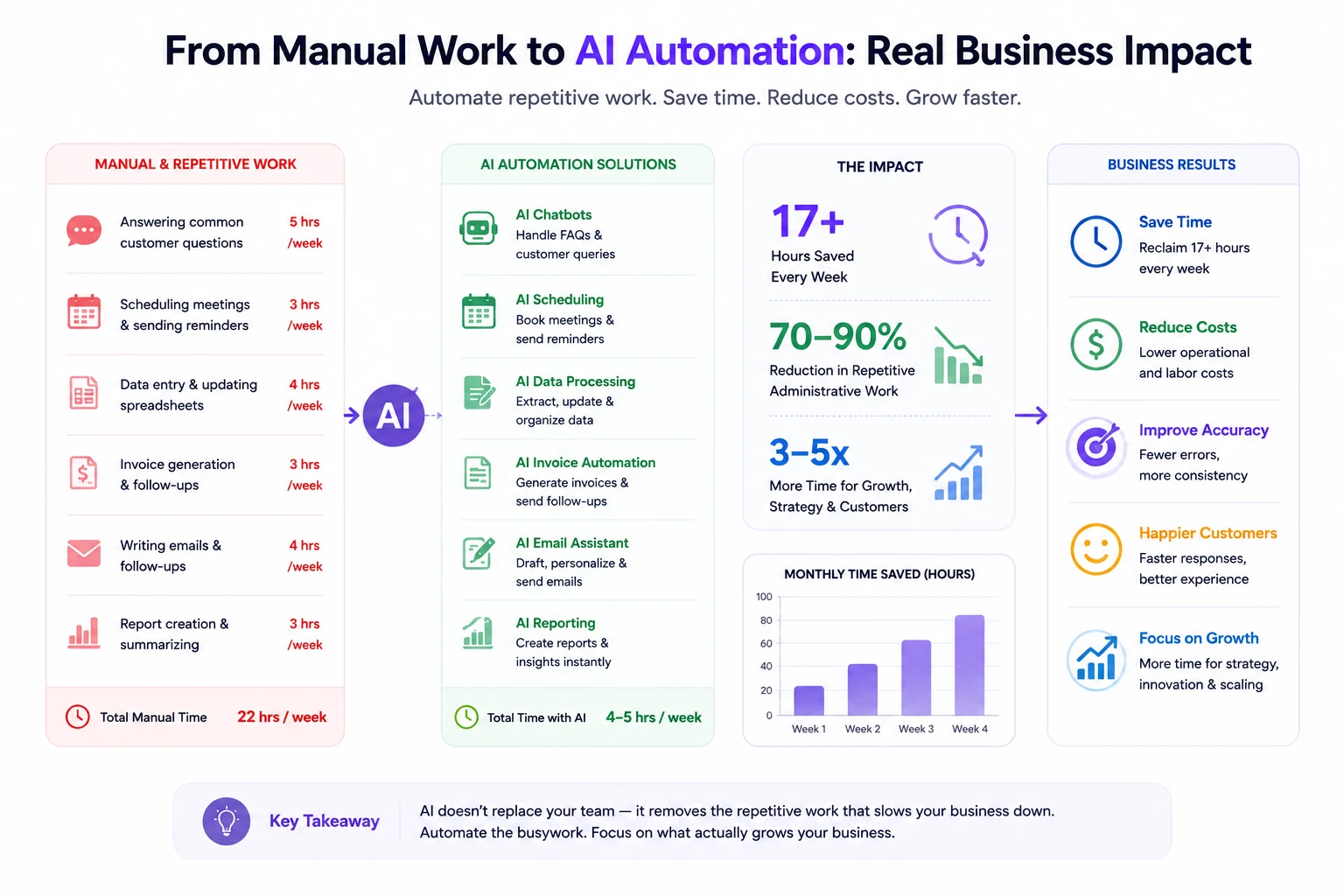
AI automation delivers the biggest ROI when businesses reduce repetitive operational work first.
→ Use the AI & SaaS Revenue Calculator to estimate labour savings, software costs, and long-term automation ROI before committing to a stack.
How Much Time Can SMBs Actually Save With AI?
The statistics on AI time savings are frequently inflated by vendors and frequently dismissed by sceptics. The honest answer is: it depends on two things — how much repetitive work your team is currently doing manually, and how consistently you implement the tools you buy.
Here's a realistic breakdown based on SMB use cases rather than vendor claims:
Research from Gartner also suggests that businesses adopting practical AI automation workflows are seeing the strongest gains in employee productivity, response speed, and operational efficiency — especially in support, documentation, and internal operations.
Realistic Weekly Time Recovery by Business Type
E-commerce business (4 staff):
- Customer support automation (Zendesk AI): 6–8 hours recovered
- Order workflow automation (Zapier): 3–4 hours recovered
- Content drafting (Claude): 2–3 hours recovered
- Total: 11–15 hours/week recovered across the team
Consulting firm (3 consultants):
- Scheduling automation (HubSpot Scheduler): 4–5 hours recovered
- Proposal drafting (Claude): 3–5 hours recovered
- Bookkeeping (Xero AI): 2–3 hours recovered
- Total: 9–13 hours/week recovered across the team
Local service business (owner-operated):
- Inbound calls (Synthflow/Bookipi): 4–6 hours recovered
- Social media (Buffer + Claude): 2–3 hours recovered
- Invoicing and reconciliation (Xero AI): 2–3 hours recovered
- Total: 8–12 hours/week recovered for the owner
"The businesses getting the most from AI automation in 2026 aren't the ones that bought the most tools. They're the ones that identified one or two high-volume manual tasks and automated those consistently." — Operations Quarterly, SMB Automation Report 2026
ROI Example
| Business | 6-person e-commerce team |
|---|---|
| Stack | Zendesk AI + Zapier Pro + Claude Pro + Xero Standard |
| Total Monthly Cost | ~$180/month |
| Labour Recovered | 12 hrs/week × $30/hr = $1,560/month |
| Support Ticket Deflection | 40% deflection on 200 tickets/week = 80 automated resolutions |
| Content Production Value | 12 pieces/month × $150 saved per piece = $1,800/month |
| Total Monthly Return | ~$3,360 |
| ROI | ((3,360 − 180) / 180) × 100 = 1,767% |
Conservative assumptions throughout. The actual ROI depends on your current process baseline and usage consistency.
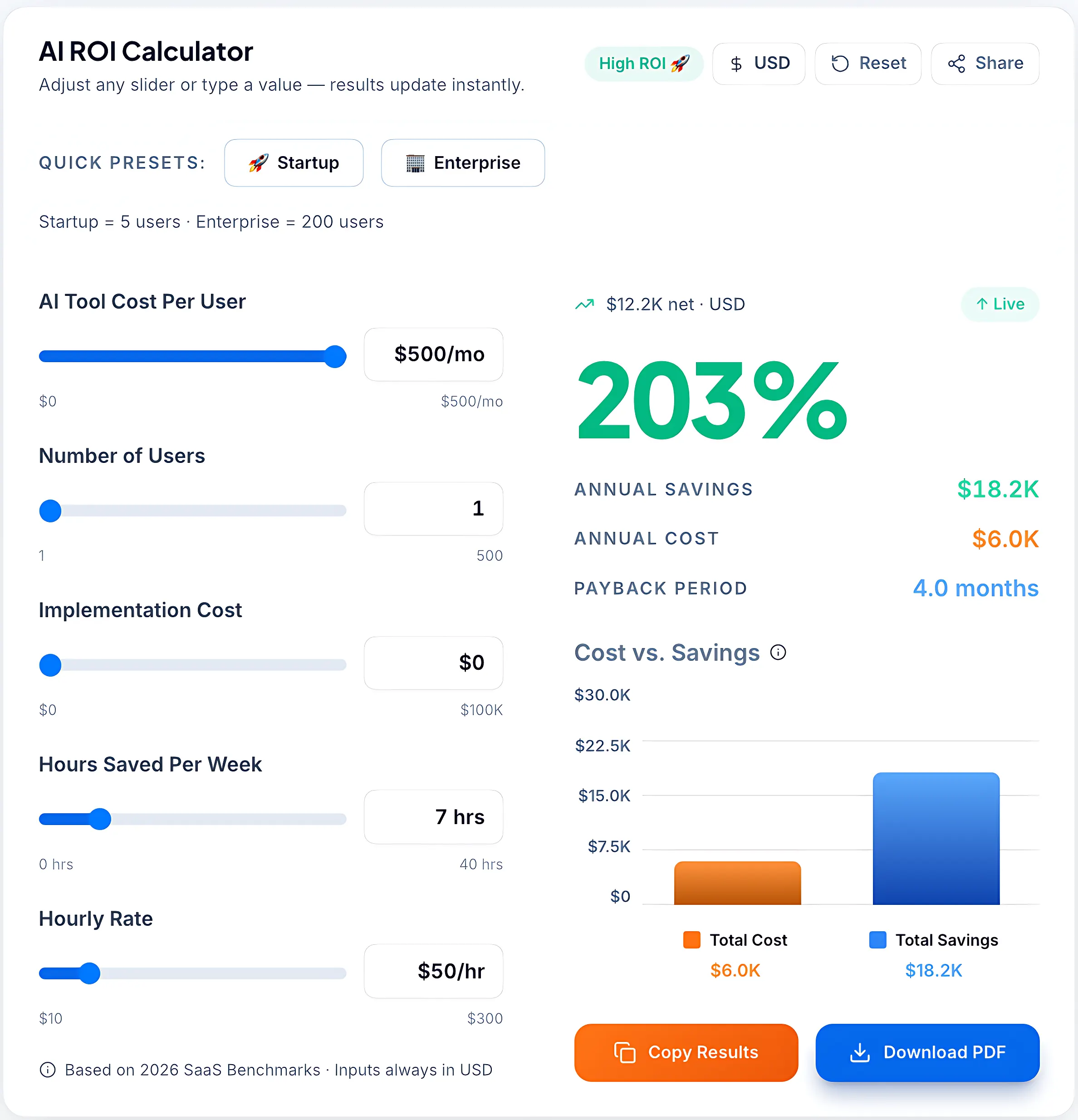
Our custom AI ROI Calculator in action, demonstrating how automating just 7 hours per week can lead to significant cost savings and high efficiency for small businesses.
→ Run your own numbers with the AI ROI Calculator before committing to a stack.
Which AI Tool Is Best for Your Business?
The tool that's best for your business is the one that addresses your highest-volume, most time-intensive repetitive workflow. That's not always obvious from a features list — it requires being honest about where your team is currently spending the most time on low-judgment tasks.
Best AI Tools by Business Type
| Business Type | Recommended AI Tool | Primary Benefit |
|---|---|---|
| E-commerce | Zendesk AI + Zapier | Support automation + order workflows |
| Marketing Agency | Claude + Sprout Social | Content production + social management |
| SaaS Startup | Claude + Zapier + HubSpot Scheduler | Product writing, workflows, sales scheduling |
| Local Service Business | Synthflow or Bookipi + Xero AI | Call handling + bookkeeping |
| Freelance Consultant | Claude + HubSpot Scheduler + Xero AI | Content, scheduling, invoicing |
| Online Business (1–2 staff) | Zapier + Claude + Xero Starter | Core ops automation on minimal budget |
| Trades / Field Service | Bookipi AI Receptionist + Xero | Calls, booking, financial admin |
| Content / Media Business | Claude + Feather AI | Writing and SEO content at scale |
→ Use the AI Tool Selector to get a personalised recommendation based on your workflows.
Biggest Mistakes SMBs Make With AI Automation
Most automation failures at the SMB level come from the same predictable mistakes. Knowing these in advance is cheaper than discovering them through six months of wasted subscriptions.
Buying too many tools at once. Three tools implemented simultaneously usually means three partial implementations and no clear picture of what's working. The discipline is to buy one, run it for 30 days, measure the change, and then decide whether to add the next. The businesses that stack five tools in month one rarely use any of them well.
Automating broken workflows. Automation makes a good process faster. It makes a broken process fail faster and more expensively. Before automating any workflow, map it out and confirm it actually works when done manually. If your support process is inconsistent now, an AI tool won't fix that — it'll just inconsistently at scale.
Skipping the integration strategy. A scheduling tool that doesn't connect to your CRM creates as much manual work as it removes. Before purchasing any tool, check whether it integrates with the other platforms you're already using. Non-integration gaps are the most common source of automation disappointment.
Ignoring ROI tracking. If you don't measure the baseline before implementing a tool, you can't evaluate whether it's working. Define two or three metrics before you start — time spent on a specific task, ticket volume, content output — and track them weekly for the first 30 days.
Skipping employee onboarding. Tools that nobody uses deliver zero ROI. If you're implementing automation for a team, involve the team in the rollout. Show them what the tool handles, what it doesn't, and how it changes their workflow. Tools imposed without context get ignored.
Looking to reduce recurring software costs? Explore these Best AI Tools Lifetime Deals in 2026 before committing to monthly subscriptions.
How to Start Using AI Without Overcomplicating Operations
The path to an effective automation stack is almost always the same — start narrow, prove value, then expand.
Step 1: Identify your single biggest repetitive bottleneck. Not everything you do manually — the one workflow that consumes the most time and produces the least strategic value. Common candidates: customer support inbox, meeting booking, social media posting, bookkeeping, content drafting.
Step 2: Choose one tool that directly addresses it. Match the tool to the specific problem, not the brand name. Use the comparison table above.
Step 3: Pilot on real data for 30 days. Not a demo environment. Real workflows, real volume, real team. This is the only way to know if the tool actually delivers in your context.
Step 4: Measure against your baseline. Compare time spent on the target workflow before and after. Calculate the labour cost recovered versus the tool cost. If the ROI is positive and consistent, you have your answer.
Step 5: Expand gradually. Add a second tool once the first is delivering consistent results. Never add two tools simultaneously — it makes it impossible to attribute what's working.
→ Download the AI Implementation Checklist to structure your rollout before you start.
About This Evaluation
This comparison was created for small business owners evaluating practical AI automation tools for real operational use cases — not enterprise AI experimentation.
We reviewed each platform based on:
- workflow automation capability
- ease of implementation
- pricing transparency
- SMB usability
- integration ecosystem
- measurable operational ROI
Tool pricing and features were verified at the time of publishing and may change over time.
What We Learned While Researching SMB Automation
One pattern became very clear while reviewing these tools: the businesses seeing the best results from AI automation were not necessarily using the most advanced platforms.
The strongest ROI consistently came from automating repetitive operational bottlenecks first — especially customer support, scheduling coordination, bookkeeping admin, and internal workflow management.
In many cases, the operational time savings were visible within the first few weeks, particularly for lean teams handling repetitive tasks manually across multiple tools.
The biggest mistake we noticed was businesses overcomplicating their automation stack too early instead of solving one clear operational problem first.