Introduction
Most teams don't have a workload problem. They have a clarity problem.
Tasks live in five different apps. Priorities shift three times before noon. Half your meetings exist to discuss what was supposed to happen in the last meeting. And by the end of the week, everyone is busy — but the most important things still aren't done.
That's not a people problem. That's a system problem.
AI task management tools are built to fix exactly this. They don't just organize your to-do list — they prioritize it, automate the repetitive coordination work, and surface what actually needs your attention right now.
According to Workplace Productivity Research (McKinsey), knowledge workers spend nearly 60% of their workweek on coordination tasks — emails, status updates, meetings, and follow-ups — rather than the skilled work they were actually hired to do. AI productivity tools target that 60% directly.
This guide breaks down the best AI tools for task management and team productivity in 2026 — what each one actually does well, who it's built for, and how to choose the right one for your team's specific workflow.
The problem isn’t lack of tools — it’s using the wrong system for how your team actually works.
If you're still building out your broader AI toolkit, our Complete Guide to Choosing AI Software for Your Business (2026 Edition) covers the full evaluation framework.
What Are AI Task Management Tools?
AI task management tools are platforms that use artificial intelligence to help individuals and teams plan, prioritize, and execute work — with less manual coordination overhead.
Traditional task tools were digital to-do lists. You added tasks, set due dates, assigned owners. Useful, but passive. They organized work exactly how you organized it — no more, no less.
Modern AI productivity tools go several steps further. They can generate task lists from meeting notes or voice input, automatically prioritize work based on deadlines and dependencies, summarize long project threads, and trigger automated workflows when conditions are met. The difference isn't just speed — it's that AI handles the low-value coordination layer so your team spends more time on actual output.
Where AI genuinely helps — and where it doesn't — is worth being clear about. AI tools are excellent at reducing friction in repetitive, structured work. They're not a substitute for strategic clarity about what your team should be working on. That judgment still has to come from you.
Where AI Actually Improves Productivity
This is the section most productivity articles get wrong — they list features instead of explaining what actually changes when you use them.
From my observation: Teams that see the biggest productivity gains are not the ones using the most features — they’re the ones using one tool consistently for a single workflow.
Task creation from notes and conversations. Instead of manually entering every action item from a meeting, AI tools transcribe, extract, and create tasks automatically. What previously took 20 minutes of post-meeting admin takes 90 seconds.
Automatic prioritization. AI tools analyze deadlines, dependencies, and workload to surface the right tasks at the right time. Instead of deciding each morning what to work on, your tool gives you a ranked list based on actual project data. This alone recovers 30–45 minutes of daily decision overhead for most users.
Meeting summaries instead of meeting recordings. Nobody watches a 45-minute recording. AI-generated summaries — with decisions, action items, and owners extracted — replace the need to watch or transcribe entirely. Teams using async summaries consistently report fewer follow-up meetings.
Workflow automation. When task A is completed, AI tools can automatically notify stakeholders, move a project to the next stage, assign the next task, and update a status dashboard — without anyone manually triggering any of it. For recurring project types (client onboarding, content production, sprint cycles), this is where the time savings compound the most.
A Federal Reserve study found that AI tools save knowledge workers an average of 5.4% of their working time — roughly 1–2 hours per day for a standard 8-hour workday.AI Productivity Research – Federal Reserve.
Types of AI Productivity Tools
Understanding what category a tool belongs to is the most important step before choosing one. The wrong type of tool solves the wrong problem — even if it's well-built.
There are four fundamentally different types of AI productivity tools — and they solve four different problems. Buying a task execution tool when you need a knowledge management platform (or vice versa) is the leading reason productivity software gets abandoned within 60 days.
Task execution tools are built for getting work done — managing projects, tracking progress, assigning owners, and running workflows at scale. Examples: ClickUp AI, Asana AI, Monday.com AI.
Knowledge and workspace tools combine documents, wikis, and project management in one connected environment. Everything your team creates lives in one place, and AI helps you find, summarize, and build on it. Example: Notion AI.
Scheduling and planning tools use AI to manage your time — not just your tasks. They optimize calendars, protect focus time, and dynamically reschedule work when priorities shift. Example: Motion.
Lightweight AI collaboration tools prioritize simplicity over depth. They're fast to set up, easy to use, and built for teams that need a flexible workspace without a complex onboarding process. Examples: Taskade, Trello.
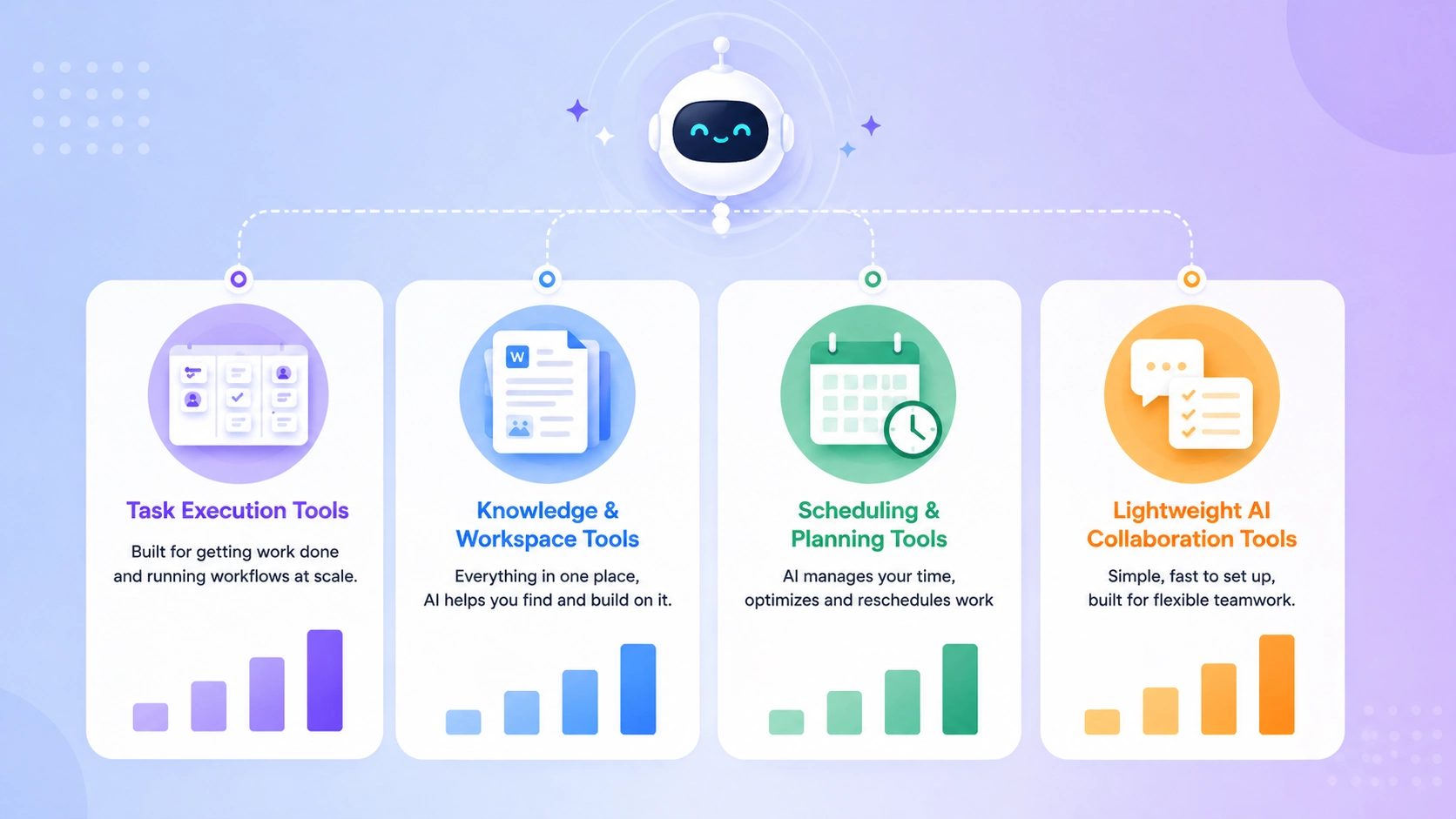
The AI automation ecosystem: How smart agents bridge the gap between task execution, knowledge management, and team collaboration.
Feature Comparison (Quick Breakdown)
Quick comparison: If you're unsure which platform fits your workflow, this breakdown shows how each tool differs at a feature level — before you read the full reviews.
| Feature | Notion AI | ClickUp AI | Asana AI | Motion | Taskade |
|---|---|---|---|---|---|
| AI Task Generation | ✅ Yes | ✅ Yes | ✅ Yes | ✅ Yes | ✅ Yes |
| Auto Prioritization | ⚠️ Limited | ✅ Yes | ⚠️ Limited | ✅ Yes | ⚠️ Limited |
| Workflow Automation | ⚠️ Basic | ✅ Advanced | ✅ Strong | ⚠️ Limited | ⚠️ Basic |
| Knowledge Management | ✅ Best-in-class | ⚠️ Limited | ❌ No | ❌ No | ✅ Yes |
| Calendar / Scheduling | ❌ No | ⚠️ Basic | ⚠️ Basic | ✅ Best-in-class | ❌ No |
| Team Collaboration | ✅ Strong | ✅ Strong | ✅ Strong | ⚠️ Limited | ✅ Strong |
| Best Use Case | Docs + projects | Execution at scale | Structured teams | Founders / solos | Lightweight teams |
Still unsure? Start with Notion AI for knowledge-heavy teams or ClickUp for execution-first workflows — both offer free plans and cover the majority of common use cases.
Best AI Tools for Task Management and Team Productivity (2026)
All pricing reflects official plans as of April 2026. Free tiers are noted where available.
- Time recovered: Knowledge workers save an average of 1–2 hours per day using AI task and workflow tools
- Meeting reduction: Teams using async AI summaries report 20–30% fewer follow-up meetings per month
- Focus time: Individuals using AI scheduling tools gain 2–3 additional deep work hours per week
- Workflow efficiency: Automated handoffs and status updates reduce project coordination overhead by 35–50%
- Adoption ROI: A Federal Reserve study found AI tools save workers 5.4% of total working time — roughly 2.5 hours per week on a standard schedule
Notion AI — Best for All-in-One Work Management
Notion AI is the most versatile tool in this list. It combines documents, wikis, databases, and project management — and layers AI across all of it. You can ask Notion to summarize a meeting note, extract action items from a document, draft a project brief, or autofill a database property based on context.
For teams that live between structured projects and unstructured thinking — strategy docs next to sprint boards, SOPs next to client notes — Notion AI keeps everything in one place and makes it searchable, summarizable, and actionable.
Key strength: AI-powered knowledge management that connects documents to tasks seamlessly.
Pricing: Free plan available; Notion AI add-on from $10/member/month (Plus plan from $16/month)
Pros:
- Best-in-class for connecting knowledge, documents, and project management
- AI can summarize, draft, translate, and extract from any page
- Extremely flexible — adapts to almost any workflow structure
Cons:
- Can feel overwhelming to set up from scratch without a template
- AI features cost extra on top of the base plan
- Not purpose-built for heavy task execution or resource management
Best for: Teams and founders who need a connected workspace for projects, documentation, and knowledge — with AI assistance across all of it.
ClickUp AI — Best for Execution and Workflow Scaling
ClickUp is built for teams that want to get things done at volume. Its AI layer handles task generation from text, automatic progress summaries, action item extraction from documents, and workflow automation that triggers across projects. The platform covers tasks, docs, goals, time tracking, and dashboards — all in one place.
Where ClickUp earns its reputation is in customization and depth. You can build nearly any workflow structure inside it — and the AI layer reduces the manual overhead of maintaining that structure.
Key strength: The widest feature set for execution-focused teams who need workflow automation at scale.
Pricing: Free plan available; paid from $7/member/month (Unlimited); ClickUp AI from $5/member/month add-on
Pros:
- Most comprehensive task and project management feature set
- AI generates tasks, summaries, and action items from any text input
- Strong automation rules across projects, sprints, and workflows
Cons:
- Feature depth creates a steeper onboarding curve than lighter tools
- UI can feel dense for users coming from simpler platforms
- AI add-on is priced separately from the base plan
Best for: Growing teams, operations-heavy companies, and agencies that need structured, automatable project management at scale.
Asana AI — Best for Structured Teams with Clear Processes
Asana has long been the tool of choice for teams that run structured workflows — defined stages, clear ownership, repeatable project types. The AI layer builds on that strength: it can draft project plans, suggest task assignments based on workload, and surface risks before they become blockers.
For teams with established processes who want AI to assist execution rather than reimagine workflow from scratch, Asana AI fits naturally.
Key strength: AI-assisted project intelligence that works best when your processes are already well-defined.
Pricing: Free plan available (basic); paid from $13.49/user/month (Premium); Asana AI features on higher tiers
Pros:
- Clean, structured interface that scales well for larger teams
- AI goal-setting and workload management reduce planning overhead
- Strong integration ecosystem (Slack, Google Workspace, Salesforce)
Cons:
- AI features are gated behind higher-tier plans
- Less flexible than ClickUp for non-standard workflow structures
- No native document or knowledge management (requires integrations)
Best for: Mid-size teams and structured organizations that need reliable project management with AI-assisted planning and workload visibility.
Monday.com AI — Best for Visual Workflow Management
Monday.com is the most visually intuitive tool in this category. Its AI capabilities include AI-generated column content, automated status updates, and workflow suggestions based on how your board is structured. For teams that think in boards and visual pipelines rather than lists, Monday.com is the most natural fit.
Key strength: Visual workflow management with AI that reduces manual board maintenance.
Pricing: Free plan available (2 seats); paid from $9/seat/month (Basic); AI features on Standard plan and above
Pros:
- Best visual interface for teams managing multiple parallel workstreams
- AI auto-fills repetitive fields and generates content within workflows
- Strong reporting and dashboard capability out of the box
Cons:
- Pricing scales quickly for larger teams
- AI features less sophisticated than ClickUp or Asana at the same price point
- Document management is limited compared to Notion
Best for: Operations teams, marketing teams, and client-facing agencies that manage multiple concurrent projects and need clear visual workflow tracking.
Motion — Best for AI-Powered Scheduling and Task Prioritization
Motion is the most ambitious tool in this category. It's not just a task manager — it's an AI operating system for your workday. Motion looks at every task you have, every meeting on your calendar, and every deadline — and builds your optimal daily schedule automatically.
If your workflow involves heavy scheduling alongside task management, tools like Motion overlap with dedicated booking platforms — covered in our AI Appointment Booking Tools for Businesses (2026 Guide).
When a new task is added or a deadline shifts, Motion doesn't just update a list. It reschedules your entire day around the new priority. For founders and individual contributors managing deep work alongside a packed meeting calendar, this is genuinely transformative.
Key strength: AI dynamic scheduling that combines task management and calendar optimization in one system.
Pricing: From $34/month (Individual); $20/user/month (Team plan, billed annually)
Pros:
- The only tool that manages both tasks and calendar as one unified system
- AI rescheduling adapts your day in real time as priorities shift
- Reduces the daily cognitive overhead of deciding what to work on
Cons:
- Most expensive tool in this guide
- Takes 1–2 weeks to set up correctly and see full value
- Not well-suited for teams that need shared project boards or workflow automation
Best for: Founders, executives, and high-output individual contributors who need AI to manage not just their tasks — but their time.
Trello — Best for Simple Visual Boards
Trello is the simplest visual task tool in this list. Kanban boards, drag-and-drop cards, and a clean interface that anyone can learn in 20 minutes. Its AI capabilities are modest compared to ClickUp or Asana — but for small teams managing straightforward projects, Trello's simplicity is the feature.
Key strength: The fastest path to a functioning visual workflow with almost no setup friction.
Pricing: Free plan available; paid from $5/user/month (Standard)
Pros:
- Fastest onboarding — teams are productive within an hour
- Free plan is genuinely functional for small teams
- Butler automation handles repetitive card actions without AI complexity
Cons:
- Not built for complex projects with multiple dependencies
- AI features significantly less developed than other tools in this list
- Scales poorly beyond ~15-person teams
Best for: Freelancers, small teams, and early-stage startups that need a lightweight visual project board without setup complexity.
Taskade — Best for Lightweight AI Collaboration
Taskade is the most AI-forward lightweight tool in this category. Every workspace comes with a built-in AI agent that can generate project plans, draft documents, run research, and answer questions about your projects — all within the same interface where your tasks live.
For small teams or distributed teams who want AI collaboration without the overhead of configuring a complex platform, Taskade offers a unique combination of simplicity and AI depth.
Key strength: Built-in AI agents that assist with planning, drafting, and execution — available from day one with minimal setup.
Pricing: Free plan available; paid from $8/member/month (Pro)
Pros:
- AI agents work natively inside every project — not as an add-on
- Combines tasks, docs, and AI chat in one minimal interface
- Strong for remote and async teams needing a flexible collaboration space
Cons:
- Less powerful for complex enterprise workflows than ClickUp or Asana
- Reporting and analytics features are limited
- Integration ecosystem still growing compared to established tools
Best for: Small teams, remote-first companies, and early-stage startups who want AI assistance built into their workflow from the start.
Comparison Table
| Tool | Best For | Core AI Strength | Free Plan | Starting Price |
|---|---|---|---|---|
| Notion AI | All-in-one workspace | Docs + knowledge + project AI | ✅ Yes | $16/member/mo |
| ClickUp AI | Execution at scale | Workflow automation + task generation | ✅ Yes | $7/member/mo |
| Asana AI | Structured teams | Project planning + workload AI | ✅ Yes | $13.49/user/mo |
| Monday.com AI | Visual workflows | AI board automation + content fill | ✅ Limited | $9/seat/mo |
| Motion | Founders / individuals | AI calendar + task scheduling | ❌ No | $34/mo |
| Trello | Simple visual boards | Basic automation (Butler) | ✅ Yes | $5/user/mo |
| Taskade | Lightweight AI teams | Built-in AI agents | ✅ Yes | $8/member/mo |
What Most Teams Get Wrong About AI Productivity Tools
After analyzing how teams actually use these tools, here’s the reality:
- Most teams don’t fail because of the tool — they fail because they try to use 2–3 tools at once
- Notion becomes messy without structure — flexibility turns into chaos fast
- ClickUp is powerful, but overkill for teams under 5 people
- Motion only works if your calendar is already disciplined — otherwise it creates friction
The biggest mistake isn’t choosing the wrong tool. It’s expecting the tool to fix unclear workflows.
AI productivity tools amplify your system — they don’t replace it.
Which Tool Should YOU Choose?
Forget feature comparisons for a moment. Here's the direct answer based on your actual situation.
If you want all-in-one work management → Notion AI. Documents, projects, wikis, and AI assistance in one connected workspace. Best when your team produces a lot of written content alongside project work.
If you want execution and automation at scale → ClickUp AI. The widest feature set, the strongest automation, and AI that reduces the manual overhead of running complex workflows. Best for operations-heavy teams.
If your team runs structured, repeatable processes → Asana AI. Clear stages, defined ownership, and AI that assists planning without disrupting established workflows. Best for teams that already know how they work.
If you're calendar-driven and need AI to manage your time, not just your tasks → Motion. The only tool that treats your calendar and task list as one system. Best for founders and executives with high meeting loads alongside deep work commitments.
If you want simple, fast, and AI-assisted from day one → Taskade. Minimal setup, built-in AI agents, and enough structure to stay organized without becoming a tool management burden.
Notion vs ClickUp vs Motion (Quick Reality Check)
- Notion = thinking + documentation
- ClickUp = execution + systems
- Motion = time + scheduling
Most teams only need ONE of these — not all three.
Real Benefits — With Proof
The productivity gains from AI task management tools aren't theoretical. They're measurable — and they compound over time.
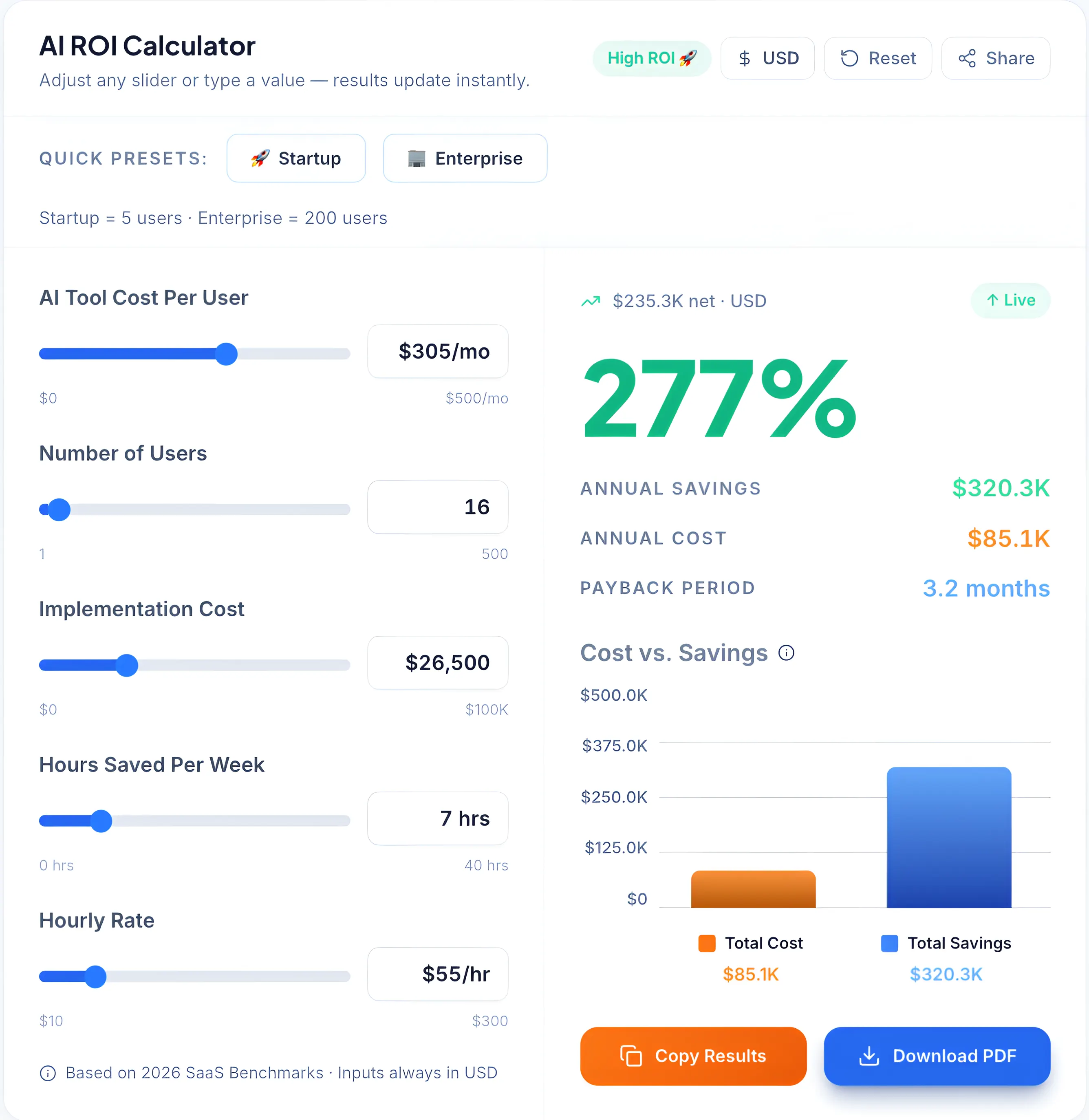
A data-driven breakdown of AI tool costs versus savings, highlighting a potential 277% ROI through increased efficiency and hours saved per week.
Time saved. A Federal Reserve working paper found that AI tools reduce knowledge work time by an average of 5.4% — roughly 1–2 hours per day depending on role and workflow. For a 10-person team, that's 10–20 hours of recovered capacity every single week.
Fewer meetings. Teams using AI-generated summaries and async updates consistently report 20–30% fewer status and follow-up meetings per month. The information that used to require a 30-minute meeting now surfaces in a 2-minute summary.
Better focus. Tools like Motion and Taskade reduce the daily decision overhead of "what should I be working on right now?" — a question that, left unanswered, fragments attention across the day. Teams report more consistent deep work blocks and fewer context-switching interruptions.
Faster project execution. Automated handoffs, AI-generated task lists, and real-time progress visibility reduce the coordination delays that slow most projects down. For recurring project types, the compounding efficiency gain is significant within 30–60 days of consistent use.
If you want to see the exact ROI these time savings represent for your team's specific situation, our AI ROI Calculator runs the numbers based on your headcount and hourly value.
The ROI Angle Most Teams Miss
Most discussions of AI productivity tools focus on features. Very few do the actual math on return.
Here's a simple framework. Take one team member's fully-loaded hourly cost (salary plus overhead — typically $40–$80/hour for knowledge workers). Multiply by the hours recovered per week from AI tooling (conservatively 1 hour/day, 5 hours/week). That's $200–$400 per person per week in recovered productive capacity.
A $15/month tool that recovers even one hour per week pays back 13–27x its monthly cost for a single user. For a 10-person team, the math is striking.
The businesses that see the highest ROI from AI productivity tools aren't the ones with the most sophisticated implementation. They're the ones that measure the before-and-after — tracking time-to-completion on recurring projects, meeting counts per month, and hours spent on coordination versus execution. Measurement creates the feedback loop that compounds the benefit over time.
Before committing to a new tool stack, it's worth calculating your potential return. Our AI & SaaS Revenue Calculator helps you estimate the revenue and efficiency impact before you spend.
How to Choose the Right AI Productivity Tool
Use this simple framework instead of getting overwhelmed by feature comparisons.
Team size first. Solo users and teams under five people can start with Taskade, Notion, or Trello — free tiers handle the workload. Teams of 5–25 get more from ClickUp or Asana, where workflow automation and shared visibility become genuinely valuable. Larger teams typically need Asana or Monday.com for the reporting and governance features.
Workflow style second. Document-heavy and knowledge-driven teams → Notion. Execution-driven and process-oriented teams → ClickUp or Asana. Calendar-constrained individuals managing deep work → Motion. Simple, fast, flexible → Taskade or Trello.
Budget third. Free tiers on Notion, ClickUp, Trello, and Taskade are functional enough to validate fit before spending. Budget $8–$20/user/month for teams once you've confirmed the tool matches your workflow.
If you're a startup working with limited budget, it's worth exploring tools designed specifically for early-stage teams — see our guide on affordable AI software for startups.
Integration requirements last. If your team runs on Slack, Google Workspace, and Salesforce, verify that your chosen tool integrates cleanly before committing. Most major platforms cover the standard integrations — but check your specific stack before purchasing a paid plan.
Pros and Cons — Honest Summary
What AI productivity tools genuinely deliver:
- Significant reduction in repetitive coordination overhead
- Faster task creation and project planning from unstructured inputs
- Clearer visibility into team workload and project status
- Measurable time savings that compound as workflows mature
What they don't fix:
- Poor process design — AI automates broken workflows faster, not better
- Lack of strategic clarity about priorities — that still requires human judgment
- Tool overload — adding one more platform to an already fragmented stack often makes things worse before they improve
The most common failure mode isn't the tool — it's the implementation. Teams that see strong results from AI productivity tools almost always started simple, validated the workflow, and added automation incrementally.
Implementation Tips
Getting a tool live is the easy part. Getting it to actually change how your team works takes a few deliberate steps.
Start with one team, one workflow. Don't roll out a new AI productivity tool to your entire organization at once. Pick one team and one recurring workflow — weekly sprint planning, client onboarding, content production — and run the tool there first. Validate the fit before expanding.
Train the team before you optimize. The most common failure mode is deploying a new tool and expecting adoption to happen naturally. Run a 30-minute walkthrough for the team, build a simple template for your first use case, and designate one person as the internal point of contact for questions.
Avoid tool overload. If your team is already using three project management tools, adding a fourth doesn't help — it fragments attention further. Be willing to retire an existing tool when you add a new one.
Measure what changes. Track one or two concrete metrics from day one — time-to-completion on a recurring project type, number of status meetings per month, or hours spent on coordination tasks per week. Without baseline measurement, you can't see the improvement — and you can't justify continued investment.
→ Not sure which tool fits your team? Use our AI Tool Selector to get a personalized recommendation in under 30 seconds.
Who Should NOT Use AI Productivity Tools?
AI task management tools are not always necessary.
- If your team is under 3 people and communicates directly
- If your workflow changes every week (no repeatable process)
- If you already struggle to maintain one tool consistently
In these cases, adding AI tools often increases complexity instead of reducing it.
Start with clarity. Then add tools.