Introduction
Every business owner knows the feeling. A client wants to book a meeting. You send your availability. They can't make it. Three emails later, the interest is gone.
Manual scheduling isn't just frustrating — it's expensive. Studies show professionals lose an average of 4–5 hours per week on scheduling coordination alone — adding up to 200+ hours per year spent managing calendars instead of using them.Workplace Productivity Research
The cost extends beyond time. No-shows, missed follow-ups, and after-hours booking gaps quietly erode revenue. A single missed consultation can mean $300–$500 in lost income — and most businesses never measure how often it happens.
AI appointment booking tools (AI scheduling software) close that gap. They detect availability in real time, route incoming bookings to the right person, send automated reminders, and confirm appointments without a single email from you.
This guide covers the top platforms, a practical selection framework, and real-world implementation advice for 2026.
If you're still evaluating AI tools more broadly, our Complete Guide to Choosing AI Software for Your Business (2026 Edition) gives you the full evaluation framework.
What Is an AI Appointment Booking Tool?
An AI appointment booking tool automates scheduling, confirmations, and appointment management — without manual coordination from either party.
Traditional scheduling tools were essentially digital calendars with a booking link. Someone picks a time, both parties get a calendar invite. Useful, but basic.
Modern AI scheduling tools go further. They analyze calendar patterns, protect deep work time, route bookings by lead type, follow up with no-shows automatically, and qualify leads before a meeting is confirmed. A traditional tool says "here's when I'm free." An AI tool handles the routing, questionnaire, buffer time, and follow-up sequence — before you've touched your keyboard.
How AI Appointment Booking Works
Calendar sync and real-time availability. Every tool syncs with Google Calendar, Outlook, or both — eliminating double-booking by checking across all connected calendars before showing open slots.
Routing and automation. Advanced tools route bookings by rules you define: meeting type, team member, round-robin assignment, or lead score.Marketing Automation Guide.Calendly's routing forms, for example, send enterprise leads to senior reps and SMB leads to junior ones automatically.
Buffer and focus time management. Tools like Reclaim.ai and Clockwise protect deep work blocks and reschedule low-priority meetings when higher-priority tasks need the time — applying AI to productivity, not just logistics.
Reminders and no-show reduction. Automated SMS and email reminders reduce no-shows by 25–40% versus manual confirmation. Reminder timing, content, and follow-up sequences are fully customizable on most paid plans.
Types of AI Scheduling Tools
Choosing the wrong type is the most common implementation mistake — and it explains why many businesses buy scheduling software and still send calendar links by hand.
There are three fundamentally different categories of AI scheduling tool — and they solve three different problems. Mismatching tool type to business need is the leading reason scheduling software gets abandoned within 90 days.
Customer-facing booking tools generate a shareable link for external clients and prospects. Examples: Calendly, Setmore, SimplyBook.me, Acuity Scheduling, Square Appointments. Right choice when your primary need is reducing inbound scheduling friction.
Internal AI scheduling assistants optimize your calendar from the inside — protecting focus time and coordinating across teams, without creating external booking pages. Examples: Reclaim.ai, Clockwise. Right choice when calendar fragmentation and meeting overload are the core problem.
Hybrid and advanced AI tools combine external booking, internal optimization, and task management in one system. Example: Motion. Right choice for founders and operators who need AI managing both client meetings and deep work time simultaneously.
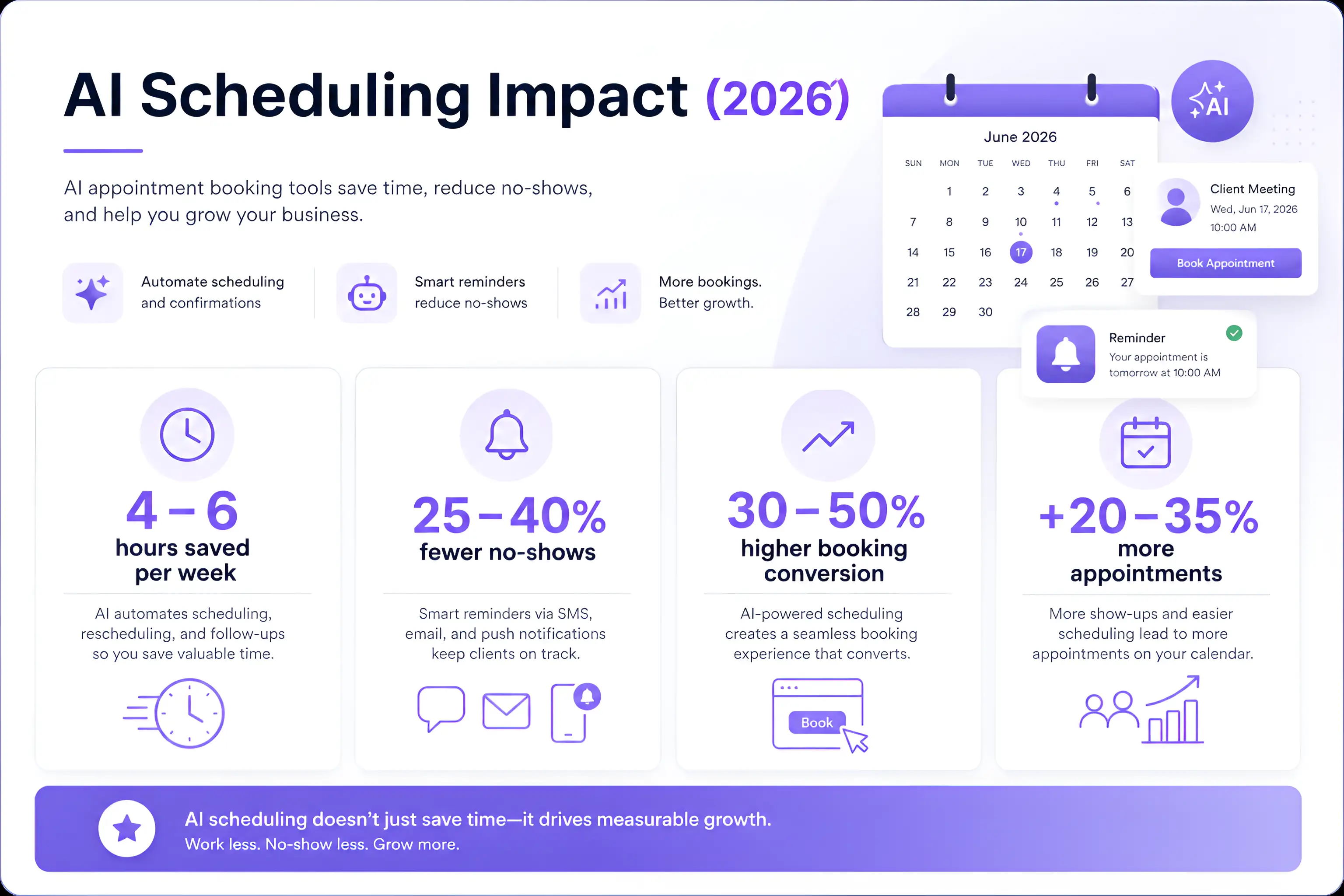
Key benefits of adopting AI scheduling assistants: Massive time savings on manual coordination and a significant reduction in meeting no-shows.
Feature Comparison (Quick Breakdown)
Quick comparison: If you're unsure which type of tool fits your workflow, this breakdown shows how each platform differs at a feature level.
| Feature | Calendly | Motion | Reclaim.ai | Clockwise | SimplyBook.me |
|---|---|---|---|---|---|
| External Booking Page | ✅ Yes | ✅ Yes | ✅ Yes | ❌ No | ✅ Yes |
| AI Calendar Optimization | ❌ No | ✅ Yes | ✅ Yes | ✅ Yes | ❌ No |
| Task Scheduling | ❌ No | ✅ Yes | ⚠️ Limited | ❌ No | ❌ No |
| Team Coordination | ⚠️ Basic | ⚠️ Limited | ⚠️ Limited | ✅ Strong | ✅ Strong |
| Intake Forms / Questionnaires | ⚠️ Basic | ❌ No | ❌ No | ❌ No | ✅ Advanced |
| Payment Integration | ✅ Yes | ❌ No | ❌ No | ❌ No | ✅ Yes |
| Best Use Case | Sales & booking | Founders | Productivity | Teams | Service business |
Still confused? Start with Calendly for simple booking or Reclaim.ai for productivity — both offer free plans and cover most common use cases.
Best AI Appointment Booking Tools for Businesses (2026)
All pricing reflects official plans as of 2026. Free tiers are noted where available.
- Time saved: Professionals recover an average of 4–6 hours per week by eliminating manual scheduling coordination
- No-show reduction: Automated reminders reduce no-shows by 25–40% compared to manual confirmation workflows
- Booking conversion: Businesses using inline booking links report 30–50% higher meeting conversion versus email-based scheduling
- Productivity gain: Teams using AI calendar optimization (Reclaim, Clockwise) report 2–3 more hours of focused work per week
- Revenue impact: Service businesses using 24/7 online booking generate 20–35% more appointments monthly than phone-only booking
Calendly — Best Overall
Calendly is the most widely adopted scheduling platform in the market — and for good reason. Setup takes under 10 minutes, the booking experience is frictionless for clients, and the feature depth scales from a solo consultant to a 50-person sales team. The free plan covers one event type with basic calendar sync. The Standard plan ($10/month) unlocks routing forms, automation, and unlimited event types — which is where real scheduling leverage begins.
Pros:
- Fastest setup in this list — live in under 10 minutes
- Routing forms direct bookings to the right team member automatically
- Integrates with Salesforce, HubSpot, Zoom, Stripe, and 100+ platforms
Cons:
- Analytics and reporting limited on lower-tier plans
- No built-in task management or calendar optimization
Best for: Individual professionals, sales teams, and consultants needing reliable, frictionless external booking with strong CRM integration.
Motion — Best for AI-Powered Productivity Scheduling
Motion is the most ambitious tool in this category. It's not just a scheduling platform — it's an AI-driven work operating system that manages both meetings and tasks in a single intelligent calendar.
When a meeting is booked, Motion evaluates your task load and rearranges your schedule to protect time for high-priority work. When a deadline shifts, your entire day adjusts around it. For founders managing deep work alongside back-to-back client calls, this kind of dynamic scheduling removes significant daily decision-making overhead.
Pros:
- AI task scheduling adapts your calendar in real time as priorities change
- Combines meeting management and project management in one interface
- Significantly reduces daily prioritization decisions
Cons:
- $34/month is the highest price point in this guide
- Full value takes 1–2 weeks to unlock — not a zero-setup tool
- Overkill for teams whose primary need is external booking links
Best for: Founders and operators managing complex workloads who need AI to optimize both meetings and deep work time simultaneously.
Reclaim.ai — Best for Intelligent Time Blocking
Reclaim.ai focuses on one high-value problem: protecting productive time in a calendar full of meetings. It automatically schedules focus blocks, habits, and recurring tasks around existing commitments — and rearranges them intelligently when new meetings land.
The Scheduling Links feature adds clean external booking capability, making Reclaim a genuine hybrid between a productivity optimizer and a customer-facing tool.
Pros:
- Habit and focus time scheduling is best-in-class for individual users
- Smart 1:1 feature finds optimal recurring meeting times automatically
- Free plan is genuinely functional for individual contributors
Cons:
- Less powerful than Motion for complex task and project management
- External booking pages are functional but less polished than Calendly
Best for: Knowledge workers and team leads who need to protect deep work time without sacrificing client availability.
Clockwise — Best for Team Calendar Coordination
Clockwise optimizes across entire teams — not just individual calendars. It analyzes every team member's schedule and moves flexible meetings to create shared focus blocks where everyone can work without fragmentation.
For teams where cross-functional meeting load is high, Clockwise delivers measurable productivity gains within the first two weeks.
Pros:
- Team-wide focus time optimization is unique to this tool
- AI Holds prevent meeting overload by locking blocks across the team
- Integrates with Slack for real-time status tied to calendar state
Cons:
- Value decreases significantly for solo users or very small teams
- Limited customer-facing booking features compared to Calendly
Best for: Growing teams of 5–50 people dealing with fragmented calendars and insufficient deep work time.
Setmore — Best Free Option for Service Businesses
Setmore offers a genuinely capable free plan — unlimited appointments, a public booking page, and basic email reminders with no credit card required. For a local service business starting out, this removes every barrier to professional online booking.
Pros:
- Free plan supports unlimited appointments and staff calendars
- SMS reminders on paid plan reduce no-shows significantly
- Built-in payment processing eliminates a separate Stripe integration
Cons:
- UI feels dated compared to Calendly or Acuity
- Limited automation and CRM integration on the free plan
Best for: Salons, fitness studios, tutors, and local service businesses that need professional online booking without upfront cost.
SimplyBook.me — Best for Custom Client-Facing Booking
SimplyBook.me is built for service businesses that need more than a basic booking link. Its feature set includes intake forms, deposit collection, service catalog management, multiple staff calendars, and custom booking widgets — all in one platform.
Pros:
- Most comprehensive service business feature set in this list
- Custom booking widget embeds cleanly in any website
- Supports deposits, membership packages, and loyalty programs
Cons:
- Feature depth creates a steeper setup curve than simpler tools
- Free plan is limited to 50 bookings/month
Best for: Healthcare providers, beauty salons, wellness practitioners, and service businesses needing a fully branded booking experience.
Cal.com — Best Open-Source Alternative
Cal.com is the open-source alternative to Calendly — self-hostable, fully customizable, and free at its core. For technical teams that want complete control over their scheduling infrastructure without per-seat pricing or vendor lock-in, Cal.com is the clear choice.
Pros:
- Fully open-source — self-host at zero licensing cost
- API-first design integrates with any internal system
- Growing enterprise feature set: routing, workflows, analytics
Cons:
- Self-hosted setup requires technical resources
- Cloud version feature parity with Calendly is still catching up
Best for: Engineering teams and technical founders who want a self-hosted or white-labeled scheduling system at scale.
Square Appointments — Best for In-Person and Retail Services
Square Appointments is purpose-built for businesses that take payments and appointments together. It integrates natively with Square POS, Square Payroll, and the full Square commerce ecosystem — making it the natural choice for any business already on Square.
Pros:
- Native Square POS integration makes payment and booking seamless
- Free plan for individuals includes a complete booking website
- Automated reminders and waitlist management on all plans
Cons:
- Limited value outside the Square ecosystem
- Team plans scale to $29–$69/month for 2–5 users
Best for: Retail shops, spas, barbershops, and businesses already running on Square as their primary commerce platform.
Acuity Scheduling — Best for Service Professionals with Complex Intake Needs
Acuity Scheduling (by Squarespace) is the most powerful intake form builder in the scheduling category. Before a client books, you can collect detailed information, require document uploads, charge deposits, and offer package bundles — all within the scheduling flow.
Pros:
- Most advanced intake form and pre-booking questionnaire capability
- Package and subscription selling built into the booking flow
- Deep Squarespace integration for businesses on that platform
Cons:
- No free plan — starts at $20/month
- Interface is functional but less polished than newer tools
Best for: Coaches, therapists, consultants, and photographers where detailed client intake is as important as the booking itself.
Comparison Table
| Tool | Best For | Key AI Features | Free Plan | Starting Price |
|---|---|---|---|---|
| Calendly | Overall / Sales teams | Routing, auto-reminders, smart availability | ✅ Yes | $10/user/mo |
| Motion | Productivity / Founders | AI task + meeting scheduling, dynamic rescheduling | ❌ No | $34/user/mo |
| Reclaim.ai | Time blocking / Focus | Habit scheduling, smart 1:1s, focus protection | ✅ Yes | $10/user/mo |
| Clockwise | Team coordination | Team focus blocks, AI meeting optimization | ✅ Yes | $6.75/user/mo |
| Setmore | Local service business | SMS reminders, payment processing | ✅ Yes | $5/user/mo |
| SimplyBook.me | Service brands | Intake forms, deposits, custom widget | ✅ Limited | $9.90/mo |
| Cal.com | Technical teams | Open-source, API-first, self-hostable | ✅ Yes | $15/mo |
| Square Appointments | Retail / In-person | POS integration, waitlist, auto-reminders | ✅ Yes | $29/mo (teams) |
| Acuity Scheduling | Service professionals | Advanced intake, packages, Squarespace sync | ❌ No | $20/mo |
Best Tools by Use Case
Small business owners handling sales and client management simultaneously need fast setup and no maintenance overhead. Calendly (free or $10/month) is the default. Add Reclaim.ai when protecting focus time becomes a priority.
Sales teams need routing, CRM integration, and reporting. Calendly's Standard or Teams plan is the market standard — its HubSpot and Salesforce integrations are the deepest available, and routing forms eliminate manual lead assignment.
Service businesses — salons, clinics, fitness studios, coaching practices — need deposits, intake forms, and staff management. SimplyBook.me and Acuity Scheduling cover this most completely. Businesses on Square default to Square Appointments.
Agencies and consultants managing multiple client relationships need a balance between external availability and protected project time. Motion manages both in one system.
Internal productivity teams dealing with meeting overload should start with Clockwise (team-level) or Reclaim.ai (individual-level) before adding any external booking layer.
Benefits of AI Appointment Booking
The compounding effect matters most. A business recovering 5 hours per week and reducing no-shows by 30% doesn't just save time — it creates capacity for more client work, more revenue, and more consistent service delivery. The ROI of a $10–$30/month scheduling tool is rarely difficult to justify once these numbers are applied to your specific situation.
If you're also looking to automate lead generation alongside scheduling, read: AI Cold Email Tools for Sales Outreach (2026 Guide).
How to Choose the Right AI Appointment Booking Tool
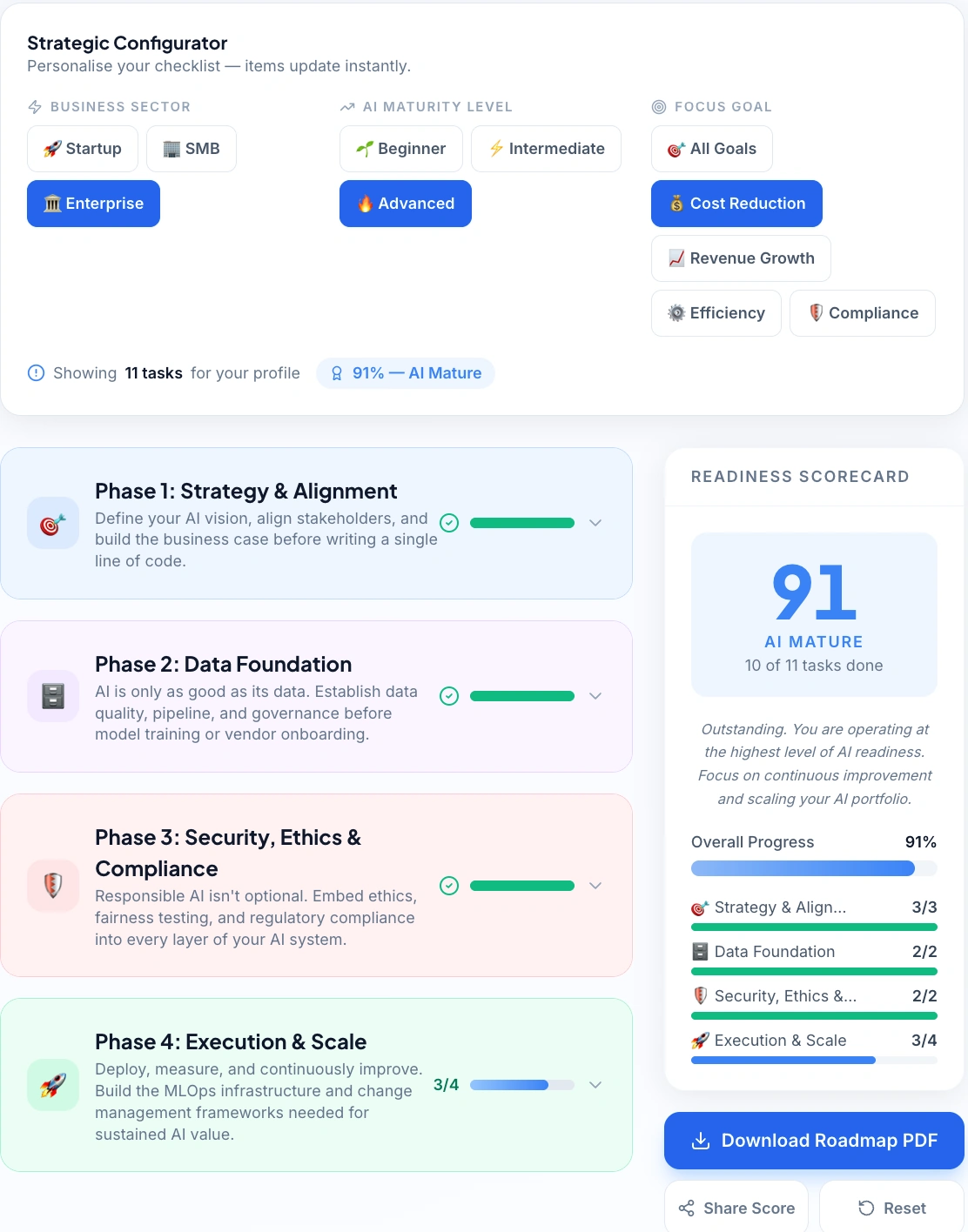
A strategic roadmap showing the 4 phases of AI implementation: Strategy Alignment, Data Foundation, Security & Compliance, and Execution at Scale.
By pricing: Free tools (Calendly free, Setmore, Cal.com, Reclaim.ai free) handle most individual and early-stage needs. Paid plans ($10–$34/month) make sense once you're booking 20+ meetings per month or need CRM integration and team routing. Annual billing saves 20–30% across most platforms.
By scheduling type: Client-facing bottleneck → Calendly or Setmore. Internal fragmentation and meeting overload → Reclaim.ai or Clockwise. Need both → Motion.
By skill level: Calendly and Setmore configure in under 10 minutes. SimplyBook.me and Acuity reward the setup investment for complex service businesses. Motion and Cal.com take longer but deliver more for users who commit.
By booking volume: Under 20 appointments/month — free tiers are enough. 20–100/month — paid automation and reminder workflows become worth the cost. Over 100/month — team routing, analytics, and CRM integration are essential.
Implementation Tips
Getting a scheduling tool live is easy. Getting it to actually change how your business operates takes a few deliberate steps.
Start with a free tool and validate your booking flow first. The most common mistake is configuring a paid tool before confirming that clients will actually use an online link. Deploy Calendly free or Setmore free, share the link with 10 clients, and see what happens. Only upgrade once the behavior is established.
Integrate your calendar and CRM from day one. A scheduling tool disconnected from your CRM creates a data gap that compounds — booked meetings that don't become pipeline records, no-shows that don't trigger follow-up sequences. Connect both before you share your booking link publicly.
Configure reminders before your first booking goes live. The no-show reduction benefit is entirely dependent on reminders being active. Set at least two: 24 hours before and 1 hour before. Add a post-appointment follow-up for no-shows.
Test the entire flow as a client. Book a test appointment. Check every step — availability display, confirmation email, calendar invite, reminder timing, cancellation flow. Friction at any step causes drop-off.
Review and audit monthly. Check your no-show rate, weekly bookings, and cancellation patterns. Use the data to refine your reminder sequences, buffer settings, and routing rules over time.
→ Not sure which tool fits your business? Use our AI Tool Selector to get a personalized recommendation in under 30 seconds.
Plan Your Scheduling Setup Properly
Choosing the right tool is only the first step. Most businesses fail not because of the software — but because of poor implementation.
Before you deploy your scheduling system, use a structured checklist to avoid common mistakes like missing integrations, no reminder setup, or poor booking flow design.
→ Use our AI Implementation Checklist to set up your scheduling system the right way from day one:Start Your Checklist