What Is an AI Note-Taking Tool?
An AI note-taking tool is software that joins your meetings — in person or virtual — and automatically converts spoken conversation into structured, usable information.
That's the key distinction from a standard recording or transcription app. A basic recorder captures audio. An AI note-taking tool processes that audio and turns it into something your team can actually act on: clean summaries, extracted decisions, assigned action items, and a searchable archive of everything discussed.
The difference in practice is significant. After a meeting with an AI note-taking tool active, you don't come away with a raw transcript that someone needs to read in full. You come away with a three-paragraph summary of what was decided, a list of next steps with names attached, and a link to the full transcript if anyone needs to verify a specific detail.
That's not transcription. That's a structured record your team can use.
If you're also optimizing how your team executes work after meetings, our guide on Best AI Tools for Task Management & Team Productivity (2026 Guide) breaks down the best platforms for turning decisions into action.
Why Businesses Are Moving to AI Notes
The shift toward AI note-taking isn't driven by novelty — it's driven by a problem that gets more expensive as teams grow.
Most organizations run more meetings than they need to. But even within necessary meetings, a consistent problem emerges: the information generated in those meetings doesn't reliably transfer into action. Manual notes are inconsistent. Follow-up emails get missed. The team member who was supposed to take notes was also expected to contribute to the discussion. And the person who missed the meeting has no way to get a reliable summary without bothering someone else.
The result is a gap between what was agreed in a meeting and what actually gets executed afterward. Research from McKinsey & Company estimates that inefficient meeting follow-through and information management costs knowledge workers nearly 28% of their working week — time spent chasing context, clarifying decisions, and repeating conversations that already happened.
AI note-taking tools address this directly:
- Consistent capture. Every meeting produces the same quality of structured notes, regardless of who's in the room or how busy everyone is.
- Searchable memory. Instead of asking a colleague "what did we decide about X three weeks ago?" you search your meeting archive and find the answer in seconds.
- Accountability by default. Action items extracted from meeting transcripts, assigned by name, create a lightweight accountability layer that follow-up emails never reliably produce.
- Async-friendly teams. Team members in different time zones can read a three-minute summary instead of watching a 45-minute recording — which means they actually stay informed.
A survey of knowledge workers found that AI meeting assistants save an average of 2.2 hours per week in post-meeting documentation and follow-up coordination. For teams running five or more meetings weekly, that's a meaningful return on a straightforward tool investment.
Types of AI Note-Taking Tools
Understanding the category a tool belongs to is more useful than comparing feature lists. Different tools solve different problems — and choosing the wrong type means solving the wrong problem, even with a well-built product.
There are four distinct categories of AI note-taking tool — and they serve four different primary needs. Mismatching tool type to workflow is the most common reason meeting AI gets adopted and then quietly abandoned within 60 days.
Live transcription tools focus on accurate real-time conversion of spoken language into text. The AI captures and structures what's being said as the meeting happens — making them particularly useful for fast-moving conversations where accuracy and speed matter. Example: Otter.ai.
Meeting assistant tools go further. They join your meetings as a bot participant, handle the transcription automatically, and produce structured outputs — summaries, action items, highlights — without any manual trigger. Examples: Fireflies.ai, Fathom, tl;dv.
Knowledge capture tools treat meeting notes as part of a broader documentation system. Notes don't just live in a separate app — they feed directly into your team's wiki, project pages, and connected workflows. Example: Notion AI.
Enterprise AI assistants are built for large organizations with existing software ecosystems. They integrate deeply with enterprise platforms — calendar, email, CRM, communication tools — and apply AI across the full workflow, not just the meeting itself. Example: Microsoft Copilot.
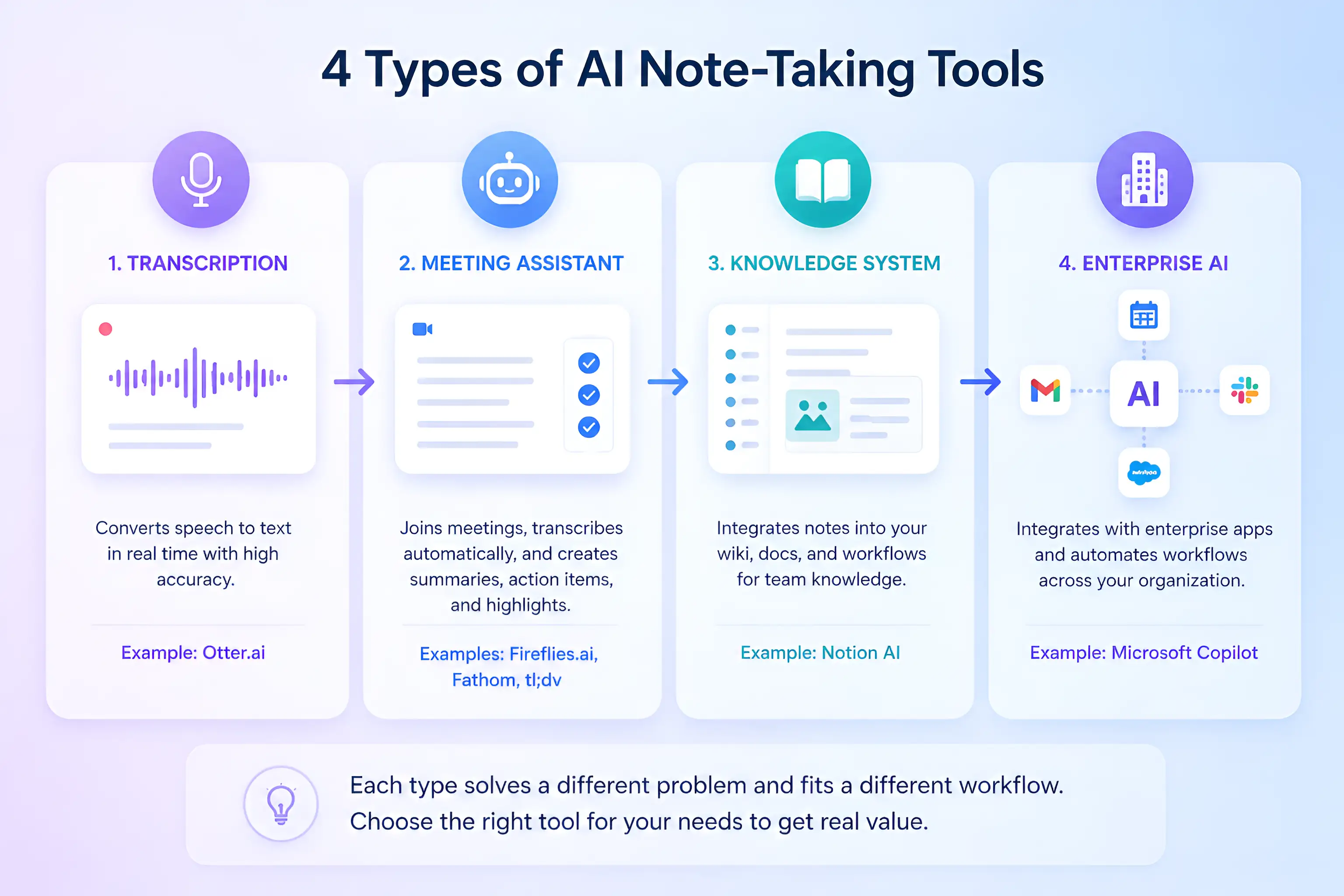
Choosing the right tool: A breakdown of the four main categories of AI note-taking software, from simple transcription to full enterprise-scale automation.
If you're building out a broader productivity stack, our Complete Guide to Choosing AI Software for Your Business (2026 Edition) gives you the full evaluation framework.
Feature Comparison (Quick Breakdown)
Quick comparison: If you're deciding between tools, this breakdown shows where each platform differs at a feature level — before the full reviews.
| Feature | Otter.ai | Fireflies.ai | Fathom | tl;dv | Notion AI | Microsoft Copilot |
|---|---|---|---|---|---|---|
| Real-Time Transcription | ✅ Yes | ✅ Yes | ✅ Yes | ✅ Yes | ❌ No | ✅ Yes |
| AI Summary + Action Items | ✅ Yes | ✅ Yes | ✅ Yes | ✅ Yes | ✅ Yes | ✅ Yes |
| Meeting Bot (Auto-Join) | ⚠️ Limited | ✅ Yes | ✅ Yes | ✅ Yes | ❌ No | ✅ Yes (Teams) |
| Clip & Highlight Sharing | ❌ No | ⚠️ Limited | ❌ No | ✅ Best-in-class | ❌ No | ❌ No |
| CRM / Tool Integrations | ⚠️ Basic | ✅ Strong | ⚠️ Basic | ⚠️ Basic | ✅ Strong | ✅ Enterprise |
| Knowledge Base Connection | ❌ No | ❌ No | ❌ No | ❌ No | ✅ Yes | ⚠️ Limited |
| Free Plan Available | ✅ Yes | ✅ Yes | ✅ Yes | ✅ Yes | ✅ Yes | ❌ No |
| Best Use Case | Live transcription | Integrations + search | Simple free tool | Clips + sharing | Docs + workflow | Microsoft 365 teams |
Still unsure? Start with Fathom (free, no setup friction) or Fireflies.ai (stronger integrations) — both cover the majority of standard business meeting needs.
Best AI Note-Taking Tools for Business Meetings (2026)
All pricing reflects official plans as of April 2026. Free tiers are noted where available.
- Time saved: Knowledge workers using AI meeting tools save an average of 2.2 hours per week on post-meeting documentation and follow-up
- Meeting clarity: Teams with AI-generated summaries report 40–50% fewer follow-up meetings to clarify decisions
- Action item completion: Structured AI action item extraction improves follow-through rates by 30–35% compared to manual notes
- Async adoption: 68% of remote teams report that AI meeting summaries have replaced the need to watch full meeting recordings
- Search value: Searchable meeting archives reduce time spent locating past decisions by an average of 1–2 hours per week per team
Otter.ai — Best for Real-Time Transcription and Team Collaboration
Otter.ai is the most widely recognized name in AI transcription — and for real-time, live meeting capture, it remains the benchmark. It transcribes as the conversation happens, identifies individual speakers, and produces a structured summary with action items at the end of every meeting. The collaborative workspace lets team members highlight, comment on, and share specific transcript sections without leaving the platform.
For teams that primarily need accurate live transcription with a straightforward collaborative layer, Otter.ai is the cleanest starting point.
Pros:
- Real-time transcription is fast and reliably accurate across accents
- Speaker identification works well in multi-participant meetings
- Team workspace allows shared highlighting and annotation
Cons:
- Auto-join bot is less reliable than Fireflies for hands-free operation
- Advanced integrations (CRM, Slack, project tools) require the paid plan
- Free tier limits (300 monthly minutes) can feel restrictive for active users
Best for: Teams and individuals who need accurate live transcription with collaborative note-sharing, primarily on Zoom or Google Meet.
Pricing: Free plan available (300 min/month); Pro from $16.99/user/month
Fireflies.ai — Best for Integrations and Searchable Meeting History
Fireflies.ai is the strongest tool in this list for teams that want meeting intelligence to flow automatically into the rest of their workflow. Its bot joins meetings without manual setup, and the post-meeting output — transcripts, summaries, action items, speaker analytics — syncs directly to CRM platforms, Slack, Notion, project management tools, and more.
The searchable archive is Fireflies' standout feature. Every conversation your team has had becomes a queryable database. You can search by keyword, topic, speaker, or date across your entire meeting history — which makes it genuinely useful for sales teams tracking deal conversations, managers reviewing recurring discussions, and anyone who has ever spent 20 minutes trying to remember what was decided in a meeting six weeks ago.
Pros:
- Auto-join bot requires zero meeting-by-meeting setup once configured
- Meeting search across full conversation history is best-in-class
- Deep integrations with Salesforce, HubSpot, Slack, Notion, and 40+ platforms
Cons:
- Summary quality can feel generic for complex or nuanced discussions
- Free plan limits storage to three months of meeting history
- Transcript accuracy drops slightly in meetings with heavy technical terminology
Best for: Sales teams, operations teams, and growing organizations that need meeting intelligence to feed directly into CRM and workflow tools.
Pricing: Free plan available; Pro from $18/user/month
Fathom — Best Free Option with Clean Summaries
Fathom has a straightforward value proposition: high-quality AI meeting summaries, a clean interface, and a genuinely functional free plan — with no credit card required to start. It joins your meetings, transcribes the conversation, and delivers a structured summary with action items and key decisions within minutes of the call ending.
What makes Fathom stand out at the free tier is output quality. The summaries are concise and well-structured — closer to what a good human note-taker would produce than the dense transcripts that characterize lower-quality tools. For small teams or individual professionals who want reliable meeting notes without a monthly commitment, Fathom is the clearest recommendation.
Pros:
- Best-in-class summary quality at the free tier
- Clean, minimal interface with low setup friction
- Highlights and clips can be shared directly from the transcript
Cons:
- Integration depth is limited compared to Fireflies
- Less suitable for large teams needing centralized meeting archives
- Advanced features (team analytics, CRM sync) require the paid plan
Best for: Freelancers, consultants, small teams, and anyone who wants clean, reliable AI meeting summaries without a tool subscription.
Pricing: Free plan available (unlimited meetings); Team plan from $19/user/month
tl;dv — Best for Sharing Clips and Meeting Highlights
tl;dv (short for "too long; didn't view") is purpose-built for one specific, high-value use case: making it easy to share the most important moments from a meeting without requiring anyone to watch the full recording.
During or after a meeting, you mark the moments that matter — a key decision, a specific client statement, a critical piece of feedback. tl;dv clips those moments into shareable highlights with timestamps, making it easy to send a two-minute clip to a stakeholder who wasn't in the meeting rather than forwarding a 45-minute recording they'll never watch.
For product teams, sales teams, and anyone who regularly needs to communicate meeting insights to people who weren't present, tl;dv solves a problem that no other tool in this list handles as cleanly.
Pros:
- Clip and highlight sharing is the best implementation in this category
- Timestamp-based navigation makes long recordings easy to reference
- Free plan covers unlimited recordings with core clip features
Cons:
- Less useful if your primary need is structured action item extraction
- CRM and workflow integrations are more limited than Fireflies
- Primarily optimized for Zoom and Google Meet
Best for: Product teams, user research teams, and sales managers who need to share specific meeting moments with stakeholders efficiently.
Pricing: Free plan available; Pro from $29/user/month
Notion AI — Best for Meeting Notes Connected to Your Workspace
Notion AI approaches meeting notes from a different angle than the other tools in this list. Rather than joining your meeting as a bot, it helps you capture, structure, and connect meeting information within the workspace your team already uses for documentation, projects, and knowledge management.
You can ask Notion AI to summarize a raw meeting transcript, extract action items, draft follow-up emails, or connect notes to relevant project pages — all inside the same platform where your team's other work lives. For teams already using Notion as their central workspace, this creates a connected record where meeting notes naturally link to the projects, decisions, and documents they relate to.
Pros:
- Meeting notes connect directly to projects, wikis, and task systems
- AI can summarize, extract, and restructure notes from any text input
- No bot required — works with any transcript or notes pasted into Notion
Cons:
- Requires manual input or transcript import — doesn't auto-join meetings
- Full value requires the team to already be working inside Notion
- AI features are an add-on cost on top of the base Notion plan
Best for: Teams using Notion as their primary workspace who want meeting notes integrated with their existing documentation and project management system.
Pricing: Free plan available; Notion AI add-on from $10/member/month (Plus plan from $16/month)
Microsoft Copilot — Best for Enterprise Teams on Microsoft 365
Microsoft Copilot is the AI layer built directly into Microsoft 365 — which means it operates natively inside Teams, Outlook, Word, and the full Microsoft ecosystem. For organizations already running on Microsoft infrastructure, Copilot delivers meeting transcription, AI summaries, and action item extraction without requiring a separate tool or integration setup.
The enterprise-grade compliance, data residency controls, and admin governance features make it the default choice for regulated industries and large organizations where data handling is non-negotiable. It won't add the most value for small teams or non-Microsoft environments — but for organizations already committed to the Microsoft ecosystem, it's the most deeply integrated option available.
Pros:
- Native integration across Teams, Outlook, and the Microsoft 365 suite
- Enterprise compliance, data residency, and governance controls built in
- No separate tool setup — works within the software your team already uses
Cons:
- Requires Microsoft 365 subscription — limited value outside the ecosystem
- Higher cost than standalone tools ($30/user/month add-on)
- Less suitable for teams using Zoom, Google Meet, or non-Microsoft platforms
Best for: Enterprise organizations, regulated industries, and large teams running on Microsoft 365 who need AI meeting assistance within their existing compliance framework.
Pricing: Microsoft 365 Copilot from $30/user/month (requires qualifying Microsoft 365 plan)
Comparison Table
| Tool | Best For | Key Strength | Free Plan | Starting Price |
|---|---|---|---|---|
| Otter.ai | Live transcription + teams | Real-time accuracy + collaboration | ✅ Yes | $16.99/user/mo |
| Fireflies.ai | Integrations + search | CRM sync + meeting archive search | ✅ Yes | $18/user/mo |
| Fathom | Simple + free | Clean summaries, zero friction | ✅ Yes | $19/user/mo |
| tl;dv | Clips + sharing | Highlight sharing with timestamps | ✅ Yes | $29/user/mo |
| Notion AI | Documentation + workflow | Notes connected to workspace | ✅ Yes | $10 AI add-on/mo |
| Microsoft Copilot | Enterprise / Microsoft 365 | Native M365 integration + compliance | ❌ No | $30/user/mo |
Which Tool Should You Choose?
Feature comparisons can complicate a decision that is actually straightforward. Here's the direct answer based on your situation.
For live meetings where accuracy matters → Otter.ai. Best when you need real-time transcription and want your team to collaborate on notes during or immediately after the call.
For integrations and a searchable meeting history → Fireflies.ai. Best when you need meeting intelligence to flow automatically into your CRM, project tools, or Slack — and when building a long-term searchable archive of conversations matters.
For a clean, free starting point → Fathom. Best when you want reliable summaries with no monthly commitment. Start here if you're unsure which tool fits your workflow.
For sharing specific moments with people who weren't in the meeting → tl;dv. Best for product teams, user researchers, and sales managers who regularly need to communicate meeting insights to stakeholders outside the call.
For teams already working in Notion → Notion AI. Best when meeting notes should live inside the same connected workspace as your projects, documentation, and task management.
For organizations on Microsoft 365 → Microsoft Copilot. Best when deep integration with Teams, Outlook, and enterprise compliance requirements are non-negotiable.
Real Benefits — With Proof
The productivity gains from AI meeting tools are consistent and measurable — but they take two to four weeks of consistent use to become visible in your workflow.
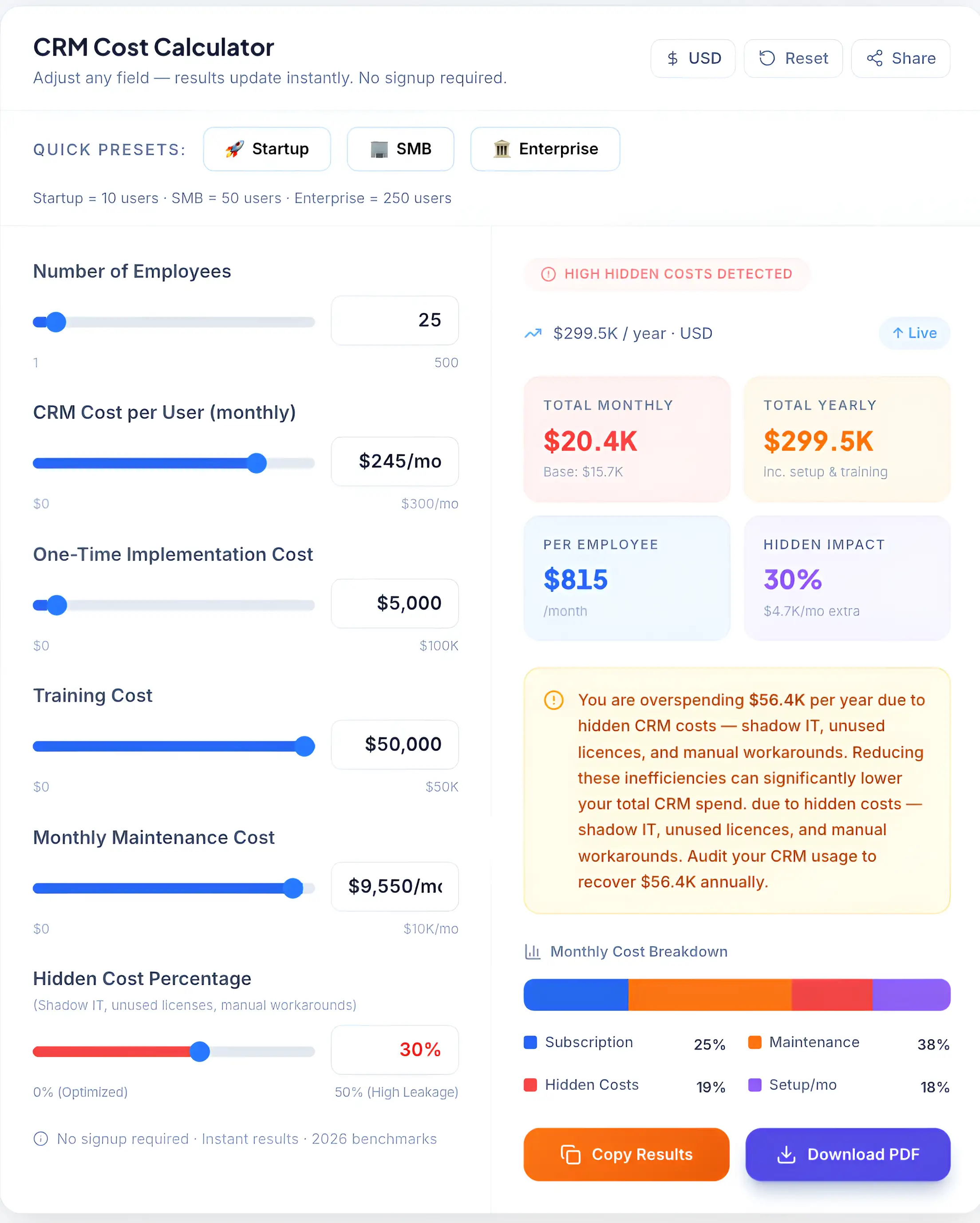
Understanding the investment: A breakdown of monthly costs and the 'Hidden Impact' of manual workarounds that AI note-taking tools can help eliminate.
No more manual notes. The person who used to take notes is now fully present in the conversation. Everyone in the meeting can focus on the discussion rather than dividing their attention between listening and writing.
Better follow-ups. Action items extracted and attributed by name create a lightweight accountability layer. Tasks don't disappear into a meeting recap email that nobody re-reads — they appear as structured, assigned outputs immediately after the call.
Searchable meeting history. A growing archive of searchable conversations changes how teams operate. Instead of trying to recall what was decided in a meeting two months ago, you search the archive and find the relevant section in seconds.
Consistent time savings. Knowledge workers using AI meeting tools report saving an average of 2.2 hours per week on post-meeting documentation, follow-up drafting, and context retrieval. For a team of ten, that's 22 hours of recovered capacity per week — productivity that compounds over months and quarters.
According to productivity research highlighted by Harvard Business Review, teams that rely on structured documentation and async communication significantly reduce coordination overhead and improve execution consistency.
Things Most People Ignore
Most AI note-taking tool comparisons focus entirely on features and pricing. A few practical considerations rarely make it into reviews — but they matter significantly for business use.
Data privacy and storage. Your meeting recordings and transcripts contain sensitive business information — client conversations, financial discussions, strategic decisions. Before deploying any tool at team scale, review where data is stored, whether it's used to train AI models, and whether you can delete it on demand. Most enterprise tools (Copilot, Fireflies Teams plan) offer clear data controls. Free tiers of consumer-facing tools sometimes don't.
Recording consent and legal compliance. In many jurisdictions — including much of Europe, several US states, and various other countries — recording a conversation without the consent of all participants is legally restricted. Most AI meeting bots announce their presence visibly, which creates an implied consent signal. But for client-facing meetings, regulated industries, or international calls, verify your legal position before deploying. When in doubt, default to explicit disclosure.
Bot visibility in meetings. A visible meeting bot — an extra participant named "Fireflies Notetaker" or "Otter Assistant" — can change the dynamic of a meeting, particularly with external clients or candidates in interviews. Some tools allow the bot to be renamed or hidden. Others don't. Consider how bot presence will land with the people on the other side of your calls before you decide on a tool.
Compliance requirements. For healthcare, legal, financial services, and other regulated industries, data handling requirements extend well beyond general privacy considerations. Tools like Microsoft Copilot and enterprise tiers of Fireflies offer the compliance certifications (SOC 2, HIPAA, GDPR) that regulated industries require. For most small businesses this isn't a barrier — but it's worth confirming before you sign up for a tool that handles sensitive client conversations.
How to Choose the Right AI Note-Taking Tool
Use this practical framework rather than comparing every feature across every tool.
Meeting type first. Sales calls with external clients have different requirements than internal team standups. Client-facing meetings where consent and data privacy matter lean toward tools with clear compliance controls (Copilot, Fireflies paid). Internal meetings where speed and simplicity matter → Fathom or Otter.
Platform compatibility second. Confirm that your chosen tool integrates reliably with your video conferencing platform. Otter.ai and Fireflies work across Zoom, Google Meet, and Microsoft Teams. tl;dv is optimized primarily for Zoom and Meet. Copilot is purpose-built for Microsoft Teams and offers limited value outside that environment.
Budget third. Fathom's free plan covers unlimited meetings for individuals. Fireflies and Otter free tiers handle occasional use. Paid plans ($16–$30/user/month) make sense once your team is running five or more meetings weekly and needs CRM integration, archive search, or compliance controls.
Team size last. Individuals and teams under five people can get significant value from free tiers. Teams of 5–20 benefit from paid plans where centralized archives, shared workspaces, and admin controls become genuinely useful. Enterprise teams typically need Copilot or Fireflies Business for governance and compliance features.
Pros and Cons — Honest Summary
What AI note-taking tools genuinely deliver:
- Consistent, structured post-meeting documentation without manual effort
- Action items captured and attributed automatically — not lost in bullet points
- Searchable meeting history that becomes more valuable over time
- Significant time savings on post-meeting follow-up and coordination
What they don't fix:
- Poorly run meetings — a good transcript of a disorganized meeting is still a disorganized record
- Strategic decision-making — AI surfaces what was said, not whether it was the right decision
- Confidential conversations — any tool joining a meeting as a bot creates a record that needs to be managed responsibly
- Accuracy in highly technical or specialist discussions — transcript accuracy decreases with domain-specific terminology
The most common failure mode is deploying an AI note-taking tool without establishing a clear process for how the outputs get used. Tools that produce summaries nobody reviews add friction without delivering value. The workflow around the tool matters as much as the tool itself.
Implementation Tips
Getting a tool configured is straightforward. Getting your team to use it consistently — and build workflows around its outputs — takes a few deliberate steps.
Start with one team or one meeting type. Don't roll out an AI note-taking tool across your entire organization at once. Pick one recurring meeting — weekly team standup, client calls, sales demos — and deploy the tool there first. Validate that the output quality fits your needs before expanding.
Test transcription accuracy with your team's specific context. Every tool handles accents, technical terminology, and crosstalk differently. Run three to five meetings through the tool before committing, and note where accuracy breaks down. Some tools handle this better than others depending on your team's communication style.
Build a follow-up workflow around the outputs. An AI summary is only valuable if someone acts on it. Decide in advance where action items go (task management tool, email, Slack), who reviews the summary after each meeting, and how the record gets stored. Without this, AI notes become an archive nobody uses.
Integrate with your existing workflow from day one. Connect your tool to Slack, your CRM, or your project management platform before the first team meeting. A disconnected note-taking tool adds a step; a connected one removes steps.
→ Not sure which tool fits your team? Use our AI Tool Selector to get a personalized recommendation in under 30 seconds.
Plan Your Meeting Intelligence Rollout
Choosing the right tool is only the first step. Most teams see limited results not because of the software — but because of an incomplete rollout. Missing integrations, no consent process for client calls, unclear ownership of action items, and no success metrics are the four most common causes of AI note-taking tools getting abandoned within 60 days.
Before you deploy your meeting AI stack, use a structured checklist to cover every implementation step correctly from the start.
→If you want to calculate what that time recovery is worth in concrete terms for your team, our AI ROI Calculator runs the numbers based on your team size and hourly cost.