What Are AI Marketing Tools, Really?
Let's skip the textbook definition.
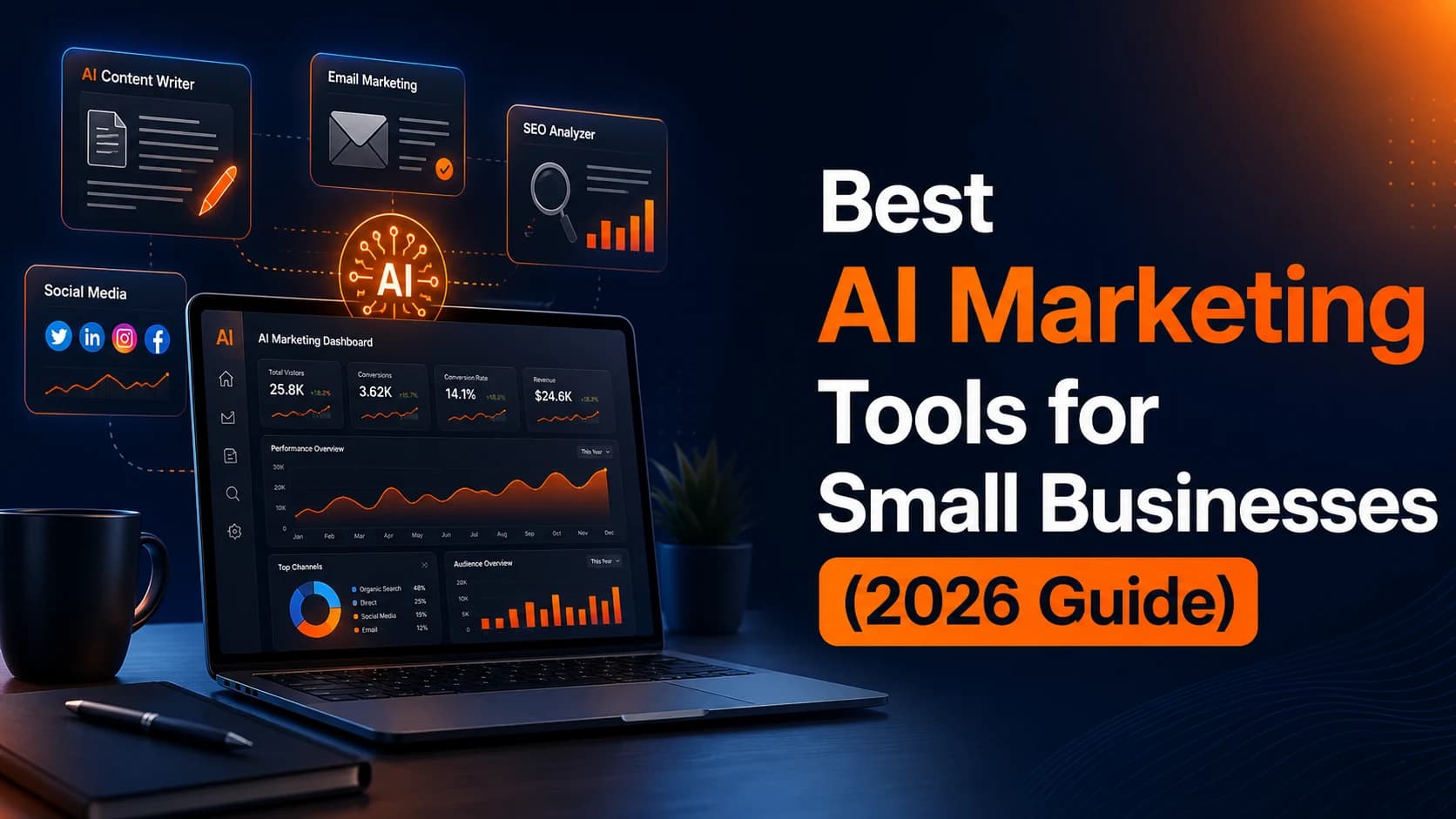
AI marketing tools are software platforms that use machine learning, natural language processing, and predictive data to help you do marketing tasks — faster and smarter than doing them by hand.
In practice, that looks like:
- Writing a month's worth of social captions in an afternoon
- Automatically segmenting your email list so the right message goes to the right person
- Generating SEO-optimized blog posts that actually rank
- Scheduling content weeks ahead while you focus on running your business
For a small business owner wearing six hats at once, that kind of leverage matters a lot.
Think about it — a solo marketer using AI can realistically do what used to take a 3-person team. That's not hype. That's what these tools are built to do.
Related reading: What Is AI in Marketing? A Beginner's Guide — HubSpot
Why Small Businesses Can't Afford to Ignore AI Marketing
Here's a number that should get your attention: 73% of small and mid-sized businesses that adopted AI marketing tools in the last two years reported measurable growth. Not just "things feel better" growth — actual lead and revenue growth.
And on the time side? Business owners using AI tools report saving 20+ hours per month on content and marketing tasks alone. That's half a workweek back in your pocket every month.
The cost benefits are just as real. Smart AI adoption can cut your marketing spend by up to 30% — mostly by eliminating tasks you used to outsource or spend hours on manually.
- 73% of SMBs using AI marketing tools report measurable revenue growth.
- Businesses save 20+ hours per month on marketing tasks using AI.
- AI-driven campaigns improve conversion rates by 18–25% on average.
- Companies reduce marketing costs by up to 30% through automation.
- Teams using AI publish 2–4× more content consistently.
What this means for you practically:
- You compete with bigger brands without needing their budget
- You move faster — campaigns go from idea to live in hours, not weeks
- You stay consistent even when things get busy
- You get data-backed decisions instead of gut-feel guesses
The businesses that hesitate usually say the same things: "I don't have time to learn new tools" or "it seems complicated." Both are understandable. Both also disappear after about a week of actually using the tools.
Further reading: AI Marketing Statistics You Should Know in 2026 — Salesforce
Best AI Marketing Tools at a Glance
| Tool | Category | Best For | Starting Price |
|---|---|---|---|
| ChatGPT | Content Creation | Writing, ideation, strategy | Free / $20 per month |
| Canva | Design | Graphics, ads, social visuals | Free / $10 per month |
| HubSpot | CRM & Automation | Lead management, email flows | Free / $20+ per month |
| Mailchimp | Email Marketing | Campaigns, segmentation | Free / $13 per month |
| Surfer SEO | SEO Optimization | Ranking content, keyword targeting | $79 per month |
| Buffer | Social Media | Scheduling, planning, analytics | Free / $6 per month |
→ Generate your personalised rollout plan using the AI Implementation Checklist tailored to your business size and use case.
AI Marketing Tools by Category
Before diving into each tool, it helps to understand the landscape. AI marketing breaks down into six key areas — and knowing which one is your weakest link will help you decide where to start.
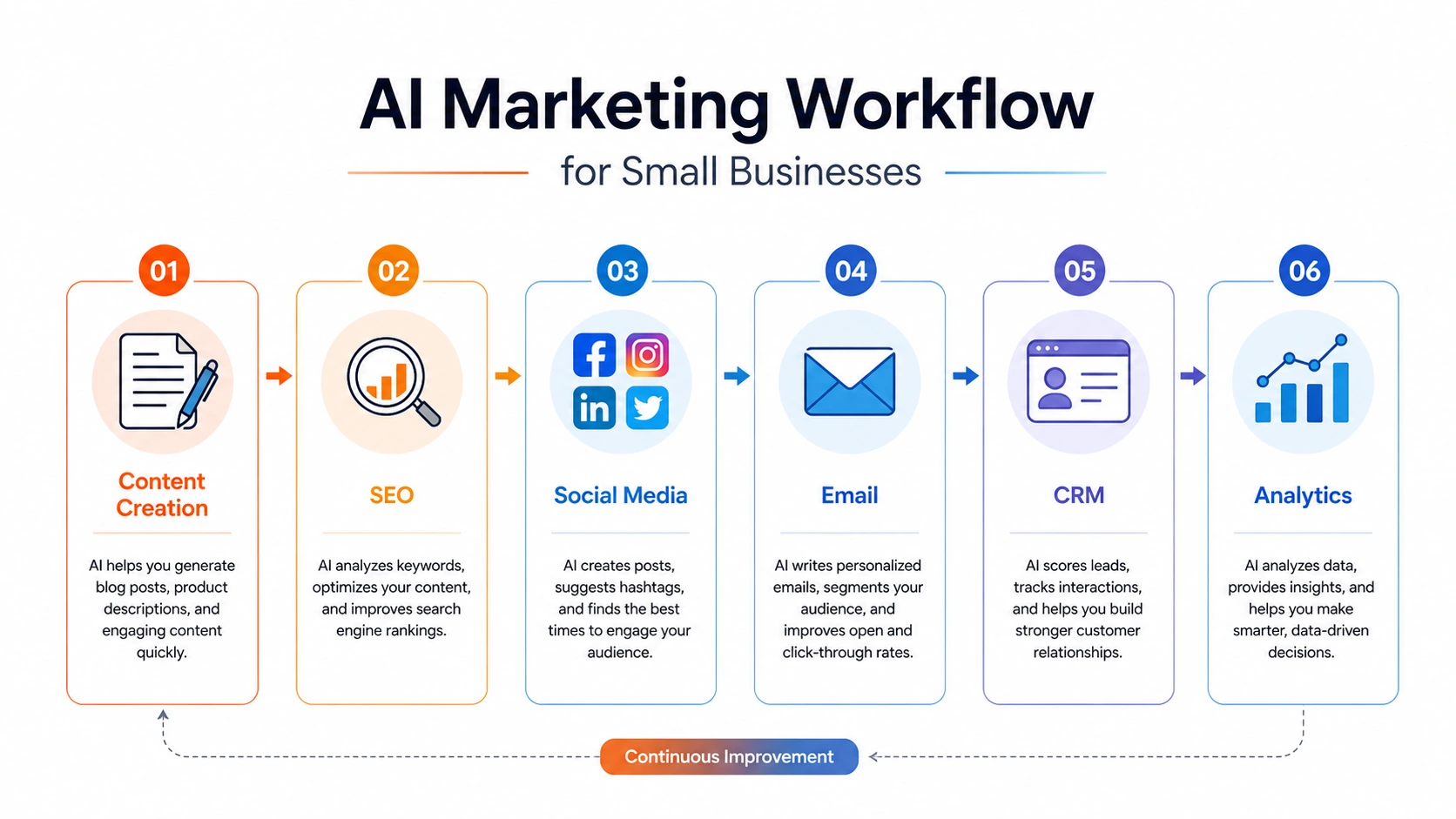
A streamlined AI-powered marketing workflow designed for small business automation.
Content Creation
This is usually the biggest time drain for small businesses. Writing blogs, emails, ad copy, product descriptions — it adds up fast. AI content tools don't just speed things up; they help you maintain quality and consistency even when you're stretched thin.
SEO Tools
Getting found on Google isn't luck. It's structure, keywords, and content that answers the right questions. AI-powered SEO tools take the guesswork out of this by analyzing what's ranking and helping you write content that can compete.
Social Media Management
Consistency is everything on social media, and that's exactly what most small business owners struggle with. AI scheduling tools let you plan weeks of content in one sitting and publish automatically — so your audience never goes quiet.
Email and CRM
Your email list is probably your most valuable marketing asset. The businesses getting the most out of email aren't sending blasts — they're sending smart, segmented messages triggered by real behavior. AI makes that possible without a dedicated email team.
Marketing Automation
This is where the real time savings happen. Automation connects your tools, triggers follow-ups, scores leads, and handles repetitive workflows so you don't have to.
Analytics and Reporting
You can't improve what you don't measure. AI analytics tools surface insights you'd probably miss in a raw spreadsheet — and they tell you what to do about them, not just what happened.
If you're not sure where to start, read this first: Choosing AI Software for Business: Complete 2026 Guide
Top AI Marketing Tools — Detailed Breakdown
1. ChatGPT (OpenAI)
Best for: Content creation, copywriting, marketing strategy
If you've used ChatGPT even once, you already know how useful it is. But most small business owners are barely scratching the surface.
Beyond just writing blog posts, ChatGPT can help you build a full content calendar, draft email sequences, brainstorm campaign angles, rewrite weak product descriptions, and even act as a sounding board for your marketing strategy.
The GPT-4o model (available in the free tier with limits) handles nuanced, long-form writing well. The paid plan ($20/month) removes usage caps and adds file uploads, image generation, and access to custom GPTs built specifically for marketing.
What works well: Speed and flexibility. You can go from a rough idea to a polished first draft in minutes. Great for solo founders who need to produce a lot of content without a writing team.
What to watch: ChatGPT outputs need editing. The writing is good but it can default to generic phrasing if you give it vague prompts. The quality of what you get out directly depends on the quality of what you put in. Learn basic prompting and your results will be dramatically better.
Pricing: Free plan available. ChatGPT Plus at $20/month.
Learn more: ChatGPT for Business — OpenAI
2. Canva
Best for: Visual design, social media graphics, marketing creatives
Canva has transformed how small businesses handle design. What used to require a graphic designer — polished social posts, branded ads, pitch decks, email headers — can now be done in 20 minutes by someone with zero design experience.
The AI features in 2026 are genuinely impressive. Magic Write generates copy inside your designs. Text-to-image lets you create custom visuals without stock photo subscriptions. Magic Resize takes one piece of content and reformats it for every platform automatically.
For a small business running Instagram, Facebook ads, email newsletters, and a website simultaneously, Canva Pro pays for itself in hours saved.
What works well: The template library is enormous and the drag-and-drop editor is genuinely easy to use. Brand Kit keeps your colors, fonts, and logo consistent across everything.
What to watch: If you need truly custom, complex design work, Canva has limitations. It's excellent for 90% of what most small businesses need, but not a replacement for a designer on high-stakes projects like full brand identities.
Pricing: Free plan is generous. Canva Pro starts at $10/month per person.
Learn more: Canva for Business — Canva
3. HubSpot
Best for: CRM, email marketing, lead management, and full-funnel automation
HubSpot is in a different category from the other tools on this list. It's not just a marketing tool — it's a full platform that connects your marketing, sales, and customer service in one place.
For small businesses that are serious about growth, HubSpot's free CRM alone is worth setting up. You get contact management, deal tracking, email sequences, live chat, and basic automation — all free, with no expiration.
The paid plans layer in AI-powered email personalization, predictive lead scoring, A/B testing, and more advanced automation workflows. If you're running any kind of outbound sales alongside your marketing, HubSpot ties it all together in a way that spreadsheets simply can't.
What works well: The all-in-one approach means you're not stitching together five different tools with Zapier. Everything talks to everything else, and the reporting gives you a genuinely clear picture of your funnel.
What to watch: HubSpot has a learning curve. It takes a few weeks to set up properly, and the paid tiers can get expensive fast if you're not selective about what you actually need.
Pricing: Free CRM forever. Paid plans start at $20/month (Marketing Hub Starter).
Learn more: HubSpot for Small Business — HubSpot
4. Mailchimp
Best for: Email marketing, automation, audience segmentation
Email marketing still delivers the highest ROI of any marketing channel — around $36 for every $1 spent according to most industry benchmarks. Mailchimp is the platform most small businesses use to capture that ROI.
The AI features have gotten noticeably better. The Content Optimizer suggests improvements to your email copy based on what performs well in your industry. Send Time Optimization picks the best time to send each campaign. Subject Line Helper generates and scores subject line variations.
For businesses with under 500 subscribers, Mailchimp's free plan covers most of what you need. Beyond that, the paid plans add automation sequences, A/B testing, and more advanced segmentation.
What works well: The drag-and-drop email builder is clean and fast. Automation workflows — welcome series, abandoned cart, re-engagement — are straightforward to set up even without technical experience.
What to watch: Mailchimp gets expensive as your list grows. If you're scaling past 5,000 contacts, it's worth comparing alternatives like Kit (formerly ConvertKit) or ActiveCampaign.
Pricing: Free up to 500 contacts. Paid plans start at $13/month.
Learn more: Mailchimp for Small Business — Mailchimp
5. Surfer SEO
Best for: SEO content writing, keyword optimization, ranking strategy
If organic search traffic matters to your business — and for most businesses, it should — Surfer SEO is one of the most practical tools available.
Here's what makes it different from a regular keyword tool: Surfer doesn't just tell you what keywords to use. It analyzes the top-ranking pages for your target keyword, pulls out the structural patterns that make them rank, and gives you a real-time content score as you write. You can see exactly what to add, what to cut, and how your draft compares to what's already winning in Google.
The AI writing assistant inside Surfer can generate draft outlines or full sections based on your keyword — which you then edit and refine. It's not a set-and-forget tool, but for businesses that are serious about organic traffic, the ROI is real.
What works well: The Content Editor is genuinely useful. If you're already creating content, adding Surfer to your process can meaningfully improve your rankings without changing your workflow that much.
What to watch: No free plan. At $79/month, it's the most expensive tool on this list. If you're publishing less than 4–6 articles per month, the cost-per-article math might not work in your favor.
Pricing: Essential plan starts at $79/month.
Learn more: Surfer SEO Overview — Surfer SEO
6. Buffer
Best for: Social media scheduling, content calendar management
Buffer is the no-fuss option for social media management. You connect your accounts, load up your posts, set a schedule, and Buffer handles the rest. Clean interface, simple workflow, does exactly what it says.
The AI assistant helps generate post variations, suggest hashtags, and repurpose content across platforms. The analytics show you which posts are performing and when your audience is most active.
For a small business managing 2–4 social accounts with a lean team, Buffer's free plan is plenty. The paid plan unlocks more accounts, deeper analytics, and engagement features.
What works well: The simplicity. Buffer doesn't try to do everything, and that's actually a strength. You can onboard in an afternoon and start scheduling the same day.
What to watch: The analytics are basic compared to dedicated social analytics tools. If social media is a primary revenue channel for your business, you might eventually outgrow Buffer.
Pricing: Free plan available. Paid plans start at $6/month per channel.
Learn more: Buffer for Small Business — Buffer
Side-by-Side Comparison
| Tool | Ease of Use | Feature Depth | ROI Potential | Best Fit |
|---|---|---|---|---|
| ChatGPT | High | High | High | Content-heavy businesses |
| Canva | Very High | Medium | High | Visual-first brands |
| HubSpot | Medium | Very High | Very High | Sales + marketing teams |
| Mailchimp | High | Medium | High | Email-driven businesses |
| Surfer SEO | Medium | High | High | SEO-focused content teams |
| Buffer | Very High | Low-Medium | Medium | Simple social scheduling |
Looking for CRM-focused tools? See: Best AI CRM Software for Small Businesses
Pricing Breakdown
| Tool | Free Plan | Paid Plan Starts | Overall Value |
|---|---|---|---|
| ChatGPT | Yes (with limits) | $20/month | High |
| Canva | Yes | $10/month | Very High |
| HubSpot | Yes (CRM) | $20+/month | High |
| Mailchimp | Yes (500 contacts) | $13/month | Medium |
| Surfer SEO | No | $79/month | High (if used consistently) |
| Buffer | Yes | $6/month | High |
How to Choose the Right Tools for Your Business
This is where most people go wrong — they pick tools based on features instead of needs. Here's a better way to think about it.
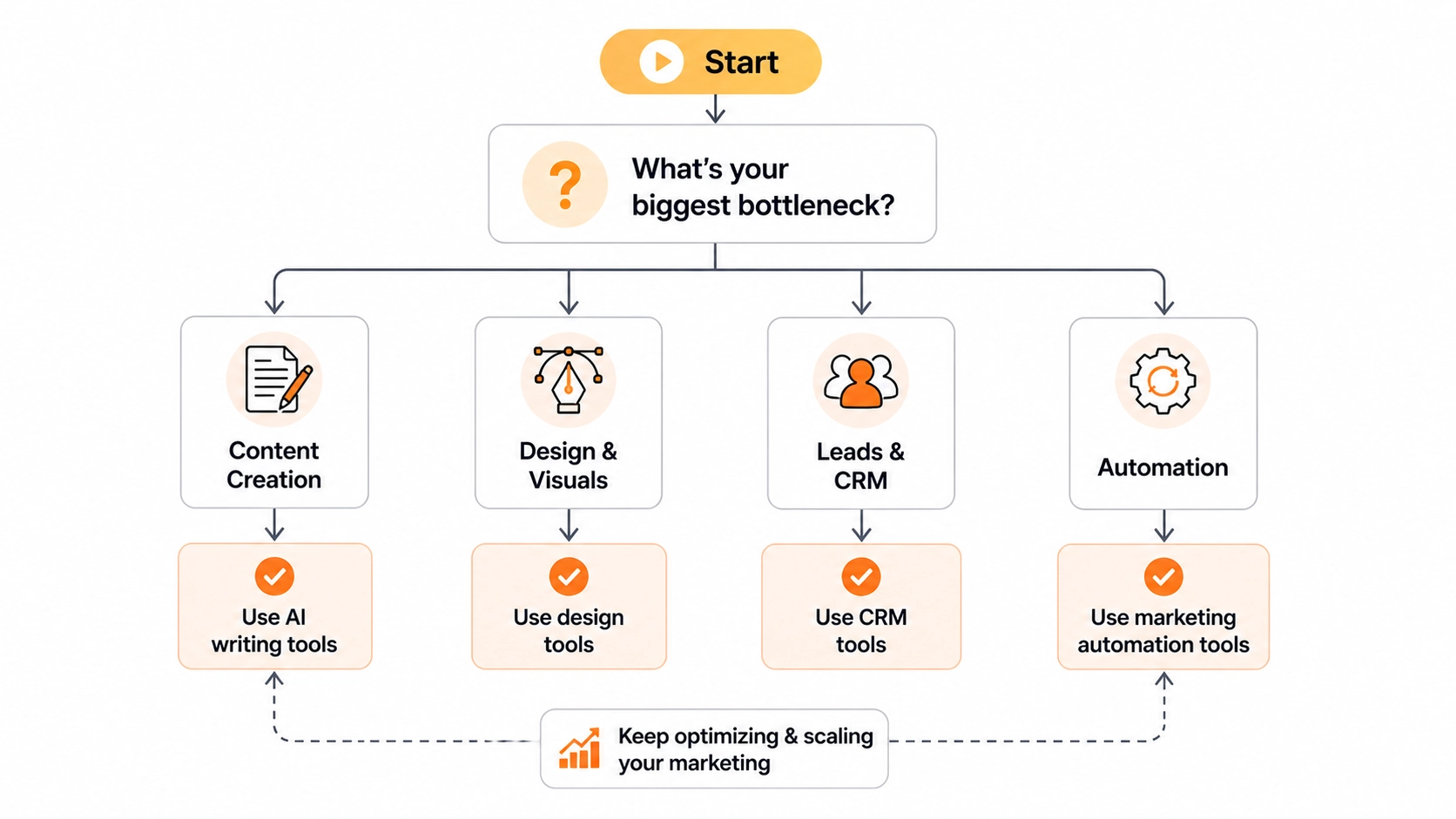
Identifying the right AI solution based on your business's biggest marketing bottlenecks.
Start with your biggest bottleneck. If content creation is eating your week, start with ChatGPT. If you can't keep up with social media, start with Buffer or Canva. If your leads are falling through the cracks, HubSpot is the priority. Fix the biggest problem first.
Stay under $100/month to start. You don't need to spend a fortune. Most small businesses can build a solid AI marketing stack for $50–80/month, or even less if you lean on free tiers. Don't let tool costs outpace the revenue they're generating.
The best AI marketing tool isn’t the most powerful — it’s the one that removes your biggest bottleneck. A CRM won’t help if your problem is content. A design tool won’t help if you're losing leads. Start where you're losing the most time or money.
Check your integrations. Your tools need to talk to each other. Before committing to anything, verify it connects with what you already use — your website platform, payment processor, or existing CRM.
Ease of use matters more than you think. A powerful tool you never open is worth zero. Be honest about how much time you have to learn something new, and factor that into your choice.
Common Mistakes Small Businesses Make with AI Marketing Tools
Getting the tools is the easy part. Using them well is where it gets tricky. Here are the mistakes that show up again and again:
Running too many tools at once. It feels productive to sign up for six different platforms. It usually isn't. You end up half-using all of them and getting full value from none. Start with two or three, use them properly, and expand from there.
Treating AI output as finished work. ChatGPT writes fast. That's the point. But "fast" doesn't mean "done." AI-generated content needs a human pass — for tone, accuracy, brand voice, and the kind of specific detail that comes from real experience. Think of AI as your first draft, not your final one.
Using tools without a strategy. If you don't know what a piece of content is supposed to do — drive traffic, capture leads, nurture existing customers — AI can't figure that out for you. The tools amplify your strategy. They don't replace the need for one.
Ignoring data and analytics. Most of these tools surface useful performance data. Actually use it. Check what's working, cut what isn't, and adjust. That feedback loop is what separates businesses that grow with these tools from businesses that just stay busy.
If automation is your goal, explore: AI Automation Tools for Local Businesses (2026 Guide)
The Best AI Marketing Stacks for Small Businesses
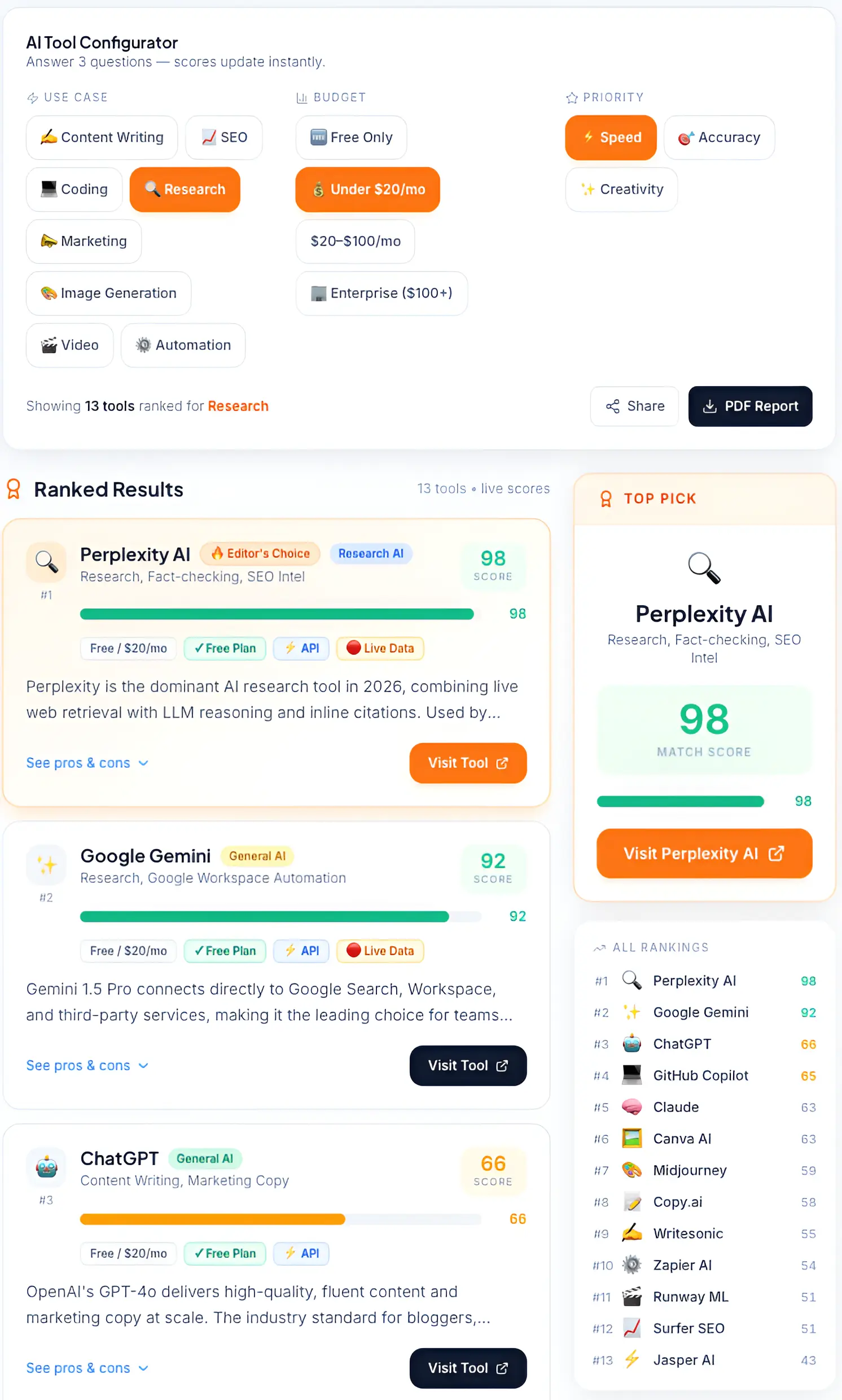
Top-ranked AI research and productivity tools for small businesses in 2026.
You don't have to figure out the perfect combination from scratch. Here are two proven setups that work well:
Starter Stack (Budget-Friendly)
ChatGPT + Canva + Mailchimp
This covers your three core needs: content creation, visual design, and email marketing. Total cost can be as low as $13/month (Mailchimp Essentials) if you use the free tiers of ChatGPT and Canva. Great for businesses just getting started with AI marketing.
Growth Stack (Scaling Up)
ChatGPT + Surfer SEO + HubSpot + Buffer
This stack adds serious SEO and CRM capability. You're now building organic traffic, managing your full customer pipeline, and keeping social media consistent — all in one connected system. Budget roughly $120–150/month depending on HubSpot tier.
→ Still unsure? Use the AI Tool Selector to find the best-fit tools based on your needs.