What Are Free AI Tools for Business?
Free AI tools are software platforms that offer a functional tier at no cost — using automation, machine learning, or generative AI to handle tasks that previously required hours of manual work or a dedicated hire.
The "free" tier isn't a stripped-down demo. For most of the tools on this list, the free version covers real business use cases from day one.
Here's what these tools actually handle:
- Content creation — drafting emails, writing blog posts, editing copy, and generating marketing materials without a full-time writer
- Design and visuals — producing social posts, ads, and branded graphics without a design agency
- Workflow automation — connecting apps and triggering tasks automatically, reducing repetitive manual work
- Customer communication — responding to inquiries faster, managing live chat, and deploying basic chatbots
- CRM and lead management — tracking prospects, managing pipelines, and following up without a sales operations team
The business case is straightforward. A small team running five of these tools can operate with the output of a much larger organization — and that gap is widening as the tools improve.
For a broader view of how AI software fits into business operations, see: Complete Guide to Choosing AI Software for Your Business (2026 Edition).
Why Free AI Tools Matter More in 2026
The cost of starting and running a business has dropped significantly — largely because capable AI tools are now free or nearly free. But most business owners still underestimate what the free tier actually includes.
- Productivity gains: Businesses using AI tools for tasks like email writing, customer support replies, and content creation report 40–60% time savings, per McKinsey 2025 SMB Productivity Report.
- Cost savings: Businesses that replaced manual processes with free AI tools saved an average of $18,000–$32,000 annually in equivalent labor costs, per a 2025 Salesforce SMB Trends survey.
- AI adoption rate: AI tool adoption among businesses with fewer than 50 employees grew 61% between 2023 and 2025, per Gartner.
- Content output: Teams using AI writing tools produce content 3–5x faster than teams relying on manual drafting alone, per HubSpot 2025 State of Marketing report.
- Startup advantage: 74% of early-stage founders cite free AI tools as the primary reason they delayed their first hire, per a 2025 Y Combinator survey.
The practical implication: businesses that build their operations around free AI tools from the start gain a structural cost advantage over competitors still paying for manual labor or expensive SaaS. The tools below represent the highest-value free options available in 2026 — across five core business functions.
This applies strongly to financial operations as well — especially expense tracking and spend visibility. For a deeper breakdown, see: Best AI Expense Tracking Tools for Startups (2026).
Best Free AI Tools for Businesses (2026): Overview Table
| Tool | Category | Free Limit | Best For | Paid Upgrade |
|---|---|---|---|---|
| ChatGPT | Content | Unlimited basic | Writing, ideation | $20/mo |
| Canva | Marketing | 25 AI credits/day | Design | $15/mo |
| Grammarly | Content | Full editing | Communication | $12/mo |
| HubSpot | CRM/Sales | Core free | Lead management | Paid add-ons |
| Notion AI | Productivity | 20 responses/mo | Organization | $8/user |
| Zapier | Automation | 100 tasks/mo | Workflows | $20/mo |
| Google Gemini | Multi-use | Unlimited | Research | Paid advanced |
| Tidio | Support | 50 conv/mo | Chatbots | $29/mo |
| Tawk.to | Support | Unlimited | Live chat | Paid upgrades |
Content and Writing AI Tools
1. ChatGPT
Best for: Content creation, email drafting, and brainstorming
ChatGPT remains the most versatile AI writing tool available — and the free tier is genuinely functional for daily business use. You can use it to draft blog posts, write marketing copy, generate product descriptions, build outreach emails, or simply think through a business problem out loud. It handles a wide range of tasks without any technical setup.
The practical value for small businesses is significant. A solo founder can use ChatGPT to produce content that would otherwise require a freelancer or agency — in a fraction of the time.
Key features:
- Blog writing, marketing copy, and email drafts
- Ideation and strategy brainstorming
- Research support and summary generation
- Usable across every department with no learning curve
Pros: Extremely versatile, beginner-friendly, and the free tier covers most everyday writing needs
Cons: Outputs sometimes require fact-checking — AI-generated content should always be reviewed before publishing
2. Grammarly
Best for: Professional communication and brand voice consistency
Grammarly sits quietly in the background and improves every piece of writing your team produces — emails, proposals, support responses, social posts. It catches grammar errors, flags awkward phrasing, and suggests clarity improvements in real time.
For businesses where written communication is a significant customer touchpoint, Grammarly pays for itself in credibility alone. The free tier includes full grammar and spelling correction across all standard writing surfaces.
Key features:
- Real-time grammar, spelling, and punctuation corrections
- Tone and clarity suggestions
- Works across email clients, Google Docs, and web browsers
Pros: Works automatically without changing your writing process; noticeably improves communication quality
Cons: Advanced tone analysis and full plagiarism checking require a paid plan
Marketing and Design AI Tools
3. Canva
Best for: Social media graphics, ads, presentations, and branded content
Canva is the design tool for businesses without a dedicated designer — and it handles that role well. The free tier includes thousands of templates, a drag-and-drop editor, and 25 daily AI design credits. You can produce social posts, pitch decks, ad banners, email headers, and video thumbnails without any design background.
The quality of output is high enough for most business marketing needs. The gap between a Canva-designed asset and a professionally designed one has narrowed considerably in recent years.
Key features:
- AI image and design generator
- Templates for social media, ads, videos, and presentations
- Drag-and-drop editor with brand kit support
Pros: Fast, easy to use, produces professional-quality output; no design experience required
Cons: Some premium assets in the free tier include a watermark — always check before publishing
4. HubSpot
Best for: Marketing automation and CRM in a single platform
HubSpot's free tier is one of the most generous in the industry. It includes a fully functional CRM, email marketing tools, a basic landing page builder, and AI-assisted content suggestions — all at no cost. For businesses managing leads, email campaigns, or a growing contact database, the free plan is a legitimate starting point.
HubSpot also scales well. When your business grows, you move up within the same platform rather than migrating to a new tool — which saves significant time and data loss risk.
Key features:
- Email personalization and campaign tracking
- Lead tracking and pipeline management
- AI-powered content suggestions and insights
Pros: Strong free CRM; scales naturally with business growth; integrates with most popular tools
Cons: Marketing automation and advanced reporting features are gated behind paid plans
Sales and CRM AI Tools
5. Google Gemini
Best for: Research, competitor analysis, and sales content development
Google Gemini's free tier gives businesses access to real-time web data — something that sets it apart from tools trained on static datasets. It's particularly useful for sales teams researching prospects, analyzing competitors, or building context-aware pitch materials before a call.
For strategic research tasks, Gemini's ability to pull and synthesize current information makes it the practical choice over tools that may be working with outdated training data.
Key features:
- Real-time web search and data synthesis
- Competitor research and market analysis
- Sales pitch assistance and proposal support
Pros: Up-to-date information; strong analytical output; free tier has no usage cap
Cons: Less versatile for creative content tasks than ChatGPT
6. HubSpot (Sales Use Case)
HubSpot's CRM is worth calling out separately for its sales function. Beyond marketing, it gives sales teams a clear view of every lead: where they came from, what they've engaged with, and where they sit in the pipeline.
For small sales teams without a dedicated CRM budget, this is the most complete free option available.
Use cases:
- Track leads through every stage of the pipeline
- Prioritize high-intent prospects with engagement data
- Automate follow-up sequences and deal reminders
Productivity and Automation Tools
7. Notion AI
Best for: Project management, documentation, and team organization
Notion combines notes, documents, databases, and task management in a single workspace — and the AI layer adds summarization, draft generation, and content organization on top. The free plan includes 20 AI responses per month, which is enough for light usage across a small team.
The real value of Notion isn't any single feature — it's consolidation. Replacing four separate tools (notes, tasks, wikis, and project tracking) with one reduces the time your team spends switching contexts.
Key features:
- Notes, documents, tasks, and databases in one interface
- AI summaries of long documents and meeting notes
- Workflow and project organization templates
Pros: Genuinely replaces multiple tools; clean interface; low learning curve
Cons: The free plan's AI limit (20 responses/month) becomes restrictive quickly for teams using it heavily
8. Zapier
Best for: Automating repetitive tasks between apps
Zapier connects the tools you already use — without writing any code. When a new lead fills out a form, Zapier can automatically add them to your CRM, send a Slack notification, and trigger a welcome email. Without Zapier, that's a three-step manual process done hundreds of times. With it, it happens automatically every time.
The free plan covers 100 tasks per month across two-step automations. For small teams just starting with automation, that's a meaningful starting point.
Key features:
- Integration with 6,000+ apps
- Trigger-and-action workflow builder
- No coding required
Pros: Significant time savings on repetitive cross-app tasks; easy to build without technical knowledge
Cons: The 100 task/month free limit is reached quickly; multi-step automations require a paid plan
Customer Support AI Tools
9. Tidio
Best for: E-commerce and product businesses needing chatbot support
Tidio combines a live chat widget with an AI chatbot — letting small businesses respond to customer inquiries automatically, even outside business hours. The free plan covers 50 conversations per month, which is enough for businesses with low-to-moderate support volume getting started.
Key features:
- AI chatbot with automated responses
- Live chat widget
- Basic conversation automation and routing
Pros: Easy to set up; improves response times immediately; no technical knowledge required
Cons: 50 conversations per month is limiting for businesses with active customer traffic
10. Tawk.to
Best for: Unlimited free live chat support
Tawk.to is the only fully free live chat tool on this list with no conversation cap. There's no paid tier pressure — the core product is free, with optional paid add-ons for removing branding or accessing premium agents.
For businesses that want live chat on their website immediately without committing to a paid plan, Tawk.to is the obvious starting point.
Key features:
- Unlimited live chat with visitors
- Visitor tracking and basic analytics
Pros: Completely free with no usage limits; quick to deploy
Cons: AI features are basic compared to Tidio; the interface is less polished than paid alternatives
Comparison Table: Decision Helper
| Tool | Best For | Ease of Use | Free Tier Power | Main Limitation |
|---|---|---|---|---|
| ChatGPT | Content | 5/5 | 5/5 | Accuracy — outputs need review |
| Canva | Design | 5/5 | 4/5 | Daily AI credit cap |
| HubSpot | CRM | 4/5 | 4/5 | Automation gated at paid tier |
| Notion AI | Productivity | 4/5 | 3/5 | 20 AI responses/month |
| Zapier | Automation | 4/5 | 3/5 | 100 task/month limit |
Best Free AI Tools by Use Case
If you're just starting out, don’t overthink this — most businesses only need ChatGPT and Canva in the first 30 days. Everything else can wait.
Not every business needs the same tools. Here's a simple way to choose based on your situation:
- Solo founders / freelancers → ChatGPT + Canva + Grammarly
- Small teams (2–10 people) → ChatGPT + Canva + HubSpot
- Marketing-focused businesses → Canva + HubSpot + ChatGPT
- Sales-driven businesses → HubSpot + Google Gemini
- Automation-heavy workflows → Zapier + HubSpot + ChatGPT
- Customer support-heavy websites → Tawk.to or Tidio
How to Actually Use These Tools (Step-by-Step)
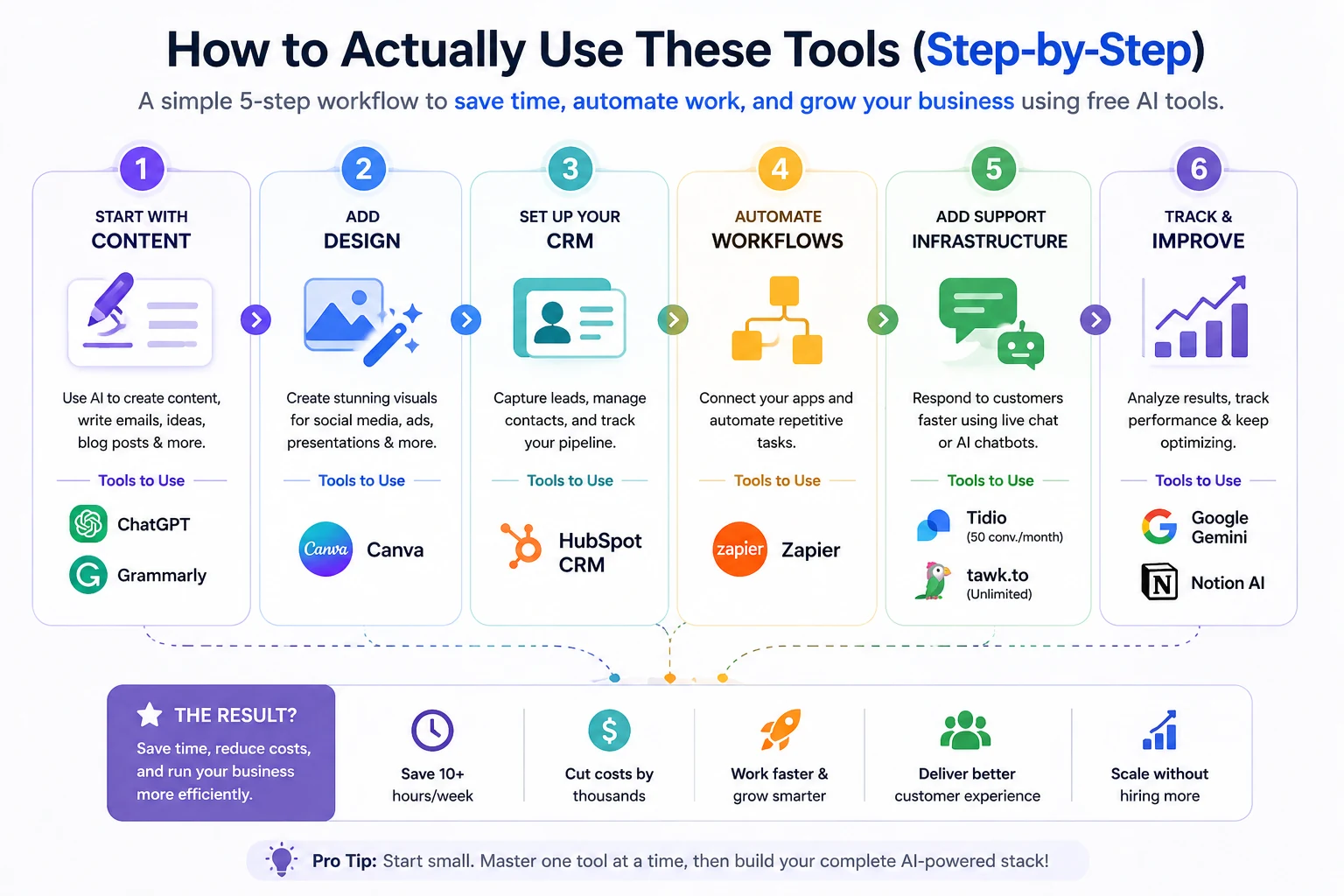
The 3-layer AI automation strategy: Seamlessly moving from manual data entry to smart capture, intelligent categorization, and final predictive financial analysis.
Most businesses fail to get full value from free AI tools not because the tools are limited — but because they try too many at once and commit to none. Here's a more effective approach.
Step 1 — Start with content. ChatGPT covers the highest-volume tasks immediately: email drafts, social post ideas, FAQ copy, and blog outlines. Use it daily until it becomes part of your standard workflow.
Step 2 — Add design. Once you're producing content regularly, Canva ensures it looks professional when it goes out. Templates replace the need to start from a blank canvas.
Step 3 — Set up your CRM. HubSpot's free CRM is worth deploying before you think you need it. Tracking contacts from the beginning prevents data chaos later.
Step 4 — Automate the connections. Once you're using three or more tools regularly, Zapier connects them. Leads from your website go straight to HubSpot. New deals trigger Slack notifications. These automations save hours per month.
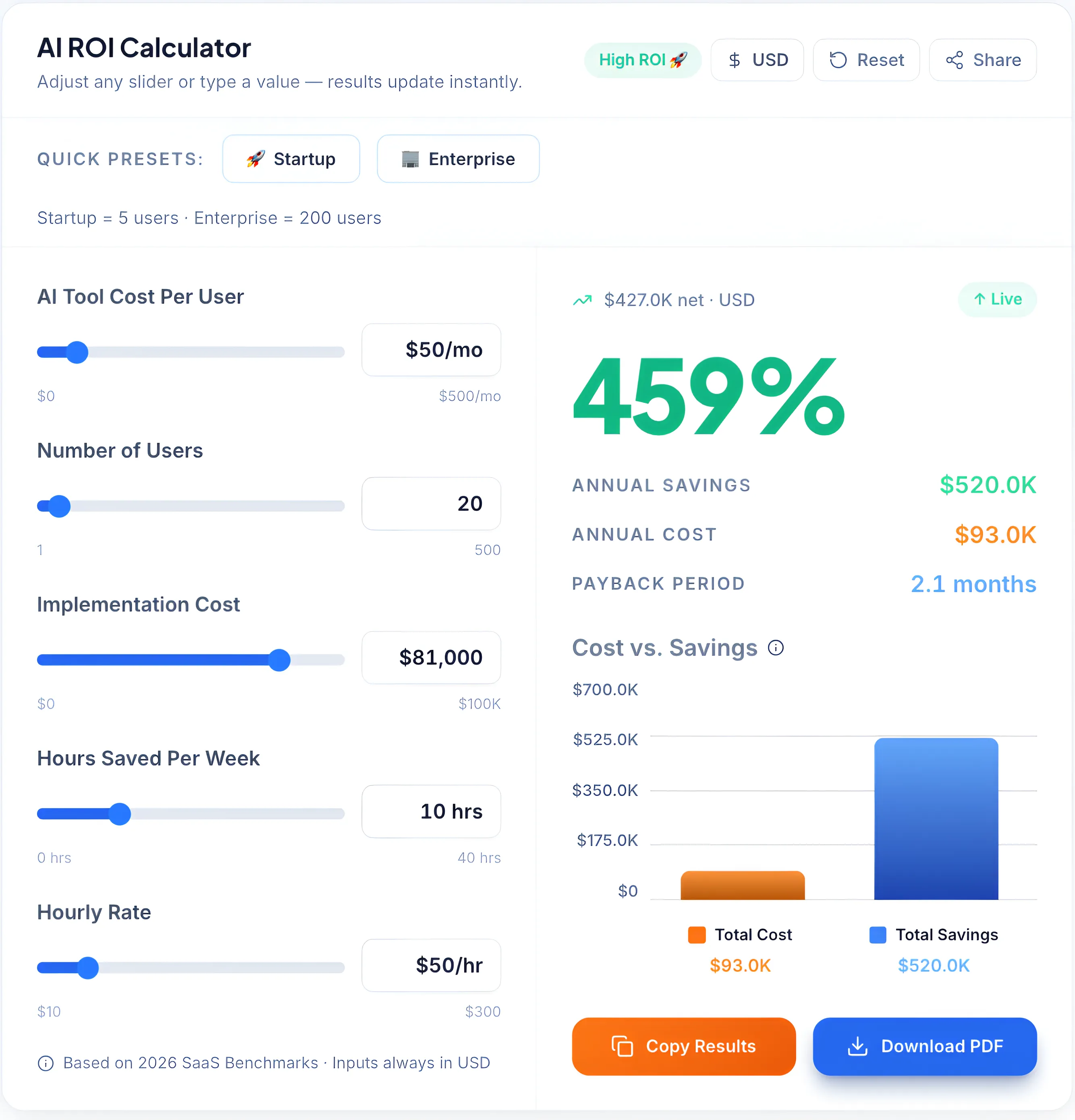
→ To understand the real impact, you can estimate how much time and cost these tools save using our AI ROI Calculator.
Step 5 — Add support infrastructure. Tawk.to or Tidio deploys in under an hour. Install it on your website and respond to visitor questions in real time.
The biggest mistake small businesses make isn't picking the wrong tool — it's picking too many tools at once. Deploying five new platforms simultaneously means none of them gets used properly. Start with ChatGPT for content and HubSpot for CRM. Run those for 30 days. Then add Canva and Zapier. Build the stack in layers, not all at once.
Real Example: How a Small Business Uses Free AI Tools
To make this practical, here's how a typical small business or startup actually uses this stack day-to-day:
Step 1 — Lead comes in
A visitor fills out a form on your website → captured inside HubSpot CRM
Step 2 — Automation triggers
Zapier automatically:
- Adds the lead to your CRM
- Sends a Slack or email notification
- Triggers a follow-up workflow
Step 3 — Response created instantly
Use ChatGPT to:
- Draft a personalized reply
- Generate a proposal or pitch outline
Step 4 — Visual assets created
Use Canva to:
- Create a proposal deck
- Design a social proof graphic or case study
Step 5 — Communication polished
Grammarly ensures:
- Emails are professional
- Tone matches your brand
Step 6 — Ongoing tracking
Everything stays organized inside HubSpot, including:
- Email conversations
- Deal stages
- Follow-up reminders
Recommended Free AI Stack
The most effective approach isn't choosing between these tools — it's stacking them by function.
Layer 1 — Content (start here):
- ChatGPT for writing and ideation
- Grammarly for polishing everything that goes out
Layer 2 — Marketing and sales (add next):
- Canva for visual content
- HubSpot for CRM and email campaigns
Layer 3 — Operations (add when volume demands it):
- Zapier for connecting your tools
- Notion AI for documentation and team organization
Layer 4 — Customer support (deploy when site traffic grows):
- Tawk.to for unlimited live chat
- Tidio if chatbot automation is needed
This full stack costs nothing to start. The combined free tiers cover the operational needs of most businesses under $500K revenue. Upgrade individual tools as specific limits become constraints — not before.
According to McKinsey's research on SMB productivity and AI adoption, small businesses that adopt AI tools systematically — starting with high-frequency tasks and expanding from there — see 2–3x the productivity gain compared to businesses that deploy tools without a clear workflow integration plan.
The complete AI expense lifecycle: Automating everything from the initial receipt scan to policy checks and final executive financial reports.
Common Mistakes to Avoid
Deploying too many tools at once. The temptation is to set up everything immediately. The result is a collection of half-configured tools that no one uses consistently. Focus on two tools until they're genuinely embedded in your workflow before adding more.
Treating AI output as final. ChatGPT and Gemini produce good first drafts — not finished products. Every AI-generated piece of content, analysis, or communication should be reviewed before it's sent or published. The 15 minutes saved on drafting is wasted if an error damages your credibility.
Ignoring free tier limits until they hit. Zapier's 100-task limit and Tidio's 50-conversation cap are easy to hit faster than expected. Track your usage monthly so you're not surprised by a workflow breaking when you exceed a limit.
Not measuring time saved. The ROI of free AI tools isn't abstract — it's measurable. Track how long specific tasks took before and after each tool is deployed. Businesses that measure this consistently make smarter decisions about which tools to keep, which to upgrade, and which to replace.
→ To track this effectively, you can use our CRM Cost Calculator to estimate how much your tools are actually costing versus the value they generate over time.
How to Choose the Right Tools
Four factors determine which tools belong in your stack:
- Volume. If you're publishing content daily, ChatGPT becomes essential. If you're publishing monthly, the free tier is more than sufficient and may be all you ever need.
- Team size. Solo operators need simplicity — ChatGPT, Canva, and HubSpot are enough to start. Teams need shared tools with collaboration features, which shifts the priority toward Notion and HubSpot's team functionality.
- Customer touchpoints. Businesses with active customer communication on their website should prioritize Tawk.to or Tidio early. B2B businesses with longer sales cycles should prioritize HubSpot.
- Integration complexity. The more tools you use, the more valuable Zapier becomes. If you're running five or more platforms, Zapier's free tier alone can save several hours per week in manual cross-platform work.
According to Forbes research on AI adoption among small businesses, SMBs using AI tools consistently are significantly more likely to scale past their first three years, make faster decisions during periods of uncertainty, and identify operational inefficiencies before they become expensive problems.