What Are AI Content Creation Tools?
Put simply, they're software platforms that use artificial intelligence to generate, edit, or enhance content — text, images, video, audio, and everything in between.
But the more useful way to think about them: a single person with the right AI tools can do what used to require a small content team. One marketer can write SEO blogs, produce branded social posts, edit podcast episodes, and create explainer videos — without hiring five specialists.
The real-world use cases break down like this:
- Blog writing — draft and optimise long-form content in a fraction of the time
- Ad copy — generate and A/B test dozens of headline and body copy variations
- Social content — maintain consistent posting across platforms without burning out
- Video creation — produce professional-looking videos without cameras or studios
If you're still producing all of this manually in 2026, you're not just working harder than necessary — you're losing ground to competitors who aren't.
For a complete framework on evaluating AI tools across different business functions, see: Choosing AI Software for Business: Complete 2026 Guide.
Why Businesses Are Adopting AI Content Tools (2026 Data)
The numbers behind AI content adoption aren't speculative anymore. They're the result of several years of real business implementation — and the gap between adopters and non-adopters is growing.
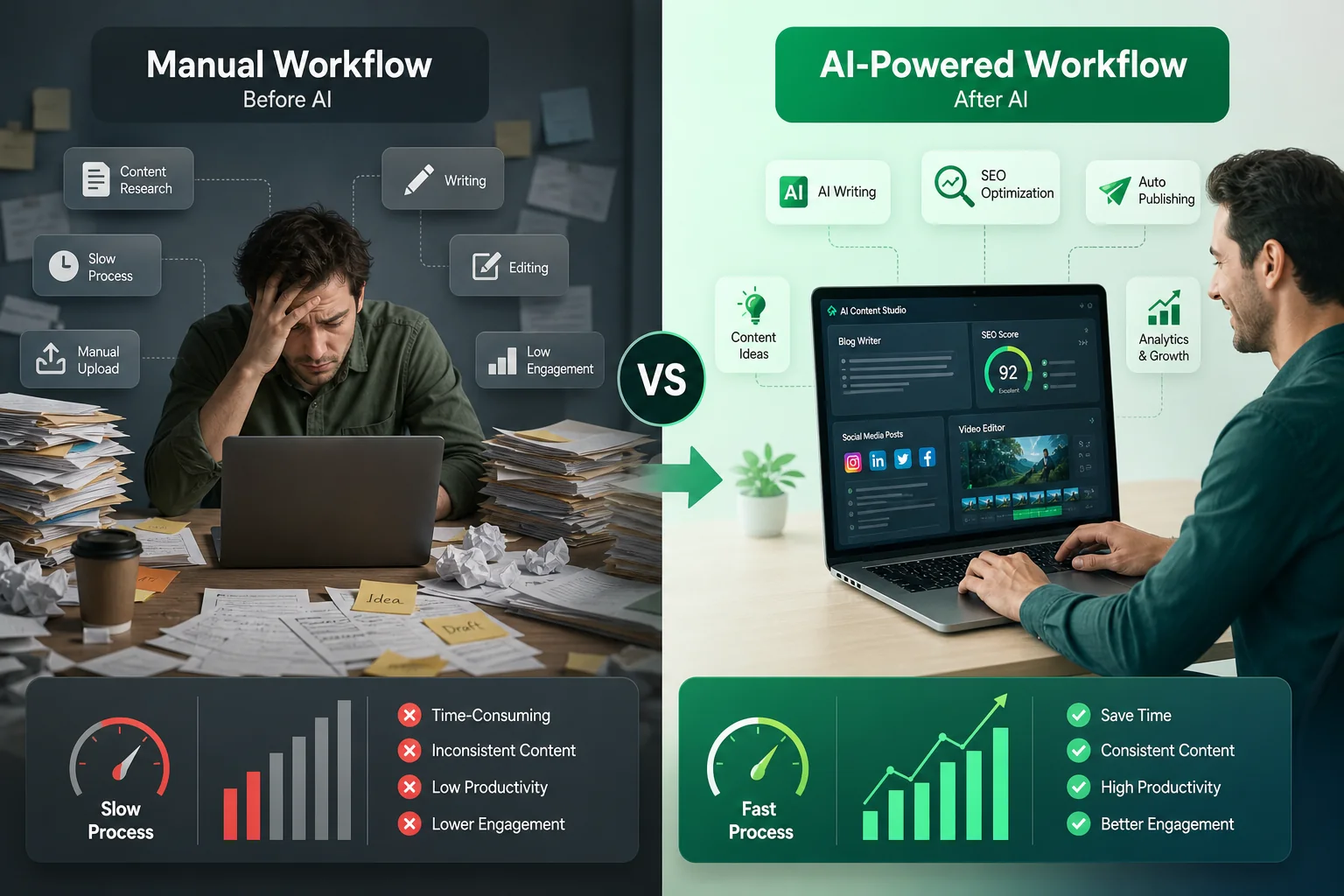
Comparing traditional manual workflows with modern AI-driven content automation for higher productivity.
According to McKinsey & Company's Global AI Research, 94% of business leaders say AI will be critical to their competitive advantage within five years. Businesses that have already integrated AI into their content workflows are reporting 84% faster content production on average — not marginal gains, but structural time savings.
- 84% faster content production reported by businesses using AI tools
- AI-assisted teams publish 3–5× more content per month on average
- Companies reduce content outsourcing costs by 40–60%
- 92% of AI-generated content still requires human editing before publishing
- SEO-focused AI workflows drive up to 2.3× organic traffic growth within 6 months
The businesses seeing these results aren't using AI to replace their content strategy. They're using it to execute faster, test more, and scale what works.
Types of AI Content Creation Tools
Before comparing individual tools, it helps to understand the landscape. AI content tools don't all do the same thing — and buying the wrong category is one of the most common mistakes businesses make.
AI Writing Tools
Text-generation platforms like ChatGPT, Jasper, and Copy.ai. They handle everything from long-form blog posts and email sequences to product descriptions and ad copy. The best ones maintain brand voice and follow SEO structures — the weaker ones require heavy editing.
Visual Content Tools
Platforms like Canva that use AI to generate or assist with graphic design, social media templates, presentations, and branded visual assets. Increasingly, these tools include text-to-image generation and brand kit enforcement built in.
Video Creation Tools
Synthesia and HeyGen fall into this category — they let you create professional video content using AI avatars, voiceovers, and scripts, without cameras, studios, or actors. Descript sits at the intersection of video and audio editing with AI-assisted features.
SEO Optimisation Tools
Tools like Surfer SEO sit alongside your writing workflow, analysing top-ranking content and giving real-time guidance on keyword usage, structure, and content gaps. They don't write for you — they tell you what to write.
Social Media Content Tools
Platforms focused specifically on generating platform-native content — captions, hashtags, thread formats, carousel scripts. Copy.ai and Jasper both have strong social media modules, though several standalone tools have emerged in this space.
If you're exploring broader AI adoption beyond content, this breakdown helps: Best AI Marketing Tools for Small Businesses.
Best AI Content Creation Tools (Detailed Breakdown)
1. ChatGPT (OpenAI)
Best for: Overall content creation across formats
ChatGPT remains the most versatile content tool available. It writes blog posts, rewrites copy, brainstorms campaign ideas, drafts email sequences, answers research questions, and handles content briefs — all in one interface. The GPT-4o model available with ChatGPT Plus is particularly strong at maintaining tone consistency and following detailed instructions.
It's not the most opinionated tool — it won't automatically apply your brand voice or enforce SEO structure without prompting — but for sheer flexibility, nothing comes close.
Features:
- Long-form content generation
- Tone and style adaptation
- Research and summarisation
- Code and data analysis
- Image generation (DALL·E integration)
- Plugin and API access
Pricing:
- Free tier available (GPT-4o mini)
- ChatGPT Plus: $20/month
- ChatGPT Team: $25/user/month
- Enterprise: Custom pricing
Pros:
- Most capable general-purpose model available
- Handles virtually every content format
- Huge community of prompt resources and workflows
- Excellent API for custom integrations
Cons:
- No built-in SEO scoring
- Brand voice requires manual prompting
- Free tier has usage limits during peak times
Real use case: A two-person marketing team uses ChatGPT Plus to produce a full content calendar monthly — blog drafts, email sequences, LinkedIn posts, and ad copy — in under 15 hours total. Previously the same output took 40+ hours using freelancers.
Salesforce's State of Marketing Report found that marketing teams using AI tools report an average +22% ROI improvement versus teams relying on manual processes, largely driven by faster iteration, better personalisation, and lower cost per content asset.
2. Jasper
Best for: Brand-focused marketing teams
Jasper is built specifically for marketing teams that need to maintain consistent brand voice at scale. Unlike ChatGPT, which adapts to whatever you ask, Jasper stores your brand guidelines — tone, style, audience, messaging pillars — and applies them automatically across every piece of content it generates.
For teams managing multiple campaigns, products, or audiences, that consistency is worth a lot.
Features:
- Brand voice storage and enforcement
- 50+ content templates (ads, emails, social, landing pages)
- Jasper Chat for conversational generation
- Team collaboration and approval workflows
- Jasper Art for AI image generation
- SEO mode with Surfer SEO integration
Pricing:
- Creator: $39/month (1 seat)
- Pro: $59/month (up to 5 seats)
- Business: Custom pricing
Pros:
- Best brand voice consistency of any writing tool
- Strong template library built around marketing use cases
- Native Surfer SEO integration
- Team workflows built in
Cons:
- Higher price point than most alternatives
- Outputs still require human editing for final polish
- Less flexible than ChatGPT for non-marketing tasks
Real use case: A SaaS marketing team of four uses Jasper to produce consistent blog content, ad copy variations, and onboarding email sequences across multiple product lines — without every piece sounding like it came from a different writer.
3. Copy.ai
Best for: Short-form content and go-to-market teams
Copy.ai has evolved significantly from its early days as a headline generator. The platform now includes full Go-To-Market workflows — structured AI pipelines that handle everything from prospect research to outreach sequences and sales content.
For short-form copy specifically — social posts, ad variations, product descriptions, email subject lines — it's faster and more template-driven than ChatGPT, which makes it easier for non-writers to get usable outputs quickly.
Features:
- GTM AI workflows (prospecting, outreach, nurture)
- 90+ copywriting templates
- Brand voice settings
- Team collaboration
- CRM integrations
Pricing:
- Free tier: Limited to 2,000 words/month
- Starter: $36/month
- Advanced: $186/month
- Enterprise: Custom pricing
Pros:
- Fast, template-driven interface
- Strong for short-form and sales copy
- GTM workflows add genuine strategic value
- Free tier is actually usable for small projects
Cons:
- Long-form content not as strong as Jasper or ChatGPT
- Advanced pricing jumps significantly
Real use case: A two-person sales team uses Copy.ai's GTM workflows to research prospects and generate personalised outreach sequences, cutting email prep time from 45 minutes per prospect to under 10.
4. Writesonic
Best for: SEO blog content
Writesonic is the most SEO-native writing tool in this comparison. It integrates keyword research, competitor analysis, and content scoring directly into the writing workflow — so you're not toggling between your writing tool and an SEO tool constantly.
Its Article Writer 6.0 generates full long-form posts structured around your target keywords, with meta descriptions, headings, and internal link suggestions built in. For businesses focused on organic search growth, it shortens the content production cycle significantly.
Features:
- Article Writer 6.0 with SEO integration
- Real-time keyword optimisation
- AI image generation
- Chatsonic (ChatGPT-style interface)
- 100+ templates
- Auditing for existing content
Pricing:
- Free: 10,000 words/month
- Small Team: $13/month
- Freelancer: $16/month
- Enterprise: Custom pricing
Pros:
- Best price-to-value ratio for SEO content
- Real-time optimisation reduces editing time
- Generous free tier
- Strong for scaling blog production
Cons:
- Output quality varies on highly technical topics
- Interface feels dense compared to Jasper
Real use case: A bootstrapped e-commerce brand uses Writesonic to produce four SEO-optimised blog posts per week, ranking for long-tail keywords they previously couldn't afford to target through agencies.
5. Canva
Best for: Visual content at scale
Canva has transformed from a design tool into an AI-powered content platform. Magic Design, Magic Write, and the text-to-image generator make it possible for non-designers to produce professional-quality visual assets — social graphics, presentations, video thumbnails, ads, reports — quickly and consistently.
For businesses that need branded visual content regularly without a dedicated design team, Canva is the most practical option available.
Features:
- Magic Design (AI layout generation)
- Magic Write (AI text generation in design)
- Text-to-image generation
- Brand Kit enforcement
- Video and animation tools
- Team collaboration
Pricing:
- Free tier available
- Canva Pro: $15/month (1 user)
- Canva Teams: $10/user/month (min 3 users)
- Enterprise: Custom pricing
Pros:
- Genuinely accessible for non-designers
- Brand Kit ensures consistent visual identity
- Covers a huge range of content formats
- Excellent value at Pro price point
Cons:
- Not a replacement for complex design work
- AI image quality lags behind dedicated tools like Midjourney
Real use case: A local service business uses Canva Pro to produce all social media graphics, email headers, and promotional materials in-house — saving $1,200+ monthly versus using a freelance designer.
6. Descript
Best for: Video and podcast editing
Descript approaches video and audio editing the way a word processor approaches writing. You edit the transcript, and the timeline updates automatically. Cut filler words, remove silences, fix mistakes — all through text-based editing rather than traditional timeline scrubbing.
For businesses producing podcast content, video testimonials, tutorials, or social clips, it reduces editing time dramatically even without prior editing experience.
Features:
- Transcript-based editing
- Overdub AI voice cloning
- Filler word removal
- Screen recording
- Social clip creation
- Captions and subtitles
Pricing:
- Free: 1 hour/month transcription
- Hobbyist: $24/month
- Creator: $40/month
- Business: $80/user/month
Pros:
- Removes the technical barrier to video editing
- Overdub saves time correcting minor audio mistakes
- Excellent for repurposing long content into short clips
Cons:
- AI voice cloning requires careful quality review
- Not suitable for complex video production
Real use case: A B2B consultant records weekly video content and uses Descript to edit, caption, and cut short clips for LinkedIn — cutting post-production from 3 hours to 45 minutes per episode.
7. Synthesia
Best for: AI video creation without cameras
Synthesia lets you create professional video content using AI avatars and typed scripts. No camera, no studio, no presenter required. You write the script, choose an avatar, select a voice, and get a finished video.
For businesses that need training videos, product explainers, onboarding materials, or multilingual content, it removes the production cost barrier almost entirely.
Features:
- 230+ AI avatars
- 130+ languages and accents
- Custom avatar creation
- Screen recording integration
- Templates for training, marketing, explainers
- Team collaboration
Pricing:
- Starter: $29/month (10 videos/month)
- Creator: $89/month (30 videos/month)
- Enterprise: Custom pricing
Pros:
- No production equipment needed
- Multilingual support is genuinely strong
- Excellent for training and onboarding content
- Consistent quality at scale
Cons:
- Avatars still feel slightly artificial on close inspection
- Less suitable for content requiring authentic human presence
Real use case: A HR team uses Synthesia to create onboarding videos for new hires in four languages — content that previously required video production budgets of $5,000+ per language.
8. Claude (Anthropic)
Best for: Long-form content, research, and nuanced writing
Claude is Anthropic's AI assistant, and it's particularly strong for tasks that require careful reasoning, nuanced writing, and handling of complex or sensitive topics. Its extended context window means it can work with large documents — full brand guides, lengthy reports, multi-chapter content — without losing coherence.
For businesses that need to produce technically detailed content, handle nuanced brand communications, or analyse large amounts of source material, Claude performs especially well.
Features:
- Large context window (up to 200K tokens)
- Strong reasoning and analysis capabilities
- Document summarisation and extraction
- Code generation
- Nuanced tone handling
- Available via API and Claude.ai
Pricing:
- Free tier available
- Claude Pro: $20/month
- Team: $25/user/month
- API pricing varies by model
Pros:
- Exceptional for long-form and research-heavy content
- Handles complex instructions reliably
- Strong at maintaining nuance in sensitive topics
- Large context window is genuinely useful for document-heavy work
Cons:
- Less marketing-specific than Jasper
- No native SEO integration
9. Surfer SEO
Best for: SEO content optimisation
Surfer SEO doesn't write content — it tells you exactly how to structure and optimise the content you write to rank. It analyses the top-ranking pages for your target keyword and gives you a real-time content score based on word count, keyword usage, heading structure, and content depth.
Used alongside ChatGPT, Jasper, or Writesonic, it's the difference between content that gets written and content that actually ranks.
Features:
- Real-time content editor with live scoring
- Keyword research and clustering
- Topical authority planning
- SERP analysis
- Jasper and Google Docs integrations
- Audit tool for existing content
Pricing:
- Essential: $89/month
- Scale: $129/month
- Scale AI: $219/month
- Enterprise: Custom pricing
Pros:
- Most actionable SEO guidance available in a content editor
- Topical map feature accelerates content strategy
- Integrates directly into existing workflows
Cons:
- Premium price point
- Value diminishes if you're not publishing consistently
10. HeyGen
Best for: AI avatar video with personalisation
HeyGen is Synthesia's closest competitor and, in several areas, its strongest challenger. Its avatar quality is arguably more realistic, and its video personalisation features — where you can generate unique videos for individual prospects or customers at scale — set it apart for sales and outreach use cases.
Features:
- 100+ AI avatars
- Video personalisation at scale
- Custom avatar creation
- Voice cloning
- Instant avatar from photo
- API access
Pricing:
- Free: 3 videos/month
- Creator: $24/month
- Team: $69/month
- Enterprise: Custom pricing
Pros:
- Higher avatar realism than most competitors
- Video personalisation at scale is a genuine differentiator
- Better pricing entry point than Synthesia
Cons:
- Smaller avatar and language library than Synthesia at base tiers
- Enterprise features require custom pricing
The best AI content tool isn’t the one with the most features — it’s the one that removes your biggest bottleneck. A video tool won’t help if you’re struggling with blog output. An SEO tool won’t matter if you’re not publishing consistently. Match the tool to the workflow gap, not the feature list.
Side-by-Side Comparison Table
| Tool | Best For | Content Type | Starting Price | Ease of Use |
|---|---|---|---|---|
| ChatGPT | Overall content creation | Text, images | Free / $20/mo | ⭐⭐⭐⭐⭐ |
| Jasper | Brand consistency | Text, templates | $39/mo | ⭐⭐⭐⭐ |
| Copy.ai | Short-form & GTM | Text, copy | Free / $36/mo | ⭐⭐⭐⭐⭐ |
| Writesonic | SEO blog content | Text, SEO | Free / $13/mo | ⭐⭐⭐⭐ |
| Canva | Visual content | Images, video | Free / $15/mo | ⭐⭐⭐⭐⭐ |
| Descript | Video & podcast | Video, audio | Free / $24/mo | ⭐⭐⭐⭐ |
| Synthesia | AI video creation | Video | $29/mo | ⭐⭐⭐⭐ |
| Claude | Long-form & research | Text, analysis | Free / $20/mo | ⭐⭐⭐⭐⭐ |
| Surfer SEO | SEO optimisation | SEO content | $89/mo | ⭐⭐⭐ |
| HeyGen | Personalised video | Video | Free / $24/mo | ⭐⭐⭐⭐ |
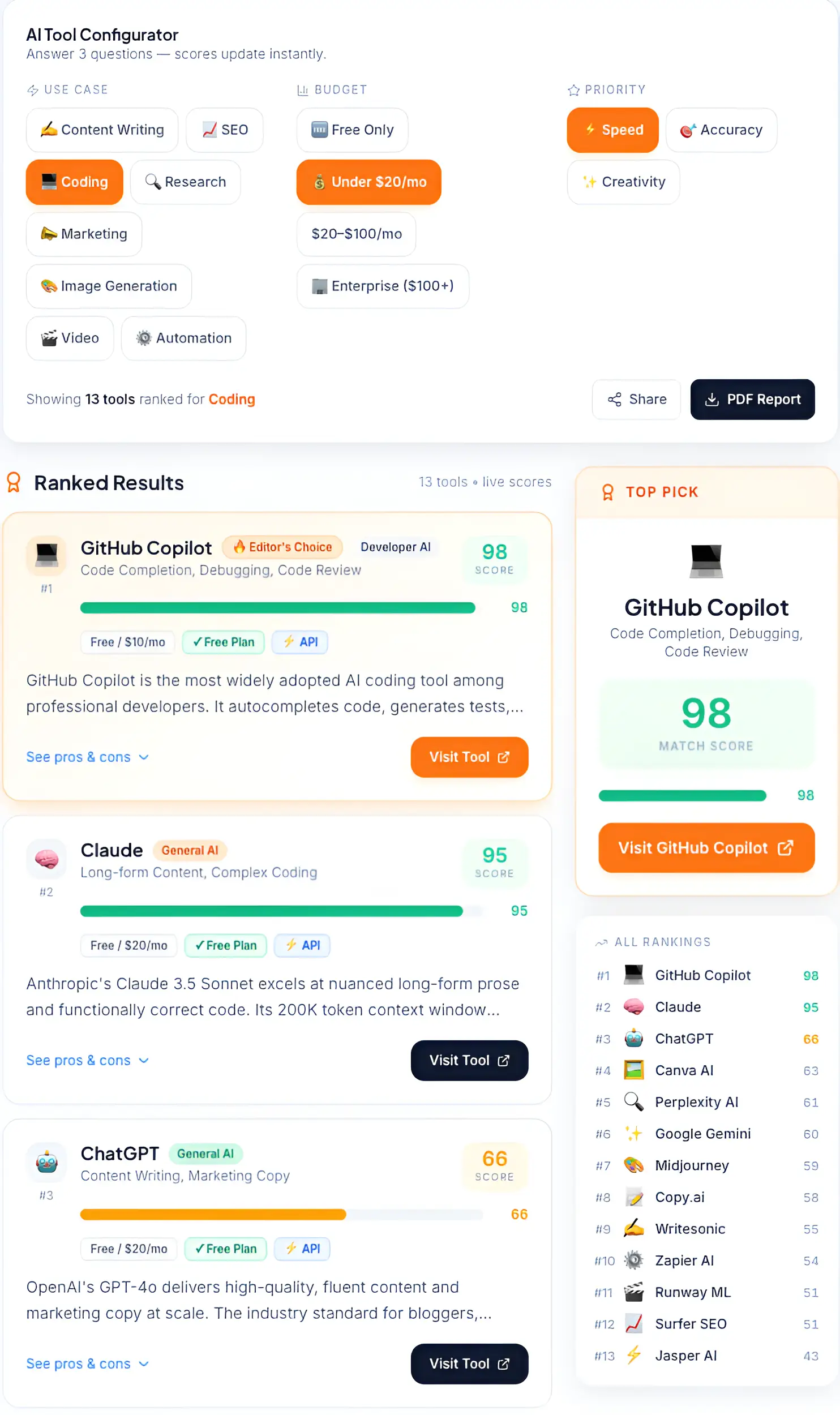
Top-rated AI tools for coding and content generation ranked by accuracy, speed, and business value.
→ Not sure which one to start with? Use the AI Tool Selector to get a personalised recommendation based on your business type and goals.
Pricing Breakdown
Budget Tools (Under $30/month)
If you're starting out or working with a lean budget, these tools deliver strong value without a large upfront commitment:
- ChatGPT Free — capable enough for most individual content tasks
- Copy.ai Free — solid for short-form with no time limit
- Canva Free — genuinely useful, though brand features are locked behind Pro
- HeyGen Free — 3 videos/month, enough to test the format
- Writesonic Free — 10,000 words/month covers most small business needs
For budget-focused tool selection strategies, see: Affordable AI Software for Startups.
Mid-Tier ($30–$100/month)
This range is where most small businesses will get the best returns. A $60–$80/month stack covering writing, design, and basic video covers the majority of content needs:
- ChatGPT Plus ($20) — upgrades to GPT-4o
- Canva Pro ($15) — unlocks brand kit and AI features
- Writesonic Freelancer ($16) — best SEO value at this price
- Descript Creator ($40) — worthwhile for any video-producing team
- Copy.ai Starter ($36) — justified for sales or GTM-heavy teams
Premium ($100+/month)
At this level, you're investing in tools that operate at team or agency scale:
- Jasper Pro ($59) — justified for teams needing brand governance
- Surfer SEO Essential ($89) — necessary for serious SEO content programs
- Synthesia Creator ($89) — worthwhile for regular video production
- Surfer Scale AI ($219) — for high-volume content operations
How to Choose the Right AI Content Tool
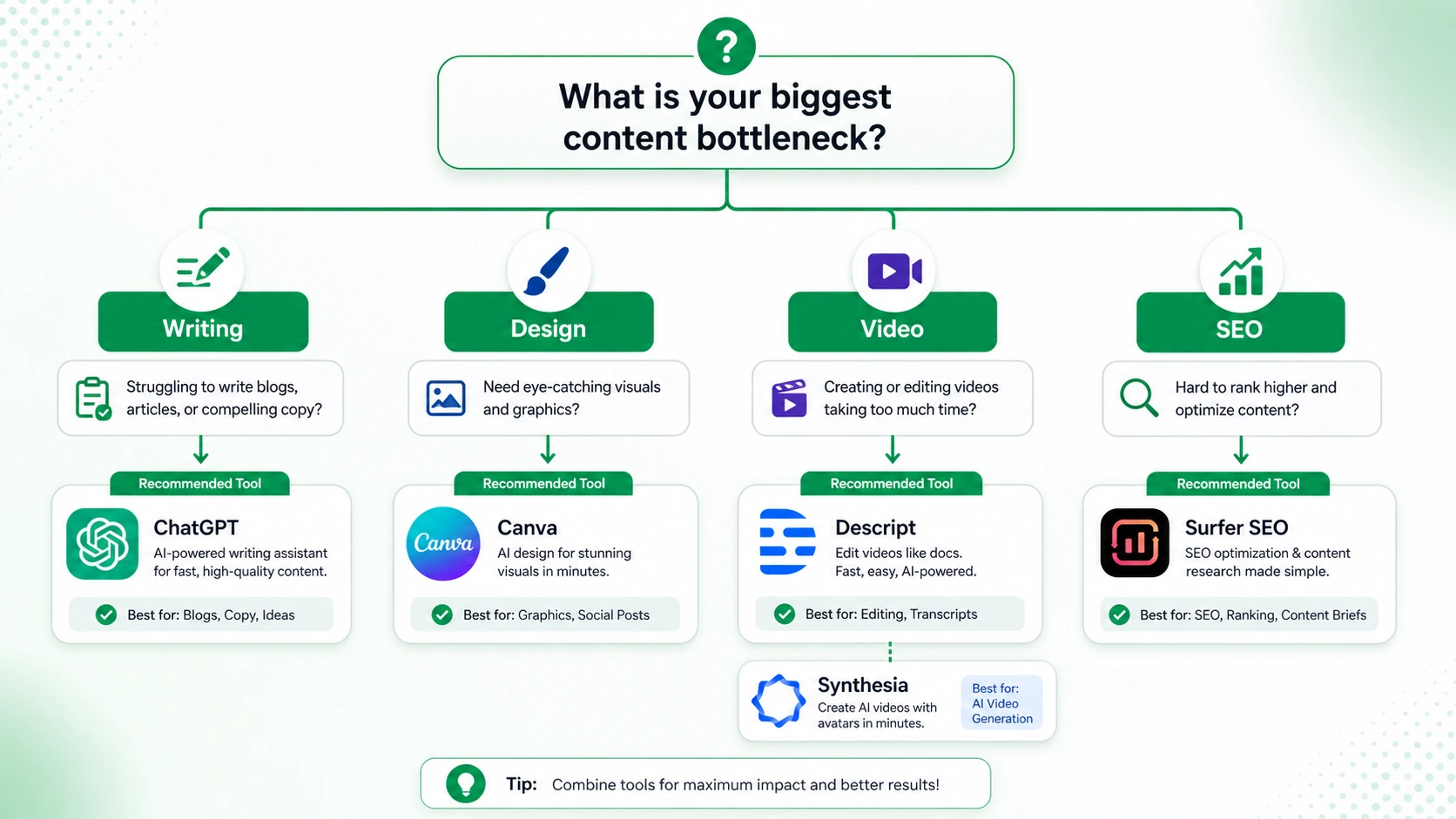
Finding the right AI content tool based on your specific creative or technical bottlenecks.
Most businesses see results faster by starting with content or email automation before investing in complex systems. A $20/month writing tool with clear use cases will outperform a $200/month platform deployed without a strategy.
Here's a practical decision framework:
Start with the bottleneck. What's consuming the most time in your content workflow right now? That's where AI delivers the fastest measurable return. If you're spending 15 hours a week writing, start with a writing tool. If editing video is the constraint, start with Descript.
Follow the budget rule. Start with under $100/month until you can demonstrate clear ROI. Most businesses can build a capable starter stack within that range. Scale up only after you've proven value on the first investment.
Check integrations first. The best tool on paper is useless if it doesn't connect to the systems you already use. Before committing to any platform, verify it integrates with your CMS, CRM, or email platform.
Prioritise ease of use. A powerful tool your team doesn't use is worth nothing. If your team isn't technical, lean toward tools with strong interfaces and template libraries over raw AI power.
→ Estimate content ROI before choosing tools using the AI ROI Calculator.
Common Mistakes Businesses Make
Buying too many tools
The default behaviour for most businesses discovering AI tools is to subscribe to several simultaneously, get overwhelmed, and end up using none of them well. Start with one tool, build a repeatable workflow around it, and expand from there.
Publishing without editing
AI-generated content isn't finished content — it's a capable first draft. Publishing without human review leads to factual errors, brand inconsistencies, and content that reads as generic. The edit step is non-negotiable if quality matters.
No content strategy underneath
AI can produce content faster. It cannot tell you what content to produce, who it's for, or how it fits into a business goal. Businesses that buy AI writing tools without a content strategy end up publishing faster with no improvement in results.
Ignoring analytics
The point of AI-accelerated content production is to publish more, test faster, and learn what works. That loop only closes if you're tracking performance. Without analytics, you're guessing louder.
Best AI Content Stacks
You don't need everything. You need the right combination for your stage and goals.
Starter Stack — Under $40/month
ChatGPT ($20) + Canva Free + Copy.ai Free
This covers the majority of text and visual content needs for a small business just getting started with AI. Write with ChatGPT, design with Canva, and use Copy.ai for short-form copy and social posts. The total cost is $20/month — cheaper than most single freelance articles.
Growth Stack — Under $120/month
ChatGPT Plus ($20) + Surfer SEO Essential ($89) + Descript Creator ($40) + Synthesia Starter ($29)
At this level, you have a full content operation: SEO-optimised blog content, podcast and video editing, and AI video production. This stack can support a content program that previously required a team of 4–5 people.