Why $50/Month Is the AI Sweet Spot in 2026
A few years ago, $50/month in SaaS got you one decent tool with half the features locked behind an enterprise tier. That math has flipped.
In 2026, most AI platforms have pushed their best capabilities down to the $15–25/month range. You can now build a composable AI stack — multiple focused tools that each do one thing exceptionally well — without spending more than what you'd spend on a couple of takeout meals.
This is especially meaningful for freelancers, solo founders, and small teams who can't afford enterprise software but compete directly against companies that can. A well-chosen $50 AI stack can genuinely close that gap. It won't automate your entire business overnight, but it will handle the time-consuming, repeatable tasks that currently eat 10–15 hours of your week.
Honestly, most people overthink this. You don’t need a complex stack — you just need the right two tools used consistently.
The shift isn't just about cost. It's about the strategy: instead of one expensive all-in-one tool trying to do everything passably, you build a lean stack of best-in-class tools that each earn their spot.
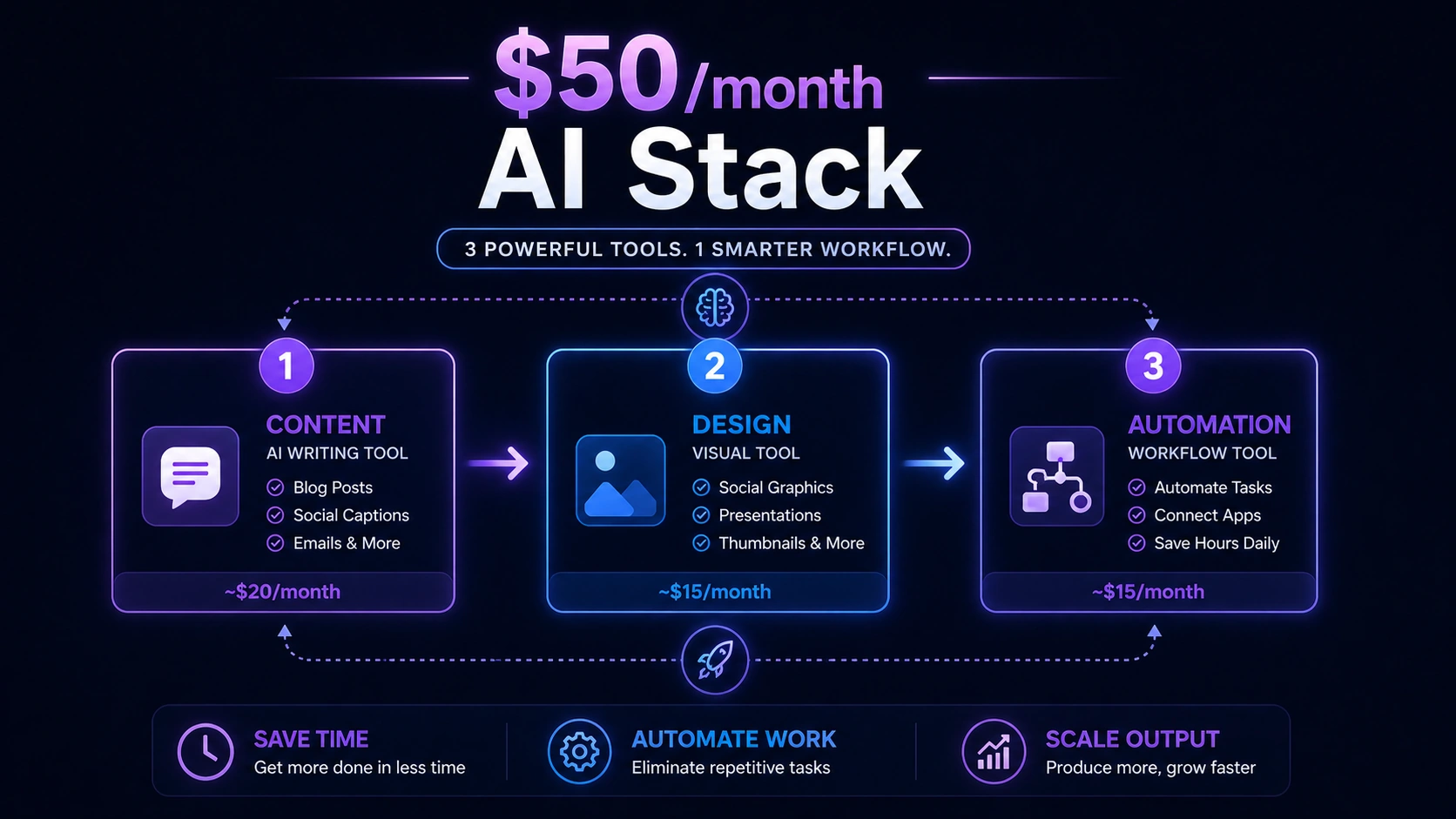
A simple $50/month AI stack breakdown showing how content, design, and automation tools connect to save time, automate work, and scale output.
- Productivity gains: Freelancers and small teams using 2–3 targeted AI tools report 40–60% time savings on repeatable tasks, per McKinsey 2025 SMB Productivity Report.
- Cost efficiency: Small businesses replacing manual processes with sub-$50 AI stacks saved an average of $14,000–$28,000 annually in equivalent labor cost, per Salesforce SMB Trends 2025.
- Adoption growth: AI tool usage among teams with fewer than 10 people grew 61% between 2023 and 2025, per Gartner.
- Content output: Teams using AI writing tools produce content 3–5x faster than those drafting manually, per HubSpot State of Marketing 2025.
- Stack size: 68% of high-ROI small business AI users run stacks of 3 tools or fewer, per a 2025 SaaS industry survey by G2.
For a deeper look at how paid tools compare to free alternatives across the same categories, see: Paid vs Free AI Tools: Which Is Better for ROI in 2026?.
Top AI SaaS Tools Under $50/Month: Overview Table
| Tool | Category | Monthly Cost | Best For | Key Limitation |
|---|---|---|---|---|
| ChatGPT Plus | Content / Research | $20 | Ideation, writing, automation | Needs integrations for full workflows |
| Canva Pro | Design / Marketing | ~$15 | Social media, ads, presentations | Not for advanced production design |
| Writesonic | SEO Content | ~$19 | Blog writing, WordPress publishing | Outputs need human editing |
| Zapier Starter | Automation | ~$20 | Multi-step workflow automation | Setup learning curve |
| Uizard | UI/UX Prototyping | ~$19 | Sketch-to-design conversion | Not production-ready |
| Grammarly Pro | Writing Polish | ~$12 | Tone correction, clarity editing | Not a content generator |
The Tools: What They Do and When They're Worth It
1. ChatGPT Plus — $20/Month
Best for: Ideation, writing, research, and building custom workflows
ChatGPT Plus is the closest thing to a Swiss Army knife in the sub-$50 AI space. The Plus tier unlocks GPT-4o with no usage caps during normal hours, file uploads, image analysis, and the ability to build Custom GPTs for specific repetitive tasks.
For a freelancer, it replaces hours of blank-page staring. For a startup, it drafts investor updates, product copy, support templates, and onboarding docs without a full writing team.
The one honest caveat: ChatGPT Plus is a generator, not a connector. It won't automatically push content into your CMS or update your CRM. That's where Zapier comes in — but more on that below.
Key features:
- Advanced reasoning with GPT-4o (no daily message cap)
- File uploads for document analysis and summarization
- Custom GPTs for task-specific automation
- Image generation via DALL·E
Pros: Handles almost any text-based task; incredibly versatile; beginner-friendly
Cons: Outputs need review before publishing; automation requires third-party tools
2. Canva Pro — ~$15/Month
Best for: Social media graphics, ad creatives, pitch decks, and brand assets
Canva Pro is the kind of tool that makes you look bigger than you are. For $15/month, you get access to Magic Studio (Canva's AI design suite), a full Brand Kit for consistent visuals, background removal, one-click design resizing, and over 100 million templates and assets.
For any business producing regular visual content — social posts, ads, presentations, client proposals — Canva Pro eliminates the need for a designer on most non-complex tasks. It's not built for pixel-perfect production work, and experienced designers will find it limiting. But for 80% of small business design needs, it does the job faster and cheaper than any alternative.
Key features:
- Magic Studio (AI image generation, background remover, text-to-design)
- Brand Kit (fonts, colors, logos in one place)
- 100M+ templates across every format
- One-click resizing across platforms
Pros: Saves hours of design work per week; no design skills needed
Cons: Not suited for complex visual production or custom illustration work
3. Writesonic — ~$19/Month
Best for: SEO blog articles, landing pages, and WordPress publishing
Writesonic is purpose-built for content at scale. It generates full-length SEO-optimized blog posts, rewrites existing content for clarity, and connects directly to WordPress for one-click publishing. At $19/month, it covers roughly 100,000 words — enough for a serious content calendar.
The honest trade-off: Writesonic's output is a strong first draft, not a finished piece. You'll still need to read through, tighten the logic, and add real-world examples. Think of it as eliminating the hardest part of writing — staring at a blank document — rather than replacing the editing step.
Key features:
- AI article and blog post generation
- SEO optimization and keyword targeting
- WordPress integration for direct publishing
- Rewriter and summarizer tools
Pros: Cuts blog production time by 60–70%; solid SEO output
Cons: Requires editing for tone and accuracy; outputs can be generic without strong prompts
4. Zapier Starter — ~$20/Month
Best for: Connecting your AI tools into actual automated workflows
Zapier is what transforms a collection of tools into a functioning system. The Starter plan unlocks multi-step Zaps — automation sequences that chain multiple actions across 6,000+ apps. In practical terms: when Writesonic publishes a post, Zapier can automatically tweet it, add it to your CRM, and Slack your team. No manual steps.
The learning curve is real. Building your first multi-step Zap takes longer than expected. But once it's running, it runs without you — and that's precisely the point.
Key features:
- Multi-step automation workflows (Zaps)
- 6,000+ app integrations
- Filters, formatters, and conditional logic
- Pre-built automation templates
Pros: Eliminates manual handoffs between tools; ROI compounds over time
Cons: Takes time to configure correctly; complex workflows can break if apps update
5. Uizard — ~$19/Month
Best for: Turning sketches or text descriptions into UI prototypes
Uizard is a niche but genuinely impressive tool for founders and product teams who need to communicate design ideas without a designer. You describe a screen in plain text or upload a hand-drawn sketch, and Uizard converts it into a clickable prototype.
It's not production-ready UI — developers will still need to build the real thing. But for early customer discovery, investor demos, or validating a product concept before spending on development, it removes a significant bottleneck.
Key features:
- Text-to-UI and sketch-to-design conversion
- Clickable prototype builder
- Component library and templates
Pros: Makes product ideation faster; no design skills required
Cons: Output isn't build-ready; limited customization depth
6. Grammarly Pro — ~$12/Month
Best for: Polishing every piece of written communication your business sends out
Grammarly sits invisibly across your browser, email client, and Google Docs — catching errors and improving clarity in real time. At $12/month, Pro adds tone detection, full-sentence rewrites, and a plagiarism checker.
It's not a content generator. It doesn't write for you. But it makes everything you write noticeably more professional — and for client-facing businesses, that credibility difference pays for itself in the first week.
Key features:
- Real-time grammar, spelling, and punctuation corrections
- Tone and clarity suggestions
- Works across email, Docs, and browsers
- Full-sentence rewrite suggestions (Pro)
Pros: Works without changing your workflow; consistently improves communication quality
Cons: Won't generate content; advanced features require paid plan
Real-World Impact: What This Stack Actually Delivers
The productivity gains aren't theoretical. Freelancers using ChatGPT Plus + Grammarly Pro report reclaiming 10–15 hours per week on content production. Marketing teams running Canva Pro + Writesonic cut visual and editorial production time by over half. Operators who deploy Zapier workflows report eliminating 3–5 hours per week in repetitive manual task handling — tasks like routing form submissions, sending follow-up emails, and updating spreadsheets.
At a conservative $50/hour freelance equivalent, 10 hours saved per week equals $2,000/month in recovered productivity — against a $50 tool spend. The math isn't complicated.
Teams using fewer than 3 AI tools consistently report higher ROI than those using 5+ tools — not because of tool quality, but because of workflow clarity and consistent usage.
Lean teams running these tools also delay their first operational hire by an average of 6–9 months, according to startup surveys — which is often the difference between a runway that runs out and one that doesn't.
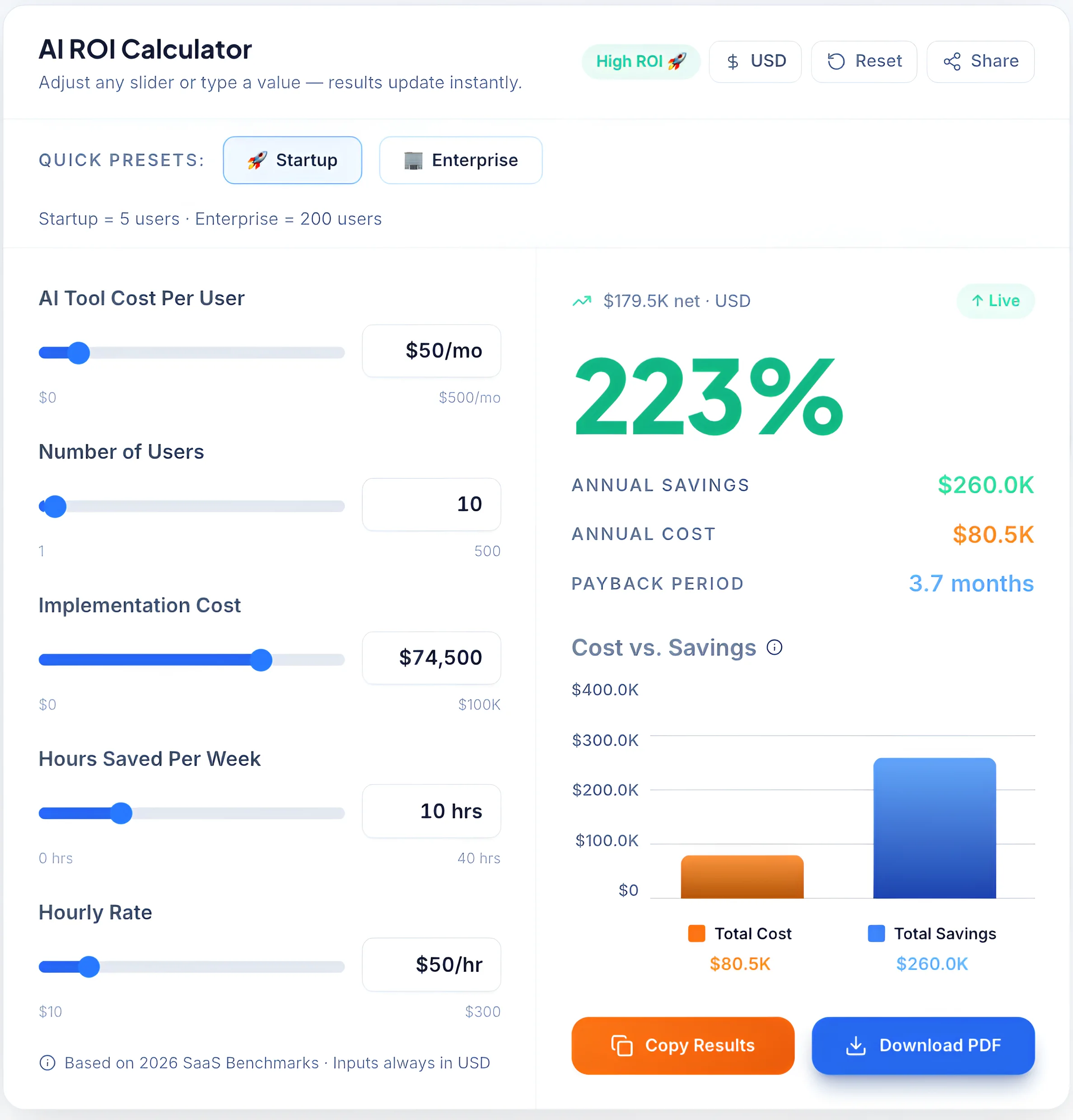
Data-driven growth: A 2026 benchmark analysis showing how affordable AI tools can deliver a 223% ROI and a 3.7-month payback period for small teams.
→ Curious how much you can actually save with these tools? Use our AI ROI Calculator to estimate your real time and cost savings instantly.
Real Example
A freelance content writer switched from manual writing to a simple stack of ChatGPT Plus + Grammarly Pro. What used to take 6–7 hours per article dropped to under 2 hours — without reducing quality. Within a month, they went from publishing 4 articles to 12, increasing both traffic and client work without hiring anyone.
Best AI Tool Stacks by Use Case
| Use Case | Recommended Stack | Est. Monthly Cost | Primary Benefit |
|---|---|---|---|
| Freelance writer | ChatGPT Plus + Grammarly Pro | $32 | 3–5x content output; polished client deliverables |
| Early-stage startup | ChatGPT Plus + Canva Pro + Zapier | $55 | Content, design, and basic automation covered |
| Solo marketer | Writesonic + Canva Pro + Grammarly Pro | $46 | Full content-to-design pipeline under $50 |
| Product founder | ChatGPT Plus + Uizard | $39 | Rapid prototyping and product messaging |
| SMB operations | Zapier + ChatGPT Plus + Notion AI | $48 | Workflow automation + team documentation |
| Content agency | Writesonic + Canva Pro + Zapier | $54 | High-volume content production at scale |
→ Not sure which combination fits your workflow? Try our AI Tool Selector to get the best AI stack for your needs in seconds.
How to Choose the Right AI Stack
Step 1: Identify Your Bottleneck
The worst way to build an AI stack is to buy what looks impressive. The right way is to ask: what task currently costs me the most time per week? If you're not sure how to evaluate tools properly, read our Complete Guide to Choosing AI Software for Your Business (2026 Edition). That answer tells you exactly which tool to buy first.
Step 2: Pick One Core Tool — Not Five
Every tool added before the first one is fully embedded just creates noise. Start with one tool, use it daily for two weeks, and let the efficiency gains show up before adding anything else.
If you’ve ever signed up for 5 tools and used none properly — you’re not alone. Almost everyone does this at first.
Step 3: Add an Automation Layer (Zapier)
Once you have a core tool producing consistent output, Zapier is almost always the right second investment. It turns your AI output into actions — publishing, notifying, updating, routing — without you touching anything manually.
Step 4: Scale Only After ROI
Don't add a third tool because it looks useful. Add it because you've measured time savings from the first two and want to extend that result into another workflow. Stack intentionally, not impulsively.
According to Forbes research on AI adoption in small businesses, SMBs that deploy AI tools systematically — targeting their highest-frequency manual tasks first — are significantly more likely to see measurable productivity returns within 60 days.
Common Mistakes That Kill ROI with AI Tools
Stacking too many tools at once. Five tools with zero workflow integration don't outperform one tool used every day. Resist the temptation to sign up for everything at once.
Paying without a clear use case. Buying Writesonic because someone on Twitter praised it — without publishing a blog consistently — is $19/month with zero return. Know what problem you're solving before you pay.
Ignoring integrations. A tool that doesn't talk to your other tools creates manual steps. Manual steps are exactly what you're trying to eliminate. Check integration options before committing to any paid plan.
Not measuring time saved. ROI from AI tools is measurable — but only if you track it. Time how long specific tasks took before a tool, then after. Businesses that measure this make better decisions about what to keep, upgrade, or cut.
According to McKinsey's research on AI adoption in small and mid-sized businesses, teams that integrate AI tools into structured daily workflows see 2–3x the productivity gain of teams that deploy tools without a clear implementation plan.