The Tool Isn't the Problem
A two-person content team spending five hours a week on first drafts they mostly discard. A marketing manager running the same vague prompt fifteen times and calling the output unusable. A sales team asking AI to write outreach copy and getting something generic enough to offend everyone and interest no one.
None of that is an AI capability problem. It's a briefing problem.
When I tested structured prompts across real business workflows — content drafting, keyword research, campaign planning, SOP documentation — the biggest variable in output quality wasn't the model. It was the prompt structure. Same tool, same task, dramatically different results based purely on how the instruction was written.
Role-based SEO prompts produced content briefs in under 10 minutes that used to take two hours. Constraint-driven marketing prompts cut revision cycles from four rounds to one. Formatting-specific prompts eliminated most of the reformatting work that normally happens after generation. The prompts that consistently performed weren't the most elaborate — they were the ones that defined the role, context, and expected format before anything else.
Most teams upgraded to an AI tool and then wondered why the output was average. The tool wasn't the issue.
→ Stop blaming tools — start fixing your prompts. Try the AI Prompt Library to create structured, high-performing AI workflows instantly.
What Structured AI Prompting Is Actually Good At
There's a lot of noise around AI replacing jobs. That's not what this is about.
What AI is genuinely useful for in a business context:
- Generating first drafts — content, emails, proposals, briefs, summaries
- Handling research volume — keyword clustering, competitor mapping, intent classification
- Processing structured tasks — schema generation, FAQ creation, SOP documentation
- Producing campaign assets — ad variations, email sequences, landing page copy
- Running multi-step workflows — sequential planning, output chaining, autonomous task execution
The pattern that holds across industries: if a task repeats frequently, follows a clear structure, and has a definable output format, it's promptable. The businesses extracting the most value from AI aren't using the most advanced models — they're briefing those models the way you'd brief a capable contractor. Clearly. With context. With an expected deliverable.
Want to automate repetitive business tasks with AI tools? See this curated list of the best options:Best AI Tools Replacing Repetitive Business Work (2026)
The Five-Part Structure That Actually Changes Output Quality
Most prompt failures come down to skipping one of these elements. Once you internalise this structure, the quality of what you get out of AI improves almost immediately.
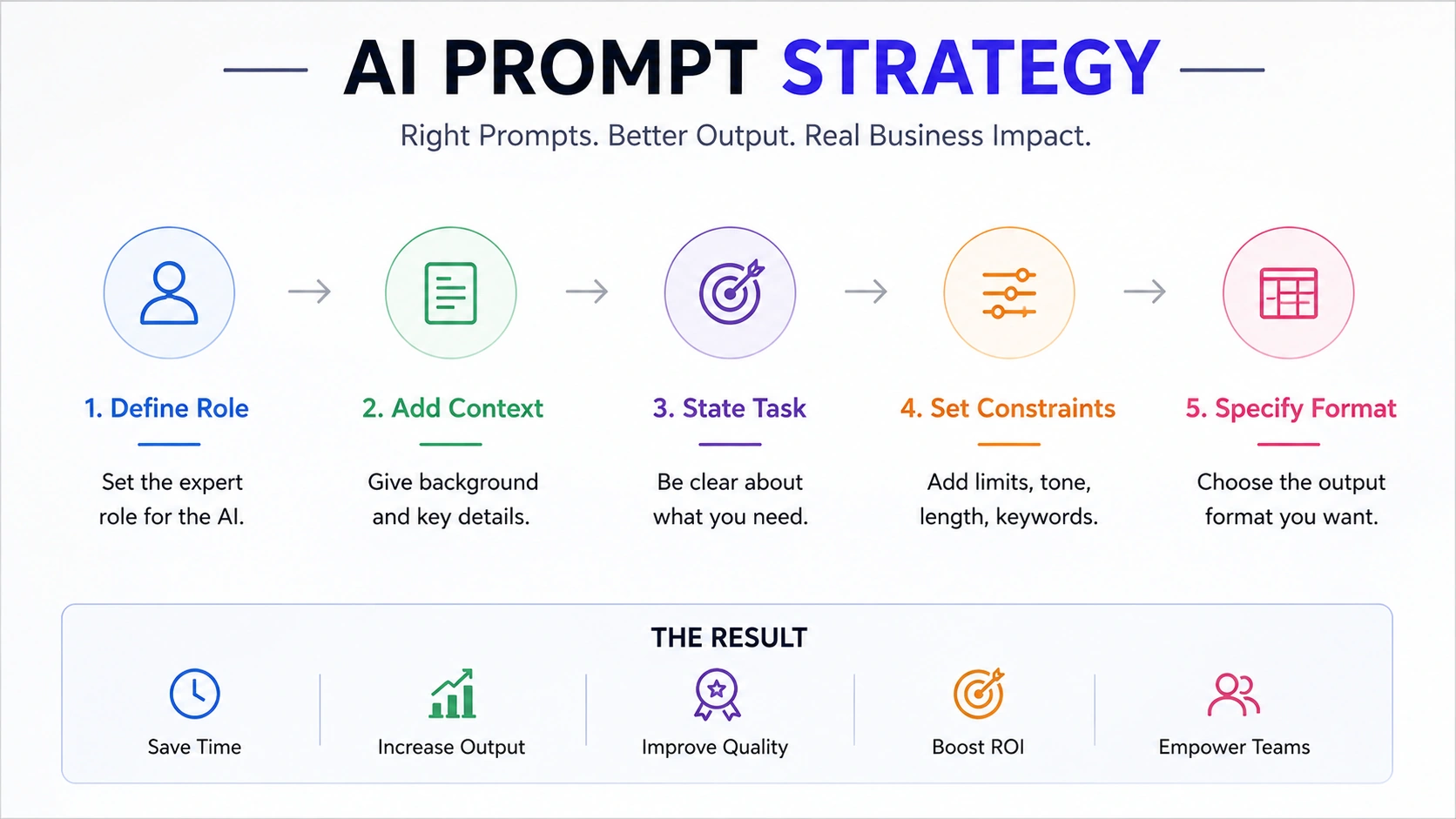
The five-part AI prompt framework used by modern business, SEO, and marketing teams to improve output quality, workflow consistency, and operational efficiency.
1. Role — Define the expertise before the task. "You are a senior SEO strategist" produces fundamentally different output than no role context at all. The model adjusts its vocabulary, depth, and framing based on what you assign it. This single change improves output relevance more than anything else.
2. Context — Give the model what it needs to understand the situation. Industry, target audience, platform, relevant constraints. Context isn't padding — it's the difference between generic output and output that fits your actual use case.
3. Task — State exactly what you need. Not "write a blog post" — "write a 2,000-word article outline for SaaS founders evaluating project management software, focused on bottom-of-funnel intent." The more specific, the less room for the model to guess.
4. Constraints — Word count, tone, reading level, what to avoid, what to include. Without constraints, responses drift toward generic. Constraints aren't limitations — they're quality controls.
Research from MIT Sloan shows that generative AI delivers the best results when businesses combine structured workflows, clear instructions, and human review systems rather than relying on AI output blindly.
5. Format — Always specify. Tables, markdown, JSON, bullets, numbered lists. If you don't say, you'll get whatever the model defaults to, which is often not what your workflow needs.
Prompt Categories at a Glance
| Prompt Category | Primary Use Case | Est. Time Saved Per Task | Skill Level Required |
|---|---|---|---|
| SEO Content Brief | Keyword targeting, structure | 2–3 hrs → 20 min | Beginner |
| Keyword Clustering | Topical authority building | 3–4 hrs → 30 min | Beginner |
| Campaign Strategy | 90-day marketing plans | 4–6 hrs → 45 min | Intermediate |
| Email Sequence | Lead nurture, cold outreach | 2–3 hrs → 20 min | Beginner |
| Ad Copy Variations | A/B testing, paid social | 1–2 hrs → 15 min | Beginner |
| Agentic SEO Workflow | Multi-step content planning | 5–8 hrs → 1 hr | Intermediate |
| SOP Documentation | Process documentation | 3–4 hrs → 30 min | Beginner |
The Best AI Prompts for Business Teams
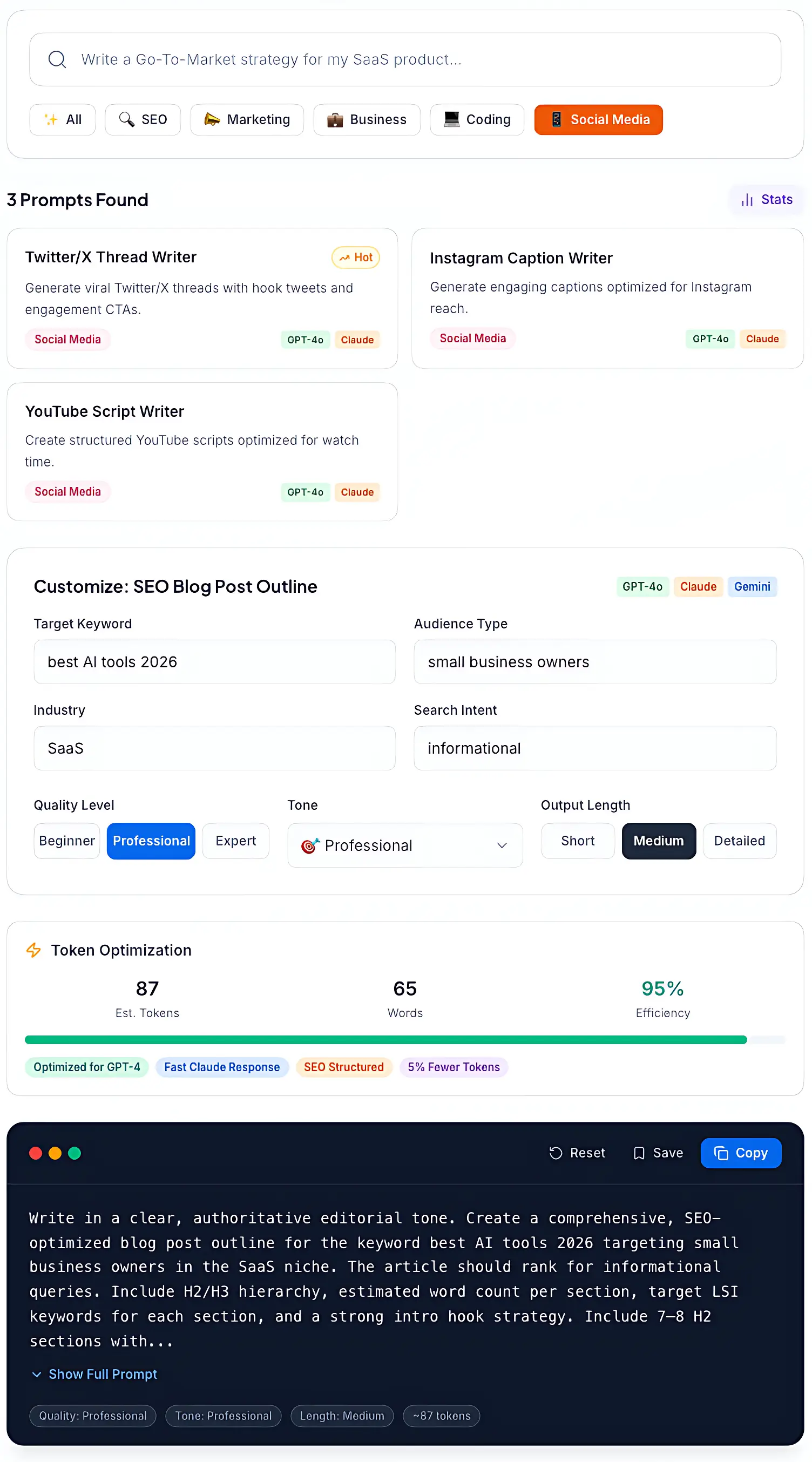
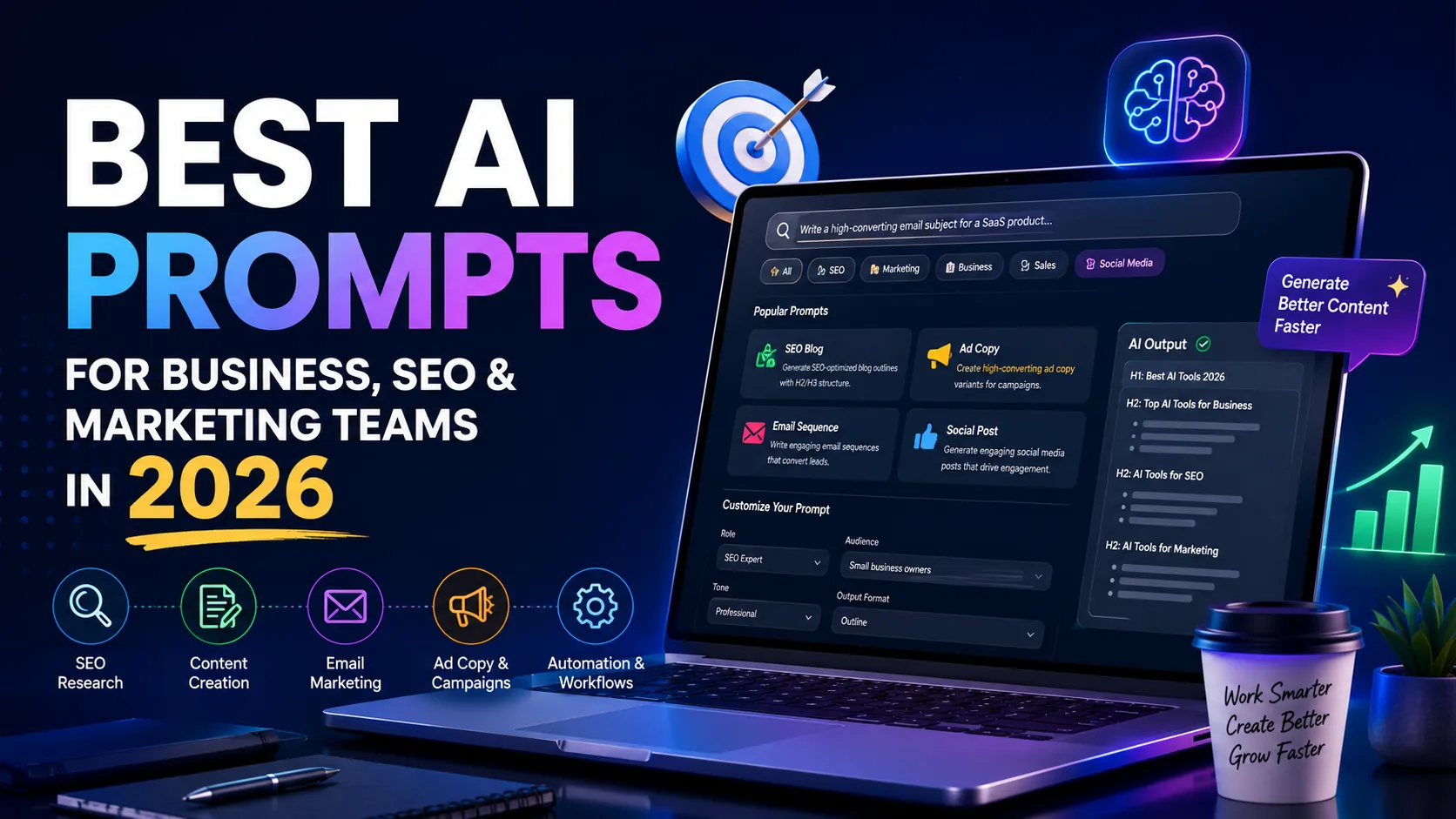
Example of a structured AI prompt library workflow showing prompt templates, customization settings, and optimized outputs for business, SEO, and marketing teams.
1. SEO Keyword Research Prompt
Best for: SEO teams, content strategists, agencies managing organic search growth
Keyword research is structurally repetitive. The same process — repeated for every topic cluster, every new client, every campaign refresh. A well-structured AI prompt doesn't replace your keyword tool data, but it dramatically accelerates the organisation, clustering, and intent classification work that follows. Sessions that used to take a full afternoon compress into 30 minutes of reviewing structured AI output.
What it produces: Primary keywords with intent classification, long-tail variations grouped by semantic theme, topic cluster structure with pillar and supporting page suggestions, content format recommendations per keyword.
The prompt:
Act as an SEO specialist. Generate a keyword research report for [topic/industry].
Include primary keywords, long-tail variations, search intent classification
(informational, navigational, transactional, commercial), and estimated monthly
search volume range. Organise by topic cluster. Output as a structured table.
Customise: Replace [topic/industry] with your niche. Add target region for local SEO context. Specify competitor domains for gap analysis.
Time impact: Teams using this report reducing initial cluster mapping from 3–4 hours to under 30 minutes. At 10 client accounts, that's roughly 30 hours monthly recovered from a single prompt type.
Recommended model: Claude — strong structured output, large context window for long keyword lists.
Watch out for: AI search volume estimates need verification against Ahrefs or Semrush before any strategy decisions. The clustering is reliable. The volume is directional at best.
2. SEO Content Brief Prompt
Best for: Content teams, SEO agencies, in-house marketers running ongoing publishing calendars
The brief is where most content quality problems either get solved or get baked in. A weak brief produces weak content — regardless of who writes it. The real issue is that a thorough SEO brief takes 90 minutes when done properly. Multiply by 20 pieces a month and you've consumed a full working week on briefs before a single word of content exists.
What it produces: Target audience definition, search intent classification, recommended word count, H2/H3 structure, key points to cover, internal linking opportunities, suggested meta title and description.
The prompt:
Act as a senior content strategist. Create a detailed SEO content brief for the
target keyword: [keyword]. Include: target audience, search intent, recommended
word count, suggested H2/H3 structure, key points to cover, internal linking
opportunities, and a suggested meta title and description. Write for a [industry]
audience based in [target region].
Customise: Replace [keyword] with your target term. Define [industry] for audience-appropriate depth. Add [target region] for localised search intent.
Time impact: Content teams report per-brief time dropping from 90 minutes to under 20. Across a 15-piece monthly calendar, that's 17 hours recovered from brief production alone.
Recommended model: Claude — strong instruction-following, coherent long-form structure.
Watch out for: Internal linking suggestions need cross-referencing against your actual site. Meta copy usually needs refinement. Competitive keywords with nuanced intent still require a human read.
3. Campaign Strategy Prompt
Best for: Marketing managers, agency strategists, growth teams planning multi-channel campaigns
Campaign strategy documents take time. Gathering objectives, defining audiences, mapping channels, setting KPIs — when done properly it's a serious planning investment before any copy is written. AI doesn't replace the strategic judgment, but it removes the blank-page problem. Strategists start with a structured first draft they can pressure-test and refine in a fraction of the time.
What it produces: Campaign objectives and KPI framework, audience segment definitions, channel mix with budget allocation recommendations, messaging pillars per channel, 30–90 day rollout timeline.
The prompt:
Act as a senior marketing strategist. Develop a 90-day digital marketing campaign
strategy for [product/service] targeting [audience]. Include campaign objectives,
primary channels, messaging pillars, budget allocation recommendations (%),
content types per channel, and success KPIs. Present as a structured strategy document.
Customise: Define [product/service] specifically — include price point and core differentiator. Define [audience] with demographics and pain points. Add current channel mix for relevant channel recommendations.
Time impact: Marketing teams report cutting strategy document time from 4–6 hours to under 60 minutes. For agencies billing strategy at $150/hour, the recovered time represents meaningful per-account margin.
Recommended model: Claude or GPT-4 — both handle strategic structure well. Claude maintains coherence across longer outputs.
Watch out for: Budget allocation recommendations need validation against actual spend data. KPI targets need anchoring to real baseline performance. Messaging pillars require a brand voice review before presenting to clients.
4. Email Marketing Sequence Prompt
Best for: Sales teams, email marketers, any business running lead nurturing or outreach
Email sequences are high-repetition writing where consistency of quality matters more than most teams acknowledge. A weak email in the middle of a nurture sequence can break a relationship that took weeks to build. Building a structured 5-email sequence from scratch — with logical progression, consistent tone, and a single CTA per email — is genuinely hard to do quickly without a framework.
What it produces: 3–5 email sequence with clear awareness-to-conversion progression, subject line options with and without personalisation tokens, single focused CTA per email, consistent tone throughout.
The prompt:
You are an email marketing strategist. Write a 5-email nurture sequence
for leads who downloaded [lead magnet]. The sequence should move from
awareness to consideration to soft conversion. Keep each email under 200 words,
conversational in tone, and include a single CTA per email. Suggest subject lines
with and without personalisation tokens.
Customise: Replace [lead magnet] with your specific offer. Add audience pain points to sharpen the angle. Specify industry and job title for B2B sequences.
Time impact: Email teams report sequence development dropping from 3–4 hours to under 45 minutes. For sales teams running multiple sequences across different personas, that's weeks of writing time recovered annually.
Recommended model: GPT-4 for conversational tone; Claude for longer sequences with better structural consistency across all five emails.
Watch out for: Brand voice review is non-negotiable before sending. CTA sharpness depends on how specifically the offer is defined. Personalisation tokens need manual handling per recipient.
5. Ad Copy Variations Prompt
Best for: Performance marketing teams, growth agencies, any business running paid social or search
Ad copy is volume work. A/B testing requires multiple variations. Different audiences need different angles. Different platforms have different character limits. Writing fifteen ad variations manually for a single campaign is a real time cost — and it's exactly the kind of structured, repeatable task AI handles reliably when prompted correctly.
What it produces: 5 ad variations testing different psychological angles, platform-specific character counts respected, primary text and headline and description per variation, brief explanation of the angle behind each.
The prompt:
Act as a performance marketing copywriter. Write 5 Facebook ad variations
for [product/offer]. Each ad should have a primary text (under 125 characters),
a headline (under 40 characters), and a description (under 30 characters).
Target audience: [describe]. Focus on one specific pain point per variation.
Include a clear CTA in each.
Customise: Define [product/offer] with core value proposition and price point. Describe [audience] specifically — job title, pain point, buying stage. Add [platform] to adjust character limits for LinkedIn, Google, or Meta.
Time impact: Teams report copy production time for a full campaign dropping from 2–3 hours to under 30 minutes. Across 4–6 campaigns monthly, that recovers 8–15 hours from a single prompt type.
Recommended model: GPT-4 for natural copy flow; Claude for structured multi-variation output with clear formatting.
Watch out for: AI can't predict which variation wins — testing still required. Very generic audience definitions produce very generic copy. Always review for brand voice and compliance.
6. Agentic SEO Workflow Prompt
Best for: Content directors, SEO leads, agency teams managing large-scale content operations
Agentic prompts are a step beyond single-task instructions. Instead of asking for one output, they instruct the AI to plan, execute, and iterate across a sequence of tasks — outputting each stage clearly before proceeding to the next. For SEO content operations, a single well-structured agentic prompt can produce a full content cluster plan: pillar brief, supporting article briefs, and internal linking map.
What used to require a half-day content planning meeting with multiple team members compresses into a structured AI output that a strategist reviews and refines in under an hour.
What it produces: Topic cluster identification with commercial value ranking, pillar page brief and supporting article briefs, internal linking map connecting all cluster pages, sequential output at each stage for human review.
The prompt:
You are an autonomous SEO agent. Your goal is to help build topical authority
for [website] in the niche: [niche]. Step 1: Identify 5 priority topic clusters
based on commercial value and search volume potential. Step 2: For each cluster,
generate a pillar page brief and 3 supporting article briefs. Step 3:
Suggest an internal linking map connecting all pages. Output each step clearly
before proceeding to the next.
Customise: Define [niche] with enough specificity for commercially relevant clusters. Add [target audience] to inform content angle across all briefs. Include [competitor domains] for gap-informed cluster selection.
Time impact: SEO teams using agentic content planning prompts report reducing new client onboarding from 2–3 days of strategy work to under 4 hours, including human review and refinement.
Recommended model: Claude — large context window handles multi-step outputs without losing coherence. This is where it genuinely outperforms alternatives.
Watch out for: Requires careful review at each stage before proceeding. Cluster commercial value needs validation against actual keyword data. Not suitable for teams without editorial oversight — the output needs human judgment at every stage.
7. SOP Documentation Prompt
Best for: Operations managers, team leads, growing businesses that run on repeatable processes
Standard operating procedures are important and consistently underdone. The reason is almost always the same — the person who knows the process best doesn't have time to document it. With the right prompt, a 15-minute verbal description of a process becomes a structured SOP document the whole team can actually follow.
The value isn't just the document. It's the consistency of execution that follows.
What it produces: Formal SOP with purpose and scope, step-by-step instructions with decision points, roles and responsibilities per stage, version control fields for ongoing updates.
The prompt:
Act as a business operations writer. Convert the following process description
into a formal Standard Operating Procedure (SOP): [describe process].
Include purpose, scope, step-by-step instructions, roles and responsibilities,
decision points, and version control fields. Format for easy use in a company wiki.
Customise: Describe [process] in as much detail as possible — the more specific, the better the output. Add [team size] and [tools used] for accurate role assignments. Specify [output platform] — Notion, Confluence, Google Docs — for compatible formatting.
Time impact: Operations teams report documentation time per process dropping from 3–4 hours to under 45 minutes. For businesses documenting 10–15 core processes, that's 25–50 hours recovered in a single documentation sprint.
Recommended model: Claude — strong at structured document output and maintaining logical flow across multi-step instructions.
Watch out for: Output quality is directly proportional to how specifically the process is described. Decision point logic needs human review — AI can miss edge cases. Version control fields need manual updating as processes evolve.
Choosing the Right Model
| Prompt Type | Best Model | Why |
|---|---|---|
| SEO analysis and briefs | Claude | Large context window, strong structure |
| Long-form writing and copy | GPT-4 | Natural prose flow, strong tone matching |
| Data-heavy / Workspace tasks | Gemini | Native Google ecosystem integration |
| Multi-step agent workflows | Claude | Coherence across long sequential outputs |
| Ad copy and short-form | GPT-4 or Claude | Both perform well; test for brand voice fit |
Mistakes Teams Keep Making
Vague tasks with no role or context. "Write me a marketing plan" tells the AI almost nothing. No audience, no product, no channel, no goal. The output will be generic because the input was generic.
Skipping format specification. If you don't say what format you need, you'll get whatever the model defaults to. That's sometimes fine. More often it's not what your workflow requires.
Starting every session without context. AI models carry no memory between sessions. Without providing brand context, audience definition, or previous work, the model is guessing at what you actually need. Front-load context every time.
Trusting AI output without review. Teams that stop thinking critically because the output looked confident end up publishing inaccurate content, sending off-brand emails, and building decisions on hallucinated statistics. AI is a drafting tool. Build human review into every workflow, full stop.
Overcomplicating the prompt. Excessively long, contradictory, or competing instructions often produce worse results than a clean, focused brief. Start simple. Add complexity only where it measurably improves output.
Measuring ROI Honestly
| KPI | What to Track | Why It Matters |
|---|---|---|
| Hours Saved Per Workflow | Before vs after time per task | Direct productivity gain |
| Revision Cycles | Editing rounds before final use | Output quality indicator |
| Content Output Volume | Pieces per week or month | Scale and throughput |
| Error Rate | Factual errors per 10 outputs | Reliability and trust |
| Cost Per Output | Tool cost ÷ outputs produced | ROI calculation anchor |
Define two or three of these before implementing any prompt workflow. If you don't measure the baseline before you start, you can't evaluate whether the prompt is actually working — or just different from what you had before.
- Average ROI: Businesses report an estimated $3.70 return for every $1 invested in AI initiatives.
- Failure Rate: Nearly 70–85% of AI projects fail due to unclear workflows, weak implementation planning, and poor measurement systems.
- Biggest Success Factor: Teams using structured workflows and measurable prompt systems consistently outperform teams using ad-hoc AI experimentation.
→ Don’t scale blindly — calculate your real AI returns using the AI ROI Calculator before investing more time or budget.
Governance and Keeping Humans in the Loop
AI can produce confident-sounding incorrect statements. Statistics, dates, product details, competitor information — all of it needs verification before it goes anywhere public. Ask the model to flag uncertainty explicitly and build fact-checking into your standard review process.
Be careful about what data enters AI systems, particularly third-party tools. Customer names, email addresses, financial data, and personally identifiable information shouldn't be pasted into commercial AI tools without a compliant data processing agreement. For sensitive work, private deployments are the safer path.
Every team using AI at real scale needs a written policy — what it can be used for, what requires human review, what's off-limits. It's basic operational hygiene, not bureaucracy.
According to Deloitte’s analysis on dynamic AI governance, businesses scaling AI systems need strong oversight frameworks, human review processes, and adaptable governance policies to maintain reliability, trust, and operational accuracy.
The teams getting the most out of AI are the ones that stayed deliberate. They used it to handle repetitive first-draft work while keeping experienced people accountable for quality, accuracy, and anything client-facing. That balance is what produces consistently good output.
Building a Shared Prompt Library
The most practical way to roll out consistent AI use across a team is a shared, maintained prompt library. When everyone starts from tested, documented prompts, the quality floor rises across the whole organisation.
Step 1: Identify your three highest-frequency AI use cases. Not everything — the three workflows that happen most often and consume the most time. Content briefs, email sequences, meeting summaries, keyword research. Pick three.
Step 2: Build and test one prompt per use case. Run each at least five times across different inputs. Refine based on output quality. Document the final version with variables clearly marked.
Step 3: Share in a format the whole team already uses. Notion, Google Docs, a shared Slack channel. Structure by category: SEO, content, marketing, operations.
Step 4: Review quarterly. Prompt performance changes as models update. Treat your library like any other piece of operational documentation — living, versioned, and maintained.
Step 5: Expand based on proven ROI. Once the first three prompts are delivering measurable time savings, identify the next three workflows to systematise. The businesses that build iteratively always outperform the ones that try to build everything at once.
If you're still evaluating which AI tools to use for your workflow, read this detailed guide:Choosing AI Software for Business: Complete 2026 Guide
Final Verdict
Most business teams don't need fifty AI prompts. They need five prompts solving five genuinely expensive problems — tested, refined, and used consistently by everyone on the team.
The keyword research prompt removes the hours spent organising clusters. The content brief prompt removes the blank-page friction that slows every publishing calendar. The campaign strategy prompt removes the half-day planning sessions before every major launch. The agentic prompt removes the coordination work that used to require a full content planning meeting.
Each one solves a specific, defined problem. None require a developer, a technical background, or a complicated setup.
The pattern across teams that see real results is consistent: they started with one high-frequency workflow, built a prompt that worked, measured the time savings honestly, and then expanded from there. Not fifty prompts in month one. Three prompts that delivered, grown deliberately.
Pick the prompt category that matches your biggest current time cost. Test it on real work for 30 days with a real baseline metric. Evaluate honestly. Then decide what to add next.
The teams producing the best AI-assisted work aren't using the most prompts. They're using the right ones, consistently, with clear ROI attached to each.