Top Picks at a Glance
| Tool | Best For | Starting Price |
|---|---|---|
| Descript | All-in-one editing and AI production | $0 (Free), Business from $50/mo |
| Riverside | Remote video/audio recording | $0 (Free), Standard from $19/mo |
| ElevenLabs | AI voice generation and TTS | $0 (Free, non-commercial), Business $1,320/mo |
| Adobe Podcast | Budget-friendly audio enhancement | $0 (Free), Premium $9.99/mo |
| Wondercraft AI | Fully AI-generated podcasts | Free tier, Business from $99/mo |
| Podcastle | Beginner-friendly recording and editing | Free, Pro $19.99/mo |
| Murf AI | Voiceovers for video and presentations | Free, Business Lite $26/mo |
| Castmagic | Content repurposing from transcripts | $39/mo (Hobby) |
Why Businesses Are Investing in AI Podcast Tools
Podcasting Has Become a Business Growth Channel
It's worth separating two ideas that often get blurred together: podcasting as entertainment and podcasting as a business asset. The growth numbers for the medium overall are striking — the podcast market is projected to reach $62.06 billion in 2026, up from $47.75 billion in 2025, with a compound annual growth rate of 27-30% expected through 2030. Global listenership is expected to hit 619 million in 2026, and YouTube has become the leading platform for podcast consumption.
What's changed for businesses specifically is that podcasting has stopped being treated as a side project. Companies are increasingly using shows as a structured way to build relationships with prospects, customers, and internal teams — closer to how a newsletter or webinar series functions than how a hobby podcast does. The shift toward video podcasts has accelerated this, since a recorded conversation can now double as content for YouTube, LinkedIn, and internal training libraries without much extra work.
- The global podcast market is projected to reach approximately $62 billion in 2026.
- Worldwide podcast listenership is expected to surpass 619 million people.
- Video podcasts continue to gain market share, with YouTube becoming a leading podcast consumption platform.
- The AI voice generation market is estimated to be worth between $3 billion and $6 billion in 2026.
- AI-powered audio software is forecast to grow at an annual rate of more than 28% through the early 2030s.
AI Is Reducing Production Costs
The cost side of this story is where AI tools have made the biggest dent. Audio enhancement that used to require a sound engineer — or at least someone comfortable in editing software — can now happen with a single slider adjustment in something like Adobe Podcast. Voice cloning and text-to-speech, meanwhile, are reshaping how companies think about narration: instead of booking a voice actor for a training module or product walkthrough, teams can generate a voiceover directly, provided they're on a plan that includes commercial licensing.
The AI voice generator market alone is estimated at $3.0-6.0 billion in 2026, and the broader AI audio tools category is projected to grow at 28.71% annually through 2032. That growth is being driven less by podcasters chasing audience numbers and more by businesses realizing that audio and video content production no longer requires the overhead it used to.
How AI Audio Tools Save Time for Marketing Teams
For marketing teams specifically, the appeal isn't really about the podcast episode itself — it's about what comes after recording. A single 45-minute conversation can be transcribed, summarized, turned into show notes, clipped into short videos for social, and rewritten into a blog post, often without a human touching most of that work directly. Tools like Castmagic are built almost entirely around this repurposing step, taking one piece of long-form content and producing several formats from it.
This matters because the actual recording is often the smallest part of the time investment. The editing, formatting, distribution, and repurposing work historically consumed far more hours than the conversation itself — and that's the part AI tools have targeted most aggressively.
If your business is evaluating podcast audience trends and listener behaviour, Edison Research's annual podcast studies provide valuable insights into podcast consumption patterns, audience growth, and industry adoption across major markets.
How We Evaluated the Best AI Podcast & Audio Tools
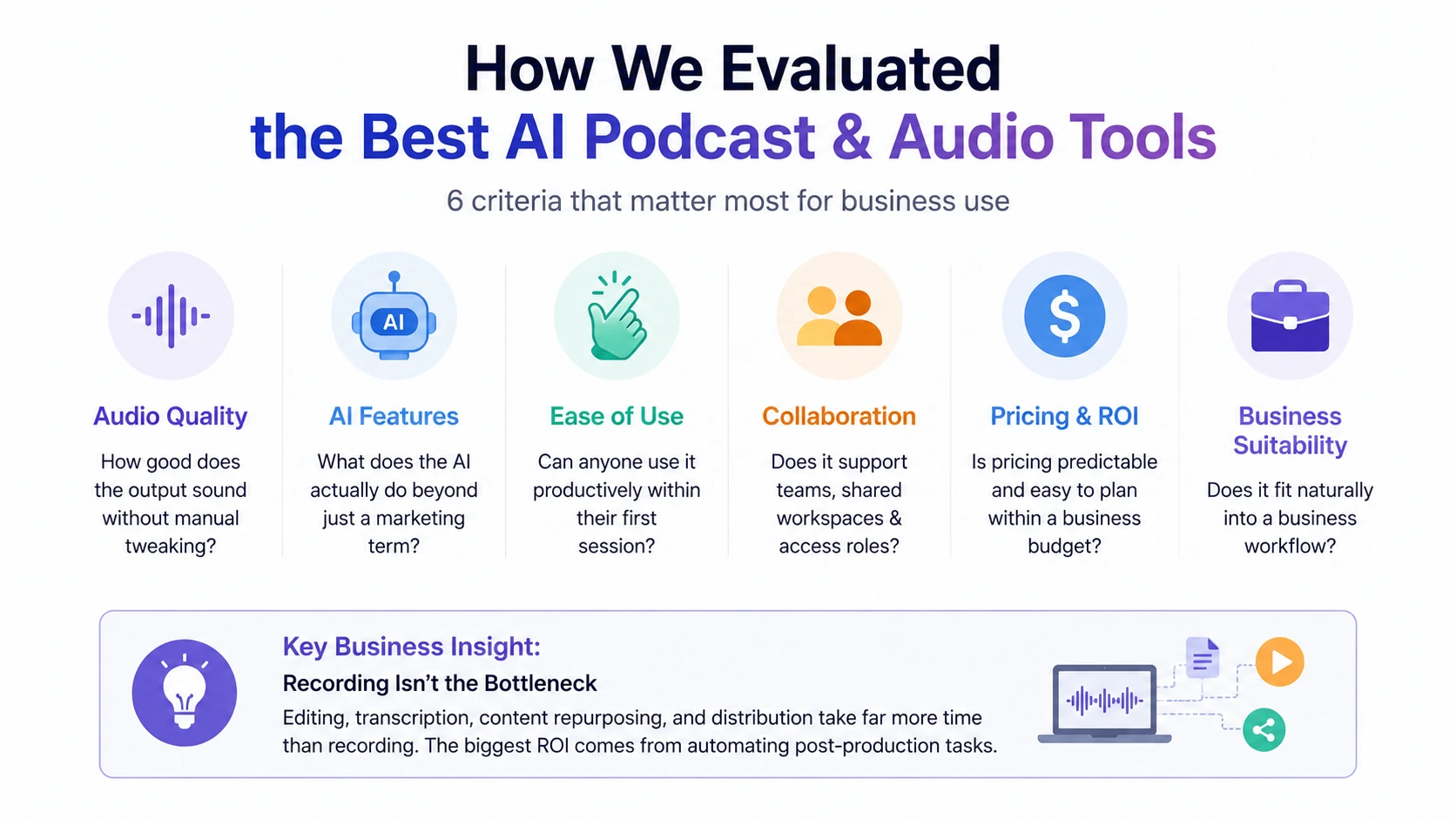
The six key factors used to evaluate AI podcast and audio tools for business use in 2026.
We looked at each tool across six criteria that matter most for business use, rather than for hobbyist podcasters chasing subscriber growth.
Audio Quality — How good does the output sound without manual tweaking? This matters more for business content than people often expect, since poor audio quality is one of the fastest ways to lose a listener's attention, regardless of how good the content is.
AI Features — What does the AI actually do, beyond being a marketing term? We distinguished between tools where AI handles a genuinely tedious task (removing filler words, generating show notes) versus tools where "AI" is more of a feature label.
Ease of Use — Can someone without audio editing experience use this tool productively within their first session? This is especially relevant for marketing teams where the person producing the podcast often isn't a dedicated audio specialist.
Collaboration Features — Does the tool support multiple team members, shared workspaces, or role-based access? Solo creator tools and business tools diverge sharply here.
Pricing & ROI — Is the pricing structure predictable for a business budget, or does it rely on credits and usage caps that make monthly costs hard to forecast?
Business Suitability — Putting it all together: does this tool fit naturally into a business workflow, or does it require workarounds to make it fit?
Most businesses assume recording a podcast is the difficult part. In reality, editing, transcription, content repurposing, and distribution usually consume far more time than the recording itself. The biggest ROI from AI podcast tools often comes from automating these post-production tasks rather than the recording process.
AI podcast tools are only one category of business AI software. If you're evaluating AI solutions across multiple departments, read our guide on Choosing AI Software for Your Business to learn a practical framework for comparing AI tools based on ROI, implementation complexity, and long-term business impact.
Best AI Podcast & Audio Tools for Businesses in 2026
1. Descript
Key Features
Descript's core idea is text-based editing — your recording gets transcribed, and editing the transcript edits the audio and video to match. On top of that, it includes Studio Sound for audio enhancement, Overdub for voice cloning, automatic filler word removal, clip creation for social media, and 4K video export. Underlord AI adds generative video and stock media options.
Pros
- Editing audio by editing text is genuinely faster once you're used to it
- Studio Sound noticeably improves rough recordings
- Over 30 AI tools bundled into the platform, including generative video
- Full stock media library included
Cons
- Lower-tier plans cap media hours fairly tightly (10 hours on Hobbyist, 30 on Creator)
- AI credits are consumed by features and can run out mid-month
- Overdub voice cloning has real limitations on the Free plan
Pricing
Free: $0 (1 hour/month, 100 AI credits). Hobbyist: $16-24/month (10 hours, 400 credits). Creator: $24-35/month (30 hours, 800 credits, 4K export). Business: $50-60/month (40 hours, 1,500 credits, team features).
Best For
Teams producing video podcasts or multi-format content who want one platform that covers editing, voice work, and basic video production.
Why Businesses Choose Descript
The text-based editing model is the real differentiator. For a marketing team that needs to turn around an episode quickly — cutting tangents, removing dead air, tightening the intro — doing that by editing a transcript is dramatically faster than scrubbing through a waveform. The Business plan's team collaboration and Brand Kit features also make it easier for multiple people to work on the same show without stepping on each other. The main thing to watch is the credit system — if your team is heavy on AI features like Overdub or Underlord, those credits can disappear faster than expected on the Creator plan.
2. Riverside
Key Features
Riverside is built around remote recording quality — 4K video with separate audio and video tracks for each participant, which means editing later doesn't involve compressed, mixed-down files. Magic Editor handles speaker highlighting, noise removal, and filler word removal automatically, while Magic Clips auto-generates short clips from longer recordings. It also includes AI show notes, an eye contact fix feature, and built-in podcast hosting.
Pros
- Recording quality for remote interviews is hard to beat — separate tracks make post-production much cleaner
- Strong fit for interview-style and multi-guest shows
- AI tools are built directly into the recording workflow, not bolted on afterward
- Podcast hosting is included, so you're not paying for a separate platform
Cons
- Lower-tier plans limit recording hours (5 hours on Standard)
- Live streaming is only available on the separate Live plan
- No voice cloning — Riverside is focused on real recordings, not synthetic voice
Pricing
Free: $0 (2 hours, 720p, watermarked). Standard: $19/month billed annually (5 hours, 4K). Pro: $39/month billed annually (15 hours, AI transcription, branded). Live: $34/month billed annually (HD live streaming, multistreaming).
Best For
Businesses running remote interview podcasts — executive conversations, customer interviews, multi-person panel discussions — where recording quality matters.
Why Businesses Choose Riverside
For thought leadership content specifically, recording quality is part of how the content gets perceived. A CEO interview that sounds like it was recorded over a phone call doesn't land the same way as one that sounds studio-produced, even if the actual content is identical. Riverside's separate-track recording means that even if one participant has a poor internet connection, their audio quality on the recording itself isn't affected. The Live plan's multistreaming to six platforms is also useful for companies running live Q&A sessions or product launches that need to hit multiple channels simultaneously.
3. ElevenLabs
Key Features
ElevenLabs is a text-to-speech and voice AI platform — there's no recording or editing functionality, but the voice generation itself is considered best-in-class. It supports 300+ voices across 30+ languages, professional voice cloning, multilingual text-to-speech, music generation, and speech-to-speech conversion. The latest model, Eleven v3, represents their current top-tier offering.
Pros
- Voice quality is widely regarded as the best available in standalone TTS
- Spotify partnership specifically for AI audiobooks signals strong industry validation
- Professional Voice Cloning is available starting on the Creator plan
- Reportedly reached $500M in annual recurring revenue, which is notable given how crowded this space is
Cons
- Free tier is explicitly non-commercial, so it's not usable for business content without upgrading
- Credit-based pricing can be hard to predict month to month
- No editing or recording features at all — this is purely a voice generation tool
Pricing
Free: $0 (non-commercial use only). Starter: $5-6/month (~30K credits). Creator: $22/month (~100K credits, includes voice cloning). Pro: $99/month (~500K credits). Scale: $330/month. Business: $1,320/month.
Best For
Businesses that need narration — training content, product walkthroughs, multilingual customer education, or synthetic voice podcasts — rather than recording real conversations.
Why Businesses Choose ElevenLabs
The Creator plan tends to be where most solo operators and small teams land, since it includes voice cloning at a relatively accessible $22/month. For larger organizations, the jump to the $1,320/month Business plan is significant, but it brings a commercial license and API access — both necessary if voice content is going into customer-facing products rather than internal use. The honest caveat here is that ElevenLabs solves one specific problem extremely well. If your business needs an actual podcast with recorded conversations, this isn't that tool — it's the voice layer that sits alongside a recording and editing platform.
4. Adobe Podcast
Key Features
Adobe Podcast centers on Enhance Speech, an AI audio cleanup tool that takes rough recordings and makes them sound closer to studio quality. Beyond that, it offers remote video recording, auto-transcription, transcript-based editing, and — as of a 2026 update — source separation, which splits a recording into speech, music, and noise layers that can be adjusted independently.
Pros
- Enhance Speech is genuinely one-click and produces noticeably better results
- Source separation gives more control than most budget tools offer
- $9.99/month is hard to beat for what it unlocks
- Fits naturally into an Adobe-based workflow if your team already uses Creative Cloud
Cons
- Free tier caps files at under 30 minutes
- Default enhancement strength (90%) tends to overprocess audio — most users get better results dialing it back to 55-60%
- Long-form content processed at high enhancement settings can sound fatiguing to listen to
Pricing
Free: $0 (files under 30 minutes). Premium: $9.99/month or $99.99/year (video support, bulk upload, 1GB file size, 2-hour duration limit, 4 hours/day enhancement, transcription editing, speaker-separated downloads).
Best For
Businesses cleaning up recordings that weren't captured in ideal conditions — customer interviews recorded over video calls, field recordings, or any audio that wasn't done in a controlled environment.
Why Businesses Choose Adobe Podcast
The value proposition here is straightforward: for $9.99 a month, you get audio enhancement that would otherwise require either expensive software or outsourced editing. The catch worth knowing about is the default settings — Adobe Podcast's enhancement defaults to 90% strength, which often sounds artificial or overprocessed, especially on longer recordings. Pulling that down to around 55-60% tends to produce more natural results. It's a minor adjustment, but one that's easy to miss if you're using the tool without reading into it first.
5. Wondercraft AI
Key Features
Wondercraft takes a different approach entirely — it generates full podcast episodes from scripts using AI voices, rather than recording real people. It supports over 1,000 voices across 50 languages, automatic translation, AI sound effects, custom voice cloning, captioned audiograms, short clip generation, API access, and episode scheduling.
Pros
- Can produce a complete episode without anyone recording anything
- Voice and language selection is extensive
- API and Zapier integrations support automated workflows
- White-label option available on the Business plan
Cons
- Entirely AI-generated — there's no option to incorporate real human recordings into the same workflow
- Business-tier features come at a meaningfully higher price point
- Free tier includes a watermark
Pricing
Free: £0 (3 episodes, basic voices). Creator: $19-25/month (20 episodes, 300+ voices). Professional: $49/month (50 episodes, multi-speaker, multilingual). Business: $99/month or $60/seat/month (unlimited episodes, custom voices, API). Enterprise: custom pricing.
Best For
Agencies and businesses producing scripted, branded audio content at scale — particularly multilingual content where recording the same script with multiple voice actors wouldn't be practical.
Why Businesses Choose Wondercraft
The honest framing for Wondercraft is that it's solving a different problem than most of the tools on this list. If your goal is a conversational interview show, this isn't the right fit — there's no substitute for two people actually talking. But for branded content that's essentially scripted audio — product announcements translated into multiple languages, recurring company updates, training content — generating it directly skips the recording and voice actor steps entirely. The Enterprise tier's custom model training and SOC2 compliance options suggest this is increasingly being positioned for larger organizations, not just solo creators experimenting with AI voices.
6. Podcastle
Key Features
Podcastle combines recording, AI voice cloning, re-voice editing, text-to-speech (ranging from 200K to 2M characters depending on plan), and an AI editing suite branded as Magic Dust, which handles silence removal and auto-leveling. It also includes transcription, podcast hosting, and 4K video support on higher tiers.
Pros
- Free plan includes unlimited audio recording at 160kbps, which is generous compared to most competitors
- Pricing is among the most affordable in this category
- Voice cloning available on the Pro plan
- Podcast hosting included at no extra cost
Cons
- Free plan limits video to 3 hours total (not monthly — lifetime)
- Text-to-speech character allowance on the Basic plan (10K characters) is quite limited
- Voice cloning is Pro-tier only
Pricing
Basic: Free (unlimited audio at 160kbps, 3 hours video, 2GB storage, 1 hour transcription, 10K TTS characters). Storyteller: $11.99/month billed annually (unlimited lossless audio, 8 hours video, 40GB storage, AI editing). Pro: $19.99/month billed annually (20 hours video, unlimited storage, voice cloning, priority support).
Best For
Small businesses and teams just getting started with podcast production who want a low-cost entry point without sacrificing core features.
Why Businesses Choose Podcastle
Podcastle's appeal is mostly about accessibility — both in terms of cost and learning curve. The unlimited audio recording on the free plan means a small business can produce an audio-only podcast without hitting usage walls, which isn't true of most competitors. The tradeoff is that team collaboration features remain limited even on the Pro plan, so this works better for a single person or very small team managing the show rather than a larger marketing department with multiple contributors.
7. Murf AI
Key Features
Murf AI focuses on AI voice generation for voiceovers — videos, presentations, courses, and similar content. It offers 60-120+ voices depending on plan, a voice changer feature, commercial licensing on business tiers, team collaboration, and API access.
Pros
- Voice quality is realistic and well-suited to professional voiceover use
- Commercial licensing is built into Business plans, removing ambiguity
- Team collaboration features available on Business Lite and above
- Entry pricing is relatively affordable
Cons
- Usage is measured in hours per year, not per month, which takes some getting used to when budgeting
- No recording or editing capability — this is text-to-speech only
- Lower-tier plans have a smaller voice selection than Creator Plus or Enterprise
Pricing
Free: $0 (10 minutes, no download). Creator Lite: $19/month annual (24 hours/year, 60 voices). Creator Plus: $33/month annual (48 hours/year, 120+ voices). Business Lite: $26/month annual (48 hours/year, team features). Business Plus: $52/month annual (240 hours/year). Enterprise: from $75/month (unlimited, voice cloning, API).
Best For
Teams that need voiceovers for video content, training courses, or marketing materials but don't need a full podcast production platform.
Why Businesses Choose Murf AI
Murf occupies a slightly different niche than ElevenLabs — it's positioned more around business voiceover use cases (presentations, course narration, video intros) than podcast-specific voice generation. The Business Lite plan's combination of team collaboration and commercial licensing at $26/month annual is reasonable for a small marketing team that needs occasional voiceover work without committing to ElevenLabs' higher Creator or Business tiers. The annual-hours pricing model is worth understanding upfront, though — it resets yearly rather than monthly, which changes how you'd plan usage around a big content push.
8. Castmagic
Key Features
Castmagic is built entirely around taking a recorded conversation and turning it into multiple content formats. It generates AI transcription with speaker identification, show notes, platform-specific social posts for LinkedIn, X, and Instagram, newsletter content, blog drafts, timestamps and chapters, quote extraction, and supports custom prompts. Magic Chat allows you to chat with a transcript to pull out specific information, and it supports 60+ languages.
Pros
- Genuinely strong for repurposing — one recording becomes social posts, a blog draft, and a newsletter without separate tools
- Custom prompts allow tailoring outputs to your brand voice
- Magic Chat is useful for pulling specific quotes or insights from long transcripts
- Wide language support
Cons
- Pricing starts higher than most other tools on this list ($39/month for a single seat)
- Minutes beyond plan limits are charged separately ($0.10-0.20/minute)
- No audio editing or recording functionality — this is purely a post-production content tool
Pricing
Hobby: $39/month ($23/month billed annually, 300 minutes/month, 1 seat). Starter: $99/month ($59/month billed annually, 800 minutes/month, 10 AI pages). Rising Star: $299/month ($179/month billed annually, unlimited minutes, 5 seats). Enterprise: custom pricing.
Best For
Marketing teams and agencies that need to extract maximum content value from every recorded episode or interview.
Why Businesses Choose Castmagic
If the rest of this list is about producing the podcast itself, Castmagic is about everything that happens after recording stops. For a marketing team, the real cost of podcast production often isn't the recording — it's the hours spent writing show notes, drafting social posts, and pulling quotes for a newsletter. Castmagic automates most of that. The Rising Star plan's five seats and unlimited minutes make sense for an agency managing multiple client shows, where the per-seat economics of lower tiers wouldn't scale. The price jump between Hobby and Starter is steep, though, so it's worth mapping your actual monthly minutes before committing to a tier.
Feature Comparison Table
| Tool | Recording | Editing | Voice AI | Repurposing | Team Features |
|---|---|---|---|---|---|
| Descript | Yes | Strong (text-based) | Yes (Overdub) | Limited (clips) | Business plan |
| Riverside | Yes (4K, remote) | Strong (Magic Editor) | No | AI show notes | Pro plan and above |
| ElevenLabs | No | No | Strong (best-in-class) | No | Business plan |
| Adobe Podcast | Yes | Moderate (cleanup-focused) | No | No | Limited |
| Wondercraft AI | No (generates audio) | N/A | Strong (1000+ voices) | Limited | Business plan |
| Podcastle | Yes | Moderate (Magic Dust) | Yes (Pro plan) | No | Limited |
| Murf AI | No | No | Strong | No | Business Lite and above |
| Castmagic | No | No | No | Strong (core focus) | Rising Star plan |
Best AI Podcast Tools by Use Case
Best for Marketing Teams
Descript, Castmagic, and Riverside cover the core marketing workflow well together. Riverside handles high-quality recording for interviews or executive conversations, Descript speeds up the editing turnaround, and Castmagic takes the finished recording and turns it into social posts, blog drafts, and newsletter content. The combination addresses both production and distribution, which is usually where marketing teams feel the most time pressure.
Best for Agencies
Castmagic's Rising Star plan, with five seats and unlimited minutes, fits how agencies typically operate — managing multiple client shows simultaneously without per-episode minute caps becoming a constraint. Wondercraft's Business plan, with white-labeling and API access, is also relevant for agencies producing AI-generated branded content for clients under their own name.
Best for Internal Training
ElevenLabs and Murf AI both make sense here, depending on scale. ElevenLabs' multilingual TTS is useful if training content needs to be localized across regions. Murf AI's course-oriented voiceover focus and team collaboration features on Business Lite make it a reasonable fit for HR or L&D teams producing training modules regularly. Podcastle is also worth considering for narration-heavy internal content on a tighter budget.
Best for Customer Education
Wondercraft AI and ElevenLabs both support multilingual output, which matters if your customer base spans multiple regions. Wondercraft's ability to generate full episodes from a script is useful for product walkthroughs or onboarding audio that needs to be produced quickly and updated often. Adobe Podcast is also relevant here in a different way — if you're cleaning up recorded customer calls or webinars for reuse as educational content.
Best for Sales Enablement
Descript's clip creation tools are useful for pulling short, shareable moments out of longer recordings — demo walkthroughs, customer testimonials, or conference talks — for use in sales outreach. Riverside is a good fit for recording customer interviews or case study conversations remotely, since the quality holds up even if the customer is on a weaker connection. Castmagic's show notes generation can also speed up how quickly sales teams get usable summaries from recorded calls.
Best for Thought Leadership Podcasts
Riverside is the clear starting point for executive interview shows, given its recording quality for remote conversations. ElevenLabs can support consistent branding through voice cloning — useful for intros, outros, or recurring segments that need a consistent voice regardless of who's speaking. Descript's Studio Sound rounds out the production side, ensuring the final audio sounds polished even if the original recording wasn't perfect.
How Businesses Use AI Podcast Tools in 2026
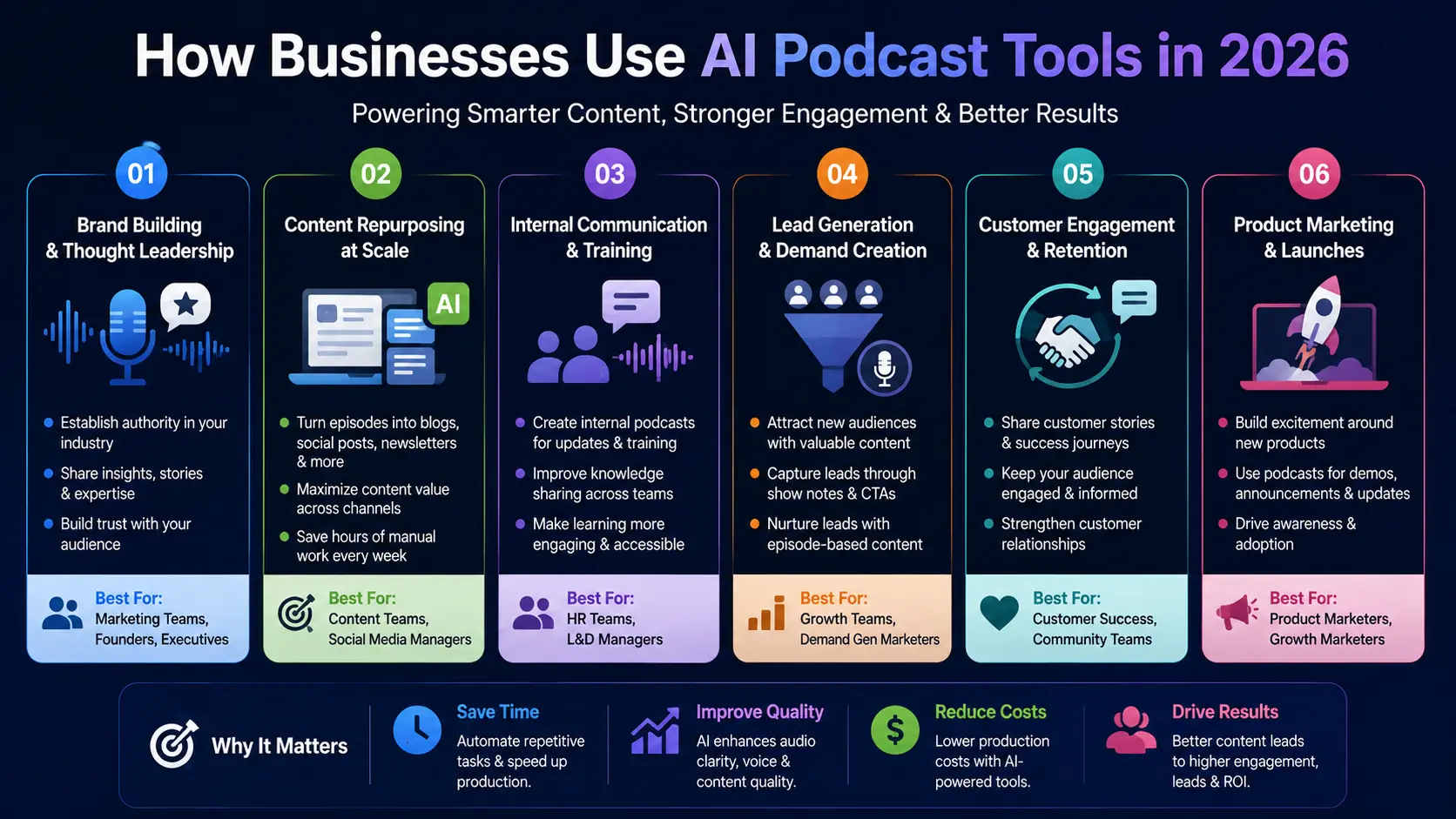
Common business use cases for AI podcast tools, including content marketing, employee training, lead generation, customer engagement, and product promotion.
Marketing Content Production
The most common pattern is using a podcast or recorded conversation as a content source rather than an end product. A single recording becomes the basis for multiple pieces of content across different channels, which changes the economics of producing it — the cost is justified not by the podcast audience alone, but by everything downstream.
Customer Education
Companies with international customer bases are increasingly using AI voice tools to produce educational content in multiple languages without recording separate sessions for each market. This is one of the more practical applications of voice cloning and multilingual TTS, since it solves a real logistical problem rather than just being a novelty.
Internal Training Programs
Training content benefits from AI narration in a fairly direct way — it removes the dependency on booking voice talent or having someone internally record (and re-record) modules every time content changes. When a training module needs updating, regenerating the narration is far faster than re-recording it.
Executive Thought Leadership
Interview-style shows featuring company leadership have become a fairly standard part of B2B content strategy. The appeal is straightforward — it's a lower-effort way to produce content compared to written long-form pieces, and it can be repurposed into clips, quotes, and articles afterward.
Podcast-to-Content Repurposing
This is arguably where AI has had the most concrete impact. Turning one recorded conversation into a transcript, a set of social posts, a blog draft, and a newsletter section used to require either a lot of manual work or a content team. Tools focused specifically on this step have made it realistic for smaller teams to produce that volume of output from a single recording session.
For businesses planning a podcast strategy, Spotify's resources for creators and brands provide additional guidance on audience engagement, podcast distribution, and content growth best practices. Learn more from Spotify for Creators.
How to Build an AI Podcast Production Workflow
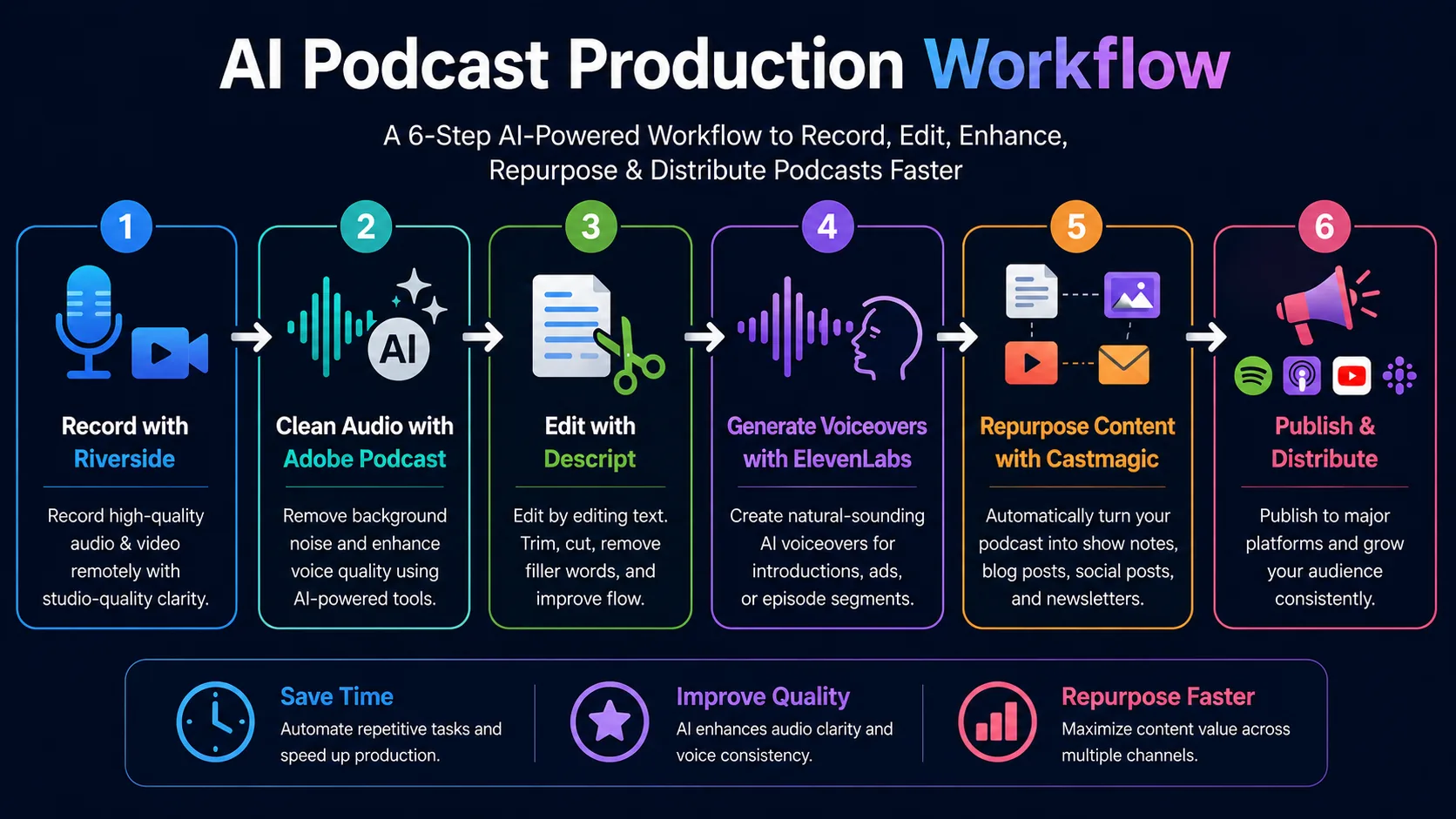
A typical AI-powered podcast workflow used by businesses to record, edit, enhance, repurpose, and distribute podcast content efficiently.
Step 1: Record with Riverside
Starting with high-quality, separate-track recordings gives you more flexibility in every step that follows. Even if your final output is audio-only, having clean video available opens up options for clips and social content later.
Step 2: Clean Audio with Adobe Podcast
Run the raw recording through Enhance Speech before editing. Adjusting the enhancement strength down to around 55-60% (rather than the 90% default) tends to produce more natural-sounding results, especially for longer content.
Step 3: Edit with Descript
With clean audio, text-based editing in Descript lets you tighten the conversation — removing tangents, dead air, and filler words — by editing the transcript directly rather than scrubbing through audio manually.
Step 4: Generate Voiceovers with ElevenLabs
For intros, outros, ad reads, or any segments that need a consistent voice regardless of who's speaking on a given episode, ElevenLabs can generate these separately and have them inserted during editing.
Step 5: Repurpose Content with Castmagic
Once the episode is finalized, run the recording or transcript through Castmagic to generate show notes, social posts, and blog content. This is the step that extends the value of the recording well beyond the podcast itself.
Step 6: Publish and Distribute
Distribute the finished episode through your hosting platform (Riverside includes this), alongside the repurposed content generated in the previous step — social posts, blog content, and newsletter sections going out across their respective channels.
→ Use our AI Prompt Generator to create structured prompts for podcast scripting, show notes, content repurposing, interview preparation, and AI voice generation workflows.
AI Podcast Production ROI Example
Traditional Podcast Production Costs
A traditional setup typically involves separate costs for recording equipment or studio time, a freelance editor, a transcription service, and potentially a copywriter for show notes and social content — each handled as a distinct line item, often with different people or vendors involved.
AI-Powered Podcast Workflow Costs
Using the workflow outlined above, a small business might combine Riverside's Standard plan ($19/month), Adobe Podcast Premium ($9.99/month), Descript's Creator plan (roughly $24-35/month), and Castmagic's Hobby plan ($39/month, or $23/month billed annually) — landing somewhere in the range of $90-105/month combined, depending on billing cycles.
Potential Time Savings
The time savings show up most in editing and repurposing rather than recording itself. AI tools reduce proposal and content drafting time substantially in adjacent categories — and for podcast-specific work, the editing and show-notes-and-social-content steps are where manual hours are most heavily concentrated, making them the steps where AI assistance has the most visible impact.
→ Use our AI ROI Calculator to estimate potential time savings, production cost reductions, and return on investment before adopting AI podcast and audio production tools.
Example ROI Calculation
If a weekly episode previously required, say, three hours of editing plus two hours of repurposing work (show notes, social posts, transcription cleanup) — five hours total — and AI tools cut that to roughly two hours combined, that's three hours saved per episode, or about 12 hours per month. At any reasonable hourly rate for the person doing that work, the combined ~$90-105/month tool cost is recovered well within the first few episodes.
The same productivity and automation principles apply beyond audio production. Businesses looking to streamline proposal creation and sales workflows should also explore our guide to Best AI Proposal & Quote Writing Tools for Businesses in 2026, which compares leading AI platforms for generating proposals, quotes, and sales documents more efficiently.
Common Mistakes Businesses Make When Using AI Podcast Tools
Choosing Too Many Tools
It's tempting to adopt a tool for every step of the process, but stacking five or six subscriptions often costs more — both in money and in the time spent switching between platforms — than a more focused combination of two or three tools that cover the workflow end to end.
Ignoring Audio Quality
Content quality and audio quality aren't the same thing, but listeners conflate them. A great conversation recorded poorly will lose listeners faster than a decent conversation recorded well. Skipping a cleanup step like Adobe Podcast's Enhance Speech to save a few minutes per episode is a false economy.
Not Repurposing Content
The single recording session is often the most expensive part of the process in terms of coordination — getting guests scheduled, setting up the recording, and so on. Not extracting additional content from that session (social posts, blog drafts, clips) leaves a lot of that investment on the table.
Skipping Team Workflows
Tools without proper collaboration features tend to create bottlenecks where one person becomes the gatekeeper for every step of production. For businesses planning to scale beyond occasional episodes, checking for team and collaboration features upfront avoids having to switch platforms later.
Overusing AI Voices
AI voice cloning is useful for specific segments — intros, recurring branded elements, multilingual versions of scripted content — but using it as a wholesale replacement for real conversations in an interview-style show tends to be noticeable to listeners and can undercut the authenticity that made the format appealing in the first place.
Future of AI Podcasting
AI Voice Cloning
As voice cloning quality continues to improve, the gap between a cloned voice and a recorded one is narrowing for short segments. The more interesting development for businesses is likely to be around consistent branded voices across content types — the same voice appearing in podcast intros, video ads, and customer education materials.
Multilingual Podcast Production
Tools like Wondercraft and ElevenLabs already support producing content across dozens of languages from a single source script. For businesses operating internationally, this reduces what used to be a significant localization cost to something closer to a configuration step.
AI Content Repurposing
The repurposing category, currently led by tools like Castmagic, is likely to keep expanding in terms of output formats — the underlying idea of "one recording, many outputs" has clear demand from marketing teams, and the formats it can target will likely keep growing.
Automated Podcast Workflows
API access, already available on several of the tools covered here (Wondercraft, Murf, Riverside, Descript via integrations), points toward more automated pipelines — where recording, cleanup, editing, and distribution steps are chained together with less manual handoff between tools.