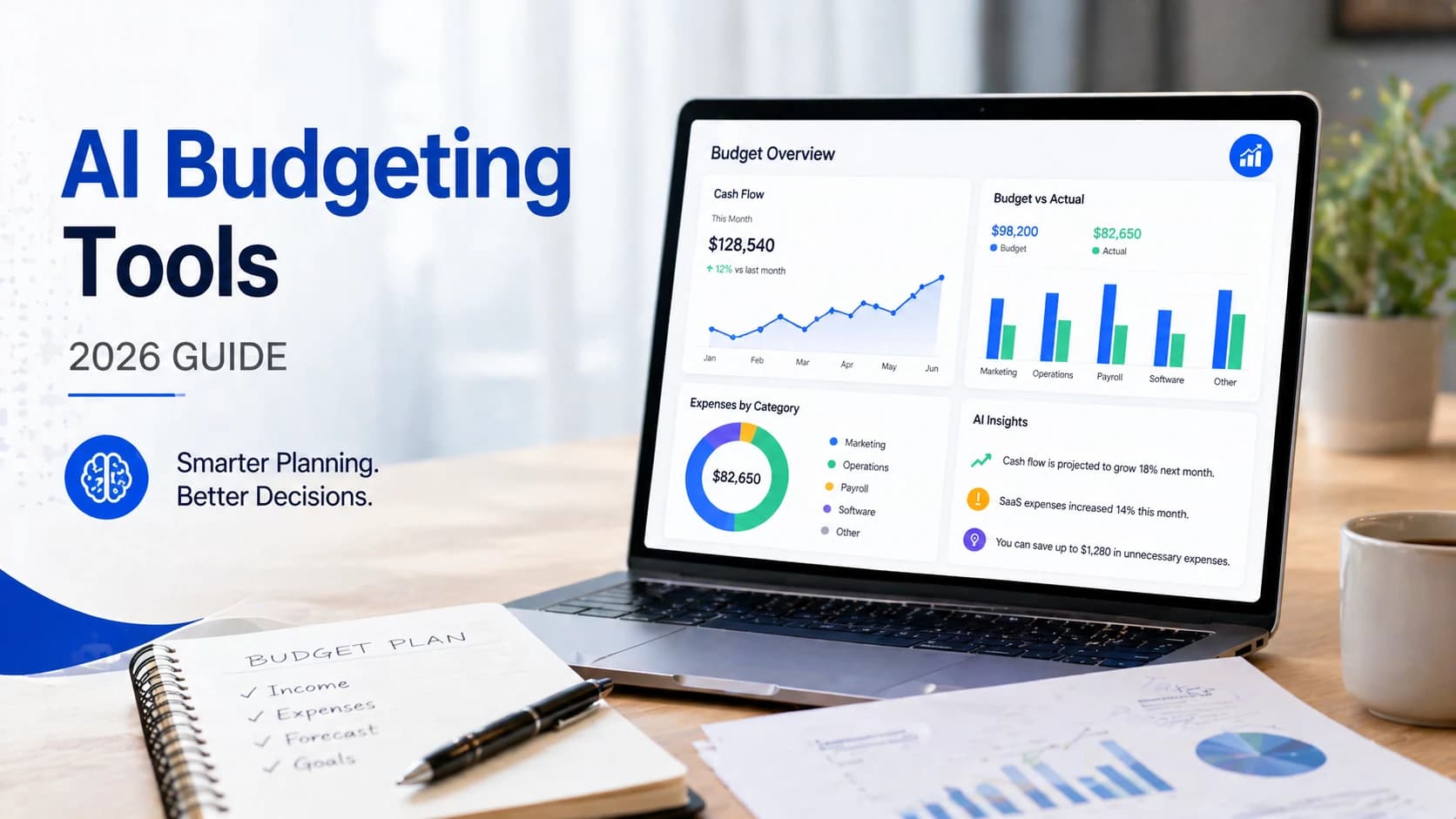
What Are AI Budgeting Tools?
AI budgeting tools are software platforms that use automation and machine learning to help business owners track income and expenses, predict future cash flow, and make better financial decisions — without needing an accountant on call.
Traditional budgeting means manual spreadsheets, end-of-month reconciliation, and guesswork about what's coming next quarter. AI budgeting software changes that equation.
Here's what these tools actually do:
- Track income and expenses automatically — syncing with bank accounts, invoices, and payment processors in real time
- Predict future cash flow — using historical transaction data to forecast what the next 30, 60, or 90 days will look like
- Suggest optimizations — flagging unusual spending, identifying cost categories that are trending up, or alerting you when a projected cash shortfall is approaching
- Automate reports — generating P&L statements, budget vs. actual comparisons, and tax-ready summaries without manual data entry
The practical difference is significant. A business owner using traditional budgeting spends 6–10 hours per month reconciling accounts and building reports. With AI-powered tools, that same work takes under an hour — and produces more accurate, forward-looking output.
For a broader look at how AI software fits into your business operations, see: Complete Guide to Choosing AI Software for Your Business (2026 Edition).
Why Business Owners Need AI Budgeting Tools
Cash flow problems are the leading cause of small business failure — not bad products, not weak marketing. According to a 2024 Intuit QuickBooks survey, 27% of small business owners say cash flow issues are their biggest operational challenge. Yet most of those businesses are still managing finances reactively — looking at last month's numbers to make today's decisions.
AI budgeting tools fix that problem specifically.
- Cash flow risk: 27% of small business owners cite cash flow problems as their top operational challenge, per Intuit QuickBooks 2024 research.
- AI adoption in finance: AI-powered financial planning tool adoption among SMBs grew 43% between 2023 and 2025, per Gartner.
- Time saved: Business owners using AI budgeting tools report saving 5–9 hours per month on financial admin, per a 2025 SCORE survey.
- Forecasting accuracy: AI-driven cash flow forecasts are 35–50% more accurate than manual projections, per McKinsey 2025 SMB Finance Report.
- Cost comparison: A part-time bookkeeper costs $800–1,400/month. A full AI budgeting stack runs $30–120/month.
The benefits go beyond time savings:
- Real-time financial visibility — know exactly where your money is at any moment, not at month end
- Accurate forecasting — see cash flow projections before problems become crises
- Automated reporting — tax prep, investor reports, and board summaries generated with one click
- Better decision-making — hire, invest, or cut with data, not instinct
The businesses that manage cash flow proactively — not reactively — consistently outperform those that don't. AI budgeting tools make that discipline accessible without a finance team.
→ To estimate how much time and cost you can save by switching to AI budgeting tools, try our AI ROI Calculator.
Best AI Budgeting Tools for Business Owners (2026)
1. QuickBooks Online
Best for: Small and mid-sized businesses that need accounting and budgeting in one platform
QuickBooks Online is the most widely used accounting platform among US small businesses — and for good reason. It handles invoicing, expense tracking, bank reconciliation, payroll, and tax preparation in a single system. Its budgeting module lets you set annual or monthly budgets by category and compare actual spending against targets in real time.
Key AI features:
- Automated transaction categorization using machine learning
- Cash flow planner with 90-day forward projections
- Smart invoice matching and duplicate detection
- Automated payment reminders for outstanding invoices
Pricing:
- Simple Start: $35/month
- Essentials: $65/month
- Plus: $99/month
- Advanced: $235/month
Pros: Industry-standard integrations (600+ apps), strong accountant ecosystem, tax-ready reports Cons: Price increases significantly as you scale, can feel complex for very small businesses
2. Xero
Best for: Growing businesses that need strong integrations and team collaboration
Xero is QuickBooks' strongest competitor — and in some areas, its superior. It offers unlimited users on all plans (QuickBooks charges per user), making it more cost-effective for teams. Its open API and 1,000+ integrations make it the preferred choice for businesses running complex tech stacks.
Key AI features:
- Automated bank reconciliation with smart matching
- Cash flow forecasting via native tools and Float integration
- AI-powered expense categorization
- Automated bill capture from email or photo
Pricing:
- Starter: $29/month
- Standard: $46/month
- Premium: $62/month
Pros: Unlimited users, excellent integrations, clean interface Cons: Payroll costs extra, fewer native US-specific tax features than QuickBooks
3. Zoho Books
Best for: Budget-conscious small businesses and startups
Zoho Books delivers the core functionality of QuickBooks and Xero at a significantly lower price point. It's part of the broader Zoho ecosystem, which means it integrates natively with Zoho CRM, Zoho Inventory, and Zoho Payroll — making it ideal for businesses already in the Zoho stack.
Key AI features:
- AI-powered receipt scanning and expense categorization
- Automated payment reminders
- Cash flow statements and budget tracking
- Workflow automation for recurring invoices
Pricing:
- Free: Up to $50K annual revenue
- Standard: $20/month
- Professional: $50/month
- Premium: $70/month
Pros: Excellent value, strong automation, free tier available Cons: Smaller accountant network than QuickBooks, fewer third-party integrations
4. FreshBooks
Best for: Freelancers and service-based businesses with simple invoicing needs
FreshBooks is purpose-built for solo operators and small service businesses. Its interface is the simplest of any tool on this list — and that's intentional. If you bill clients by the hour or project, FreshBooks handles time tracking, invoicing, and expense capture without any accounting complexity.
Key AI features:
- Automated expense categorization
- Smart invoice follow-ups
- Time tracking with project profitability reports
- Basic cash flow reporting
Pricing:
- Lite: $19/month (5 clients)
- Plus: $33/month (50 clients)
- Premium: $60/month (unlimited clients)
Pros: Easiest interface on this list, excellent mobile app, great client-facing invoices Cons: Limited budgeting and forecasting depth, not suited for product-based businesses
5. Float
Best for: Cash flow forecasting and visual financial planning
Float is not an accounting tool — it's a forecasting layer that sits on top of QuickBooks, Xero, or FreshBooks. It pulls your historical transaction data and builds a visual, rolling cash flow projection that updates automatically as new transactions come in. For businesses where cash timing is critical — agencies, contractors, seasonal businesses — Float is the clearest view of financial risk available.
Key AI features:
- Automated 90-day cash flow forecast
- Scenario planning (best case / worst case / most likely)
- Budget vs. actual variance tracking
- Real-time alerts for projected shortfalls
Pricing:
- Essential: $59/month
- Pro: $99/month
- Premium: $199/month
Pros: Best-in-class cash flow visualization, intuitive scenario modeling, excellent for agencies Cons: Requires QuickBooks or Xero — not a standalone tool
6. LivePlan
Best for: Startups and businesses building formal financial plans
LivePlan combines business plan creation with ongoing financial tracking. It's the preferred tool for startups seeking funding or businesses that need to present financial projections to investors or lenders. Its dashboard compares actual performance against your business plan in real time.
Key AI features:
- AI-assisted business plan generation
- Budget vs. actual performance dashboards
- KPI tracking with visual benchmarks
- Milestone and goal tracking
Pricing: $20/month (annual billing)
Pros: Best tool for pitch-ready financial plans, integrates with QuickBooks and Xero Cons: Less useful for day-to-day bookkeeping, better as a planning complement than a primary tool
7. Planful
Best for: Finance teams managing complex budgeting and scenario planning
Planful is built for businesses that have outgrown spreadsheets but aren't ready for enterprise ERP systems. It handles multi-department budgeting, rolling forecasts, and consolidated financial reporting — with AI-assisted variance analysis and automated report generation.
Key AI features:
- AI-powered anomaly detection in budget vs. actual data
- Automated rolling forecasts updated with real data
- Predictive scenario modeling
- Structured financial close workflows
Pricing: Custom (typically $1,000–3,000/month for mid-market)
Pros: Extremely powerful for multi-department finance, strong audit trail Cons: Requires implementation support, not practical for businesses under $2M revenue
8. Anaplan
Best for: Enterprise FP&A and connected planning across departments
Anaplan operates at the enterprise level — connecting finance, supply chain, HR, and sales planning on a single platform. Its AI engine models complex interdependencies across the business, enabling truly connected financial forecasting. This is not a tool for small businesses. It's included here because fast-scaling companies need to know when they've outgrown the tools below it.
For a deeper comparison of accounting platforms and how to choose between them, see: AI Accounting Software for Small Businesses (2026).
Key AI features:
- Connected planning across finance, HR, and operations
- AI-driven demand and revenue forecasting
- Real-time what-if modeling at scale
- Custom KPI dashboards for executive reporting
Pricing: Custom enterprise pricing (typically $30,000+/year)
Pros: Most powerful FP&A platform available, fully customizable, handles extreme complexity Cons: Enterprise cost and complexity — overkill for any business under $10M revenue
Comparison Table
| Tool | Starting Price | AI Features | Best For | Difficulty |
|---|---|---|---|---|
| QuickBooks Online | $35/mo | Cash flow planner, auto-categorization | All-in-one SMBs | Medium |
| Xero | $29/mo | Bank reconciliation, expense AI | Growing teams | Medium |
| Zoho Books | Free | Receipt scanning, automation | Budget-conscious | Easy |
| FreshBooks | $19/mo | Invoice AI, expense tracking | Freelancers | Easy |
| Float | $59/mo | 90-day forecast, scenario planning | Forecasting | Easy |
| LivePlan | $20/mo | Business plan AI, KPI dashboards | Startups | Easy |
| Planful | Custom | Anomaly detection, rolling forecasts | Finance teams | Hard |
| Anaplan | Custom | Connected planning, demand AI | Enterprise FP&A | Hard |
What Most Articles Won’t Tell You About AI Budgeting Tools
After evaluating these tools across different business types, here’s the reality most guides skip:
- QuickBooks Online is powerful — but overkill for businesses under $300K revenue
- Xero is better for teams, but unnecessary for solo founders
- Float is only valuable if your cash flow fluctuates monthly — otherwise it's not worth the cost
- Zoho Books covers 80% of small business needs at a fraction of the price
Most “best tools” lists recommend everything to everyone. In practice, choosing the wrong tool can waste both time and money.
If you're a small business owner, the goal isn’t to get the most powerful tool — it’s to get the simplest system that gives you clear financial visibility.
Best Tool by Use Case
Choosing the right tool depends less on features and more on where you are in your business right now.
- Freelancers and solo operators → FreshBooks. Simple invoicing, time tracking, and basic expense tracking. No accounting complexity needed.
- Small businesses (under $1M revenue) → QuickBooks Online or Zoho Books. QuickBooks if you have an accountant. Zoho if you want to self-manage at lower cost.
- Startups seeking funding → LivePlan + Xero. LivePlan for investor-ready projections, Xero for clean day-to-day accounting.
- Agencies and project-based businesses → Xero + Float. Xero for accounting, Float for client-level cash flow visibility.
- Scaling companies ($2M–$10M revenue) → QuickBooks Advanced or Planful. When multi-department budgeting and rolling forecasts become critical.
- Enterprise ($10M+ revenue) → Anaplan. When connected planning across departments is the requirement.
Most small businesses waste money on tools that are more complex than they need. Before upgrading to Planful or Anaplan, ask honestly: do you have a dedicated finance employee who will actually use the advanced features? If not, QuickBooks Advanced with Float covers 90% of what most sub-$5M businesses need — at a fraction of the cost.
→ If you're unsure which tools match your business stage, use our AI Tool Selector to get a personalized recommendation.
Recommended AI Budgeting Stack
The most common mistake is treating budgeting software as an either/or decision. The right approach is layered — one tool for accounting, one for forecasting, and one for spend control.
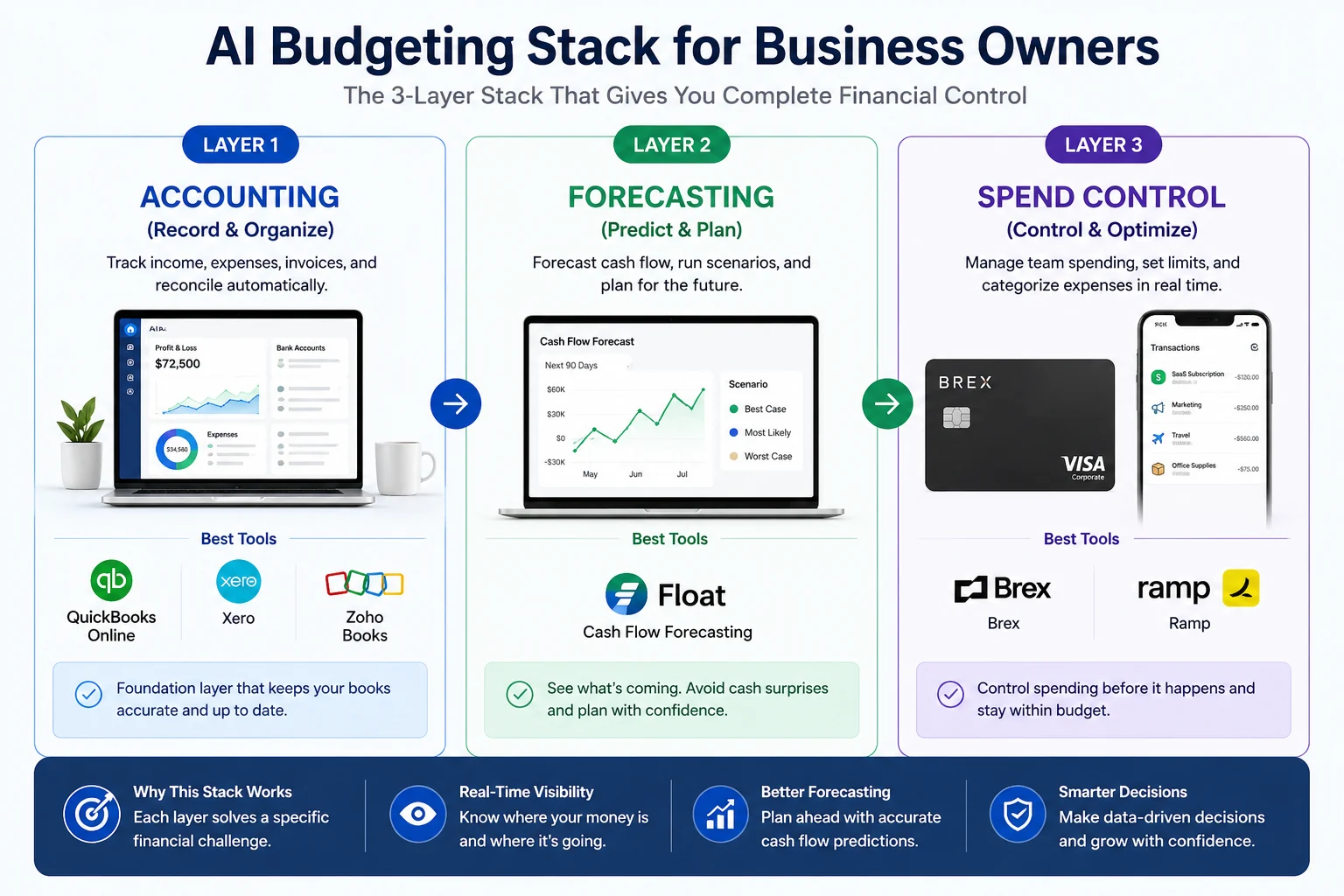
The 3-layer AI budgeting stack: Integrating accounting, forecasting, and real-time spend control for complete financial visibility.
Layer 1 — Accounting (required):
QuickBooks Online or Xero — handles income, expenses, invoicing, and tax reporting
Layer 2 — Forecasting (add after Layer 1 is stable):
Float — pulls data from your accounting tool and builds 90-day cash flow projections automatically
Layer 3 — Spend Control (add when team expenses become a management problem):
Brex or Ramp — corporate cards with AI-powered spend categorization, real-time budget alerts, and automated receipt capture
This three-layer stack costs $90–160/month for most small businesses and replaces a significant amount of accountant billable time — while giving you better financial visibility than most businesses have at 10x the revenue.
According to Harvard Business Review research on SMB financial management, businesses that maintain rolling cash flow forecasts updated at least monthly are 2.3x more likely to sustain growth through economic downturns than those relying on static annual budgets.
How AI Budgeting Actually Works (Step-by-Step)
From my analysis: Most small business owners don’t fail at budgeting because of lack of tools — they fail because they don’t review financial data consistently. The tools listed here only work if you check them weekly, not monthly.
Understanding the workflow helps you get real value from any tool on this list — not just set it up and forget it.
-
Track income and expenses — Connect your bank accounts, payment processors (Stripe, Square, PayPal), and invoicing system. The tool syncs transactions automatically.
-
Categorize automatically — AI categorizes every transaction by type (payroll, marketing, SaaS subscriptions, cost of goods). You review and correct edge cases. The system learns from corrections.
-
Forecast future cash position — Using 3–12 months of historical data, the forecasting engine projects your cash balance 30, 60, and 90 days out — accounting for known recurring expenses and expected revenue.
-
Compare budget vs. actual — Set monthly or annual targets by category. The dashboard shows real-time variance — where you're over, where you're under, and by how much.
-
Adjust spending based on data — When a forecasted shortfall appears two months out, you have time to act: delay a hire, accelerate a collection, or cut a discretionary expense. With traditional budgeting, you see the problem after it's already happened.
This workflow is what separates AI-assisted budgeting from a spreadsheet. The forecasting step — specifically getting visibility 60–90 days out — is the highest-value capability most small businesses are not currently using.
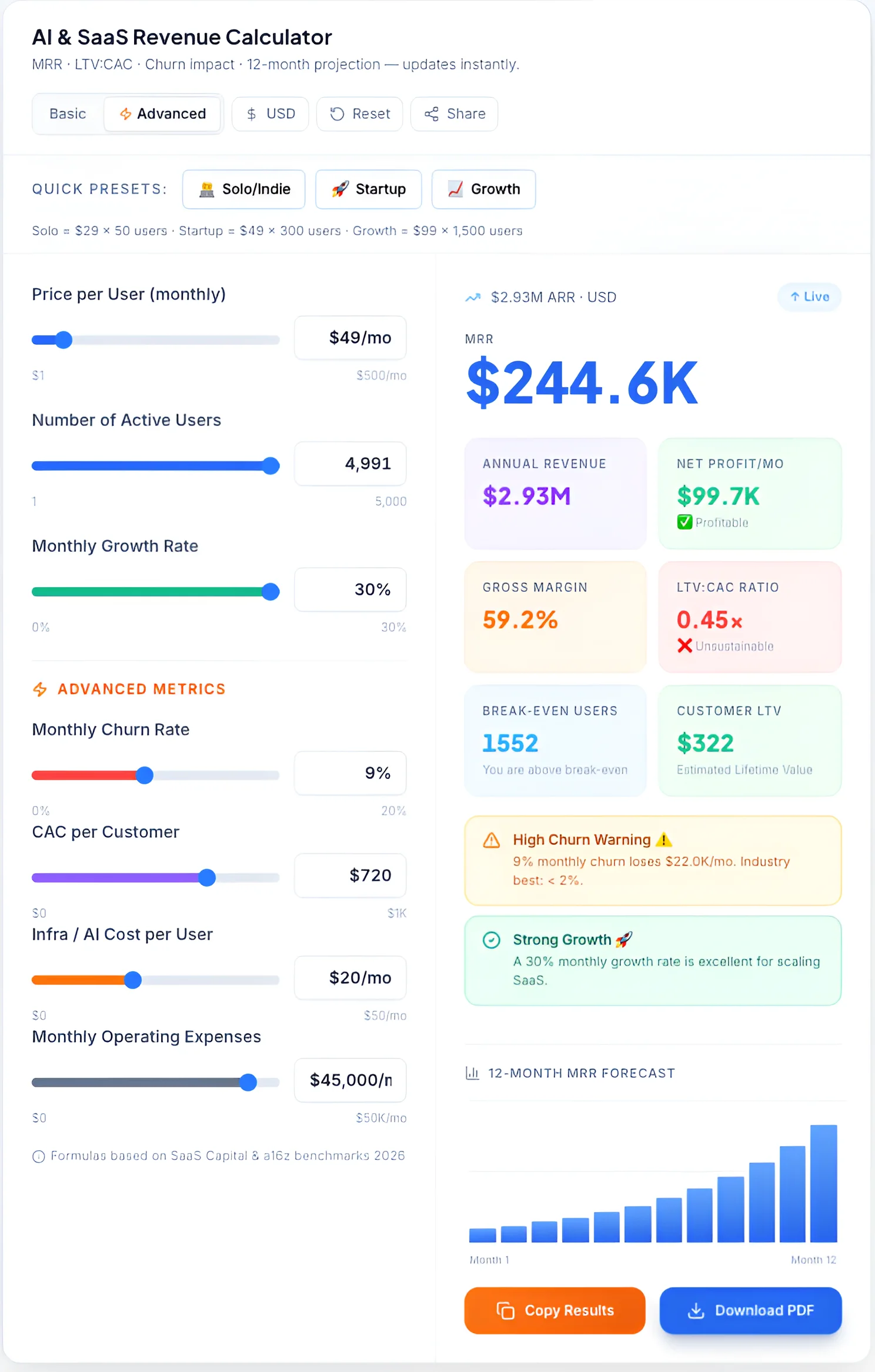
Real-time AI revenue calculator providing deep insights into MRR, LTV:CAC ratios, and 12-month financial projections.
Common Mistakes to Avoid
Most businesses that fail to get value from AI budgeting tools make the same predictable errors.
Using only an accounting tool, no forecasting. QuickBooks and Xero are exceptional at recording what happened. They're limited at predicting what's coming. Without a forecasting layer (Float or native forecasting), you're still flying partially blind.
Ignoring cash flow timing. Revenue and cash are not the same thing. A business can be profitable on paper and cash-flow negative in practice — because invoices are outstanding, expenses are front-loaded, or seasonal patterns create gaps. Cash flow forecasting specifically addresses timing, which accounting tools don't.
Not updating the budget. A budget set in January is outdated by March for most growing businesses. AI tools should prompt monthly budget reviews — otherwise the "budget vs. actual" comparison loses meaning.
Automating without reviewing. AI categorization is accurate 85–90% of the time. The remaining 10–15% of miscategorized transactions corrupt your data and your forecasts. Build a 15-minute weekly review into your workflow.
How to Choose the Right Tool
Four variables determine which tool is right for your business:
- Budget. If you're under $500K revenue, the free Zoho Books tier or FreshBooks Lite at $19/month is sufficient to start. Only upgrade when volume demands it.
- Team size. Solo operators need simplicity. Teams need user permissions, approval workflows, and multi-user access — which Xero handles better than most at the price.
- Complexity. Product-based businesses need inventory tracking (QuickBooks Plus). Service businesses with simple invoicing can use FreshBooks or Zoho.
- Integration needs. If you're already using Salesforce, HubSpot, or Shopify, check integration quality before committing. QuickBooks and Xero have the broadest integration ecosystems.
For businesses investing in growth, AI tools are not limited to finance — marketing automation plays a major role. Here’s a breakdown of AI tools for social media marketing.
According to Forbes research on AI adoption in small businesses, SMBs using AI-powered financial tools are significantly more likely to identify cash flow shortfalls in advance, make faster hiring and investment decisions, and maintain profitability through economic volatility.
Who Should NOT Use AI Budgeting Tools?
AI budgeting tools are not necessary if:
- You have fewer than 20 transactions per month
- You’re running a side project with no consistent revenue
- You already work closely with a full-time accountant handling forecasting
In these cases, a simple spreadsheet is often enough. Adding tools too early can create unnecessary complexity.