

What is AI Accounting Software?
Traditional accounting software gave you a place to record transactions. Useful — but it still meant someone had to categorize every expense, reconcile every bank statement, and manually build every report.
AI accounting software works differently. It figures things out on its own. A payment to Adobe gets categorized as software. A receipt photographed on your phone gets read, interpreted, and logged. A month of transactions gets reconciled in minutes, not hours.
The technical backbone: OCR reads documents and receipts, machine learning categorizes transactions based on your history, and automation handles the repetitive matching. Over time, the system learns how your business operates and gets more accurate.
The real shift is from reactive bookkeeping to proactive financial intelligence. Modern tools don't just store data — they surface what's coming next. Cash flow projections, tax estimates, spending anomalies — things that used to require an accountant's interpretation now appear automatically on your dashboard.
Why AI is Transforming SMB Accounting in 2026
Here's where most small business owners get this wrong: they think accounting software is about compliance. It's not. Compliance is the minimum. The real value is time, errors, and visibility.
The average SMB owner spends 10–15 hours per week on financial admin. AI automation handles most of that in the background. Manual data entry is where small business accounting breaks down most — wrong categories, missed transactions. AI categorization reduces those errors by 40–50%, and it improves the longer you use it.
The underrated benefit is visibility. When your books update automatically and cash flow is projected forward, you stop making decisions on gut feel. You know your runway, see which clients pay late, and catch an over-budget month before it becomes a crisis. For businesses operating with thin margins, that's a real competitive edge.
For a broader look at how automation impacts business productivity, this analysis by McKinsey explains the real-world impact of AI adoption: What is Generative AI?
For teams working remotely, combining accounting automation with the right collaboration stack is critical. See our guide on AI Tools for Remote Team Collaboration to streamline communication, task management, and financial workflows together.
AI Accounting Stats & ROI (2026)
- Time savings: SMB owners using AI accounting tools report saving 10–15 hours per week on bookkeeping and financial admin.
- Error reduction: Automated categorization reduces accounting errors by 40–50% compared to manual entry.
- ROI: Businesses generate an average 3x–5x return within 90 days, measured in time recovered and reduced accountant fees.
- Cost replacement: A $50–80/month AI accounting stack replaces $400–$800/month in bookkeeper hours for routine tasks.
- Adoption: 67% of small businesses globally now use cloud-based accounting software — up from 43% in 2022.
The bottom line: AI accounting software doesn't just cut costs — it changes what financial information you have access to, and when you have it.
For a broader view of how AI tools drive value across business functions, see: Complete Guide to Choosing AI Software for Your Business (2026 Edition).
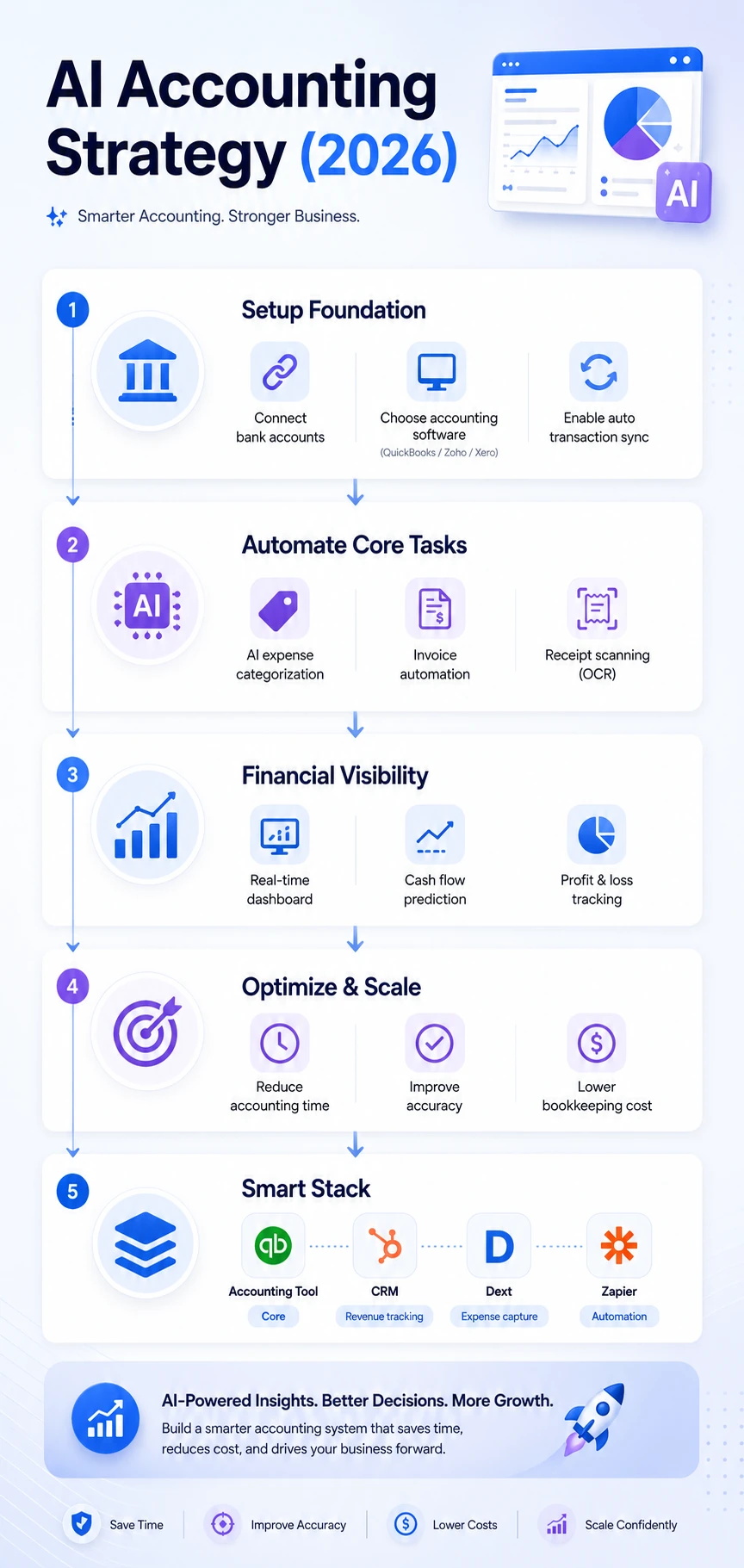
Our 2026 AI Accounting Strategy framework helps businesses move from manual entry to automated real-time financial insights.
Best AI Accounting Software for Small Businesses (2026)
| Tool | Best For | Pricing | Ease of Use | Key AI Feature |
|---|---|---|---|---|
| QuickBooks Online | SMBs, broad use cases | From $30/mo | ⭐⭐⭐⭐⭐ | Cash flow AI insights |
| Xero | Growing businesses | From $15/mo | ⭐⭐⭐⭐ | AI reporting assistant |
| Zoho Books | Integrated Zoho stack | From $15/mo | ⭐⭐⭐⭐ | CRM + finance AI |
| FreshBooks | Freelancers, service biz | From $19/mo | ⭐⭐⭐⭐⭐ | Auto expense tracking |
| Dext | Receipt & expense capture | From $25/mo | ⭐⭐⭐⭐ | OCR receipt scanning |
| Vic.ai | AP automation (mid-market) | Custom pricing | ⭐⭐⭐ | AI invoice routing |
Want to estimate how much time and money you can actually save? Use the AI ROI Calculator to project your bookkeeping automation gains in minutes.
QuickBooks Online
QuickBooks covers the full accounting cycle — invoicing, expenses, payroll, tax prep, and reporting — in one well-designed platform. The AI layer adds cash flow forecasting, anomaly detection, and smart categorization that improves every month. For US-based businesses, the tax support and accountant ecosystem are unmatched.
One pricing trap worth knowing: the introductory discount is generous, but most businesses need the Essentials plan at $60/month — the Simple Start plan at $30/month is genuinely limited for day-to-day use.
Pricing: Simple Start $30/mo; Essentials $60/mo; Plus $90/mo Pros: Most complete SMB tool available; strongest US tax support; 700+ integrations Cons: Pricing jumps sharply between tiers; can feel complex for very simple businesses Best for: Product businesses, businesses with employees, and any SMB working with a US accountant.
Xero
Xero is the right choice for businesses outside the US, or teams that prioritize a clean interface over feature depth. Multi-currency support is meaningfully better than QuickBooks, and the AI reporting assistant handles natural language financial questions well.
Where it falls short: US payroll integration isn't as tight, and fewer US accountants specialize in it. If your accountant is American, ask which platform they prefer before you commit.
Pricing: Early $15/mo (invoice limits apply); Growing $42/mo; Established $78/mo Pros: Cleaner interface; excellent for international businesses; 1,000+ integrations Cons: Entry plan has strict invoice limits; smaller US accountant community Best for: UK, Australian, and international businesses with multi-currency needs.
Zoho Books
If you're already using Zoho CRM or Zoho Inventory, Zoho Books is the natural accounting choice — everything connects natively. Financial data flows directly into CRM deal records, giving you a joined-up business view that's hard to replicate with separate tools. The Zia AI assistant provides anomaly alerts and cash flow predictions, and pricing is significantly cheaper than QuickBooks at comparable feature depth.
Pricing: Free (under revenue threshold in some regions); Standard $15/mo; Professional $40/mo Pros: Best value for Zoho users; strong automation; competitive pricing Cons: Less useful outside the Zoho ecosystem; Zia AI not as deep as QuickBooks Best for: Zoho ecosystem businesses and budget-conscious SMBs wanting solid automation.
FreshBooks
FreshBooks is built for freelancers, consultants, and small service businesses that invoice clients, track time, and need clean expense management — without needing complex inventory or multi-entity reporting. It's the easiest tool on this list to get started with. AI categorizes expenses automatically from your connected bank and card accounts and improves with every correction you make.
The honest trade-off: FreshBooks is excellent within its lane, but it isn't a full accounting system. For the businesses it's designed for, it's likely the best choice here.
Pricing: Lite $19/mo; Plus $33/mo; Premium $60/mo Pros: Easiest to use; excellent invoicing and time tracking; great mobile app Cons: Not a full accounting system; limited reporting depth Best for: Freelancers, consultants, agencies, and solo service businesses.
Dext
Dext solves one problem exceptionally well: getting paper receipts, invoices, and bills into your accounting system accurately and without manual entry. Photograph a receipt — Dext reads the vendor, amount, date, and tax, then pushes it directly to QuickBooks, Xero, or Zoho Books. No receipt pile at month-end.
Dext is an add-on, not a standalone platform. Most valuable for businesses with significant expense volume or teams submitting expenses regularly.
Pricing: From $25/mo solo; team plans scale by users Pros: Best-in-class OCR accuracy; eliminates receipt management entirely Cons: Requires a connected accounting platform; pricing scales with users Best for: SMBs with high receipt or invoice volume, as an add-on to their core tool.
Vic.ai
Vic.ai is an AI-native accounts payable platform built for businesses processing 50+ vendor invoices per month. It learns your approval workflows and coding logic — straight-through processing rates reach 80–90% after a few months. For most small businesses it's overkill, but for a growing finance team drowning in invoice processing, it changes everything.
Pricing: Custom (contact sales) Pros: Best AP automation in the market; dramatically reduces processing time Cons: Enterprise-oriented pricing; not suitable for low invoice volumes Best for: Mid-market businesses with high AP volume wanting near-complete automation.
Quick Recommendation (Based on Your Business Type)
- Freelancers / Solo: FreshBooks (simple, fast setup)
- Growing SMBs: QuickBooks Online (complete system)
- International Businesses: Xero (multi-currency strength)
- Zoho Users: Zoho Books (best integration)
- High Expenses / Receipts: Add Dext to any tool
If you're unsure, start with QuickBooks — it covers the widest range of use cases and scales with your business.
Essential AI Features to Look For
OCR receipt scanning — accuracy matters. A tool that misreads amounts creates more work than it saves. Test this in your free trial.
Automatic transaction categorization — a good engine reaches 90%+ accuracy within 60–90 days. A poor one stays at 60% and asks for corrections constantly. This is the most important feature to evaluate.
Bank feed automation — all major tools offer this, but bank coverage varies. Confirm your specific bank is supported before committing.
AI cash flow prediction — projects your cash position 30–90 days forward based on historical patterns. Knowing 6 weeks ahead that you'll be short changes how you manage receivables.
Tax-ready tagging — automatically flags transactions with correct tax codes. Critical if you're VAT or GST registered, and saves significant accountant cleanup at year-end.
Real-World Use Cases
Agency owner, 5-person team. Bank transactions sync overnight and auto-categorize by morning. The owner reviews exceptions — usually under 10 per week — and approves. Time on books: 30 minutes instead of 4 hours weekly.
Product business, seasonal revenue. AI cash flow projection flags a low-balance risk 7 weeks ahead. Owner accelerates receivables collection early rather than scrambling at month-end.
Freelancer, tax prep. FreshBooks tags every eligible expense automatically throughout the year. A complete categorized report is ready at tax time. What used to take a full weekend takes two hours.
AI Accounting Maturity Levels (SMB Perspective)
Most businesses don’t fully benefit from AI accounting because they stop too early.
Level 1: Manual + Software
Basic accounting tool, mostly manual entry.
Level 2: Assisted Automation
AI categorizes transactions, but requires frequent corrections.
Level 3: Automated Workflows
Bank feeds, categorization, and reporting run automatically with minimal review.
Level 4: Financial Intelligence
AI predicts cash flow, flags risks, and supports decision-making proactively.
Most small businesses operate at Level 1–2. Real ROI starts at Level 3.
Benefits and Challenges
Benefits
Time recovered. 10–15 hours per week for a business doing $500K+ in annual revenue. Those hours go back to the owner.
Real-time financial visibility. When books update automatically, your P&L and cash position are always current. Better decisions follow from accurate, timely data.
Lower accounting costs. Clean, current books mean your accountant spends less time fixing errors and more time on advice that actually moves the business forward.
Challenges
AI trust. Some owners are uncomfortable with software making categorization decisions. Review exceptions regularly during the first 60 days — that's how you build confidence in the system.
Setup investment. Budget 3–5 hours for initial setup: bank connections, chart of accounts, data import. It pays back within the first week of normal operation.
Over-reliance risk. AI categorization is good but not perfect. A monthly 20-minute review catches errors before they accumulate.
The businesses that get the most from AI accounting software treat it as a system to manage, not a black box to ignore. Twenty minutes per week reviewing transactions and exceptions is what turns accounting software into a genuine business intelligence tool — not just a bookkeeping shortcut.
Security & Integration Checklist
| Factor | What to Check | Why It Matters |
|---|---|---|
| SOC 2 Compliance | Confirmed on vendor website | Data protection standard for US businesses |
| GDPR Compliance | Required for EU customers | Legal requirement if you operate in Europe |
| 256-bit Encryption | In transit and at rest | Protects financial data from interception |
| Two-Factor Authentication | Available and enforced | First line of defense against unauthorized access |
| CRM Integration | HubSpot, Zoho, Salesforce | Connects revenue data to sales pipeline |
| API Access | Available on paid plans | Enables custom workflows |
| Automatic Data Backup | Daily or real-time | Prevents loss from accidental deletion |
| Role-Based Permissions | Available for team accounts | Controls who can view or edit financial data |
| Audit Log | Available on business plans | Tracks all changes for compliance and review |
All major platforms — QuickBooks, Xero, FreshBooks, Zoho Books — are SOC 2 compliant with 256-bit encryption. Differences in role-based permissions and audit log depth matter more as your team grows.
For a deeper breakdown of standards like SOC 2 and financial data security, refer to this guide by IBM: What is SOC 2?
How to Choose the Right AI Accounting Tool
Business type first. Freelancers and consultants: FreshBooks. Product or inventory businesses: QuickBooks or Xero. Zoho stack users: Zoho Books. High expense volume: add Dext to any of the above.
Budget. FreshBooks and Zoho Books start under $20/month. QuickBooks and Xero run $30–$45/month for a functional plan. The entry tiers on both Xero and QuickBooks have real limitations — always check what's actually included before picking a plan.
Integration fit. Check that your accounting tool connects natively to your CRM and payroll system. QuickBooks integrates with HubSpot and Gusto. Zoho Books connects to the full Zoho suite. Xero covers most needs with 1,000+ integrations.
Ease vs depth. FreshBooks is the easiest tool here. QuickBooks has the most depth. Most small businesses need something they'll actually log into every week — be honest about which matters more.
If you're also managing sales pipelines alongside accounting, use the CRM Cost Calculator to understand your total software cost before scaling your stack.
AI Accounting Stack
The most effective approach isn't finding one tool that does everything. It's building a connected system where each layer handles a specific job cleanly.
Core accounting → QuickBooks Online or Xero. Single source of truth for all transactions, reconciliation, and reporting.
CRM → Zoho CRM or HubSpot. When a deal closes, the invoice generates automatically in your accounting platform.
Expense capture → Dext. All receipts and supplier invoices captured and synced to your accounting core. Eliminates manual expense entry entirely.
Automation → Zapier. Overdue invoices trigger CRM follow-up tasks. Monthly reports email to stakeholders automatically. New transactions post to Slack.
Total stack cost: approximately $90–$130/month. Against a part-time bookkeeper at $400–$800/month, that's a 4–6x return before improved visibility is even counted.
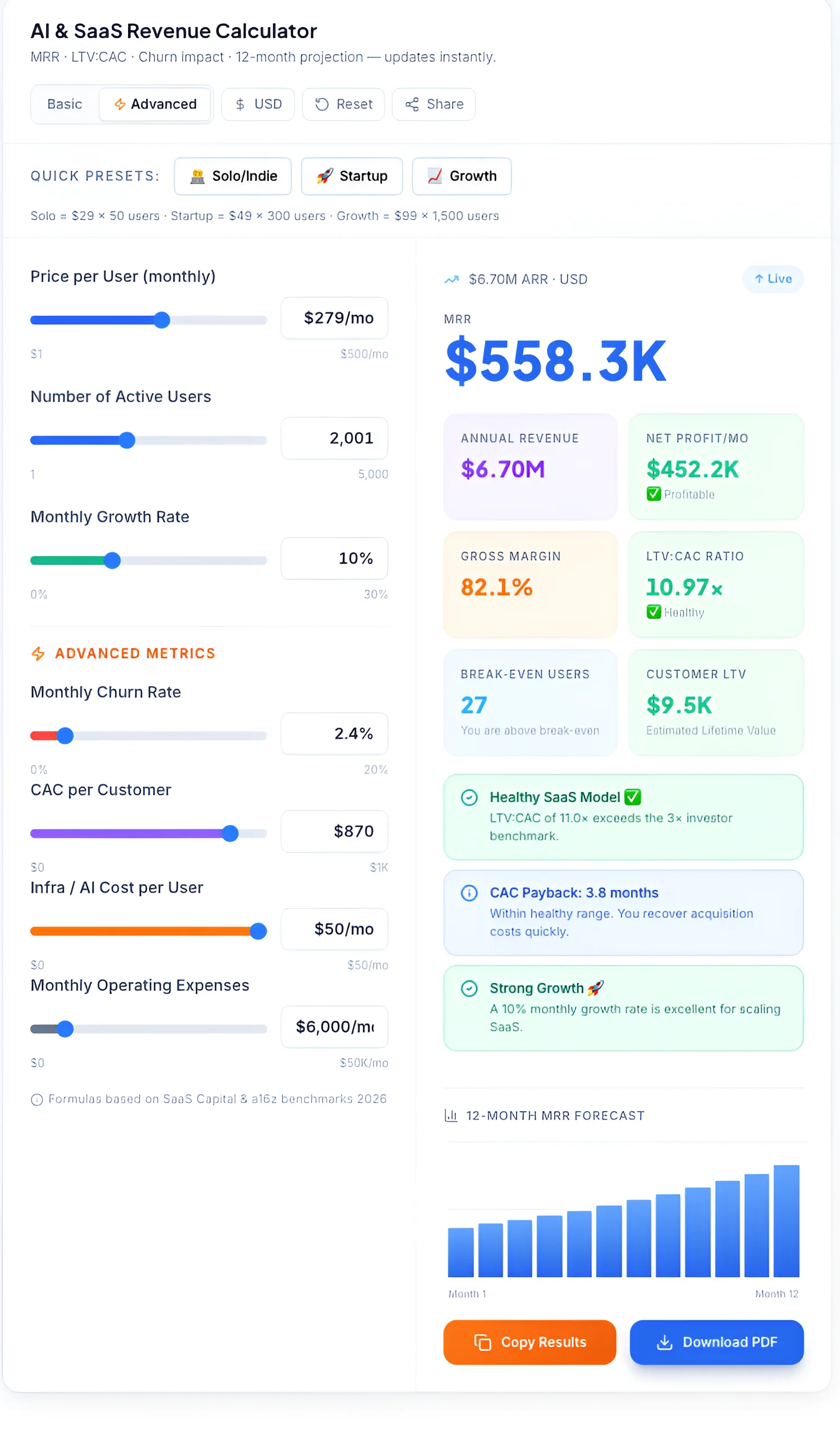
Using an AI-driven revenue calculator allows small businesses to project growth and manage churn with 2026 industry benchmarks.
Future of AI in Accounting (2026+)
Autonomous bookkeeping is arriving. All major platforms are moving toward zero-touch processing for routine transactions — captured, categorized, reconciled, and reported without human input. QuickBooks' Intuit Assist and Xero's AI assistant are early versions. Within 24 months, straight-through processing will be standard across the category.
AI financial advisor built into the software. Instead of asking your accountant whether this month's margin is normal, the software will tell you proactively — anomaly detection, industry benchmarking, and natural language financial guidance inside the same dashboard you use daily.
Lights-out accounting for the smallest businesses. For freelancers and sole traders, the goal is accounting that requires essentially no manual work. Bank feeds, receipt capture, and AI categorization already cover most of it. Tax filing integration is the final piece, and several platforms are actively building it now.


