

What Are AI Workflow Automation Tools?
If you've ever caught yourself copying data from one app to another, sending the same follow-up email for the tenth time, or manually updating a spreadsheet that could update itself — that's exactly the problem AI workflow automation is built to solve.
At its core, workflow automation means setting up a system where repetitive tasks happen automatically, triggered by a specific action or schedule. You set the rules once; the software does the work.
But here's where 2026 is different from even two years ago: we've moved well beyond simple rule-based automation.
Rule-based automation (the older model) works on fixed "if this, then that" logic. If a new lead fills out your form, add them to a spreadsheet. If a sale is made, send a confirmation email. Simple, predictable, useful — but limited.
AI-powered automation takes it further. Instead of following rigid rules, these tools can interpret context, prioritize tasks, and adapt based on patterns in your data. An AI-powered CRM doesn't just log a new contact — it scores them based on behavior, suggests the next action, and drafts a follow-up email tailored to their engagement history.
Agentic workflows are the 2026 frontier. Think of an "agent" as an AI assistant that doesn't just execute a task — it plans and completes a multi-step goal with minimal human input. Instead of automating one action, an agentic workflow can handle an entire process: receive a lead, research them, draft a personalized outreach email, schedule a follow-up, and update your CRM — all without you touching it. Tools like Zapier and Make are already rolling out agentic capabilities, and it's becoming the defining upgrade of this generation of automation software.
For small businesses, this shift matters because it means you can now automate complex, judgment-heavy work — not just the obvious repetitive stuff.
Why Small Businesses Need AI Workflow Automation
Start with the workflow that wastes the most time — not the most complex one. Most small businesses try to automate everything at once and get stuck. Instead, pick one high-friction task (like lead follow-ups, data entry, or report generation), automate it, and measure the result. This builds momentum and ensures your automation stack grows based on real impact, not assumptions.
Let's be honest: small business owners are stretched thin. You're managing operations, chasing leads, handling customer issues, and still trying to find time to grow. The to-do list never shrinks — it just shifts.
That's exactly why automation isn't a "nice to have" anymore. It's a practical decision with real, measurable payoff.
Time savings are the most immediate win. Most small business owners who implement workflow automation report saving 10–15 hours per week within the first month. That's nearly two full workdays reclaimed — time you can reinvest in strategy, customer relationships, or simply getting some breathing room back.
Productivity gains compound quickly. When routine tasks run automatically in the background, your team can focus on higher-value work. Research consistently shows 30–40% productivity improvements among teams that fully adopt automation tools — not from working harder, but from eliminating the low-value tasks that fragment their day.
Cost savings are real and scalable. Hiring a part-time admin to handle data entry, email follow-ups, and appointment reminders might cost $1,500–$2,500/month. The right automation stack can handle all of that for under $100/month — and it doesn't call in sick.
→To estimate how much time and money you can actually save, try our AI ROI Calculator and get a quick breakdown based on your business workflow.
Manual errors go down. Humans make mistakes when doing repetitive work — it's not a flaw, it's just biology. Automated workflows execute exactly as designed, every time. That means fewer data entry errors, missed follow-ups, or forgotten tasks slipping through the cracks.
The bottom line: for a small business competing against larger, better-resourced companies, AI workflow automation is one of the most cost-effective ways to level the playing field.
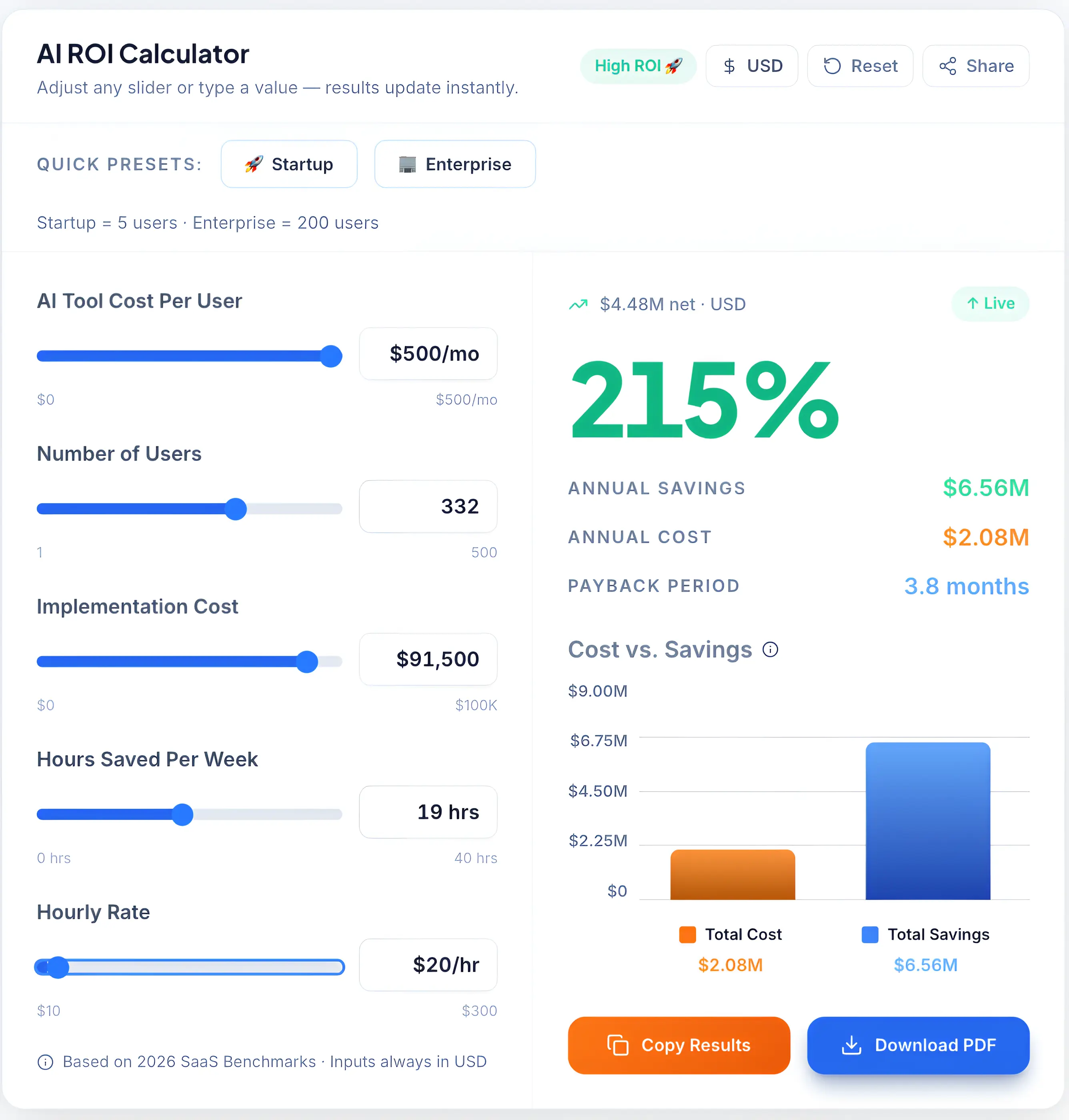
Our custom AI ROI Calculator helps small businesses estimate potential savings and productivity boosts before investing in automation tools.
Top 5 Automations to Start With (Beginner Blueprint)
If you're new to automation, don't try to automate everything. Start with these high-impact workflows:
-
Lead Capture → CRM Entry Form submission → auto add to CRM → notify via Slack
-
Email Follow-Up Automation New lead → send welcome email → schedule follow-up after 2 days
-
Invoice & Payment Alerts Payment received → update system → send confirmation email
-
Task Creation Automation New deal → auto-create tasks in ClickUp or Trello
-
Weekly Report Automation Collect data → generate report → send to email/Slack automatically
Rule: If you repeat a task more than 3 times a week → automate it.
AI Automation Stats & ROI (2026)
The numbers behind AI workflow automation aren't just impressive — they're actionable.
- Productivity boost: Businesses using AI automation report 30–40% improvement in team productivity within 90 days of full deployment.
- Time recovered: Small business owners save an average of 10–15 hours per week through workflow automation — equivalent to nearly two full workdays.
- ROI on automation tools: Companies generate an average $3–$5 return for every $1 spent on workflow automation software when properly implemented.
- Error reduction: Automated workflows reduce data entry and process errors by up to 90% compared to manual execution.
- Adoption curve: Over 68% of small businesses globally now use at least one automation tool, up from 41% in 2023 — and those that adopt grow operational efficiency 35% faster than those that don't.
The takeaway: Automation ROI isn't theoretical. It shows up in your calendar, your error rate, and your monthly expenses — usually within the first 60 days.
For a broader look at how AI tools drive business value across functions, see: Complete Guide to Choosing AI Software for Your Business (2026 Edition).
Best AI Workflow Automation Tools for Small Businesses (2026)
There's no shortage of automation tools on the market — but not all of them are built with small businesses in mind. Some are too complex. Others look simple but hit walls fast when your workflows grow. The tools below are selected based on ease of use, integration depth, pricing transparency, and real-world utility for teams without dedicated IT support.
| Tool | Best For | Pricing | Ease of Use | Key Feature |
|---|---|---|---|---|
| Zapier | General automation | From $20/mo | ⭐⭐⭐⭐⭐ | 7,000+ app integrations |
| Make | Visual, complex workflows | From $9/mo | ⭐⭐⭐⭐ | Drag-and-drop scenario builder |
| HubSpot | CRM + marketing automation | From $20/mo | ⭐⭐⭐⭐⭐ | AI email + lead scoring |
| n8n | Self-hosted / custom workflows | Free (self-hosted) | ⭐⭐⭐ | Full data control + open source |
| ActiveCampaign | Email + CRM automation | From $15/mo | ⭐⭐⭐⭐ | Advanced email sequences |
| ClickUp AI | Project + task automation | From $7/mo | ⭐⭐⭐⭐ | AI task management |
| Zoho Flow / Pabbly | Budget-friendly automation | From $10/mo | ⭐⭐⭐⭐ | Unlimited workflows (Pabbly) |
Zapier
Zapier is the most widely used automation platform for small businesses — and for good reason. It connects over 7,000 apps, which means if you use it, Zapier almost certainly integrates with it. Setting up a basic "Zap" (their term for an automated workflow) takes minutes, not hours, and requires zero coding.
In 2026, Zapier has added meaningful AI features including AI-powered Zap suggestions, natural language workflow builders, and early agentic workflow capabilities that can handle multi-step processes with conditional logic. For most small businesses, this is the automation tool to start with.
Key Features:
- 7,000+ app integrations (the largest library in the category)
- AI-powered workflow builder using natural language
- Multi-step Zaps with conditional paths
- Pre-built workflow templates for common business processes
Pricing: Free tier (5 Zaps, 100 tasks/month); Starter at $20/month; Professional from $49/month
Pros: Easiest to use in the category; enormous integration library; strong documentation and community support Cons: Task-based pricing can escalate quickly at higher volumes; advanced logic requires higher-tier plans
Best for: Small businesses wanting fast setup with broad app compatibility — especially teams using popular tools like Gmail, Slack, Shopify, or HubSpot.
Make (formerly Integromat)
Make takes a different approach. Instead of a linear workflow, it gives you a visual canvas where you drag, drop, and connect "modules" to build scenarios. This makes complex, multi-branch workflows much easier to understand and manage compared to text-based builders.
Make is more powerful than Zapier for intricate logic — think multiple conditional branches, data transformation, or workflows that loop through lists of records. It's also significantly cheaper at scale, which makes it attractive for small businesses with automation-heavy operations.
Key Features:
- Visual drag-and-drop scenario builder
- Advanced data transformation and filtering
- HTTP/webhook modules for custom integrations
- Significantly more operations per dollar than Zapier
Pricing: Free tier (1,000 operations/month); Core plan from $9/month; Pro from $16/month
Pros: Excellent value for complex workflows; intuitive visual builder; generous free tier Cons: Steeper learning curve than Zapier; less beginner-friendly for simple use cases
Best for: Small businesses with moderate technical comfort who want powerful automation at a lower price point.
HubSpot
HubSpot isn't just a CRM — it's a full automation platform for marketing, sales, and customer service. Its strength lies in how deeply integrated these functions are. Lead capture, email nurture sequences, deal tracking, and customer follow-ups can all run automatically within one platform, without stitching together multiple apps.
For small businesses that don't want to manage a patchwork of tools, HubSpot's free CRM with paid automation features is often the most practical all-in-one solution.
Key Features:
- AI-powered email personalization and lead scoring
- Automated deal stage progression in the sales pipeline
- Workflow automation for marketing campaigns and follow-ups
- Native integration across marketing, sales, and service hubs
Pricing: Free CRM (no expiry); Starter bundle from $20/month; Professional from $90/month
Pros: Best-in-class CRM + automation combination; excellent free tier to start; strong reporting Cons: Pro features get expensive quickly; can feel overwhelming for very small teams
Best for: Small businesses wanting CRM, email marketing, and automation under one roof — especially service businesses and B2B teams.
n8n
n8n is the automation tool for small business owners who value data control and flexibility above convenience. It's open-source and self-hostable, which means you can run it entirely on your own server — your data never touches a third-party cloud unless you choose it to.
The cloud-hosted version is available if self-hosting isn't practical, and n8n offers a visual workflow builder similar to Make. The trade-off is clear: more power and control, but a steeper setup process.
Key Features:
- Open-source and fully self-hostable
- 400+ built-in integrations; custom HTTP nodes for everything else
- Code node for advanced JavaScript/Python logic within workflows
- Fair-code license — free for self-hosting, paid for cloud
Pricing: Free (self-hosted); Cloud Starter from $24/month
Pros: Complete data ownership; no per-task pricing on self-hosted; highly flexible Cons: Requires technical setup for self-hosting; smaller template library than Zapier
Best for: Tech-comfortable small business owners in regulated industries (healthcare, finance, legal) or anyone with strong data privacy requirements.
ActiveCampaign
ActiveCampaign sits at the intersection of email marketing and CRM automation, and it does both exceptionally well. Its visual automation builder is one of the most intuitive in the industry — you can map out entire customer journeys with conditional branching, lead scoring, and behavior-triggered emails without any coding.
For small businesses where email marketing is a primary revenue driver, ActiveCampaign offers more automation depth than most tools in this price range.
Key Features:
- Visual customer journey automation builder
- Predictive lead scoring powered by AI
- Behavior-triggered email sequences
- CRM with pipeline automation built in
Pricing: Starter from $15/month (up to 1,000 contacts); Plus from $49/month
Pros: Best email automation depth in this price range; excellent deliverability; strong CRM integration Cons: Pricing scales with contact count, which can add up; not ideal as a general-purpose automation tool
Best for: Small businesses running content marketing, e-commerce, or lead nurture campaigns where email is the primary channel.
ClickUp AI
ClickUp started as a project management tool, but it's evolved into something much more with its AI layer. ClickUp AI can summarize tasks, generate subtasks, draft project updates, and automate recurring workflows — all inside the platform where your team already works.
For small businesses that struggle with task delegation, project tracking, and internal communication, ClickUp AI addresses those problems without requiring a separate automation tool.
Key Features:
- AI-generated task summaries, subtasks, and status updates
- Automated task assignments and recurring workflows
- AI writing assistant built into docs and tasks
- 1,000+ integrations with external apps
Pricing: Free tier available; Unlimited from $7/user/month; Business from $12/user/month
Pros: Excellent all-in-one for teams; AI features feel genuinely useful, not gimmicky; strong free tier Cons: Can be overwhelming at first; AI features require paid plans
Best for: Small teams managing multiple projects who want automation and AI task support in one place.
Zoho Flow / Pabbly
These two tools deserve a mention together because they serve the same audience: small businesses that want solid automation without Zapier-level pricing.
Zoho Flow integrates tightly with the broader Zoho ecosystem (CRM, Books, Desk) and is a natural fit if you're already using Zoho products. Pabbly Connect takes a different angle — flat-rate pricing with no task limits, which makes it uniquely attractive for high-volume automation use cases.
Key Features (Zoho Flow): Deep Zoho product integration; visual builder; 900+ app connections Key Features (Pabbly Connect): Unlimited workflow executions on all plans; one-time lifetime deal available; growing integration library
Pricing: Zoho Flow from $10/month; Pabbly Connect from $19/month (unlimited tasks)
Pros: Excellent value; Pabbly's unlimited task model is rare in this category Cons: Smaller integration libraries than Zapier; Zoho Flow is best within the Zoho ecosystem
Best for: Budget-conscious small businesses with high automation volume, or teams already embedded in the Zoho suite.
Real-World AI Workflow Use Cases
Knowing what a tool does is one thing. Seeing how it fits into your actual business is another. Here are the most common and highest-value automation use cases for small businesses in 2026.
Lead Generation Automation When a prospect fills out your contact form, automation can immediately add them to your CRM, assign a lead score, trigger a personalized welcome email, notify your sales rep via Slack, and schedule a follow-up task — all before you've even seen the notification. What used to take 20 minutes of manual work now takes zero.
Email Marketing Automation Set up behavior-triggered email sequences that respond to what your subscribers actually do: opened an email but didn't click? Send a follow-up with a different angle. Clicked a product link but didn't buy? Trigger a targeted offer 48 hours later. This level of personalization used to require an enterprise marketing team. Now it runs in the background on tools like ActiveCampaign or HubSpot.
CRM Automation Deal stages update automatically as prospects engage. Contacts get tagged based on behavior. Follow-up tasks get created when a deal goes cold. Your CRM stops being a place you update manually and starts being a system that keeps your pipeline moving on its own.
Customer Support Automation AI chatbots (via tools like Tidio or HubSpot's live chat) handle common queries 24/7 — FAQs, order status, appointment booking, basic troubleshooting. Complex issues get escalated to a human with full context already logged. Support response times drop. Customer satisfaction goes up. Your team handles fewer tickets.
Social Media Automation Schedule posts across platforms, automatically repurpose blog content into social snippets, monitor mentions and trigger response workflows — all without manually managing each channel. Tools like Buffer or Zapier-connected workflows can handle the distribution layer, freeing you to focus on content quality.
Email Marketing Automation Set up behavior-triggered email sequences that respond to what your subscribers actually do: opened an email but didn't click? Send a follow-up with a different angle. Clicked a product link but didn't buy? Trigger a targeted offer 48 hours later. This level of personalization used to require an enterprise marketing team. Now it runs in the background on tools like ActiveCampaign or HubSpot.
If your workflows involve meetings, notes, and follow-ups, you can also explore our guide to the best AI note-taking tools for business meetings to automate documentation and team communication.
Common Automation Mistakes to Avoid
Most small businesses fail at automation not because of tools — but because of approach.
- Automating broken processes → bad workflows scale faster
- Over-automation too early → confusion + wasted time
- No monitoring system → workflows silently fail
- Ignoring edge cases → automation breaks in real scenarios
Fix: First simplify → then automate.
Benefits and Challenges of AI Workflow Automation
✅ Benefits
Save significant time. The 10–15 hours per week figure isn't exaggerated. When your most repetitive tasks run automatically, the hours add up fast. That time goes back to you and your team.
Reduce errors and inconsistency. Automated workflows don't forget steps. They don't mistype data. They don't skip a follow-up because they were busy. The consistency improvement alone is worth the investment for many businesses.
24/7 operation. Your automation doesn't sleep. Lead capture, email responses, support tickets, and data syncing happen around the clock — even when your team is offline.
Scale without proportional hiring. This is the real competitive advantage. As your business grows, automation handles the increasing volume of routine tasks without requiring you to hire in lockstep with that growth.
Save significant time. The 10–15 hours per week figure isn't exaggerated. When your most repetitive tasks run automatically, the hours add up fast. That time goes back to you and your team.
If you want a deeper breakdown of how automation improves productivity at scale, this analysis of the economic potential of generative AI by McKinsey explains how businesses reduce repetitive work and shift focus to higher-value activities.
⚠️ Challenges
There's a learning curve. Even the most beginner-friendly tools require time to understand properly. Expect to invest 2–4 hours upfront before your first workflow runs reliably.
Automation debt is real. Workflows that aren't maintained become liabilities. If an app updates its API or your process changes, an outdated Zap can silently fail for days before anyone notices. Schedule a monthly audit of your active automations.
Over-automation can backfire. Not everything should be automated. Customer relationships built on personal touch, creative decisions, and context-sensitive judgment calls still need humans. The goal is to automate the routine so you can be more present for what actually matters.
How to Choose the Right AI Automation Tool
With so many options, the right approach is to match the tool to your situation — not chase the most feature-rich platform you can find.
Budget first. If you're just starting out, the free tiers of Zapier, HubSpot, or Make are genuinely capable and more than enough to test the value of automation before spending anything. Only upgrade when you've hit clear limits.
→If your automation setup includes CRM tools, use our CRM Cost Calculator to estimate total costs including setup, licences, and hidden expenses.
Ease of use vs. power. Be honest about your team's technical comfort. Zapier is the right call for non-technical users who want fast results. Make or n8n are better if you're comfortable with logic-building and want more control. Choosing a more powerful tool than you'll actually use is a waste of money and momentum.
Integration support. Before committing to any platform, check that it integrates with the specific apps you already use. Zapier leads on breadth; n8n leads on flexibility; HubSpot leads on depth within its own ecosystem.
Scalability. Think 12 months ahead. Will this tool's pricing still make sense when your workflow volume doubles? Will it support the new apps you'll add? Pabbly's unlimited task model, for example, becomes extremely attractive once your automation volume grows.
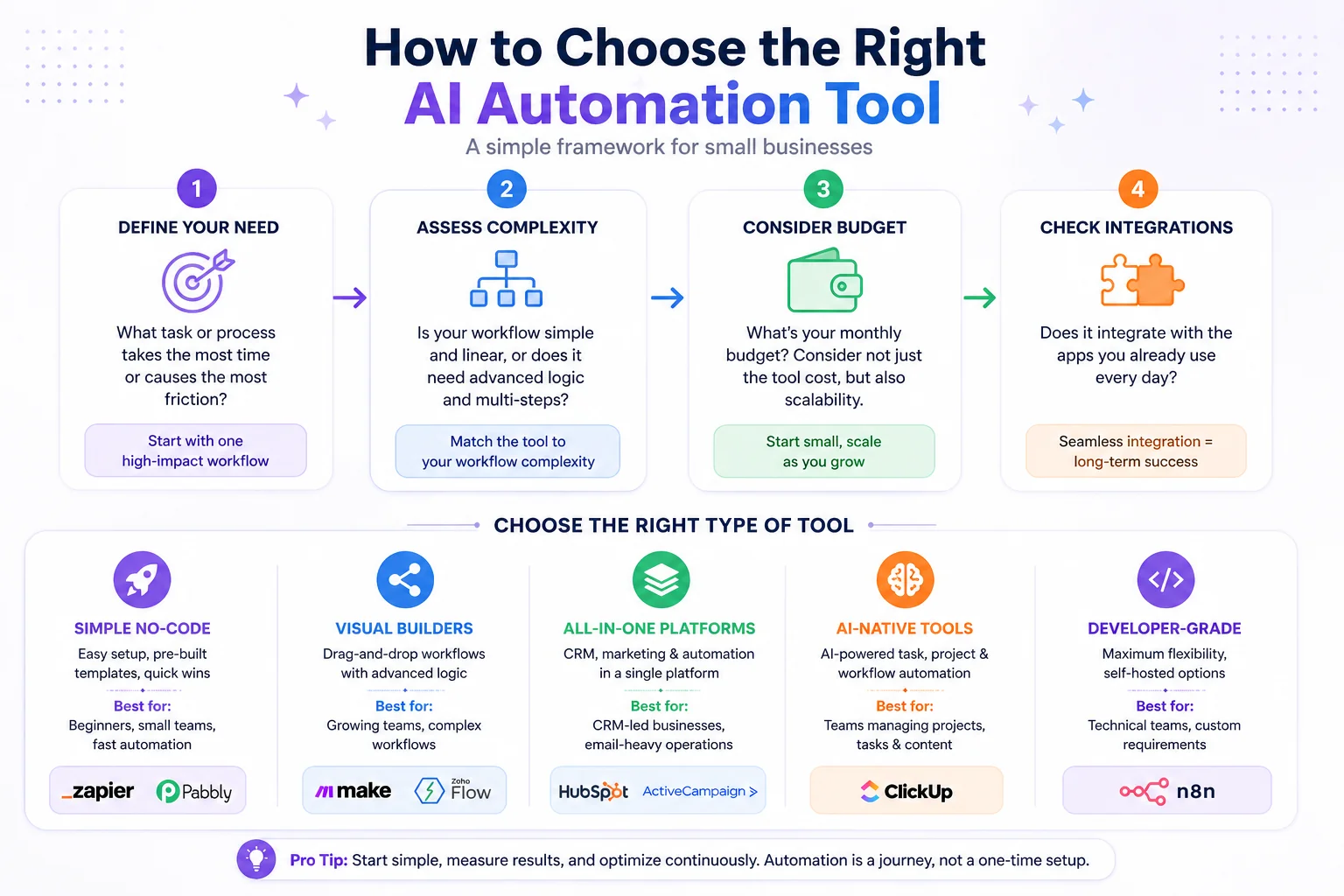
A simple 4-step framework and tool categorization to help small businesses select the right AI automation software.
Security & Data Privacy in Automation Tools
This section doesn't get enough attention — and it should, especially if your business handles customer data, financial records, or any personally identifiable information (PII).
When you connect your apps through an automation platform, you're essentially granting that platform access to data flowing between those apps. That's a significant trust decision, and it's worth understanding what you're agreeing to.
Data handling risks to understand:
- Which data fields are being passed between apps, and are any of them sensitive?
- Does the automation platform log workflow execution data, and for how long?
- What happens to your data if you cancel your subscription?
Cloud vs. self-hosted. Most automation tools are cloud-hosted, meaning your data passes through their servers. For most small businesses, this is fine — major platforms like Zapier and HubSpot invest heavily in security compliance. But if you're in a regulated industry (healthcare, legal, finance), n8n's self-hosted option gives you full control over where data lives and how it's handled. No third-party servers, no data retention policies you didn't write yourself.
Compliance basics to check:
- Look for GDPR compliance if you have customers in the EU
- Check for SOC 2 Type II certification on any tool handling customer data
- Review what OAuth scopes an integration requests — it should only access what it actually needs
Taking 30 minutes to review the security posture of your automation stack is far less painful than managing a data breach after the fact.
Complexity vs. Capability (Choosing the Right Level)
Not every business needs the same depth of automation. Here's a practical framework for matching tool complexity to your actual needs.
| Tool Type | Example Tools | Ease | Power | Best For |
|---|---|---|---|---|
| Simple no-code | Zapier, Pabbly | ⭐⭐⭐⭐⭐ | ⭐⭐⭐ | Beginners, small teams, fast setup |
| Visual builders | Make, Zoho Flow | ⭐⭐⭐⭐ | ⭐⭐⭐⭐ | Growing teams, moderate complexity |
| All-in-one platforms | HubSpot, ActiveCampaign | ⭐⭐⭐⭐ | ⭐⭐⭐⭐ | CRM-led businesses, email-heavy |
| AI-native tools | ClickUp AI | ⭐⭐⭐⭐ | ⭐⭐⭐⭐ | Teams managing projects + tasks |
| Developer-grade | n8n | ⭐⭐ | ⭐⭐⭐⭐⭐ | Technical teams, data privacy needs |
The honest advice: start one level simpler than you think you need. You can always upgrade. You can't get back the hours you spent configuring a tool that was too complex for where you are right now.
Future Trends in AI Workflow Automation (2026+)
Automation is evolving faster than most small businesses realize. Here's what's coming — and what's already arriving.
Agentic AI workflows are the biggest shift. Rather than automating single tasks, agentic systems can handle entire goals. Give an agent a brief — "follow up with all leads who haven't responded in 7 days" — and it plans, executes, adapts, and reports back. Zapier's AI agents and Make's scenario intelligence are early versions of this. Within 12–18 months, agentic capabilities will be table stakes for leading automation tools.
Hyperautomation is scaling down to small businesses. Hyperautomation — the concept of automating everything that can be automated across an entire organization — was once an enterprise-only conversation. In 2026, the tools and costs have come down far enough that small businesses can implement meaningful hyperautomation strategies without enterprise budgets.
Natural language workflow builders are removing the last technical barrier. You used to need to understand trigger-action logic to build automations. Now you can type "when a new contact submits the form, add them to my CRM and send a welcome email" — and the tool builds it. This is already live in Zapier's AI builder and will become standard across the category. For small business owners who've always found automation intimidating, this is the change that makes it genuinely accessible.
According to Gartner’s hyperautomation trend report, businesses are rapidly moving toward automating entire workflows instead of individual tasks.


