

What Are AI Tools for Remote Team Collaboration?
Remote work has a communication problem — and it's not what most people think. It's not that teams talk too little. It's that they're often talking in the wrong format, at the wrong time, with no record of what was decided.
AI collaboration tools are built to fix exactly that.
At its core, an AI collaboration tool is any software that helps distributed teams communicate, coordinate, and get work done — and uses AI to reduce the friction involved. That could mean automatically summarizing a one-hour meeting into three bullet points, translating async updates across time zones, or surfacing the right document the moment someone asks a question in Slack.
But it's worth understanding how we got here, because the gap between old-school collaboration tools and what's available in 2026 is significant.
Traditional collaboration tools gave you a place to talk and share files. Email threads, video calls, shared drives. Useful, but passive — they stored information without helping you find or use it.
AI-powered collaboration tools are active. Slack's AI can search your entire message history and surface the answer to a question without you scrolling through channels. Zoom's AI Companion writes your meeting summary and action items before you've even left the call. Notion AI turns a messy doc into a structured brief in seconds. These tools don't just store work — they participate in it.
Agentic collaboration is the frontier that's arriving right now. Think of an AI agent as a teammate that doesn't just respond to requests — it proactively coordinates across tools. Imagine an agent that notices a project deadline was updated in ClickUp, automatically drafts a Slack message to the affected team members, reschedules the Zoom check-in, and updates the Notion project doc. No one asked it to do any of that. It just handled it. Tools like ClickUp AI and Notion AI are beginning to ship these capabilities, and they'll define how high-performing remote teams operate over the next two years.
Why AI Is Essential for Remote Teams in 2026
If you manage a remote team, you already know the core problems. But they're worth naming clearly, because understanding them makes the tool choices easier.
Meeting fatigue is real and measurable. The average remote worker attends 15–20 meetings per week in a sync-heavy culture. That's not collaboration — that's calendar management with a Zoom window open. Most of those meetings could be a well-structured Loom video or a Notion doc with a comment thread. AI tools make it practical to make that shift, because they reduce the overhead of async communication enough that people actually adopt it.
Time zone fragmentation kills momentum. A three-person team spread across New York, London, and Singapore has about two hours of overlap per day. In a sync-first culture, that means two hours to make decisions that could otherwise happen asynchronously across 24 hours. AI-assisted async workflows — where context is captured automatically and handoffs are structured — let teams move faster with less overlap required.
Productivity gains are substantial and well-documented. Remote teams that implement AI collaboration tools consistently report productivity improvements in the 30–42% range, not because people work longer hours, but because less time is wasted on coordination overhead — finding the right document, waiting for a meeting recap, chasing status updates.
AI doesn't replace human connection. It protects time for it. When routine coordination runs automatically, your team's actual face-time (virtual or otherwise) becomes higher quality. You spend your overlap hours on decisions and relationships, not status updates.
If you want a deeper breakdown of how AI improves productivity at scale, this analysis of the economic potential of generative AI by McKinsey explains how businesses reduce repetitive work and shift focus to higher-value activities.
Remote Work & AI Collaboration Stats (2026)
The data behind AI-powered remote collaboration isn't just compelling — it's directional.
- Productivity lift: Remote teams using AI collaboration tools report 42% higher productivity compared to teams relying on traditional tools alone.
- AI adoption rate: 72% of distributed teams globally now use at least one AI-powered collaboration tool — up from 44% in 2023.
- Meeting reduction: Teams that implement async-first AI workflows reduce their weekly meeting count by an average of 35–50% without losing decision-making speed.
- Collaboration efficiency: AI search and summarization tools improve cross-team information retrieval speed by up to 25x compared to manual search.
- Engagement gap: Remote teams with AI-assisted workflows report 28% higher engagement scores than those using traditional sync-only communication models.
The pattern is clear: AI doesn't make remote work easier by doing more work. It makes remote work easier by eliminating the coordination friction that fragments attention and drains energy.
For a broader look at how AI tools drive productivity across business functions, see: Complete Guide to Choosing AI Software for Your Business (2026 Edition).
Best AI Tools for Remote Team Collaboration (2026)
The tools below are chosen for distributed teams specifically — not just "good software" in general. Each one solves a real remote work problem, integrates well with the others, and has pricing that makes sense for teams that aren't enterprise-scale.
| Tool | Category | Best Use Case | Pricing | AI Feature |
|---|---|---|---|---|
| Slack | Communication | Team messaging + async | From $8.75/user/mo | AI search, channel summaries |
| Microsoft Teams | Communication | Enterprise + Office 365 | From $6/user/mo | Copilot meeting summaries |
| Notion AI | Documentation | Knowledge base + docs | From $10/mo (+AI add-on) | AI writing, search, summaries |
| Loom | Async video | Video updates + demos | From $15/mo | AI transcription + summaries |
| Miro | Visual collaboration | Brainstorming + planning | From $10/user/mo | AI board generation |
| Zoom | Video meetings | Calls + webinars | From $15.99/user/mo | AI Companion summaries |
| ClickUp AI | Project management | Task tracking + workflows | From $7/user/mo | AI task gen + automation |
| Glean | AI search | Cross-tool knowledge search | Custom pricing | Searches Slack, Drive, Notion |
Slack
Slack has been the default communication layer for remote teams for years. In 2026, it's earned that position even more with AI features that genuinely change how teams use it.
Slack AI can now search your entire message history — channels, DMs, threads — and surface direct answers to natural language questions. Ask "what did we decide about the Q3 pricing change?" and Slack AI returns the answer with a source link, not a list of search results to comb through. It can also generate channel summaries when you return from vacation or come late to a project, so you don't spend 45 minutes reading back through threads.
Huddle recaps are another practical upgrade: Slack automatically transcribes and summarizes voice huddles, so the outcome of a quick sync is captured without anyone having to write up notes.
Key Features:
- AI-powered message search with natural language queries
- Automated channel and thread summaries
- Huddle transcription and recaps
- Workflow builder for recurring processes and automation
Pricing: Free tier (90-day message history); Pro from $8.75/user/month; Business+ from $15/user/month
Pros: Best-in-class messaging UX; enormous integration library; AI features feel genuinely useful Cons: Can become notification-heavy without discipline; pricing adds up for larger teams
Best for: Remote and hybrid teams of any size that use chat as their primary communication layer.
→Want to estimate how much time and cost your team can actually save with AI tools? Try the AI ROI Calculator to get a quick projection based on your team size and workflow.
Microsoft Teams
Microsoft Teams is the right choice when your organization is already inside the Microsoft 365 ecosystem. The integration with Word, Excel, SharePoint, and Outlook is deep and native — which matters enormously for teams that live in Office documents and need collaboration to happen inside them, not alongside them.
The headline AI feature is Copilot for Microsoft 365, which generates meeting summaries, action item lists, and even drafts follow-up emails directly from your call transcript. It can also answer questions like "what did Sarah say about the budget in last week's call?" by searching across your Teams history and recorded meetings.
For enterprise-scale remote teams or organizations with compliance requirements, Teams is often the only realistic choice — and Copilot makes it significantly more capable than its reputation suggests.
Key Features:
- Copilot AI for meeting transcription, summaries, and action items
- Deep integration with Microsoft 365 apps
- Channel-based communication with threaded conversations
- Enterprise-grade compliance and security tools
Pricing: Essentials from $4/user/month; Microsoft 365 Business Basic from $6/user/month; Copilot add-on from $30/user/month
Pros: Unbeatable Microsoft 365 integration; strong compliance features; Copilot is genuinely powerful Cons: Interface can feel heavy; Copilot adds meaningful cost; less friendly for non-Microsoft shops
Best for: Enterprise and mid-market remote teams already in the Microsoft ecosystem, especially those with compliance requirements.
Notion AI
Notion has become the go-to knowledge base for remote teams, and the AI layer makes it substantially more useful. Instead of just being a place where documentation lives, Notion AI lets your team interact with that documentation — ask questions, generate summaries, extract action items, or rewrite a messy draft into a clean brief.
For remote teams, this is particularly valuable because documentation is the connective tissue of async work. When Notion AI can surface "what's our current onboarding process?" in seconds, the value of maintaining good documentation increases — and so does the incentive to write it in the first place.
The AI writing assistant is also genuinely good for remote teams producing a lot of written output: project briefs, meeting prep docs, team wikis, product specs. It doesn't write everything for you, but it significantly reduces the friction of getting from blank page to structured document.
Key Features:
- AI Q&A across your entire workspace
- AI writing assistant for docs, wikis, and briefs
- Automated meeting note templates with AI summaries
- Database automation for project and task tracking
Pricing: Free tier (limited); Plus from $10/user/month; AI add-on from $10/user/month
Pros: Best-in-class knowledge management; AI Q&A is genuinely useful; flexible for many use cases Cons: Can become disorganized without structure discipline; AI requires separate add-on cost
Best for: Remote teams that rely heavily on documentation, wikis, and written knowledge sharing.
Loom
Loom is the async collaboration tool that remote teams consistently underestimate until they use it. The concept is simple: record a short screen-and-camera video to explain something, share the link, and let your teammate watch it on their own schedule. No meeting required.
In 2026, Loom's AI features have made this even more practical. Every Loom video is automatically transcribed and summarized. Viewers can ask questions in the comment thread using AI, which references the transcript to answer. You can search across all your team's Loom recordings by content — so "find the video where James explained the new API structure" actually works.
For teams spanning multiple time zones, Loom effectively turns one person's explanation into something that can be consumed, referenced, and questioned by anyone, at any time. That's a genuinely different way of working.
Key Features:
- AI-generated video transcripts and summaries
- AI-powered Q&A on video content
- Screen + camera recording with instant sharing
- Full-text search across your team's video library
Pricing: Free (25 videos); Business from $15/user/month; Business+ from $20/user/month
Pros: Eliminates a huge category of unnecessary meetings; AI summaries are excellent; easy to adopt Cons: Free tier is limited; video content can accumulate and become hard to organize
Best for: Async-first remote teams, especially those with significant timezone gaps where live meetings are impractical.
Miro
Miro is the visual collaboration layer that remote teams need for the work that doesn't fit neatly into text. Brainstorming, system design, product roadmaps, workshop facilitation, retrospectives — all of these are activities that feel awkward in a shared doc but natural on a canvas.
Miro's AI features include automatic diagram generation from text descriptions, AI-powered board summarization, and smart layout suggestions. The most practically useful: you can describe a workflow or process in plain language and Miro generates a starting diagram for the team to refine together.
For distributed teams running regular planning sessions or design reviews, Miro provides a shared visual space that works as well async as it does in a live session.
Key Features:
- AI diagram and flowchart generation from text
- AI board summary and insight extraction
- Real-time and async collaboration on the same canvas
- 2,500+ templates for common remote workflows
Pricing: Free tier (3 boards); Starter from $10/user/month; Business from $20/user/month
Pros: Best visual collaboration tool available; AI generation features are practical; strong template library Cons: Can feel overwhelming for simple use cases; pricing scales with users
Best for: Product, design, and engineering teams that do planning, brainstorming, or diagramming work together.
Zoom
Zoom remains the most reliable video meeting platform for remote teams, and its AI Companion has become one of the most practically useful AI features in the collaboration category.
AI Companion automatically generates meeting summaries and action item lists as soon as the call ends — before you've even had a chance to write your own notes. It captures who said what, what was decided, and what needs to happen next. For remote teams running multiple meetings per week across time zones, this alone is worth the subscription cost.
Zoom's AI also supports smart chapters (auto-segmenting recordings by topic), conversation intelligence for sales and customer calls, and meeting coaching features that give you feedback on talk-time ratios and engagement.
Key Features:
- AI Companion for automated meeting summaries and action items
- Smart recording chapters with topic auto-segmentation
- Conversation intelligence for sales and support calls
- Seamless integration with Slack, Notion, and ClickUp
Pricing: Free tier (40-min limit); Pro from $15.99/user/month; Business from $21.99/user/month
Pros: Most reliable video infrastructure; AI Companion is genuinely excellent; broad integration support Cons: Free tier meeting limit is restrictive; AI features require paid plans
Best for: Any remote team running regular video meetings — the AI summary feature alone makes the upgrade from free worthwhile.
ClickUp AI
ClickUp has grown from a project management tool into a genuine AI-powered work hub. Its AI layer handles a range of task management functions that previously required manual effort: generating subtasks from a brief description, writing task summaries, automating recurring workflows, and drafting project status updates.
For remote teams, the value of ClickUp AI is in the coordination layer. When tasks update automatically, when status changes trigger notifications, and when AI can generate a project summary for a stakeholder in seconds, the amount of manual project management overhead drops significantly.
The result is a team that spends more time doing the work and less time managing the system that tracks the work.
Key Features:
- AI task generation from plain-language descriptions
- Automated subtask creation and dependency tracking
- AI-written project summaries and status updates
- 1,000+ integrations with communication and documentation tools
Pricing: Free tier available; Unlimited from $7/user/month; Business from $12/user/month
Pros: Excellent value; AI features are genuinely integrated (not bolted on); strong free tier Cons: Feature-rich interface can be overwhelming to configure; AI on paid plans only
Best for: Remote teams managing multiple concurrent projects who want task automation and AI assistance in one place.
Glean
Glean is the tool most remote teams haven't heard of yet — and the one that solves one of the most painful parts of distributed work: finding information that's scattered across a dozen different apps.
Glean is an AI-powered enterprise search tool. Connect it to Slack, Google Drive, Notion, GitHub, Jira, Salesforce — and it indexes all of it. Ask a question in natural language and Glean returns the answer from wherever it lives, with source attribution. No more "I know someone wrote this down somewhere but I can't find it."
For fast-growing remote teams, knowledge retrieval becomes a real bottleneck once you're past a certain size. Glean addresses that directly.
Key Features:
- AI search across 100+ connected tools and data sources
- Natural language question answering with source links
- Personalized results based on role and activity
- Enterprise-grade permissions — only surfaces what each user can access
Pricing: Custom pricing (typically enterprise-tier); contact for SMB options
Pros: Solves the knowledge fragmentation problem better than anything else in the category Cons: Pricing is opaque and tends toward enterprise; overkill for teams under ~25 people
Best for: Growing remote teams (25+ people) where finding existing knowledge has become a meaningful time drain.
The best remote teams don't use more tools — they use fewer tools more intentionally. A tightly integrated stack (Slack + Notion + ClickUp + Zoom) consistently outperforms scattered tools with overlapping functions. Clarity beats feature overload.
Recommended AI Collaboration Stack by Team Size
Choosing tools becomes easier when you match them to your team size and workflow complexity.
1–5 People (Startup / Small Team)
- Slack (communication)
- Notion AI (docs + knowledge base)
5–20 People (Growing Remote Team)
- Slack + Zoom + Notion AI
- ClickUp AI for task tracking
- Loom for async communication
20+ People (Scaling Team)
- Microsoft Teams or Slack Enterprise
- Notion AI (structured documentation)
- ClickUp AI (workflow automation)
- Glean (knowledge search across tools)
Insight: Most teams fail by overbuilding too early. Start lean → expand only when coordination breaks.
Real-World AI Collaboration Workflows
Knowing what each tool does is one thing. Seeing how they work together in a real remote team context is where it clicks.
Async communication with Loom + Slack Instead of scheduling a meeting to walk a teammate through a new process, record a five-minute Loom. Share the link in Slack. Loom AI generates the transcript and summary automatically. Your teammate watches it on their schedule, asks questions in the comment thread, and AI references the transcript to help answer them. A meeting that would have taken 30 minutes of scheduling and 20 minutes of execution takes 5 minutes to record and 8 minutes to watch. Net saving: 37 minutes, zero calendar overhead.
AI meeting summaries with Zoom + ClickUp Your weekly team sync runs on Zoom. AI Companion generates the summary and action items the moment the call ends. Those action items get pasted into ClickUp — or, with a Zapier integration, pushed there automatically. Tasks are created, assigned, and tracked before anyone opens their notes app. Nothing falls through the cracks.
Project tracking automation with ClickUp AI A new project kicks off. You type a one-paragraph brief into ClickUp AI, and it generates a full task list with subtasks, estimated effort, and suggested assignees based on your team's past projects. Status updates get auto-generated weekly. Stakeholders get a clean summary without anyone having to write it. The project manager focuses on unblocking work, not documenting it.
Knowledge management with Notion AI Your team's product documentation, onboarding guides, and decision logs all live in Notion. A new hire joins and asks "what's the rationale behind our pricing model?" Notion AI searches the workspace and returns the relevant docs with a direct answer. No onboarding call needed. No "let me forward you that thread" email. The answer is there, findable, and useful on day one.
Cross-timezone coordination Your US team ends their day at 5pm EST. Your India team starts at 9am IST — a 10.5-hour gap. Instead of handing off via a rushed video call, the US team records Looms for anything that needs explanation, updates ClickUp tasks with current status, and leaves Slack voice messages for quick context. The India team arrives to a fully briefed workspace. Glean surfaces any background docs they need. The day moves forward with zero synchronous overlap required.
A new project kicks off. You type a one-paragraph brief into ClickUp AI, and it generates a full task list with subtasks, estimated effort, and suggested assignees based on your team's past projects.
If you want to explore more automation-first setups like this, see: AI Workflow Automation Tools for Small Businesses.
Async vs Sync Collaboration (AI Impact)
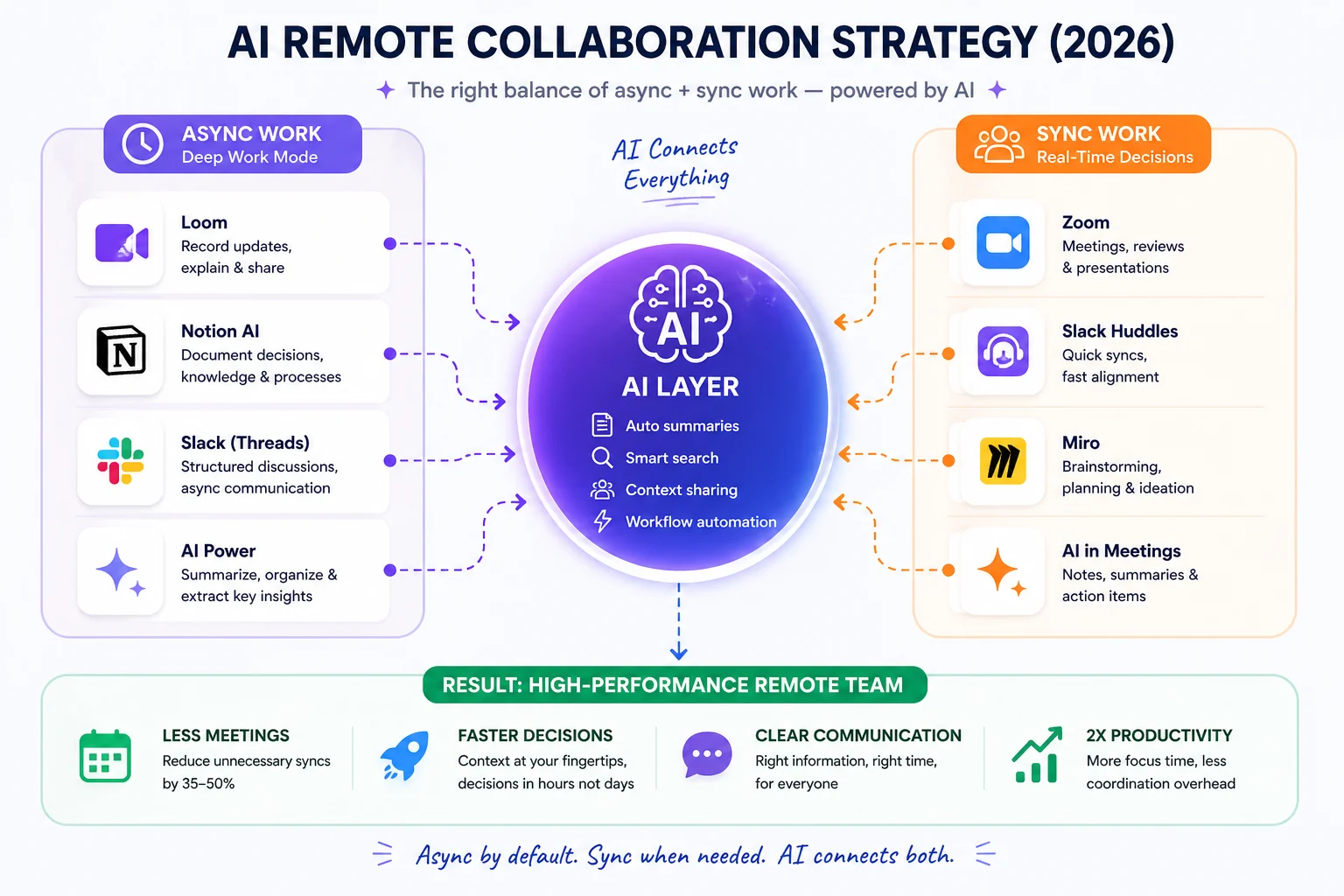
A strategic framework for 2026 showing how AI bridges the gap between asynchronous deep work and real-time synchronous collaboration for high-performance remote teams.
This is the most important strategic decision a remote team makes — and most teams default to sync without thinking about it. Let's make the distinction concrete.
Synchronous collaboration means everyone needs to be present at the same time: video calls, live chat, real-time document editing. It's great for brainstorming, urgent decisions, and relationship-building. It's terrible for deep work, time zone-distributed teams, and anything that could be a written update.
Asynchronous collaboration means work happens independently, with responses expected within a defined window (not immediately). Think Loom videos, Notion docs with comment threads, Slack messages that don't demand instant replies. It's slower in the moment but faster in aggregate — because it protects long blocks of focused work time.
AI has changed the economics of async dramatically. The reason most teams defaulted to sync was that async was high-friction: you had to write well, provide enough context, and wait. AI reduces all three barriers. Loom AI gives your video context-on-demand. Notion AI structures your written updates. Slack AI makes sure nothing gets buried.
Async vs Sync Collaboration: Tool Comparison
| Type | Tools | Best For | Pros | Cons |
|---|---|---|---|---|
| Async | Loom, Notion, Slack (threads) | Documentation, updates, reviews | Protects deep work; timezone-friendly; AI-searchable | Slower for urgent decisions; needs strong writing culture |
| Sync | Zoom, Teams, Slack Huddles | Decisions, brainstorms, relationship-building | Real-time alignment; better for complex discussions | Calendar overhead; meeting fatigue; limited to overlap hours |
| Hybrid AI | ClickUp AI, Miro, Glean | Planning, coordination, knowledge retrieval | Best of both; AI bridges the gaps | Requires intentional setup and team buy-in |
The best remote teams in 2026 aren't fully async or fully sync — they're intentionally hybrid, using AI tools to make async the default for information sharing and sync for the conversations that genuinely benefit from it.
Best AI Tool Combinations (Real-World Stacks)
| Use Case | Stack |
|---|---|
| Async-first teams | Slack + Loom + Notion AI |
| Meeting-heavy teams | Zoom + ClickUp AI + Slack |
| Documentation-heavy teams | Notion AI + Glean + Slack |
| Fast-growing startups | Slack + ClickUp AI + Notion AI |
Takeaway: Tools alone don’t matter — how they work together does.
Common Mistakes Remote Teams Make with AI Tools
Even the best tools fail without the right usage model.
- Too many tools too early → creates confusion instead of clarity
- No async culture → Slack becomes noisy, meetings increase
- Ignoring documentation → knowledge gets lost in chats
- Over-reliance on meetings → AI benefits never realized
Fix: Tools don’t create productivity — systems do.
Benefits and Challenges of AI Collaboration Tools
✅ Benefits
Fewer meetings, same decisions. When information is well-documented and AI-searchable, the number of "can you just hop on a quick call?" requests drops significantly. Teams report reducing weekly meeting count by 35–50% without any loss of decision-making quality.
Better transparency across the team. AI summarization means everyone has access to what was discussed, decided, and assigned — regardless of whether they were in the meeting. This is particularly valuable for teams where not everyone can attend every session.
Global team support without the coordination tax. Async-first workflows with AI assistance mean your team in Singapore doesn't need to wait for your team in New York to wake up to unblock work. The information they need is captured, organized, and retrievable.
AI-driven productivity gains that compound. The first week you use AI meeting summaries, you save an hour. After three months of building a well-documented Notion workspace, you save hours every week just in onboarding and knowledge retrieval. These gains stack.
⚠️ Challenges
Notification overload is the enemy of async. If Slack channels ping for every update and ClickUp sends alerts for every task change, you've recreated synchronous attention fragmentation in an async format. Be deliberate about notification settings — this is a cultural decision as much as a technical one.
Over-automation can feel impersonal. If every interaction is mediated by an AI summary or automated message, teams can start to feel disconnected. Keep the human touchpoints — weekly video check-ins, casual chat channels, occasional 1:1s — intentional and protected.
Less spontaneous human connection. The hallway conversation doesn't happen on remote teams. AI tools can make work more efficient, but they can't replace the informal relationship-building that happens naturally in an office. Remote teams need to build that intentionally — virtual coffee chats, non-work Slack channels, annual in-person offsites.
How to Choose the Right AI Collaboration Tools
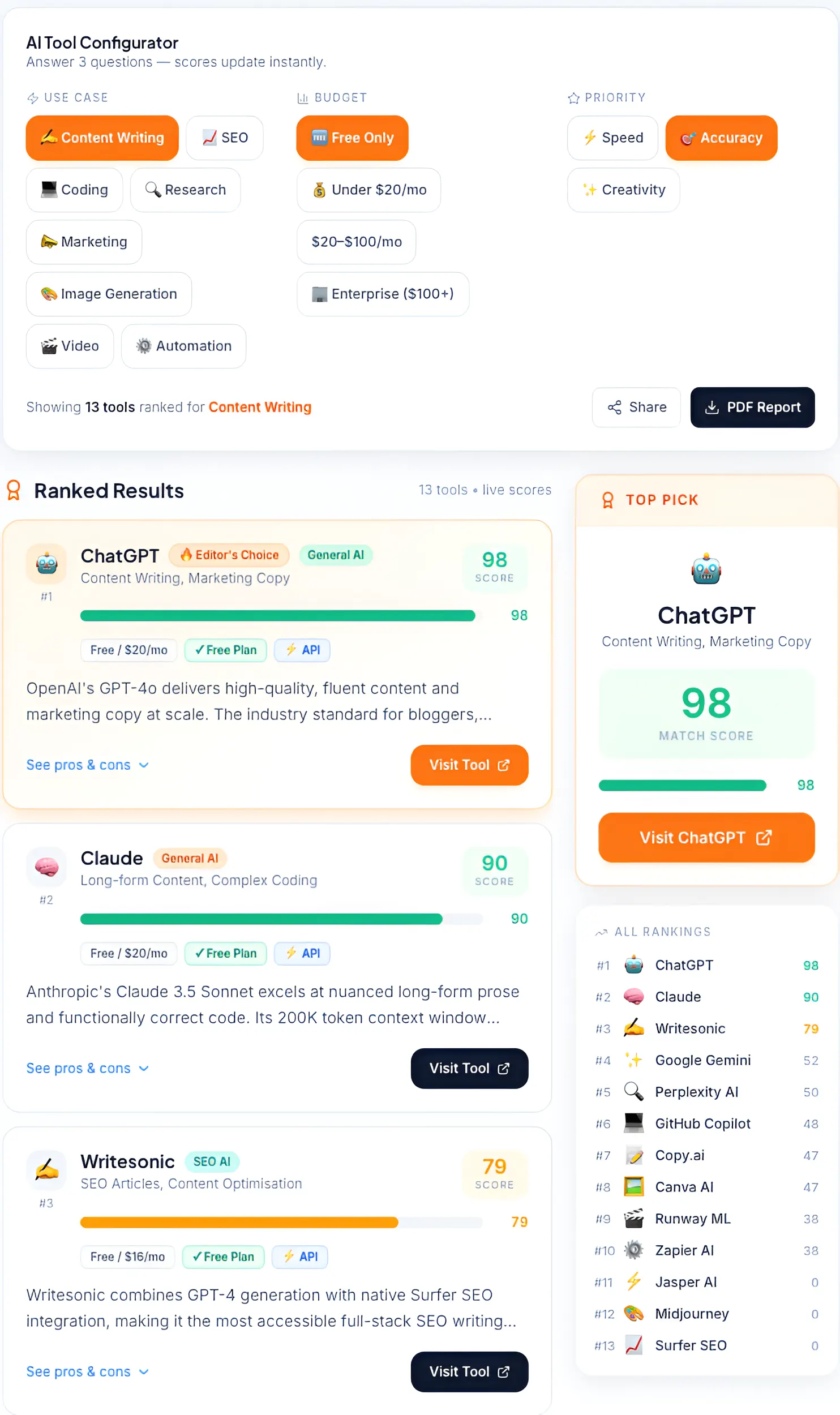
Our AI Tool Configurator helps remote teams quickly identify the best software for content writing, SEO, and coding by filtering based on specific business needs.
With eight tools covered above and dozens more on the market, the right approach is matching tools to your specific situation — not building the most comprehensive stack you can find.
Team size shapes everything. A 5-person startup needs one communication tool and one project management tool. A 50-person distributed team needs dedicated solutions for search, documentation, async video, and project tracking. Don't build a 50-person stack at 5 people.
Remote-only vs hybrid changes the priorities. Fully remote teams should prioritize async-first tools — Loom, Notion, async Slack culture. Hybrid teams need stronger sync infrastructure (Teams or Zoom) because their in-office members will default to meetings, and remote members need robust async alternatives to stay included.
Async vs sync preference. Be honest about your team's communication culture. If your team hates writing, an async-first stack will fail no matter how good the tools are. If your team is already async-leaning, investing in Loom and Notion AI will compound quickly.
Budget and integration fit. Most of these tools have free tiers that are genuinely useful for testing. Check integrations before committing — a Slack-centric team will get far more value from tools that integrate natively with Slack than from a parallel platform that doesn't.
→Not sure where to start? Use the AI Implementation Checklist to plan your rollout step-by-step without overwhelming your team.
Security & Data Privacy for Remote Teams
Collaboration tools hold some of your most sensitive business information — team discussions, project plans, customer data, financial docs. Understanding the security posture of the tools you choose isn't optional.
Data sharing risks to understand. When you connect tools via Zapier or native integrations, data flows between platforms. Know exactly which data fields are moving, who can access them, and what each platform's data retention policy is. Most teams never read this — and it matters more than the UI.
Cross-app integration security. When Notion, Slack, and ClickUp are all talking to each other, your attack surface expands. Use OAuth scopes that grant the minimum access required. Review connected app permissions quarterly. Remove integrations you're not actively using.
Compliance basics for remote teams:
- GDPR: If you have team members or customers in the EU, your collaboration tools need GDPR-compliant data processing. Slack, Notion, Zoom, and Microsoft Teams all offer GDPR-compliant configurations — but you need to enable them.
- SOC 2 Type II: For any tool handling sensitive customer or employee data, confirm SOC 2 certification before deploying at scale.
- Data residency: Some tools (notably Microsoft Teams and Notion Enterprise) allow you to specify which geographic region your data is stored in — important for teams with strict data sovereignty requirements.
Enterprise vs SMB trade-offs. Enterprise-tier plans (Microsoft Teams, Glean) offer advanced compliance controls, audit logs, and admin tools that SMB plans don't. If you're in a regulated industry, this distinction matters enough to justify the cost premium.
For a deeper breakdown of enterprise security standards like SOC 2 and compliance frameworks, refer to this guide by IBM: What is SOC 2?
Building Your AI Collaboration Stack
The most effective remote teams don't pick tools in isolation — they build a stack where each layer handles a specific job and the tools integrate with each other cleanly.
Here's a practical blueprint for a 5–20 person remote team in 2026:
Layer 1 — Communication: Slack (real-time messaging, async threads, AI search)
Layer 2 — Meetings: Zoom with AI Companion (video calls with automated summaries and action items)
Layer 3 — Documentation: Notion AI (knowledge base, project docs, AI Q&A across your workspace)
Layer 4 — Task Management: ClickUp AI (project tracking, task automation, AI-generated status updates)
Optional Layer 5 — Async Video: Loom (for walkthroughs, demos, and updates that don't need a live call)
Total cost for a 5-person team: approximately $65–$110/month, depending on plan tiers. That's a fully integrated, AI-powered collaboration environment for the price of a single day's consulting work.
Deploy in this order:
- Set up Slack and establish communication norms (which channels, what gets posted where, notification policies)
- Add Notion and migrate your key docs and knowledge base into it
- Upgrade Zoom to a paid plan and turn on AI Companion for all meetings
- Roll out ClickUp AI for project management, starting with one active project
- Add Loom once you've identified the meeting types that don't actually need to be meetings
Future of AI in Remote Collaboration (2026+)
The tools available today are impressive. What's coming in the next 12–24 months is a meaningful step further.
Agentic AI teammates are becoming real. Not AI that answers questions — AI that takes initiative. An agentic teammate notices that a project milestone was missed, identifies which tasks are blocking it, drafts a message to the relevant team members, and proposes a revised timeline for your approval. You review and confirm; it executes. Tools like ClickUp AI and Notion are building toward this. Within 18 months, it'll be a standard feature of leading platforms.
Outcome-based work replaces activity-based tracking. Today's tools track what people do — tasks completed, messages sent, time logged. Tomorrow's tools will track what teams achieve — goals hit, decisions made, value delivered. AI makes this practical by connecting activity data to outcomes automatically, removing the need for manual reporting.
AI coordination across tools becomes seamless. Right now, you still need humans to bridge information between Slack, Notion, ClickUp, and Zoom. The next generation of AI will handle that coordination layer natively — pulling context from wherever it lives, surfacing it where it's needed, and keeping all your tools in sync without integration maintenance.
Smart collaboration hubs replace app sprawl. The current model of having 6–8 separate tools is a transitional state. Expect to see more unified "collaboration intelligence" platforms that consolidate communication, documentation, task management, and AI assistance into a single coherent environment.


