Introduction
Video is the highest-performing content format in digital marketing right now — and the production gap between large brands and small businesses has never been more visible.
According to recent industry data from Wyzowl Video Marketing Statistics, video continues to deliver higher engagement and conversion rates than any other content format.
A professional video ad used to cost $3,000–$10,000 to produce. A YouTube series required a camera crew, editor, and a post-production timeline measured in weeks. For most small businesses and growing teams, consistent video content was simply out of reach.
That's changed completely in 2026. AI video creation tools now let a solo marketer produce broadcast-quality YouTube videos, social ads, and short-form content in a fraction of the time — without a studio, a production team, or video editing experience.
The challenge now isn't whether to use AI video tools. It's knowing which one solves your specific problem.
If you're unsure how to choose the right AI tool for your business, read our Complete Guide to Choosing AI Software for Your Business (2026 Edition).
Best AI Video Creation Tools for Businesses (2026)
All pricing reflects official starter plans. Free tiers are noted where available.
- Production time: Average video production time drops from 6–8 hours → 60–90 minutes per video
- Publishing frequency: Teams using AI video tools publish 3–5x more content monthly
- Ad CTR improvement: Businesses running 4+ creative variations report 18–28% higher CTR versus single-creative campaigns
- Cost reduction: AI tools replace $2,000–$6,000/month in freelance editing and production spend for teams publishing 10+ videos monthly
- Short-form content: One 30-minute recording generates 10–15 Shorts/Reels via Opus Clip in under 15 minutes
Runway — Best for Advanced Creative and Ad Production
Runway is the most powerful AI video generation tool available to non-technical teams. Its Gen-3 Alpha model generates cinematic video from text prompts, and its suite of AI editing features — background removal, motion tracking, inpainting — handles tasks that previously required a professional editor.
For ad creative, Runway is uniquely valuable: it generates entirely original footage, meaning you're not limited by stock video libraries or filming schedules.
Pros:
- Text-to-video generation produces genuinely usable ad creative
- Advanced editing features replace core post-production workflows
- Strong for high-production brand content and awareness ads
Cons:
- Steeper learning curve than beginner tools
- Starts at $15/month but scales quickly with generation credits
Best for: Marketers who need original AI-generated video footage for brand campaigns and paid ads.
Pictory — Best for Blog-to-Video Conversion
Pictory solves a specific but extremely common problem: you've written high-quality blog content that nobody watches. Paste any URL or script into Pictory and it builds a complete video — matched footage, captions, voiceover, and music — in under 10 minutes.
For content-heavy businesses (SaaS, e-commerce, agencies), Pictory is the fastest way to extend the life of existing content across YouTube and social channels.
Pros:
- Blog-to-video pipeline requires zero video editing knowledge
- Auto-captioning and highlight extraction save hours per post
- Strong stock footage library with licensed music included
Cons:
- Output style is template-driven — creative customization is limited
- Not suitable for talking-head or avatar-based content
Best for: Bloggers, SaaS teams, and content marketers converting written content into YouTube and social videos.
Synthesia — Best for AI Avatar Videos
Synthesia lets you create professional presenter-style videos using a realistic AI avatar — no camera, no teleprompter, no filming. Type your script, choose an avatar, and Synthesia produces a polished talking-head video in minutes.
This is particularly powerful for training content, product explainers, and onboarding videos — formats where the script matters more than production flair.
Pros:
- 230+ AI avatars across languages, ethnicities, and presentation styles
- 140+ language support with natural-sounding AI voiceover
- Produces studio-quality results with no filming equipment
Cons:
- Avatar realism varies — close-up shots can still feel uncanny
- Not the right tool for emotionally driven brand storytelling
Best for: SaaS companies, corporate training teams, and agencies producing multilingual explainer and onboarding videos at scale.
InVideo — Best for Beginners and Social Content
InVideo is the most beginner-accessible AI video tool in this list. Its AI-powered script-to-video workflow produces ready-to-publish social content in under 15 minutes, with a library of 5,000+ templates for YouTube intros, Instagram Reels, product showcases, and more.
The learning curve is genuinely flat. If you can type a prompt, you can publish a video.
Pros:
- AI script generation + video assembly in a single workflow
- Free plan available (with watermark) — usable before spending anything
- Template library covers every major social format
Cons:
- Output is template-constrained — not suited for high-customization ad creative
- Advanced brand customization requires the paid plan ($35/month)
Best for: Small business owners and solo creators who need consistent, publishable social content without video editing experience.
Descript — Best for Editing and Content Repurposing
Descript flips the video editing paradigm entirely. Instead of editing a timeline, you edit a transcript. Delete a sentence from the text, and the corresponding video clip disappears. It's the fastest way to turn raw recordings into polished content — and its AI Overdub feature lets you fix audio mistakes by typing corrections, using a clone of your own voice.
Pros:
- Transcript-based editing eliminates traditional timeline editing entirely
- Screen recording, podcast, and video editing all in one platform
- Filler word removal and silence trimming are fully automated
Cons:
- Voice cloning requires a paid plan and training data submission
- Not a generation tool — requires original footage as input
Best for: Podcasters, YouTubers, and sales teams repurposing recorded content into polished videos, clips, and social assets.
VEED.io — Best for Subtitles and Short Videos
VEED.io is the fastest path from raw video to subtitle-optimized, platform-ready content. Its auto-subtitle accuracy rivals professional transcription services, and the built-in editor handles aspect ratio conversion, text overlays, and branding elements without leaving the browser.
For businesses running video ads and short-form social content, VEED.io solves one of the biggest hidden time costs: caption and subtitle production.
Pros:
- Auto-subtitles in 100+ languages with industry-leading accuracy
- One-click aspect ratio conversion for multi-platform publishing
- Collaborative editing — multiple team members in the same project
Cons:
- Primarily an editing and enhancement tool, not a generation tool
- Advanced features require the Pro plan ($24/month)
Best for: Social media managers and ad teams optimizing short-form content for Instagram, TikTok, and YouTube Shorts.
Opus Clip — Best for Shorts and Reels
Opus Clip does one thing — and does it exceptionally well. Upload any long-form video, and it identifies the most engaging 30–90 second moments, adds animated captions, reformats to vertical, and exports 10–15 clips ready for Shorts, Reels, and TikTok.
For any business running a YouTube channel or a podcast, Opus Clip turns one recording session into a week of short-form content.
Pros:
- Viral moment detection is genuinely accurate — not just random cuts
- Auto-reframe keeps speakers centered throughout the clip
- Produces 10–15 clips per video in under 10 minutes
Cons:
- Limited to repurposing existing footage — no generation capability
- Quality of clips is only as good as the source content
Best for: YouTubers, podcast creators, and agencies looking to maximize short-form content output from existing long-form recordings.
HeyGen — Best for Sales and Multilingual Videos
HeyGen sits alongside Synthesia in the AI avatar space but leads on one specific capability: video translation. Upload a video in English, and HeyGen translates it into 40+ languages — with lip sync that matches the translated audio to the original speaker's mouth movements.
For businesses selling in multiple markets, this eliminates the cost of re-filming content for each region entirely.
Pros:
- Lip-synced video translation is the most sophisticated in this category
- Custom avatar creation from a short video recording
- Strong for personalized sales outreach video at scale
Cons:
- Translation accuracy varies by language pair — review before publishing
- Pricing scales steeply with avatar minutes used
Best for: International sales teams, e-commerce brands selling across markets, and agencies with multilingual client bases.
How AI Video Tools Improve Marketing Performance
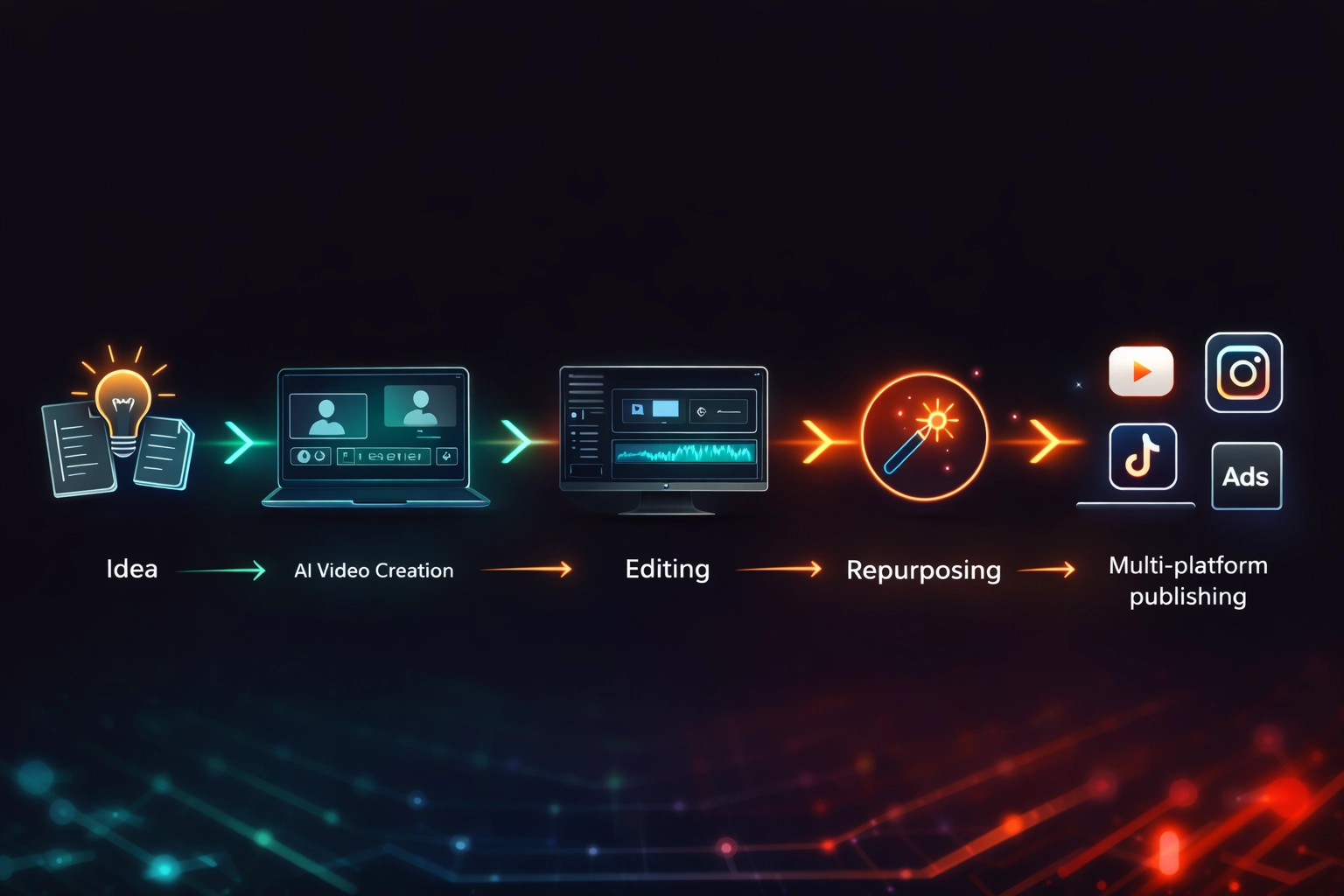
The End-to-End AI Video Pipeline: Streamlining the process from initial brainstorming to final distribution across all major social media and advertising platforms.
Faster content production is the most immediate benefit — but it's not the most valuable one. The real compounding advantage is what speed enables.
When a team can produce a video in 90 minutes instead of 8 hours, they publish more. More YouTube videos means more indexed content, more watch time, and more channel authority. More ad variations means more creative testing data, which directly improves cost-per-click and conversion rates.
YouTube emphasizes consistency and watch time as key ranking factors, as explained in the YouTube Search and Discovery system documentation.
Multi-platform content distribution becomes achievable for small teams. A single 10-minute YouTube video becomes: a short Reels clip (Opus Clip), a subtitle-optimized version for LinkedIn (VEED.io), a translated version for a new market (HeyGen), and a blog-to-video summary for evergreen traffic (Pictory). One shoot, five assets, five platforms.
Creative testing for ads is where ROI compounds fastest. Most small businesses run one ad creative per campaign. High-performing advertisers run 4–6 variations simultaneously. AI video tools make multiple variation production affordable — and the performance data pays back within weeks.
The businesses seeing the highest AI video ROI in 2026 are not the ones producing the best individual videos. They're the ones producing the most consistently — and using performance data from each piece to improve the next. Volume creates feedback loops that quality alone never does.
If you're already creating written content, you can pair video with blogging using these AI blog writing tools for beginners to build a complete content engine.
AI Video Marketing Performance Benchmarks (2026)
Important context: AI improves production speed first. Engagement and ranking improvements follow from the consistency that speed enables — not from the tools alone. Expect 60–90 days of consistent publishing before organic metrics begin compounding.
Real-World Use Cases
YouTube growth strategy. A SaaS company publishing one tutorial video per week with InVideo and repurposing each into 3 Shorts with Opus Clip can build a content library of 52 long-form videos and 150+ Shorts in 12 months — without a production team.
E-commerce video ads. An online store using Runway to generate product ad variants can test 6 creative angles per campaign instead of 1 — identifying winning hooks in week one rather than month two.
Lead generation videos. A B2B company using Synthesia to produce personalized video proposals — with an avatar presenting tailored content to each prospect — reports significantly higher reply rates than text-based outreach.
Agency content scaling. An agency managing 10 client accounts uses Descript for editing, Pictory for blog repurposing, and VEED.io for platform formatting — serving 10x the content volume without proportional headcount growth.
→ Not sure which AI tool fits your business? Use our AI Tool Selector to get a personalized recommendation in under 30 seconds.
How to Choose the Right AI Video Tool
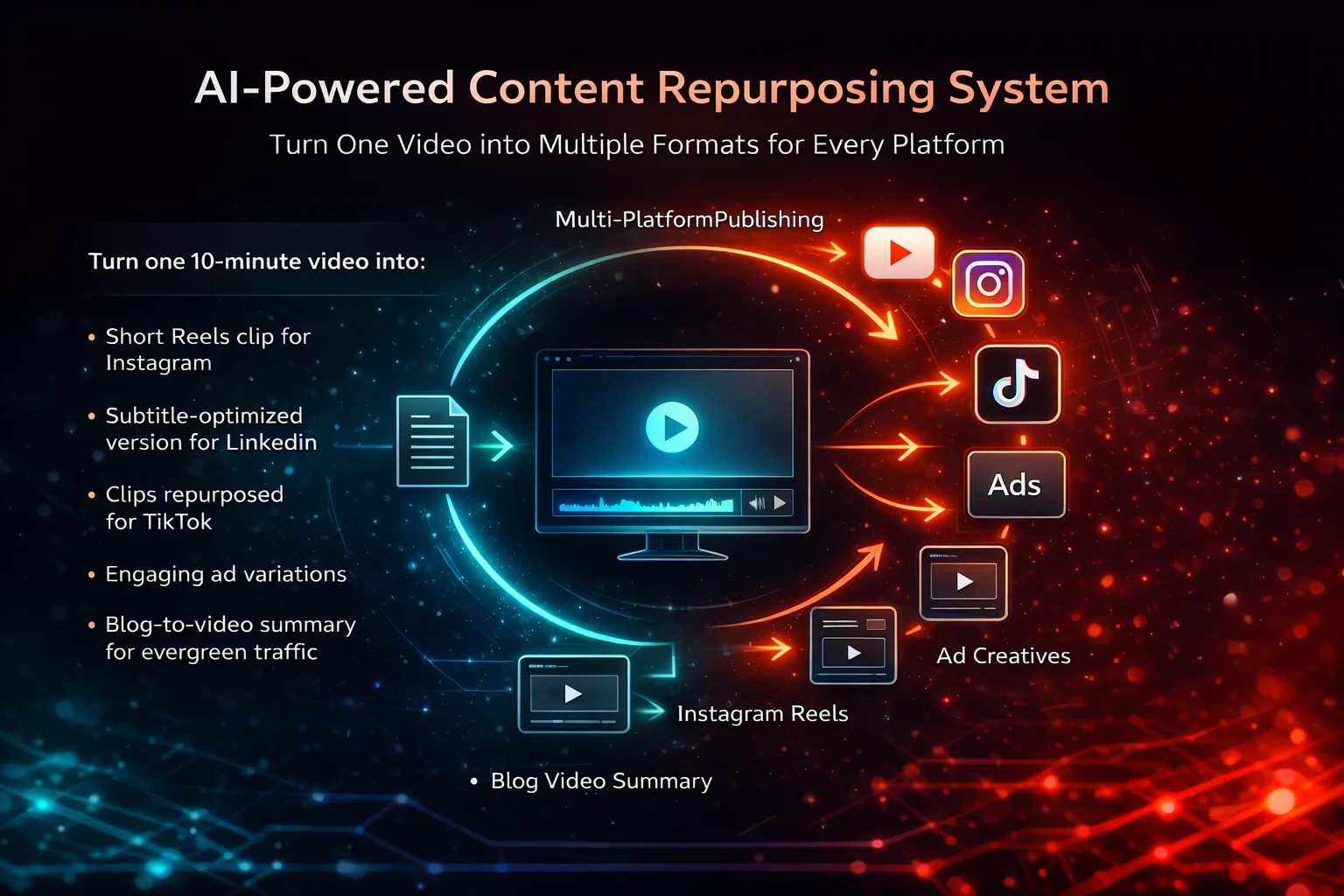
Content Multiplication Strategy: How AI tools allow businesses to maximize their ROI by transforming a single long-form video into high-engagement assets for every channel.
| Your Situation | Best Tool | Reason |
|---|---|---|
| Complete beginner, social content | InVideo | Flat learning curve, template-driven |
| Blog content → YouTube | Pictory | URL-to-video in under 10 minutes |
| No camera, need presenter videos | Synthesia or HeyGen | Realistic AI avatars, no filming needed |
| Editing existing recordings | Descript | Transcript-based editing is dramatically faster |
| Subtitles + platform formatting | VEED.io | Best-in-class auto-captions, one-click resize |
| Long video → Shorts/Reels | Opus Clip | 10–15 clips per video, viral moment detection |
| Original ad footage, advanced creative | Runway | AI-generated footage, professional editing features |
| Multilingual video at scale | HeyGen | Lip-synced translation in 40+ languages |
Based on budget:
- Under $30/month: InVideo or VEED.io — covers most beginner needs
- $30–$70/month: Pictory, Descript, or Opus Clip — repurposing and editing at scale
- $70–$150/month: Synthesia, HeyGen, or Runway — production-grade output for ads and brand content
Pro Tips: What Most Guides Won't Tell You
Consistency beats quality for most businesses. A 5-minute YouTube video published every week outperforms a 20-minute cinematic production published monthly. Search algorithms and audience retention both reward regularity. Use AI tools to lower the barrier to publishing — not to produce perfect videos.
AI scales execution, not strategy. The businesses failing with AI video tools are the ones who automate before they've validated their content angle, audience, and messaging. AI amplifies what's already working. It can't diagnose what isn't.
More creative variations always outperform single-creative campaigns. If you're running paid ads, the single highest-ROI use of any AI video tool is producing multiple creative angles per campaign. One winning variation out of five tested typically outperforms your best single-creative guess by 30–50%.
→ Before you trial any platform, generate your rollout plan using the AI Implementation Checklist tailored to your business.